Summary: You quota’d your API key, yet spend can still blow past what you expected. Here’s why that happens — and how to break AI trial budget control into three budget lines that must run in order.
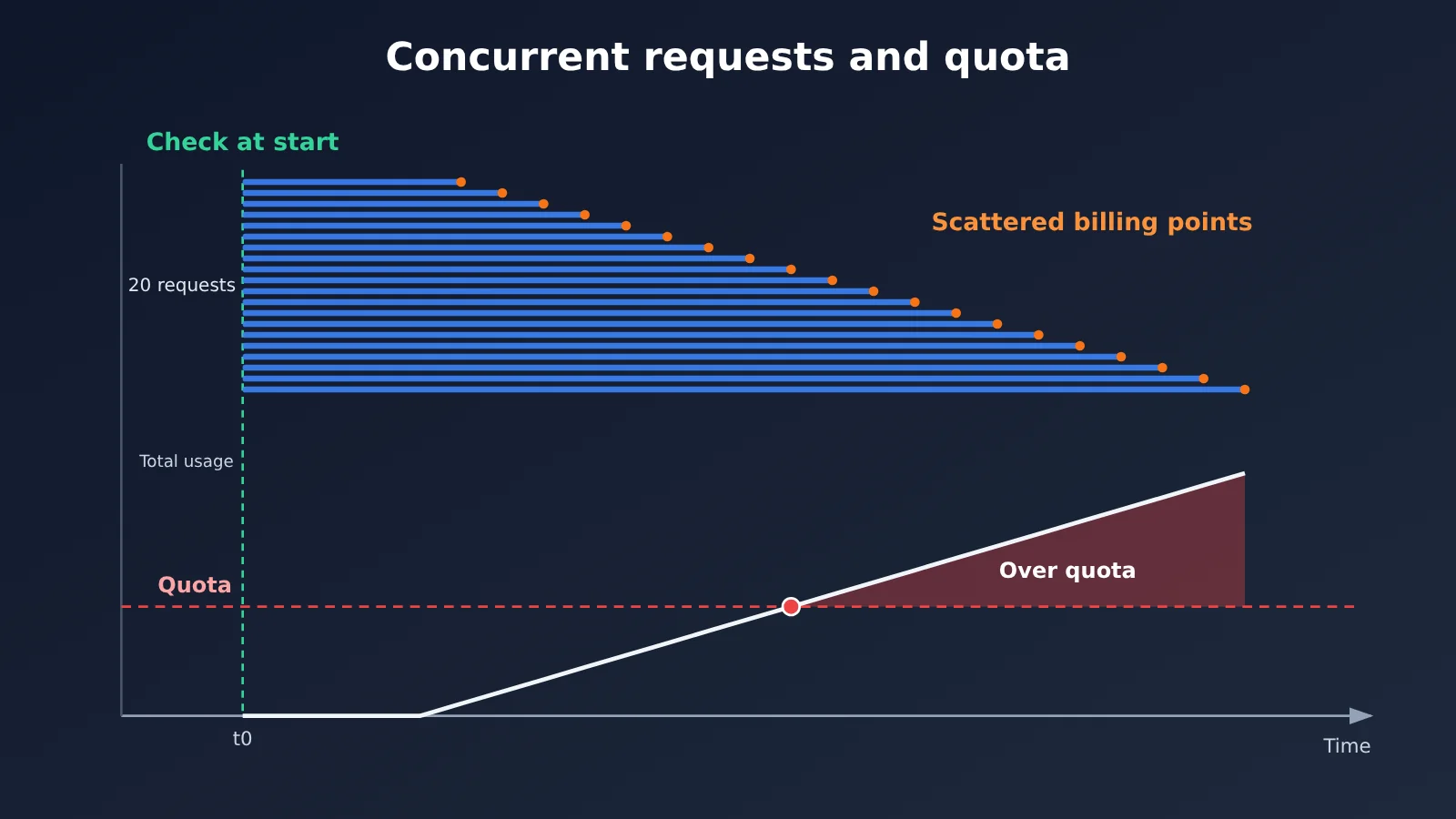
The bottom line first: the key quota on the gateway is a soft cap, not a hard billing ceiling under concurrent requests. Take APIYI’s token documentation as an example — the quota is checked when a request starts. Multiple requests can clear that check at the same time, or a single request can be pricey enough on its own, and total consumption can still land above the configured quota.
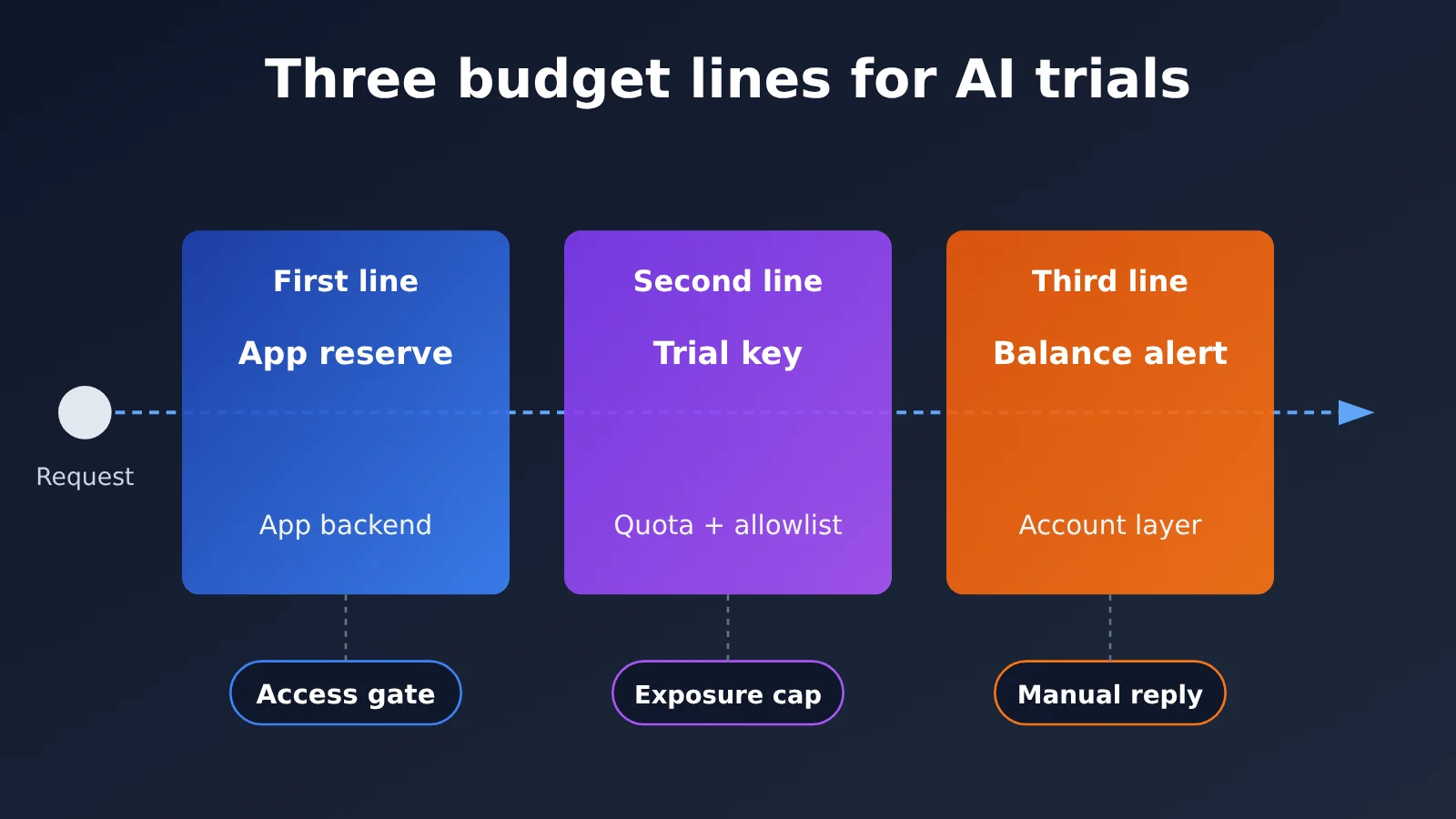
A dependable approach handles this in three layers:
- The application backend does the check before sending the request, and reserves budget atomically.
- On the gateway side, issue a separate key for trial traffic, with a quota and a model allowlist, so that if this key is abused the damage stays contained.
- Account balance alerts only notify — they exist to trigger a human response.
These three layers don’t substitute for one another. Real budget admission happens in the application’s own ledger.
Knowledge Map and Index: The Sequence and Division of Labor of the Three Budget Lines
The table below serves both as a knowledge map and an index. It lists the order in which the three budget lines take effect, what each is responsible for, why they’re arranged this way, and the corresponding section numbers in the main text.
| Order | Budget Line | What It’s Responsible For | Why It’s Placed Here | Goal | Main Text |
|---|---|---|---|---|---|
| Premise | Understanding soft quotas | Distinguishing pre-request checks, pre-deduction, and actual deduction | Without clarity on billing timing, the three layers below can’t be designed | Understand how overspending happens | 1, 1.1 |
| First | Application backend budget | Atomic reservation and settlement by user and trial pool | Only the application knows “who’s using it and how much they can use” | Stop overspending before sending the request | 2.1, 3 |
| Second | Independent trial Key | Quota, model whitelist, isolation from production traffic | When the application has a bug, the gateway is the second boundary | Reduce the exposure surface of a single Key | 2.2 |
| Third | Account balance alerts | Notify when balance falls below threshold | Alerts are after-the-fact signals with no interception capability | Get humans involved in time | 2.3 |
| Implementation | Concurrency ledger and launch checklist | Reservation, settlement, failure handling, reconciliation, friendly prompts | Turn the earlier principles into verifiable processes | Can be verified item by item before launch | 3, 4 |
Suggested reading order: first read Section 1 to understand the timing, then Section 2 to clarify the division of labor, and Section 3 for the implementation part. Section 4 is suitable for separate reference before launch.
To Know: Essential Terms Before Understanding Budget Lines
| Term | Brief explanation |
|---|---|
| Soft limit | Quota is checked at request start; passing the check doesn’t guarantee total consumption stays under the line |
| Pre-deduction | The gateway deducts a portion based on an estimate first, then settles by actual usage after the request ends |
| Atomic reservation | Completes “check remaining and occupy” in a single indivisible operation, preventing concurrent requests from passing at the same time |
| In-flight reservation | The portion of budget still in occupied state in the ledger while a request has been sent but its actual cost isn’t confirmed yet |
| remain_quota | The one-time total quota field for APIYI tokens; per the docs, 500000 corresponds to $1 |
| Reconciliation | Checking gateway logs against your own ledger line by line, correcting deviations between estimates and actuals |
1 Why API Key Quota Can Be Exceeded Under Concurrency
The APIYI token documentation is explicit about this: Key quota is a soft limit, checked when a request starts. So concurrent requests—or a single high-priced request—can push actual consumption past the configured quota. That’s inherent to the “check at the start, settle at the end” billing model; it has nothing to do with whether some platform has a bug.
Here’s a hypothetical scenario to make it intuitive (numbers are illustrative, not measured). A trial Key has $1 of quota left, and 20 requests arrive at the same moment. Each one sees “balance is positive” at its start check, so all of them get through. By the time they finish one after another and settle by actual usage, total consumption is already well past $1. Even without concurrency, a single long-context request with a large output could cost more than the remaining quota on its own.
There are also two common misunderstandings worth clarifying:
- Quota doesn’t auto-restore daily. The docs state that remain_quota is a one-time total quota; “reset every day” is something the application side has to implement with its own scheduled script.
- A model whitelist is not a cost cap. It only limits which models can be called—it places no constraint on the number of calls to the same model or the scale of each call.
1.1 The Three Time Points of API Key Quota: Pre-request Check, Estimate, and Actual Deduction
A single invocation has three time points on the billing side, and each answers a different question:
| Time point | Where it happens | Question it answers | Can it serve as a hard cap |
|---|---|---|---|
| Pre-request check | Gateway, at request start | Does this Key have any quota left right now | No—concurrent requests all pass at once |
| Estimate and pre-deduction | Gateway, based on an estimate | Roughly how much this request will occupy | No—the estimate deviates from the actual |
| Actual deduction | Gateway, after request ends | How much this request actually used | Post-hoc data, can’t be used for admission |
APIYI’s explanation of pre-deduction is this: the gateway pre-deducts based on an estimate and settles by actual usage afterward, and this mechanism does not replace atomic reservation on the business side. The gateway’s pre-deduction exists for its own billing—it has no idea how much trial quota one of your users has left today. So the question “can this user send another request” can only be answered by your application backend.
2 The Three Budget Lines for AI Trials
These three lines address three kinds of risk: overuse at the business-logic level, abuse or leakage at the Key level, and balance depletion at the account level. API4 “Unrestricted Resource Consumption” in the OWASP API Security Top 10 (2023) covers the same class of problem: endpoints without limits on resource consumption bring both service and cost risks. For AI endpoints, the cost risk tends to be the more direct one.
2.1 The First Budget Line: User and Trial Pool Budgets in the Application Backend
This is the only layer that can do “admission control,” and it has to manage two levels:
- User-level budget: the total or daily quota for each trial user. The daily quota is reset by the application’s own scheduled job, not by the gateway.
- Trial pool budget: the shared overall cap for all trial users. Even if no single user goes over, total cost still needs a ceiling when the user count spikes.
A request has to pass both the user-level and pool-level reservation before it’s let through, and the two must be completed in the same atomic operation or the same transaction. Otherwise you get a race where “the user reservation succeeds but the pool is already full.”
This layer also has to decide request scale on the server side: which model is allowed, what the max_tokens cap is, and how long the input can be. These parameters can’t be passed straight through from the frontend — otherwise a user only has to change one parameter to throw off the estimated cost.
2.2 The Second Budget Line: A Dedicated Trial Key, Quota, and Model Allowlist
The gateway issues a separate Key for trial traffic, fully isolated from production traffic. This Key’s job is to limit the exposure surface: if the application ledger has a bug, or the Key gets leaked, the damage is confined to this Key’s quota and won’t spill over into production business.
A few configuration tips:
- Set the quota as “trial pool budget + some buffer.” It should sit slightly higher than the application-side pool budget as a backstop — don’t set it equal to the pool budget, or the application-layer reservation is basically pointless.
- The model allowlist should only include the models open to trials. It stops the trial Key from being used to call high-cost models, but it doesn’t limit request count or scale, so the server-side scale limits from section 2.1 are still required.
- Since the quota is a soft cap, this line tolerates “slight overruns.” Its purpose is to keep the overrun within an acceptable range — don’t count on it for zero overspend.
The general practice of splitting Keys, quotas, and logs by project is a separate topic. Here I’ll just stress one point: trial traffic gets its own Key.
2.3 The Third Budget Line: Account Balance Alerts
APIYI’s balance alert documentation explicitly states that alerts are notifications and won’t block requests. When the balance drops below the threshold, the alert’s job is to push a message to the person on call, who then decides whether to top up, pause the trial entry point, or investigate abnormal traffic.
Two suggestions for using this layer:
- Set the alert threshold based on “the maximum consumption during the time it takes to detect and respond” — don’t just pick a round number.
- Alerts must be tied to a specific response action, for example writing in the on-call handbook: “after receiving the alert, close the trial registration entry point first.” An alert with only a notification and no follow-up action is as good as nonexistent.
3 A Hypothetical Concurrency Ledger: Atomic Reservation to Reconciliation
This section presents an illustrative design. The table structures, prices, and numbers are all hypothetical, used to explain the flow, and do not represent measured data from any system. The flow has five steps:
Atomic check and reserve → server locks model and size → send request
      → settlement / failure handling → offline reconciliation correction
3.1 Table Structure and States of the Budget Ledger
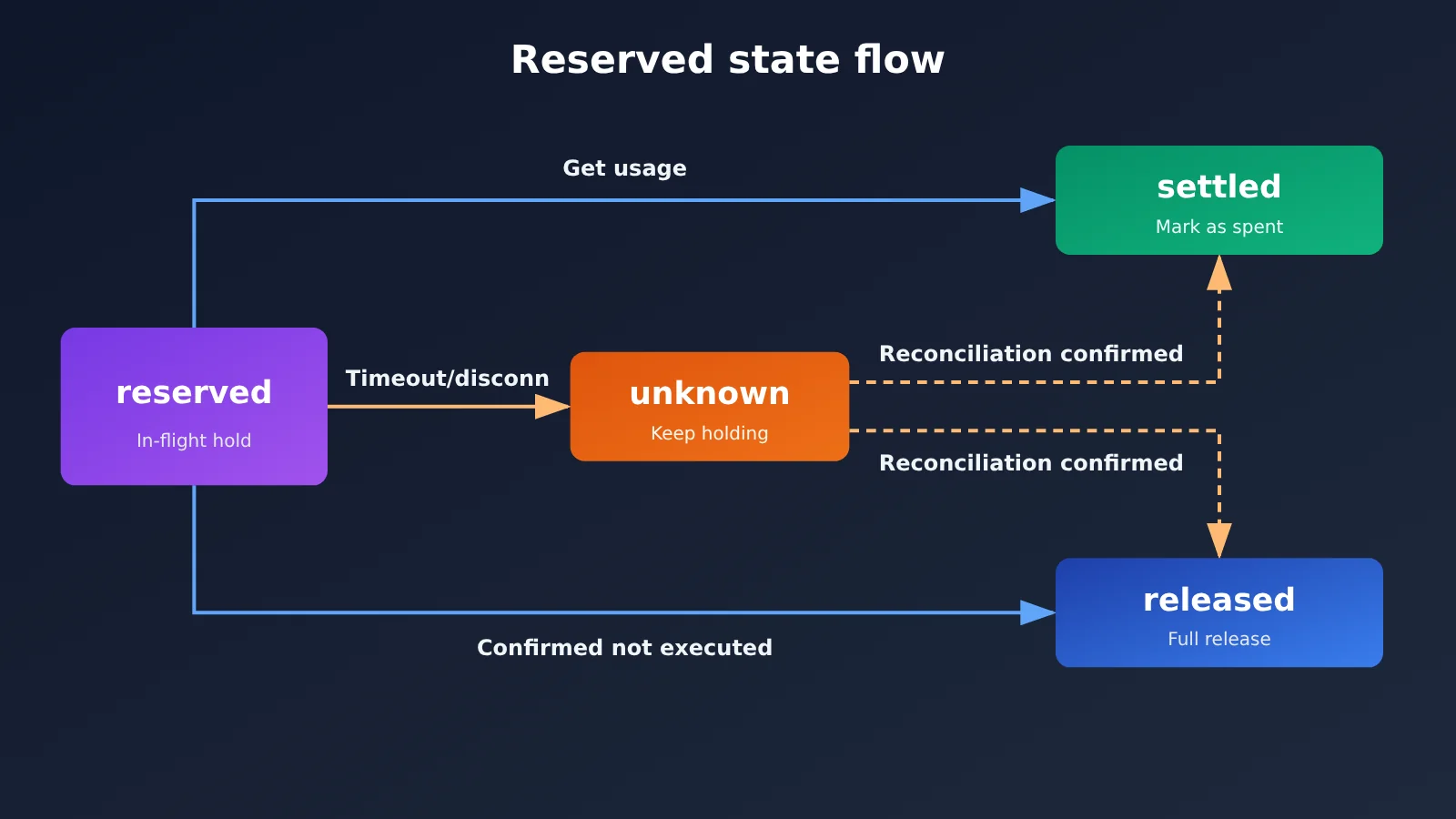
The illustrative data structure has two tables: budgets records the limit, spent amount, and reserved amount for each user and trial pool; reservations records each reservation and its status.
| Reservation State | Meaning | Impact on “Available Balance” |
|---|---|---|
| reserved | Reserved, request in flight | Holds the estimated amount |
| settled | Actual usage obtained, settled | Converted to spent, releases the difference |
| released | Confirmed request was not executed | Fully released |
| unknown | Timeout, disconnection, cost unknown | Continues to hold, waiting for reconciliation |
The available balance is calculated as limit - spent - reserved, where reserved includes reservations in the unknown state.
3.2 Atomic Check-and-Reserve: Keeping Concurrent Requests from Both Slipping Through
The trick is to merge “checking” and “occupying” into a single conditional update statement, letting the database guarantee atomicity:
-- Illustration: reserve only when there's enough balance left; return the affected row count
UPDATE budgets
SET reserved = reserved + :estimate
WHERE owner_id IN (:user_id, :pool_id)
  AND limit_amount - spent - reserved >= :estimate;
-- The affected row count must equal 2 (both the user and the pool succeeded), otherwise roll back the transaction and reject the request
The estimate should use the upper bound: input token count times the input unit price, plus max_tokens times the output unit price. Actual usage usually comes in below that, and you just refund the difference at settlement. Better to reserve a bit too much than too little.
3.3 Server-Side Lockdown of the model and Task Size
The estimation parameters used for reserving must match the parameters of the request that actually goes out exactly. Here’s the idea in code:
ALLOWED_TRIAL_MODELS = {"trial-model-a"}   # Illustration: models open for trial
MAX_OUTPUT_TOKENS = 1024                   # Illustration: server-enforced cap
MAX_INPUT_TOKENS = 8000

def build_trial_request(user_input, requested_model):
    model = requested_model if requested_model in ALLOWED_TRIAL_MODELS \
        else "trial-model-a"
    input_tokens = count_tokens(user_input)
    if input_tokens > MAX_INPUT_TOKENS:
        raise InputTooLarge()
    estimate = price_in(model) * input_tokens \
             + price_out(model) * MAX_OUTPUT_TOKENS
    return model, MAX_OUTPUT_TOKENS, estimate
The max_tokens and model coming from the frontend are just reference values—what the server decides is final.
3.4 Sending Requests, Settlement, and Failure Handling
Before you send a request, generate a unique request ID and write it into the reservation record, so you can match it later in the logs. Once the request comes back, handle it in one of three ways:
- Success with usage returned: calculate the amount from actual usage,
spent += actual,reserved -= estimate, and set the reservation status to settled. - A clear failure where nothing executed: for example, parameter validation errors or auth failures — errors where you can confirm the request never entered billing. Here, release the reservation and set the status to released.
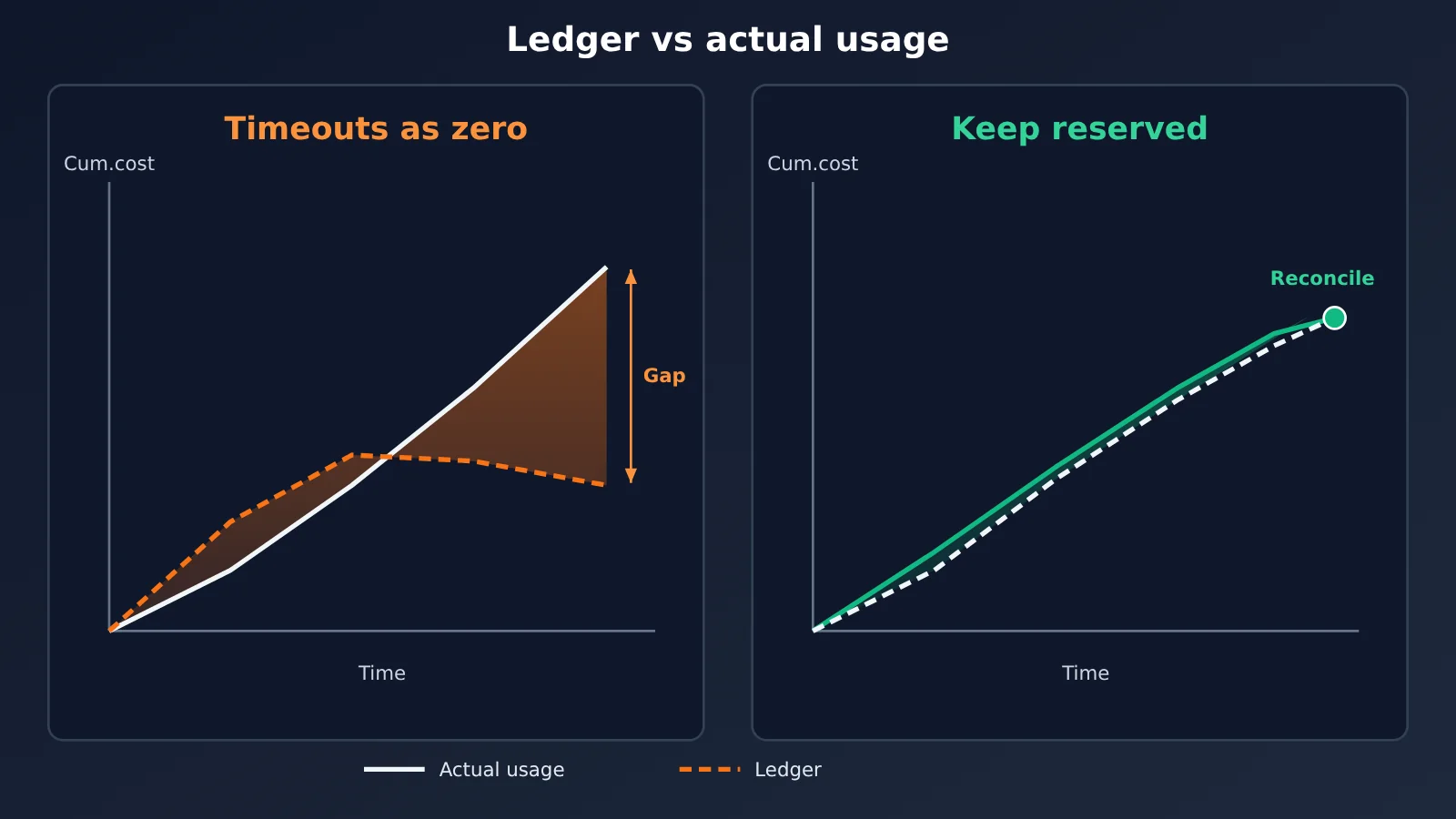
- Timeout or dropped connection: the request may already have executed upstream and incurred cost — the result just never came back. In this case, don’t treat the cost as zero. Mark the status as unknown and keep the reservation held.
Case 3 is where things go wrong most often. Releasing the reservation on a timeout is effectively erasing costs that may already exist from the ledger. During periods of high concurrency and high timeout rates, that error keeps piling up.
3.5 Offline Reconciliation: Fixing unknown and Estimation Drift
APIYI’s log query supports incremental export, and the docs position it for offline reconciliation — it can’t be used as a per-request gate for releasing funds. So reconciliation should run as a scheduled job:
- Pull the incremental logs since the last reconciliation and match them against the
reservationstable by request ID or time window. - For unknown reservations you find in the logs, change them to settled using the actual amount from the log. For ones still missing after the agreed time window, change them to released.
- Track the distribution of deviation between estimated and actual amounts. If actuals often come close to or even exceed estimates, go back and check the estimation formula in section 3.3.
The reconciliation results also feed the third budget line: if the ledger total and the account’s actual consumption keep diverging, that’s itself a signal that needs human investigation.
4 Pre-Launch Checks for the Three Budget Lines, and Friendly Messages When Quota Runs Out
4.1 Pre-launch checklist for the three budget lines
| Check item | Budget line | How to verify |
|---|---|---|
| User and pool reservations happen inside the same transaction | First | Load-test with concurrent requests and confirm that spent plus reserved never exceeds the cap |
model, max_tokens, and input length are decided by the server |
First | Tamper with front-end parameters and confirm they have no effect |
Timed-out requests are recorded as unknown and keep their hold |
First | Inject a timeout failure and inspect the ledger state |
The reconciliation job runs on schedule and processes unknown entries |
First | Check the reconciliation logs and the state transitions |
| The trial key is separate, with a quota slightly higher than the pool budget | Second | Compare the key configuration against the pool budget figures |
| The trial key’s model allowlist contains only the trial models | Second | Call with a model outside the allowlist and confirm it’s rejected |
| A daily quota reset script exists and is monitored | First, Second | Check the scheduled job’s execution records |
| Balance alert thresholds line up with the runbook | Third | Rehearse the flow from alert to closing the entry point |
4.2 Messages users see when quota runs out
When a reservation fails, the app should return a clear business error instead of letting the request hit the gateway and come back with an error nobody can interpret. The message should carry three pieces of information:
- What happened: for example, “Today’s trial quota is used up” or “Trial slots are currently full.” Running out of personal quota and the trial pool being full are different cases and should be worded differently.
- When it comes back: if there’s a daily quota, tell them when it resets. If it’s a one-off quota that’s exhausted, explain what upgrade options are available.
- Current status: you can show the remaining quota, but base it on the ledger’s available balance with in-flight reservations deducted — otherwise you get the “it says I have balance but I still got rejected” problem.
Once those checks are done, there’s a simple way to validate the whole setup: simulate a concurrency spike on top of an upstream timeout, then confirm the ledger’s “spent + in-flight reserved” never drops below the actual consumption after reconciliation, and that the trial key’s consumption doesn’t meaningfully overshoot its quota. Satisfy both, and the three budget lines are genuinely working.
References
- APIYI Token Management documentation: soft limits, remain_quota, daily reset, and model allowlist details
- Link:
docs.apiyi.com/api-capabilities/token-management
- Link:
- APIYI Pre-deducted Quota documentation: estimated pre-deduction and post-settlement mechanism
- Link:
docs.apiyi.com/faq/pre-deduction-quota
- Link:
- APIYI Balance Alerts documentation: alerts notify only, they don’t block requests
- Link:
docs.apiyi.com/faq/balance-alerts
- Link:
- APIYI Log Query documentation: incremental export and offline reconciliation
- Link:
docs.apiyi.com/api-capabilities/log-query
- Link:
- OWASP API Security Top 10 2023: API4 Unrestricted Resource Consumption
- Link:
api-security.owasp.org/editions/2023/en/0xa4-unrestricted-resource-consumption/
- Link:
In all things, preparation brings success; without preparation, failure. — The Book of Rites, Doctrine of the Mean