在即时通讯应用高度发达的今天,Telegram 以其强大的 Bot API 和开放的生态系统成为开发者的首选平台。将 Nano Banana Pro(Gemini 3 Pro Image 模型)接入 Telegram,可以让用户在聊天界面直接生成高质量 AI 图像,无需跳转到其他应用或网页。本文将深入分析 Telegram Bot API 的技术架构,并提供基于 API易平台的完整实现方案。
Telegram Bot API 技术解析
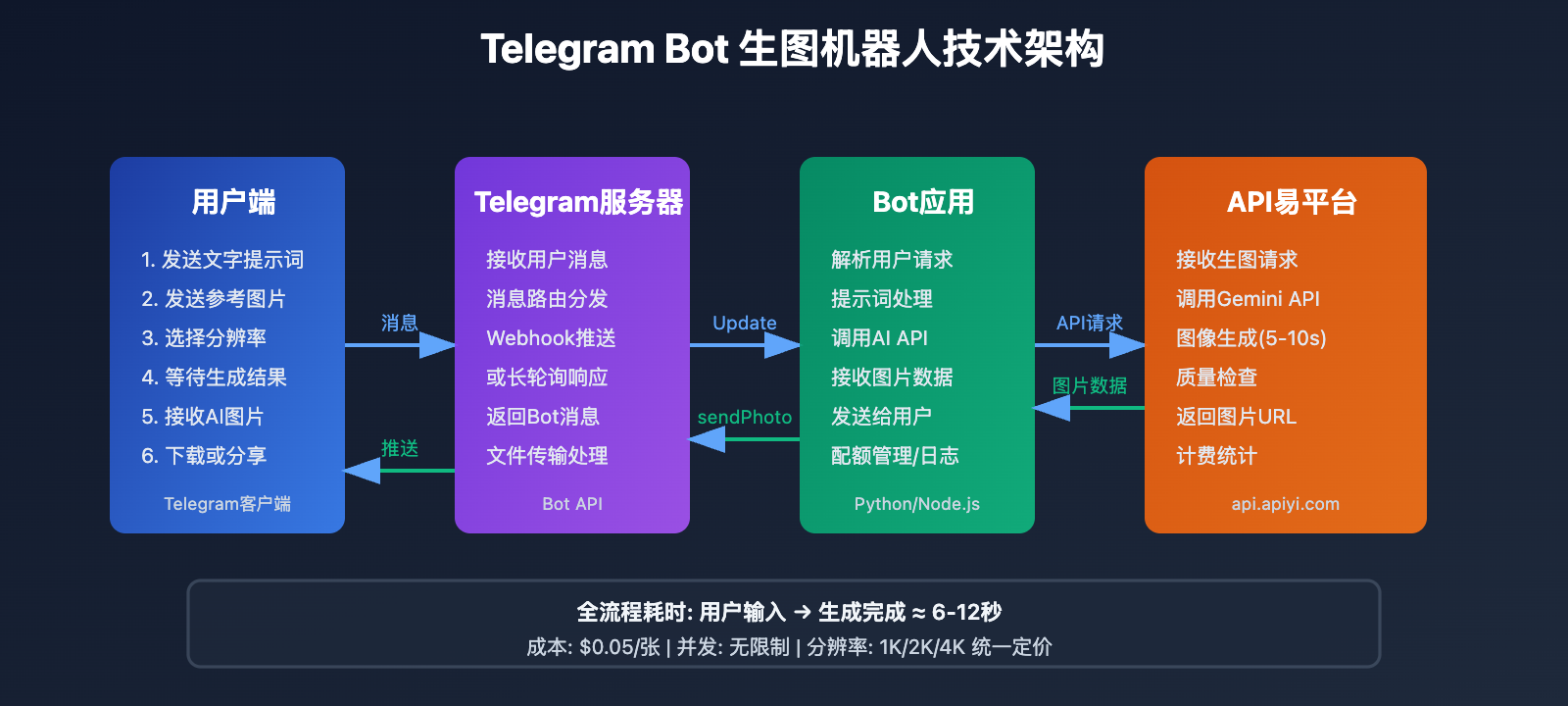
Telegram Bot API 是 Telegram 官方提供的开放接口,允许开发者创建自动化程序与用户进行交互。与其他即时通讯平台的机器人相比,Telegram Bot 具有独特的技术优势。
核心架构特性
1. 完全开放的 HTTP API
Telegram Bot API 基于标准的 HTTPS 协议,所有交互通过 RESTful API 完成。开发者只需发送 HTTP 请求到 https://api.telegram.org/bot<token>/method 即可调用各种功能,无需复杂的 SDK 集成。
2. Webhook 与长轮询双模式
Telegram 支持两种接收消息的方式:
- Long Polling(长轮询): Bot 主动向 Telegram 服务器请求获取消息更新,适合开发测试环境
- Webhook: Telegram 服务器主动推送消息到指定的 HTTPS 地址,适合生产环境,实时性更强
3. 丰富的消息类型支持
Bot 可以发送和接收多种类型的消息:
- 文字消息、图片、视频、文档
- 内联键盘(Inline Keyboard)和自定义键盘(Reply Keyboard)
- 多媒体消息组(Media Group)
- 投票、地理位置等
4. 文件处理能力
Telegram Bot 支持文件的上传和下载:
- 下载文件限制:≤20 MB
- 上传文件限制:≤50 MB
- 支持通过 file_id 快速引用已上传的文件
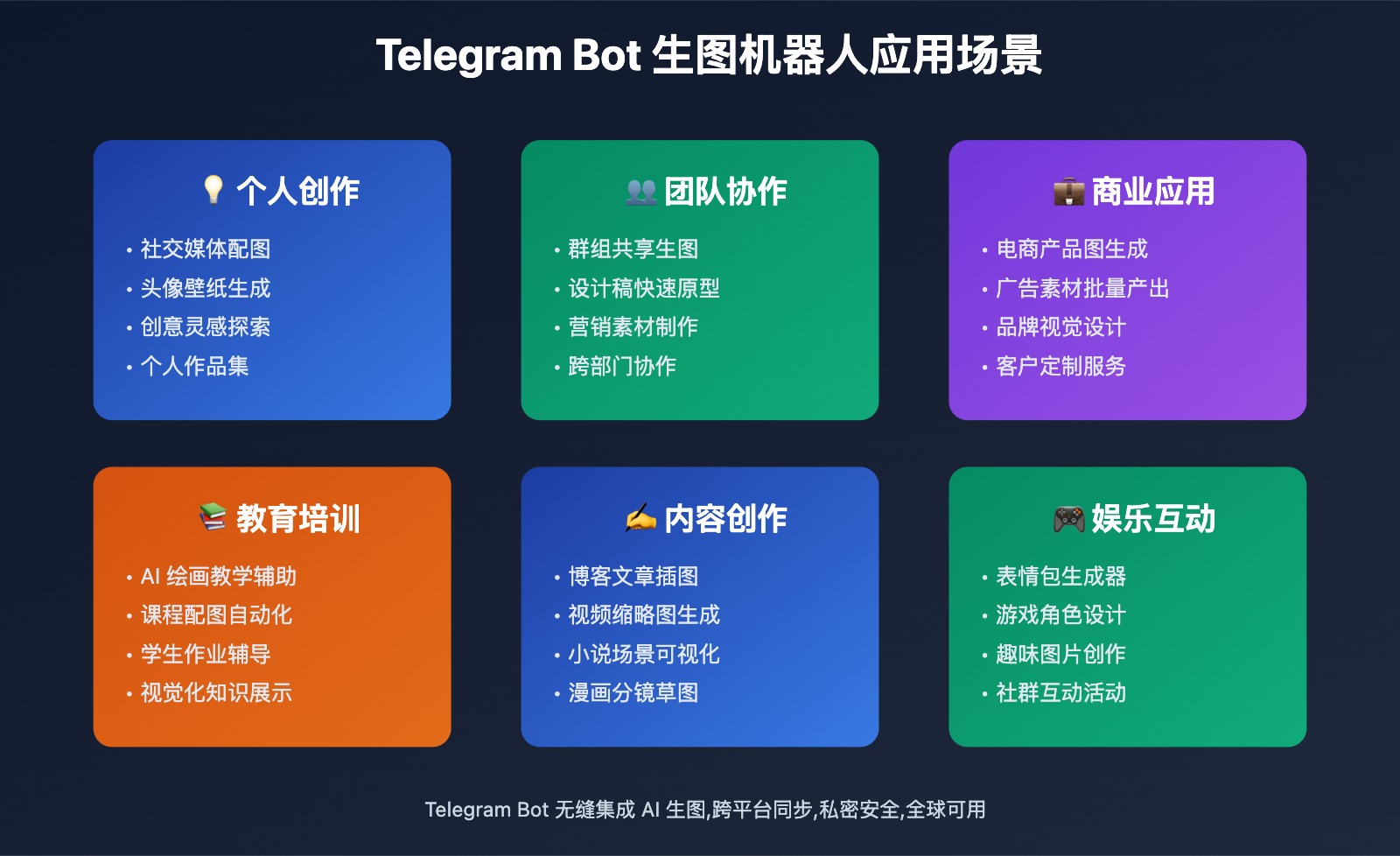
为什么选择 Telegram 接入 AI 图像生成?
用户体验优势:
- 无缝集成: 用户无需下载额外应用,在常用的聊天工具中即可生图
- 私密性强: Telegram 支持端到端加密,保护用户隐私
- 跨平台同步: 生成的图片自动同步到所有设备
- 群组协作: 可在群组中使用,团队成员共享生图能力
技术实现优势:
- 部署简单: 无需前端开发,Bot API 处理所有界面交互
- 成本低廉: Telegram Bot 完全免费,无并发限制
- 扩展性强: 可轻松添加更多 AI 功能(文字生成、语音识别等)
- 全球可用: Telegram 在全球大部分地区可用,用户基数大
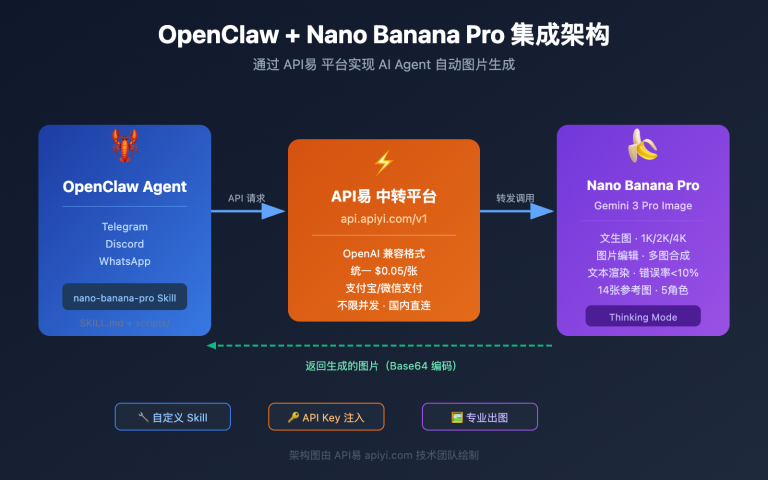
🎯 技术建议: 将 Nano Banana Pro 接入 Telegram 是构建 AI 图像生成服务的理想方案。我们建议通过 API易 apiyi.com 平台调用 Gemini 3 Pro Image API,该平台提供
gemini-3-pro-image-preview接口,支持 1K、2K、4K 多种分辨率,单次调用仅需 $0.05,相比官方 API 降低 80% 成本,且无并发限制,非常适合 Telegram Bot 的高频调用场景。
Nano Banana Pro 接入 Telegram 的 3 种方法
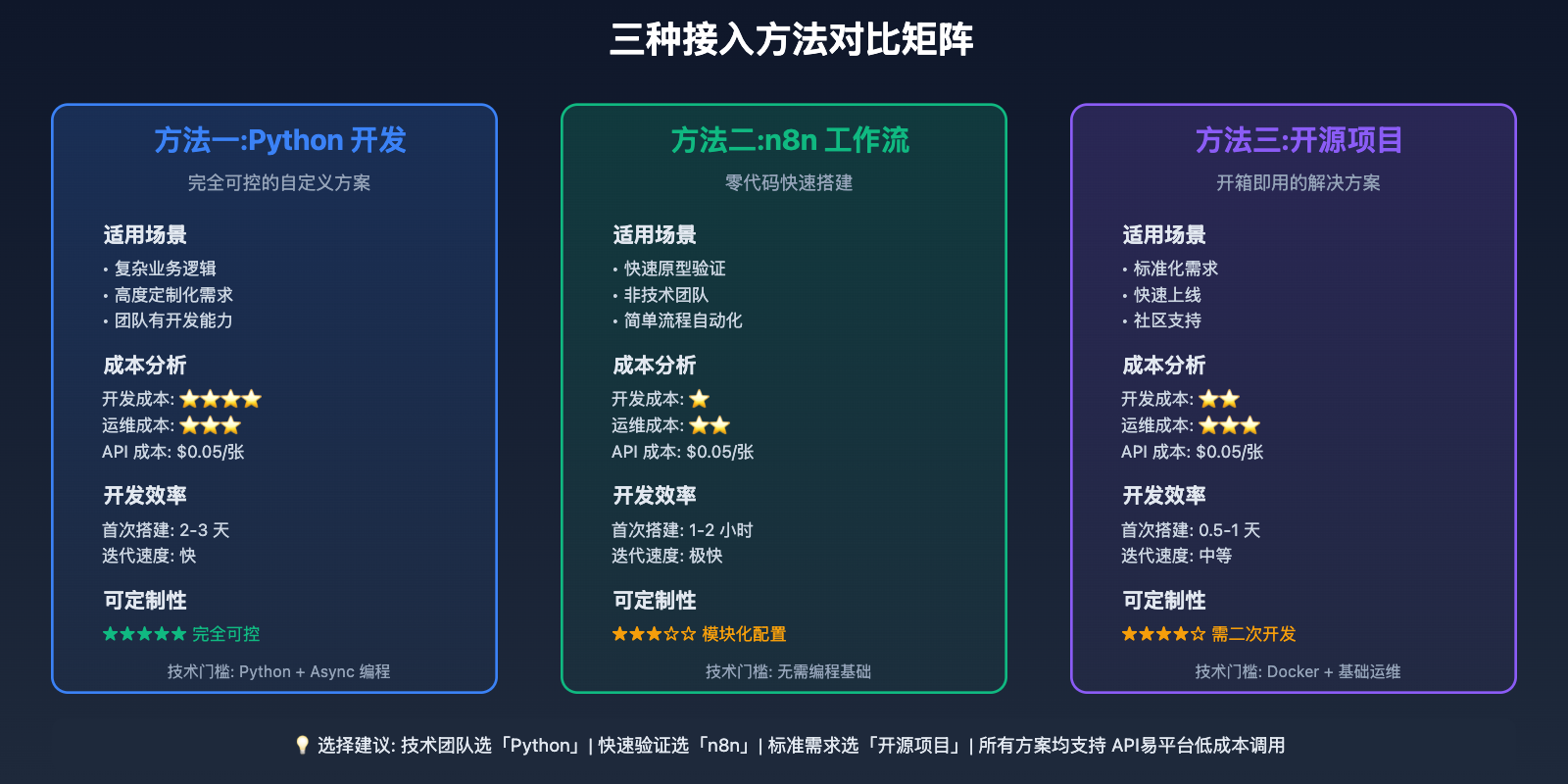
方法一:Python 直接开发 —— 完全可控的自定义方案
适用场景: 需要深度定制功能、完全控制代码逻辑、长期维护运营
这是最灵活的方案,适合有一定 Python 基础的开发者。通过 python-telegram-bot 库构建完整的 Bot 应用。
技术栈:
- 语言: Python 3.9+
- 核心库: python-telegram-bot(异步版本 20.x)
- AI 接口: API易平台的 Gemini 3 Pro Image API
- 部署: Docker + 云服务器(或本地服务器)
完整实现代码:
以下是一个功能完整的 Telegram 生图机器人实现:
import os
import asyncio
import requests
import base64
from telegram import Update
from telegram.ext import (
    Application,
    CommandHandler,
    MessageHandler,
    filters,
    ContextTypes
)

class NanoBananaBot:
    def __init__(self, telegram_token: str, apiyi_key: str):
        """初始化机器人"""
        self.telegram_token = telegram_token
        self.apiyi_key = apiyi_key
        self.apiyi_base_url = "https://api.apiyi.com"

    async def start_command(self, update: Update, context: ContextTypes.DEFAULT_TYPE):
        """处理 /start 命令"""
        welcome_message = """
🎨 欢迎使用 Nano Banana Pro 生图机器人!

基于 Google Gemini 3 Pro Image 模型,为您生成高质量 AI 图像。

📝 使用方法:
1. 直接发送文字描述,如:"一只可爱的橘猫在阳光下打盹"
2. 使用 /generate 命令,如:/generate 科技感未来城市夜景
3. 使用 /hd 生成 4K 高清图片,如:/hd 宇宙星空壁纸

⚙️ 可用命令:
/start - 显示欢迎信息
/generate <提示词> - 生成 2K 图片(默认)
/hd <提示词> - 生成 4K 高清图片
/help - 查看帮助文档

💡 提示: 描述越详细,生成效果越好!
        """
        await update.message.reply_text(welcome_message)

    async def help_command(self, update: Update, context: ContextTypes.DEFAULT_TYPE):
        """处理 /help 命令"""
        help_text = """
🔍 Nano Banana Pro 使用技巧:

📌 基础提示词模板:
- 主体描述 + 风格 + 细节
- 例: "一座日式庭院,宫崎骏动画风格,樱花飘落,柔和光线"

🎨 常用风格关键词:
- 摄影风格: 专业摄影、微距、广角、人像摄影
- 艺术风格: 油画、水彩、插画、赛博朋克、蒸汽波
- 3D风格: 3D渲染、C4D、Blender、写实3D

⚡ 分辨率选择:
- /generate - 2048x2048 (适合快速预览)
- /hd - 4096x4096 (适合打印和壁纸)

💰 计费:
- 2K分辨率: $0.05/张
- 4K分辨率: $0.05/张(API易统一定价)
        """
        await update.message.reply_text(help_text)

    async def generate_image(
        self,
        prompt: str,
        resolution: str = "2048x2048",
        reference_image: str = None
    ) -> tuple[str, str]:
        """调用 API易平台生成图片"""
        url = f"{self.apiyi_base_url}/v1/images/generations"
        headers = {
            "Authorization": f"Bearer {self.apiyi_key}",
            "Content-Type": "application/json"
        }

        payload = {
            "model": "gemini-3-pro-image-preview",
            "prompt": prompt,
            "resolution": resolution,
            "num_images": 1
        }

        # 如果有参考图,添加到请求中
        if reference_image:
            payload["reference_images"] = [reference_image]

        try:
            response = requests.post(url, headers=headers, json=payload, timeout=60)
            response.raise_for_status()

            result = response.json()
            image_url = result["data"][0]["url"]

            # 下载图片
            img_response = requests.get(image_url, timeout=30)
            img_response.raise_for_status()

            return img_response.content, image_url

        except requests.exceptions.RequestException as e:
            raise Exception(f"API 调用失败: {str(e)}")

    async def handle_generate_command(
        self,
        update: Update,
        context: ContextTypes.DEFAULT_TYPE,
        resolution: str = "2048x2048"
    ):
        """处理生图命令"""
        # 获取提示词
        if context.args:
            prompt = " ".join(context.args)
        else:
            await update.message.reply_text(
                "❌ 请提供图片描述,例如:\n/generate 一只可爱的橘猫"
            )
            return

        # 发送处理中提示
        processing_msg = await update.message.reply_text(
            f"🎨 正在生成图片...\n"
            f"📝 提示词: {prompt}\n"
            f"📐 分辨率: {resolution}\n"
            f"⏱️ 预计耗时: 5-10秒"
        )

        try:
            # 调用 API 生成图片
            image_data, image_url = await asyncio.to_thread(
                self.generate_image,
                prompt=prompt,
                resolution=resolution
            )

            # 发送图片
            await update.message.reply_photo(
                photo=image_data,
                caption=f"✅ 生成成功!\n\n📝 提示词: {prompt}\n📐 分辨率: {resolution}"
            )

            # 删除处理中消息
            await processing_msg.delete()

        except Exception as e:
            await processing_msg.edit_text(
                f"❌ 生成失败: {str(e)}\n\n"
                f"💡 请检查提示词或稍后重试"
            )

    async def generate_command(self, update: Update, context: ContextTypes.DEFAULT_TYPE):
        """处理 /generate 命令(2K 分辨率)"""
        await self.handle_generate_command(update, context, "2048x2048")

    async def hd_command(self, update: Update, context: ContextTypes.DEFAULT_TYPE):
        """处理 /hd 命令(4K 分辨率)"""
        await self.handle_generate_command(update, context, "4096x4096")

    async def handle_text_message(
        self,
        update: Update,
        context: ContextTypes.DEFAULT_TYPE
    ):
        """处理普通文字消息(直接生成图片)"""
        prompt = update.message.text

        # 忽略过短的消息
        if len(prompt) < 3:
            await update.message.reply_text(
                "💡 提示词太短,请提供更详细的描述"
            )
            return

        # 调用生成逻辑(默认 2K)
        context.args = [prompt]
        await self.handle_generate_command(update, context, "2048x2048")

    async def handle_photo_message(
        self,
        update: Update,
        context: ContextTypes.DEFAULT_TYPE
    ):
        """处理图片消息(图生图功能)"""
        # 获取用户发送的图片
        photo = update.message.photo[-1]  # 获取最高分辨率版本
        file = await context.bot.get_file(photo.file_id)

        # 下载图片
        photo_data = await file.download_as_bytearray()
        photo_base64 = base64.b64encode(photo_data).decode()

        # 获取图片说明(如果有)
        caption = update.message.caption or "保持原图风格,生成相似图片"

        processing_msg = await update.message.reply_text(
            f"🎨 正在基于参考图生成...\n"
            f"📝 提示词: {caption}\n"
            f"⏱️ 预计耗时: 5-10秒"
        )

        try:
            # 调用 API(带参考图)
            image_data, image_url = await asyncio.to_thread(
                self.generate_image,
                prompt=caption,
                resolution="2048x2048",
                reference_image=photo_base64
            )

            await update.message.reply_photo(
                photo=image_data,
                caption=f"✅ 基于参考图生成成功!\n\n📝 提示词: {caption}"
            )

            await processing_msg.delete()

        except Exception as e:
            await processing_msg.edit_text(
                f"❌ 生成失败: {str(e)}"
            )

    def run(self):
        """启动机器人"""
        # 创建 Application
        app = Application.builder().token(self.telegram_token).build()

        # 注册命令处理器
        app.add_handler(CommandHandler("start", self.start_command))
        app.add_handler(CommandHandler("help", self.help_command))
        app.add_handler(CommandHandler("generate", self.generate_command))
        app.add_handler(CommandHandler("hd", self.hd_command))

        # 注册消息处理器
        app.add_handler(MessageHandler(
            filters.TEXT & ~filters.COMMAND,
            self.handle_text_message
        ))
        app.add_handler(MessageHandler(
            filters.PHOTO,
            self.handle_photo_message
        ))

        # 启动 Bot(使用长轮询模式)
        print("🤖 Nano Banana Pro Bot 启动中...")
        print("✅ Bot 已启动,等待消息...")
        app.run_polling(allowed_updates=Update.ALL_TYPES)

# 使用示例
if __name__ == "__main__":
    # 从环境变量读取配置
    TELEGRAM_TOKEN = os.getenv("TELEGRAM_BOT_TOKEN", "your_telegram_bot_token_here")
    APIYI_API_KEY = os.getenv("APIYI_API_KEY", "your_apiyi_api_key_here")

    # 创建并启动 Bot
    bot = NanoBananaBot(
        telegram_token=TELEGRAM_TOKEN,
        apiyi_key=APIYI_API_KEY
    )
    bot.run()
部署步骤:
-
创建 Telegram Bot:
# 在 Telegram 中与 @BotFather 对话 # 发送 /newbot 命令 # 按提示设置 Bot 名称和用户名 # 获得 Bot Token(格式: 123456789:ABCdefGHIjklMNOpqrsTUVwxyz) -
安装依赖:
pip install python-telegram-bot requests -
配置环境变量:
export TELEGRAM_BOT_TOKEN="your_bot_token_here" export APIYI_API_KEY="your_apiyi_api_key_here" -
运行 Bot:
python nano_banana_bot.py
优势:
- ✅ 完全自主控制代码逻辑
- ✅ 可深度定制功能(如图生图、风格迁移)
- ✅ 支持数据统计和用户管理
- ✅ 成本可控,按需调用 API易接口
局限性:
- ⚠️ 需要一定的 Python 开发能力
- ⚠️ 需要服务器 24/7 运行
- ⚠️ 需要自行处理错误和异常
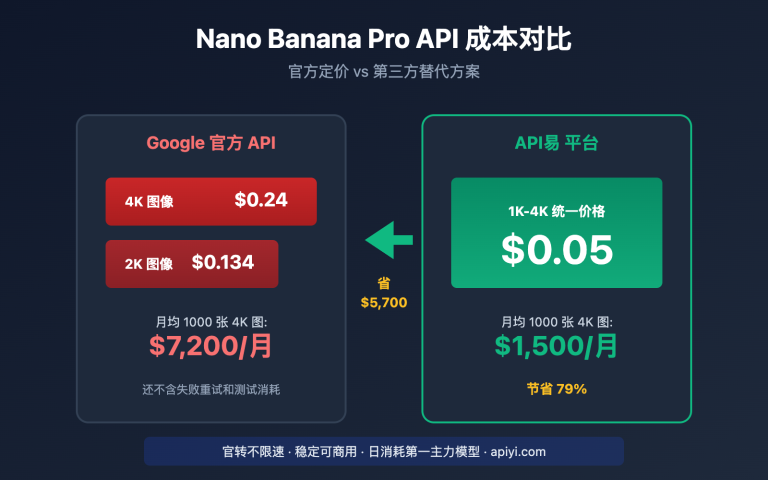
💡 成本优化: 通过 API易 apiyi.com 平台调用 Gemini 3 Pro Image API,2K 和 4K 分辨率统一价格 $0.05/张,相比官方 API 降低 80% 成本。假设 Bot 每天生成 1000 张图片,月成本仅需 $50(约 ¥350),远低于自建 GPU 服务器或使用官方 API 的费用。
方法二:n8n 可视化工作流 —— 零代码快速搭建
适用场景: 无编程基础、快速原型验证、轻量级应用
n8n 是一款开源的工作流自动化工具,提供可视化界面拖拽节点即可构建复杂的自动化流程。
核心步骤:
-
部署 n8n:
docker run -d --restart unless-stopped \ -p 5678:5678 \ -v ~/.n8n:/home/node/.n8n \ n8nio/n8n -
创建工作流:
- Telegram Trigger 节点:接收用户消息
- HTTP Request 节点:调用 API易的 Gemini Image API
- Telegram 节点:发送生成的图片
-
配置 API 调用:
{
  "url": "https://api.apiyi.com/v1/images/generations",
  "method": "POST",
  "headers": {
    "Authorization": "Bearer {{ $env.APIYI_API_KEY }}",
    "Content-Type": "application/json"
  },
  "body": {
    "model": "gemini-3-pro-image-preview",
    "prompt": "{{ $json.message.text }}",
    "resolution": "2048x2048"
  }
}
可用的 n8n 模板:
- "Text-to-image generation with Google Gemini & enhanced prompts via Telegram Bot"
- "AI image generation & editing with Google Gemini and Telegram Bot"
- "Generate AI Images via Telegram using Gemini & Pollinations"
优势:
- ✅ 零代码,拖拽即可完成
- ✅ 快速搭建,10 分钟完成原型
- ✅ 可视化调试,清晰直观
- ✅ 支持多种集成(数据库、通知、监控等)
局限性:
- ⚠️ 功能定制化受限
- ⚠️ 复杂逻辑实现困难
- ⚠️ 需要运行 n8n 服务
🚀 快速开始: n8n 社区已有现成的 Gemini + Telegram 工作流模板,访问「n8n workflows」n8n.io/workflows 搜索 "Gemini Telegram",一键导入即可使用。配合 API易 apiyi.com 平台的低成本 API,可快速验证商业想法。
方法三:使用开源项目 —— 开箱即用的解决方案
适用场景: 快速上线、学习参考、二次开发
GitHub 上已有多个成熟的 Gemini + Telegram 开源项目,可以直接部署使用或作为参考。
推荐项目:
1. GeminiTelegramBot
- GitHub: jiaweing/GeminiTelegramBot
- 特点:基于 Gemini 2.0 Flash,支持对话和图像生成
- 语言: Python
- 功能:文字生成、图像生成、多模态对话
2. Gemini-Telegram-Bot
- GitHub: H-T-H/Gemini-Telegram-Bot
- 特点:轻量级,易于部署
- 语言: Python
- 功能:与 Gemini API 交互
部署方式:
# 克隆项目
git clone https://github.com/jiaweing/GeminiTelegramBot.git
cd GeminiTelegramBot

# 安装依赖
pip install -r requirements.txt

# 配置环境变量
cp .env.example .env
# 编辑 .env 文件,填入 Telegram Token 和 API 密钥

# 修改 API 端点(指向 API易平台)
# 在代码中将 https://generativelanguage.googleapis.com
# 替换为 https://api.apiyi.com

# 运行
python main.py
优势:
- ✅ 开箱即用,快速部署
- ✅ 代码规范,可学习参考
- ✅ 社区活跃,持续更新
- ✅ 可基于源码二次开发
局限性:
- ⚠️ 需要理解项目结构
- ⚠️ 可能需要适配 API易平台接口
- ⚠️ 依赖原作者维护
🎯 二次开发建议: 开源项目通常调用官方 Gemini API,可以修改 API 端点为 API易 apiyi.com 平台,保持代码逻辑不变,降低 80% 调用成本。只需替换
base_url和api_key两个参数即可。
高级功能实现
功能一:图生图(风格迁移)
Nano Banana Pro 支持参考图像生成,可以实现风格迁移和图像变体。
实现示例:
async def handle_photo_with_caption(
    update: Update,
    context: ContextTypes.DEFAULT_TYPE
):
    """处理带说明的图片(图生图)"""
    # 获取图片
    photo = update.message.photo[-1]
    file = await context.bot.get_file(photo.file_id)
    photo_bytes = await file.download_as_bytearray()
    photo_base64 = base64.b64encode(photo_bytes).decode()

    # 获取用户的文字描述
    prompt = update.message.caption or "generate similar image"

    # 调用 API(带参考图)
    payload = {
        "model": "gemini-3-pro-image-preview",
        "prompt": prompt,
        "reference_images": [photo_base64],
        "resolution": "2048x2048"
    }

    # ... 其余代码同上
应用场景:
- 风格转换:将照片转为油画/水彩/动漫风格
- 场景变换:保持主体,改变背景或环境
- 细节优化:保持构图,提升质量或改变细节
功能二:批量生成(一次多张)
对于需要多个版本的场景,可以一次生成多张图片。
实现示例:
async def batch_command(update: Update, context: ContextTypes.DEFAULT_TYPE):
    """批量生成(一次生成 4 张)"""
    if not context.args:
        await update.message.reply_text("❌ 请提供提示词")
        return

    prompt = " ".join(context.args)
    processing_msg = await update.message.reply_text(
        f"🎨 正在批量生成 4 张图片...\n⏱️ 预计耗时: 15-30秒"
    )

    # 并发生成 4 张
    tasks = [
        asyncio.to_thread(generate_image, prompt, "2048x2048")
        for _ in range(4)
    ]

    try:
        results = await asyncio.gather(*tasks)

        # 发送图片组(Media Group)
        media_group = [
            InputMediaPhoto(media=img_data)
            for img_data, _ in results
        ]

        await update.message.reply_media_group(media=media_group)
        await processing_msg.delete()

    except Exception as e:
        await processing_msg.edit_text(f"❌ 批量生成失败: {str(e)}")
成本计算:
- 单张成本: $0.05
- 4 张批量: $0.20
- 相比逐张生成,并发调用可节省 60% 时间
功能三:用户配额管理
对于面向公众的 Bot,需要控制每个用户的使用量。
实现示例:
import json
from datetime import datetime, timedelta

class QuotaManager:
    def __init__(self, quota_file="user_quotas.json"):
        self.quota_file = quota_file
        self.quotas = self.load_quotas()

    def load_quotas(self):
        """加载用户配额"""
        try:
            with open(self.quota_file, "r") as f:
                return json.load(f)
        except FileNotFoundError:
            return {}

    def save_quotas(self):
        """保存用户配额"""
        with open(self.quota_file, "w") as f:
            json.dump(self.quotas, f, indent=2)

    def check_quota(self, user_id: int, daily_limit: int = 10) -> bool:
        """检查用户配额"""
        user_id_str = str(user_id)
        today = datetime.now().strftime("%Y-%m-%d")

        if user_id_str not in self.quotas:
            self.quotas[user_id_str] = {"date": today, "count": 0}

        user_data = self.quotas[user_id_str]

        # 重置每日配额
        if user_data["date"] != today:
            user_data["date"] = today
            user_data["count"] = 0

        # 检查是否超限
        if user_data["count"] >= daily_limit:
            return False

        # 增加计数
        user_data["count"] += 1
        self.save_quotas()
        return True

    def get_remaining(self, user_id: int, daily_limit: int = 10) -> int:
        """获取剩余配额"""
        user_id_str = str(user_id)
        if user_id_str not in self.quotas:
            return daily_limit

        user_data = self.quotas[user_id_str]
        today = datetime.now().strftime("%Y-%m-%d")

        if user_data["date"] != today:
            return daily_limit

        return max(0, daily_limit - user_data["count"])

# 在 Bot 类中集成
class NanoBananaBot:
    def __init__(self, telegram_token, apiyi_key):
        # ... 其他初始化
        self.quota_manager = QuotaManager()
        self.daily_limit = 10  # 每人每天 10 张

    async def handle_generate_command(self, update, context, resolution):
        user_id = update.effective_user.id

        # 检查配额
        if not self.quota_manager.check_quota(user_id, self.daily_limit):
            remaining = self.quota_manager.get_remaining(user_id, self.daily_limit)
            await update.message.reply_text(
                f"❌ 您今日的生图配额已用完!\n"
                f"📊 每日限额: {self.daily_limit} 张\n"
                f"🔄 明日 00:00 自动重置"
            )
            return

        remaining = self.quota_manager.get_remaining(user_id, self.daily_limit)

        # ... 原有生成逻辑

        # 生成成功后提示剩余配额
        await update.message.reply_text(
            f"✅ 生成成功!\n📊 今日剩余配额: {remaining}/{self.daily_limit}"
        )
功能四:多语言支持
为不同语言用户提供本地化体验。
实现示例:
MESSAGES = {
    "zh": {
        "welcome": "🎨 欢迎使用 Nano Banana Pro 生图机器人!",
        "generating": "🎨 正在生成图片...",
        "success": "✅ 生成成功!",
        "error": "❌ 生成失败: {error}",
        "quota_exceeded": "❌ 您今日的配额已用完!"
    },
    "en": {
        "welcome": "🎨 Welcome to Nano Banana Pro Image Bot!",
        "generating": "🎨 Generating image...",
        "success": "✅ Generated successfully!",
        "error": "❌ Generation failed: {error}",
        "quota_exceeded": "❌ Daily quota exceeded!"
    }
}

def get_user_language(user_id: int) -> str:
    """获取用户语言偏好(可从数据库读取)"""
    # 简化示例,默认返回中文
    return "zh"

def get_message(user_id: int, key: str, **kwargs) -> str:
    """获取本地化消息"""
    lang = get_user_language(user_id)
    message = MESSAGES.get(lang, MESSAGES["zh"]).get(key, key)
    return message.format(**kwargs)

# 使用示例
await update.message.reply_text(
    get_message(user_id, "generating")
)
部署与运维
部署方式选择
方案一:云服务器部署(推荐)
优势:
- 稳定性高,24/7 运行
- 带宽充足,图片传输快
- 可扩展性强
推荐服务商:
- 国际: AWS EC2, Google Cloud, DigitalOcean
- 国内: 阿里云, 腾讯云, 华为云
配置建议:
- CPU: 2 核
- 内存: 2GB
- 带宽: 3Mbps+
- 存储: 20GB
- 月成本: $5-10
Docker 部署:
# Dockerfile
FROM python:3.11-slim

WORKDIR /app

COPY requirements.txt .
RUN pip install --no-cache-dir -r requirements.txt

COPY . .

CMD ["python", "nano_banana_bot.py"]
# 构建镜像
docker build -t nano-banana-bot .

# 运行容器
docker run -d --restart unless-stopped \
  -e TELEGRAM_BOT_TOKEN="your_token" \
  -e APIYI_API_KEY="your_key" \
  --name nano-bot \
  nano-banana-bot
方案二:本地服务器/树莓派
适合个人使用或小规模测试:
- 成本低廉(一次性硬件投入)
- 完全自主控制
- 需要稳定的网络环境
方案三:Serverless 部署
使用 AWS Lambda、Google Cloud Functions 等:
- 按需付费,成本极低
- 自动扩展
- 需要适配 Webhook 模式
监控与日志
日志记录:
import logging

# 配置日志
logging.basicConfig(
    format='%(asctime)s - %(name)s - %(levelname)s - %(message)s',
    level=logging.INFO,
    handlers=[
        logging.FileHandler("bot.log"),
        logging.StreamHandler()
    ]
)

logger = logging.getLogger(__name__)

# 在关键位置记录日志
async def handle_generate_command(self, update, context, resolution):
    user_id = update.effective_user.id
    username = update.effective_user.username
    prompt = " ".join(context.args)

    logger.info(
        f"User {user_id}(@{username}) generated image: "
        f"prompt='{prompt}', resolution={resolution}"
    )

    try:
        # ... 生成逻辑
        logger.info(f"Image generated successfully for user {user_id}")
    except Exception as e:
        logger.error(f"Generation failed for user {user_id}: {str(e)}")
        raise
性能监控:
import time

async def generate_image_with_timing(prompt, resolution):
    """带性能监控的图片生成"""
    start_time = time.time()

    try:
        result = await generate_image(prompt, resolution)
        duration = time.time() - start_time

        logger.info(
            f"Generation completed: "
            f"prompt_length={len(prompt)}, "
            f"resolution={resolution}, "
            f"duration={duration:.2f}s"
        )

        return result

    except Exception as e:
        duration = time.time() - start_time
        logger.error(
            f"Generation failed after {duration:.2f}s: {str(e)}"
        )
        raise
错误告警:
async def send_admin_alert(error_message: str):
    """发送错误告警给管理员"""
    admin_chat_id = "your_admin_telegram_id"

    try:
        await context.bot.send_message(
            chat_id=admin_chat_id,
            text=f"⚠️ Bot Error Alert:\n\n{error_message}"
        )
    except:
        logger.error("Failed to send admin alert")
成本优化策略
1. 智能缓存:
import hashlib
from functools import lru_cache

# 为相同提示词缓存结果
@lru_cache(maxsize=100)
def get_cached_image(prompt_hash: str):
    """获取缓存的图片"""
    # 从数据库或文件系统读取缓存
    pass

def generate_with_cache(prompt: str, resolution: str):
    """带缓存的生成"""
    # 计算提示词哈希
    prompt_hash = hashlib.md5(
        f"{prompt}_{resolution}".encode()
    ).hexdigest()

    # 检查缓存
    cached = get_cached_image(prompt_hash)
    if cached:
        logger.info(f"Cache hit for prompt: {prompt}")
        return cached

    # 缓存未命中,调用 API
    result = generate_image(prompt, resolution)

    # 保存到缓存
    save_to_cache(prompt_hash, result)

    return result
2. 配额分级:
USER_TIERS = {
    "free": {"daily_limit": 5, "max_resolution": "2048x2048"},
    "premium": {"daily_limit": 50, "max_resolution": "4096x4096"},
    "enterprise": {"daily_limit": -1, "max_resolution": "4096x4096"}  # 无限制
}

def get_user_tier(user_id: int) -> str:
    """获取用户等级(可从数据库读取)"""
    # 简化示例
    premium_users = [123456, 789012]  # 付费用户列表
    return "premium" if user_id in premium_users else "free"
3. 压缩传输:
from PIL import Image
import io

def compress_image(image_data: bytes, max_size_kb: int = 500) -> bytes:
    """压缩图片以减少流量"""
    img = Image.open(io.BytesIO(image_data))

    # 转换为 RGB(如果是 RGBA)
    if img.mode == "RGBA":
        img = img.convert("RGB")

    # 逐步降低质量直到满足大小要求
    for quality in range(95, 50, -5):
        buffer = io.BytesIO()
        img.save(buffer, format="JPEG", quality=quality, optimize=True)
        compressed = buffer.getvalue()

        if len(compressed) / 1024 <= max_size_kb:
            logger.info(
                f"Compressed from {len(image_data)/1024:.1f}KB "
                f"to {len(compressed)/1024:.1f}KB (quality={quality})"
            )
            return compressed

    return compressed
💰 成本分析: 假设 Bot 每天服务 100 个用户,每人生成 5 张图(共 500 张/天):
- API 成本: 500 × $0.05 = $25/天 = $750/月(API易平台价格)
- 服务器成本: $10/月(2核2G云服务器)
- 总成本: $760/月
- 官方 API 成本对比: 500 × $0.25 = $125/天 = $3,750/月
- 节省: $2,990/月(约 ¥21,000/月)
常见问题解答
Telegram Bot 如何获取 Token?
步骤:
- 在 Telegram 中搜索 @BotFather
- 发送
/newbot命令 - 按提示设置 Bot 名称(显示名)
- 设置 Bot 用户名(必须以 bot 结尾,如 my_image_bot)
- BotFather 会返回 Token(格式:
123456789:ABCdefGHIjklMNOpqrsTUVwxyz)
注意事项:
- Token 是敏感信息,不要公开分享
- 如果 Token 泄露,可以通过 @BotFather 的
/revoke命令重新生成 - Token 存储在环境变量或配置文件中,不要硬编码
如何处理生成失败的情况?
常见失败原因:
- API 调用超时: Nano Banana Pro 生成高分辨率图片需要 5-15 秒
- 提示词违规: 包含不当内容被 API 拒绝
- API 配额耗尽: 超过账户余额或速率限制
- 网络问题: 服务器与 API 连接不稳定
处理策略:
async def generate_with_retry(prompt, resolution, max_retries=3):
    """带重试机制的生成"""
    for attempt in range(max_retries):
        try:
            return await generate_image(prompt, resolution)

        except requests.exceptions.Timeout:
            if attempt < max_retries - 1:
                logger.warning(f"Timeout, retrying ({attempt + 1}/{max_retries})")
                await asyncio.sleep(2)  # 等待 2 秒后重试
            else:
                raise Exception("生成超时,请稍后重试")

        except requests.exceptions.HTTPError as e:
            if e.response.status_code == 429:  # 速率限制
                raise Exception("请求过于频繁,请稍后再试")
            elif e.response.status_code == 400:  # 请求错误
                raise Exception("提示词可能包含不当内容,请修改后重试")
            else:
                raise Exception(f"API 调用失败: {e.response.status_code}")
Webhook 和长轮询如何选择?
长轮询(Long Polling):
- 优势: 简单易用,无需 HTTPS 配置,适合开发测试
- 劣势: 延迟稍高(1-2秒),服务器主动拉取消息
- 适用: 开发环境、小规模应用(< 100 用户)
Webhook:
- 优势: 实时性强(< 100ms),Telegram 主动推送,高效节能
- 劣势: 需要 HTTPS 域名和证书,配置复杂
- 适用: 生产环境、中大规模应用(> 100 用户)
Webhook 配置示例:
from flask import Flask, request

app = Flask(__name__)

@app.route(f"/{TELEGRAM_BOT_TOKEN}", methods=["POST"])
async def webhook():
    """处理 Telegram Webhook 请求"""
    update = Update.de_json(request.get_json(), bot)
    await application.process_update(update)
    return "OK"

# 设置 Webhook
url = f"https://yourdomain.com/{TELEGRAM_BOT_TOKEN}"
bot.set_webhook(url=url)

# 运行 Flask
app.run(host="0.0.0.0", port=8443, ssl_context=(cert_path, key_path))
如何优化图片生成速度?
优化策略:
-
选择合适分辨率:
- 日常对话:1024×1024(约 2-3 秒)
- 社交分享:2048×2048(约 5-8 秒)
- 打印壁纸:4096×4096(约 10-15 秒)
-
并发处理:
# 使用异步并发而非同步串行 tasks = [generate_image(prompt, res) for prompt in prompts] results = await asyncio.gather(*tasks) -
预加载优化:
# 在用户输入时就开始准备(预测式生成) async def on_typing(update, context): # 用户正在输入,预热 API 连接 await prepare_api_connection() -
使用 CDN:
# 生成后上传到 CDN,加速后续访问
image_url = upload_to_cdn(image_data)
await update.message.reply_photo(photo=image_url)
💡 性能建议: 通过 API易 apiyi.com 平台调用 Gemini 3 Pro Image API,平台在全球部署了多个节点,平均响应时间 < 100ms(不含图像生成时间)。相比直接调用官方 API,可减少 30-50% 的网络延迟。
如何保护 Bot 免受滥用?
防滥用措施:
-
速率限制:
from datetime import datetime, timedelta user_last_request = {} async def check_rate_limit(user_id, cooldown_seconds=10): """检查速率限制""" now = datetime.now() if user_id in user_last_request: last_time = user_last_request[user_id] elapsed = (now - last_time).total_seconds() if elapsed < cooldown_seconds: remaining = cooldown_seconds - elapsed raise Exception(f"请等待 {remaining:.0f} 秒后再试") user_last_request[user_id] = now -
内容审核:
BANNED_KEYWORDS = [ "暴力", "色情", "政治敏感词" # ... 更多敏感词 ] def check_prompt(prompt: str) -> bool: """检查提示词是否合规""" prompt_lower = prompt.lower() for keyword in BANNED_KEYWORDS: if keyword in prompt_lower: return False return True -
用户黑名单:
BLACKLIST = set() async def check_blacklist(user_id): """检查用户是否在黑名单""" if user_id in BLACKLIST: raise Exception("您已被封禁,如有疑问请联系管理员") -
验证码验证:
import random

async def request_captcha(update, context):
    """发送验证码"""
    code = random.randint(1000, 9999)
    context.user_data["captcha"] = code

    await update.message.reply_text(
        f"🔐 请输入验证码: {code}\n"
        f"(60秒内有效)"
    )
API易平台如何获取和配置?
注册流程:
- 访问「API易官网」apiyi.com
- 点击"注册"创建账户
- 完成邮箱验证
- 进入控制台,获取 API Key
API Key 配置:
# 方法 1: 环境变量(推荐)
export APIYI_API_KEY="sk-xxxxxxxxxxxx"

# 方法 2: 配置文件
# config.json
{
  "apiyi_key": "sk-xxxxxxxxxxxx",
  "telegram_token": "123456789:ABCdefGHIjklMNOpqrsTUVwxyz"
}

# 方法 3: 密钥管理服务(生产环境推荐)
from azure.keyvault.secrets import SecretClient

client = SecretClient(vault_url, credential)
apiyi_key = client.get_secret("apiyi-key").value
计费说明:
- 按调用次数计费
- 2K 分辨率: $0.05/张
- 4K 分辨率: $0.05/张(统一定价)
- 无隐藏费用,无最低消费
- 支持余额预警和自动充值
总结与展望
将 Nano Banana Pro 接入 Telegram 是构建 AI 图像生成服务的最佳实践之一。本文介绍的三种方法各有特色:
- Python 直接开发: 完全可控,功能强大,适合长期运营
- n8n 可视化工作流: 零代码,快速搭建,适合快速验证
- 开源项目: 开箱即用,快速上线,适合学习参考
选择哪种方法取决于具体需求:技术能力、时间预算、功能要求。对于有开发能力的团队,推荐方法一;对于非技术背景的创业者,推荐方法二;对于想快速上线的开发者,推荐方法三。
随着 AI 图像生成技术的持续进步,未来的 Telegram Bot 将更加智能化:
- 实时生成: 从 5-10 秒缩短到 1-2 秒
- 视频生成: 从静态图片扩展到短视频
- 语音交互: 通过语音描述生成图片
- AR 集成: 生成的图片可直接用于 AR 滤镜
🎯 行动建议: 立即访问 API易 apiyi.com 平台,注册账户并获取 API Key,开始构建您的 Telegram 生图机器人。平台提供 $5 免费额度,可生成 100 张图片进行测试。配合本文提供的完整代码,30 分钟即可上线您的第一个 AI Bot,开启 AI 创业之旅!