
作者注:詳解如何使用 Nano Banana Pro (Gemini 3 Pro Image) 製作建築正交藍圖,從平面圖、立面圖到剖面圖,快速生成符合 CAD 標準的技術圖紙
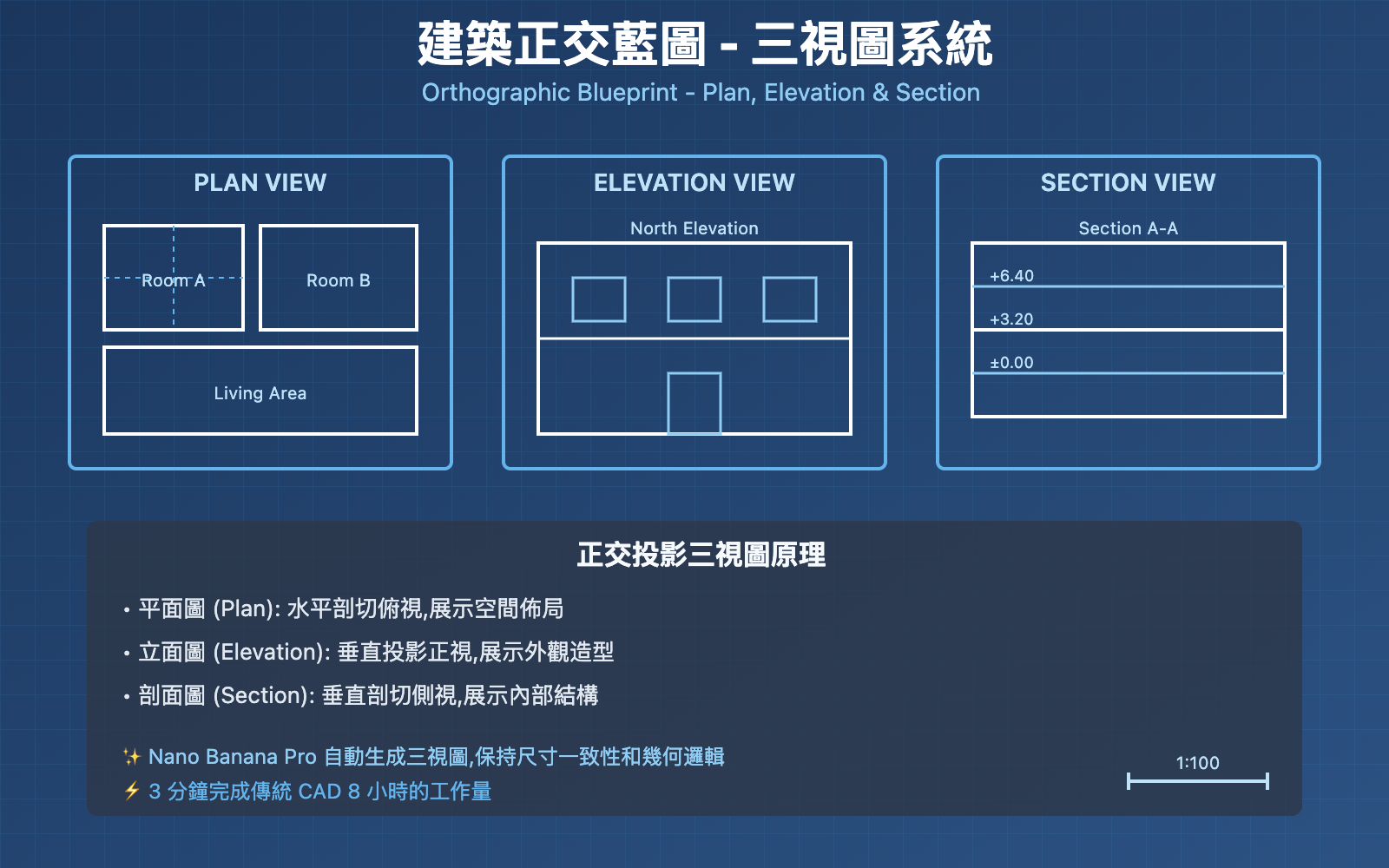
傳統建築藍圖製作需要精通 AutoCAD、Revit 等專業軟件,耗時數小時甚至數天。Nano Banana Pro (Gemini 3 Pro Image Preview) 通過強大的視覺推理能力,讓你用一句提示詞即可生成符合專業標準的正交藍圖,包含平面圖 (Plan)、立面圖 (Elevation) 和剖面圖 (Section)。
核心價值: 讀完本文,你將學會使用 Nano Banana Pro 生成建築正交藍圖,掌握線型控制、標註規範和多視圖組合技巧,將概念設計轉化爲可施工的技術圖紙。
Nano Banana Pro 建築藍圖核心能力
Nano Banana Pro 是 Google DeepMind 基於 Gemini 3 Pro 推出的圖像生成模型,在 2025 年底因其卓越的 建築可視化能力 在建築界引發病毒式傳播。其在技術圖紙生成方面的核心能力包括:
| 核心能力 | 技術參數 | 建築藍圖價值 |
|---|---|---|
| 視覺推理 | 支持 "derendering" 反向工程 | 理解建築空間邏輯,準確表達結構關係 |
| 精準線型控制 | CAD 級別可變線寬 | 粗線表達剖切元素,細線表達投影元素 |
| 文本渲染 | 技術字體清晰標註 | 尺寸標註、圖紙編號、北向指示自動生成 |
| 高分辨率輸出 | 原生 2K/4K | 滿足打印和施工圖紙要求 |
| 多視圖生成 | 一次生成平立剖三視圖 | 完整表達建築設計意圖 |
什麼是建築正交藍圖 (Orthographic Blueprint)?
建築正交藍圖是使用 正交投影 (Orthographic Projection) 技術繪製的建築技術圖紙,遵循嚴格的製圖標準。與透視圖不同,正交投影保持尺寸比例精確,是建築施工的法定依據。
三大核心視圖:
- 平面圖 (Plan View): 從上方俯視建築水平剖切後的投影,展示房間佈局、牆體位置、門窗開口
- 立面圖 (Elevation View): 從正前方、側方等方向觀察建築外觀,展示外立面設計、高度關係
- 剖面圖 (Section View): 沿垂直面剖切建築,展示內部空間層高、結構關係、樓板厚度
技術規範:
- 線型標準: 粗線 (0.5-0.7mm) 表示剖切部分,細線 (0.18-0.25mm) 表示投影部分
- 比例尺: 1:50、1:100、1:200 等標準建築比例
- 標註系統: 尺寸標註、標高標註、材料標註、圖紙索引
- 網格系統: 結構軸線編號 (A-Z, 1-99)
Nano Banana Pro 建築藍圖生成流程
第一步: 準備參考圖像或概念描述
Nano Banana Pro 支持兩種輸入方式:
方式 1: 基於參考圖像生成藍圖
上傳建築照片、3D 渲染圖或手繪草圖,AI 自動反向工程爲技術藍圖。
示例提示詞:
Create an orthographic blueprint that describes this building in plan, elevation, and section.

Technical requirements:
- Use strict CAD linework with variable line weights
- Thick lines (0.7mm) for cut elements (walls, ground)
- Thin lines (0.25mm) for projected elements (doors, windows, furniture)
- Include dimensions in meters
- Label "North Elevation" and "Main Entrance"
- Add structural grid lines (A-D, 1-5)
- Use technical architectural font for annotations
- Include scale bar (1:100)

Layout: Grid format with Plan View (top left), Front Elevation (top right), Section A-A (bottom)
方式 2: 純文本描述生成藍圖
直接用自然語言描述建築設計意圖,AI 自動生成規範藍圖。
示例提示詞:
Generate an orthographic blueprint for a two-story modern villa.

Building specifications:
- Ground floor: Living room (6m x 8m), Kitchen (4m x 5m), Bathroom (2m x 3m)
- Second floor: Master bedroom (5m x 6m), Two bedrooms (4m x 4m each), Bathroom (2m x 3m)
- Total footprint: 12m x 10m
- Floor height: 3.2m each
- Flat roof with parapet

Blueprint requirements:
- Plan view showing room layout and furniture placement
- North and South elevations showing fenestration
- Section view cutting through main staircase
- Technical line weights and dimension annotations
- Scale 1:100
關鍵技巧:
- 明確線型要求: "strict CAD linework" / "variable line weights"
- 指定視圖類型: "plan", "elevation", "section"
- 包含尺寸信息: 房間尺寸、樓層高度、開間進深
- 標註要求: "label", "annotate", "dimension lines"
- 比例尺: 明確圖紙比例 (1:50 / 1:100 / 1:200)
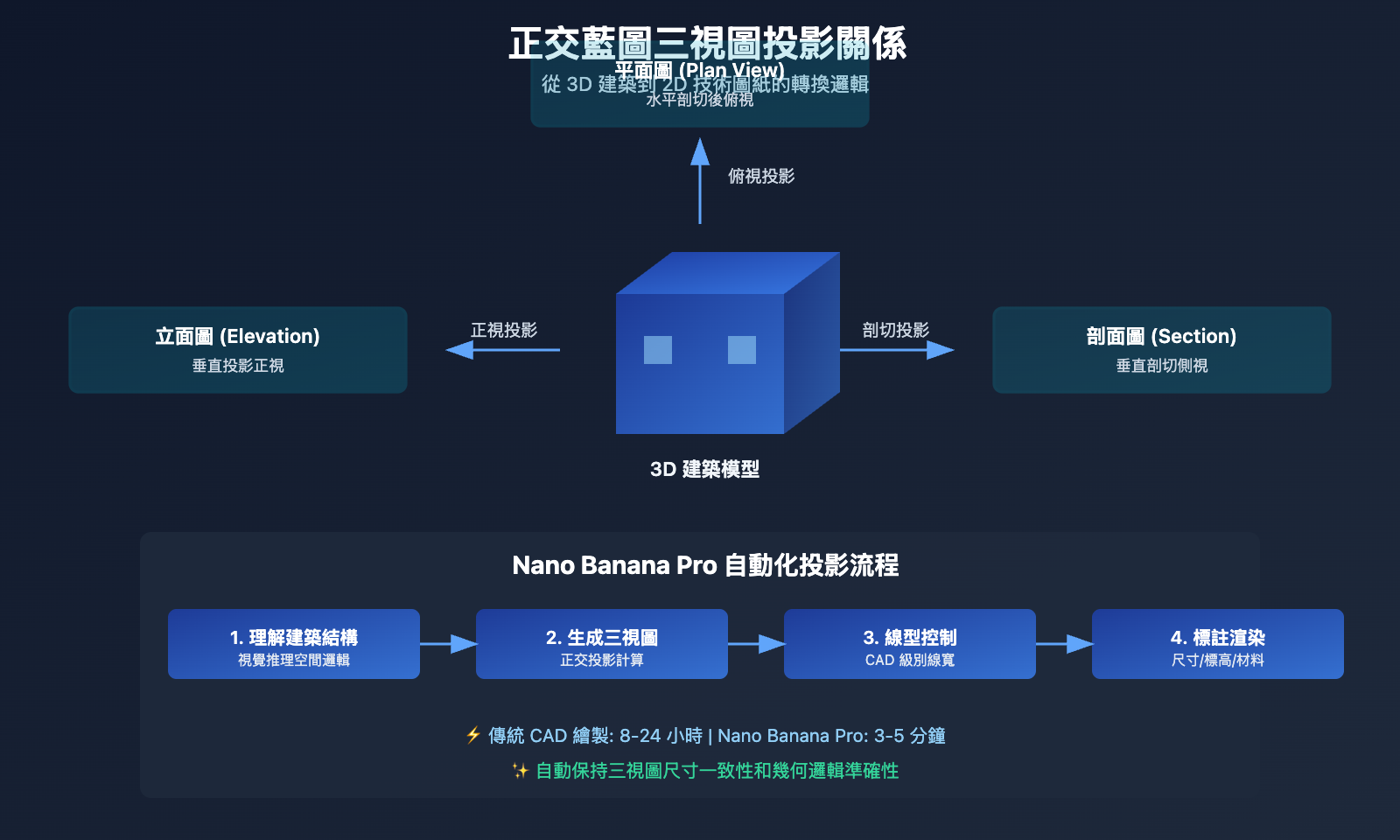
第二步: 調用 API 生成藍圖
以下是使用 Python 調用 Nano Banana Pro API 生成建築藍圖的代碼示例 (通過 API易平臺):
import openai

client = openai.OpenAI(
    api_key="YOUR_APIYI_KEY",
    base_url="https://vip.apiyi.com/v1"
)

response = client.images.generate(
    model="gemini-3-pro-image-preview",
    prompt="""Create an orthographic blueprint for Neuschwanstein Castle in plan, elevation, and section.

    Use professional CAD linework with variable line weights.
    Include dimension annotations and scale 1:200.""",
    size="2048x2048",
    quality="hd"
)

blueprint_url = response.data[0].url
print(f"藍圖生成成功: {blueprint_url}")
查看完整高級配置代碼
import openai
from typing import Optional, List

def generate_architectural_blueprint(
    building_description: str,
    views: List[str] = ["plan", "elevation", "section"],
    scale: str = "1:100",
    line_weights: bool = True,
    dimensions: bool = True,
    resolution: str = "2048x2048"
) -> str:
    """
    生成建築正交藍圖

    Args:
        building_description: 建築描述或參考圖像路徑
        views: 需要生成的視圖類型
        scale: 圖紙比例
        line_weights: 是否使用可變線寬
        dimensions: 是否包含尺寸標註
        resolution: 輸出分辨率 (2048x2048 或 4096x4096)

    Returns:
        生成圖像的 URL
    """
    client = openai.OpenAI(
        api_key="YOUR_APIYI_KEY",
        base_url="https://vip.apiyi.com/v1"
    )

    # 構建技術規範
    technical_specs = []

    if line_weights:
        technical_specs.append("Use strict CAD linework with variable line weights")
        technical_specs.append("Thick lines (0.7mm) for cut elements")
        technical_specs.append("Thin lines (0.25mm) for projected elements")

    if dimensions:
        technical_specs.append("Include dimension annotations in meters")
        technical_specs.append("Add structural grid lines")

    technical_specs.append(f"Scale: {scale}")
    technical_specs.append("Use technical architectural font")

    # 構建視圖佈局
    view_layout = ", ".join([f"{v.capitalize()} View" for v in views])

    # 完整提示詞
    prompt = f"""Create an orthographic blueprint for: {building_description}

Views required: {view_layout}

Technical requirements:
{chr(10).join(f"- {spec}" for spec in technical_specs)}

Layout: Professional blueprint grid with all views labeled
Background: Light blue grid paper (typical blueprint style)
"""

    try:
        response = client.images.generate(
            model="gemini-3-pro-image-preview",
            prompt=prompt,
            size=resolution,
            quality="hd"
        )
        return response.data[0].url
    except Exception as e:
        return f"生成失敗: {str(e)}"

# 使用示例
result = generate_architectural_blueprint(
    building_description="A modern single-family house with 3 bedrooms, 2 bathrooms, and open-plan living area",
    views=["plan", "north_elevation", "south_elevation", "section"],
    scale="1:100",
    line_weights=True,
    dimensions=True,
    resolution="2048x2048"
)
print(result)
快速測試: 通過 API易 apiyi.com 獲取 Nano Banana Pro 的測試額度,平臺統一支持 OpenAI SDK 調用格式。訪問 imagen.apiyi.com 可在線體驗藍圖生成效果,無需編程即可測試。
第三步: 優化線型和標註
Nano Banana Pro 支持多輪對話編輯,可針對生成的藍圖進行精細調整:
常見優化需求:
-
調整線型粗細
Make the wall lines thicker (0.9mm) and furniture lines lighter (0.15mm) for better contrast -
添加尺寸標註
Add dimension lines showing room sizes in meters. Include overall building dimensions (length x width) -
補充剖面標註
In the section view, add floor height annotations (e.g., "FL +0.00", "FL +3.20", "FL +6.40") Add material hatching for concrete walls and indicate insulation layers -
優化網格系統
Add structural grid lines labeled A-D (vertical) and 1-5 (horizontal) Show grid spacing dimensions -
調整視圖佈局
Rearrange the layout: Plan view at top, Front and Rear elevations in middle row, Section A-A at bottom
Align all views to the same baseline for consistency
專業技巧:
- 使用建築術語如 "hatch", "baseline", "grid spacing" 提升精度
- 明確指定線寬數值 (如 0.7mm, 0.25mm) 而非 "thick/thin"
- 參考標準圖集規範 (如 GB/T 50104-2010 建築製圖標準)
第四步: 導出和後期處理
生成的藍圖可直接用於:
- 設計提案: 客戶彙報時的概念圖紙
- 施工參考: 小型項目的施工指導圖
- 教學演示: 建築教育中的案例展示
後期優化建議:
- 導入 CAD 軟件: 使用 Adobe Illustrator 或 Inkscape 打開 PNG,轉換爲矢量圖形
- 精細化調整: 在 AutoCAD 中補充精確尺寸和材料標註
- 打印輸出: 2K 分辨率適合 A3 打印,4K 適合 A1 大幅面
Nano Banana Pro 藍圖生成技術解析
1. 視覺推理 (Visual Reasoning)
Nano Banana Pro 的核心優勢在於 "derendering" 反向工程能力,即從視覺信息反推結構邏輯。
技術原理:
- 識別建築照片中的牆體、門窗、屋頂等元素
- 推斷空間深度和層高關係
- 自動生成符合幾何邏輯的平立剖視圖
實際應用:
根據 Architizer Journal 報道,建築師 Sarah Chen 使用 Nano Banana Pro 將歷史建築照片反向生成爲精確藍圖,用於修復項目的技術圖紙編制,將傳統測繪時間從 2 周縮短到 30 分鐘。
2. CAD 級別線型控制
根據 Google AI 官方文檔,Nano Banana Pro 支持專業 CAD 線型規範:
| 線型類型 | 線寬 | 用途 | 示例元素 |
|---|---|---|---|
| 粗實線 | 0.7-0.9mm | 剖切部分 | 被剖切的牆體、地面、屋頂 |
| 中實線 | 0.35-0.5mm | 可見輪廓線 | 門窗框、傢俱輪廓 |
| 細實線 | 0.18-0.25mm | 投影線 | 地板材質、傢俱細節 |
| 虛線 | 0.18mm | 隱藏線 | 上層樓板投影、隱藏結構 |
| 點劃線 | 0.25mm | 軸線/中心線 | 結構軸網、對稱軸 |
提示詞示例:
Use professional CAD line weights:
- 0.9mm thick continuous lines for cut walls and structural elements
- 0.35mm medium lines for visible edges and door/window frames
- 0.18mm thin lines for floor patterns and furniture details
- 0.18mm dashed lines for hidden elements (upper floor projection)
- 0.25mm dash-dot lines for structural grid axes
3. 文本標註系統
Nano Banana Pro 的 文本渲染能力 在建築藍圖中至關重要:
支持的標註類型:
- 尺寸標註: 房間尺寸、牆體厚度、門窗洞口
- 標高標註: 樓層標高 (±0.000, +3.200)
- 材料標註: 牆體材質 (240mm 磚牆, C30 混凝土)
- 圖紙索引: 圖紙編號、比例尺、北向指示
- 房間編號: 功能分區標識 (01 客廳, 02 臥室)
字體規範:
- 西文: Arial, Helvetica (簡潔無襯線)
- 中文: 黑體、仿宋 (清晰易讀)
- 數字: 等寬字體 (對齊尺寸標註)
Nano Banana Pro vs 傳統 CAD 軟件對比
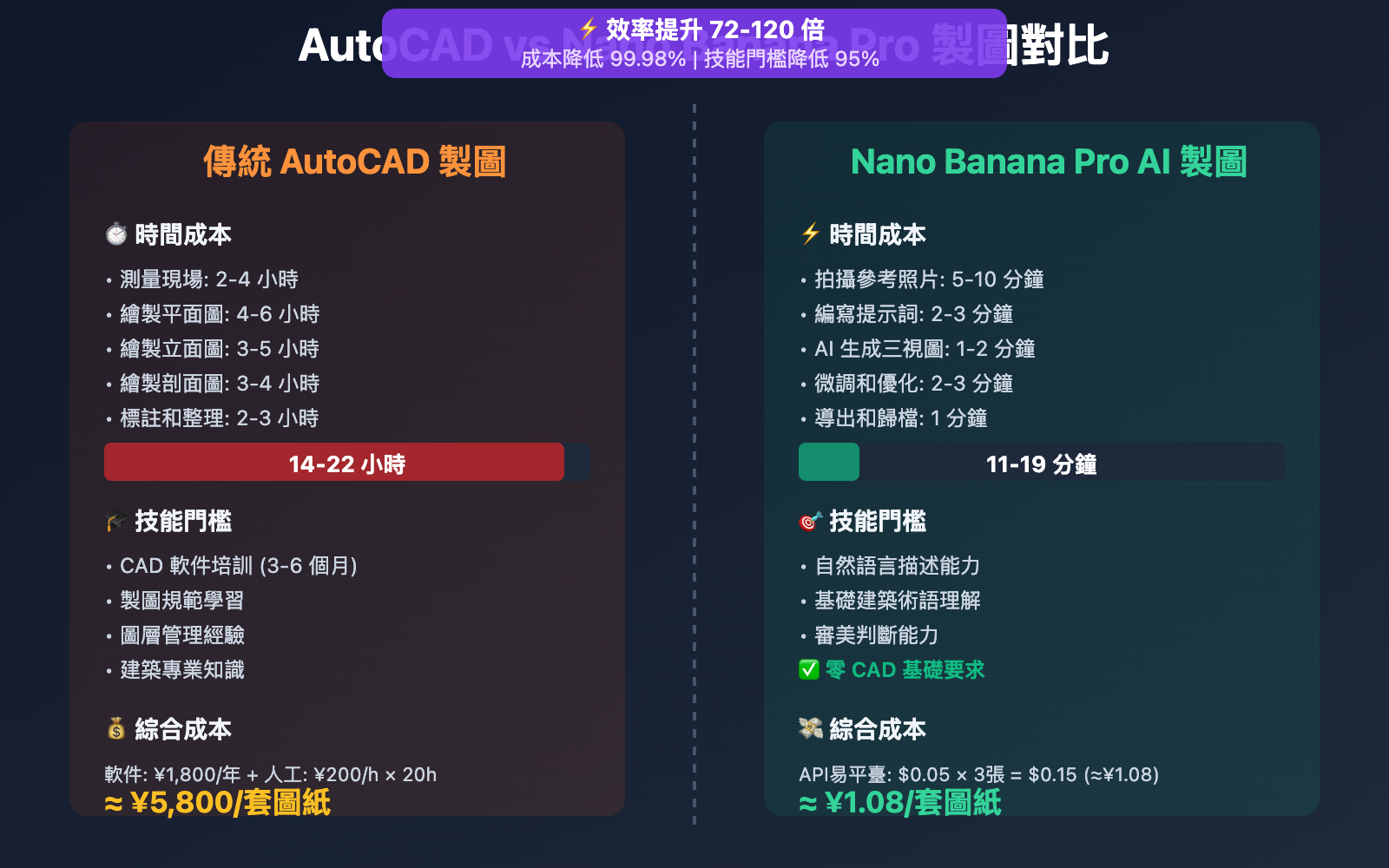
| 對比維度 | 傳統 AutoCAD 製圖 | Nano Banana Pro AI 製圖 |
|---|---|---|
| 製作時間 | 8-24 小時 (測量+繪圖+標註) | 3-5 分鐘 (提示詞生成) |
| 技術門檻 | 需要專業 CAD 培訓 (數月學習) | 自然語言描述即可 |
| 精度控制 | 像素級精確 (±1mm) | 概念級精確 (±5-10%) |
| 修改成本 | 需要重新繪製圖層 | 一句話即可局部編輯 |
| 適用場景 | 施工圖、竣工圖、法定圖紙 | 概念設計、方案彙報、快速迭代 |
| 輸出格式 | DWG/DXF (矢量) | PNG/JPG (位圖,可轉矢量) |
| 成本 | AutoCAD 訂閱 ¥1,800/年 + 人工 | API易 $0.05/張 |
結論: Nano Banana Pro 適合 設計前期 快速出圖,傳統 CAD 適合 施工階段 精確製圖。最佳實踐是結合使用: AI 生成初稿 → CAD 精細化 → 施工圖審查。
對比說明: 上述時間數據來自 ArchiLabs.ai 實測報告。可通過 API易 apiyi.com 平臺以 $0.05/張 的價格進行驗證 (相比 Google 官方 4K 定價 $0.24/張,節省 79%)。
Nano Banana Pro 建築藍圖高級技巧
1. 多視圖組合生成
參考 iMini AI 教程,可一次生成完整圖紙集:
prompt = """Generate a complete orthographic blueprint set for a modern art gallery.

Required views:
1. Ground Floor Plan (1:100) - showing exhibition halls, entrance lobby, cafe
2. First Floor Plan (1:100) - showing administrative offices, storage
3. North Elevation (1:100) - main entrance facade
4. South Elevation (1:100) - rear service entrance
5. Section A-A (1:100) - cutting through main exhibition hall showing double-height space
6. Section B-B (1:100) - cutting through staircase

Layout: 2x3 grid with consistent alignment
Technical: CAD line weights, dimension annotations, structural grid (A-F, 1-8)
Style: Professional blueprint on light blue grid paper
"""
優勢: 所有視圖自動對齊,確保尺寸一致性。
2. 歷史建築測繪
Nano Banana Pro 可將歷史建築照片反向工程爲測繪圖紙:
# 上傳歷史建築照片
with open("historic_building.jpg", "rb") as img:
    response = client.images.generate(
        model="gemini-3-pro-image-preview",
        prompt="""Reverse engineer this historic building into an orthographic blueprint.

        Generate:
        - Measured floor plan with room dimensions
        - Front and side elevations showing architectural details
        - Section view revealing ceiling heights and structural system

        Preserve:
        - Original window proportions and spacing
        - Decorative elements (cornices, pilasters, moldings)
        - Roof pitch and chimney locations

        Technical: 1:50 scale, detailed dimension annotations""",
        image=img
    )
應用場景: 文物保護、歷史建築修復、舊建築改造。
3. 參數化設計迭代
利用 Nano Banana Pro 快速生成多個設計方案:
# 批量生成不同戶型方案
for layout in ["1-bedroom", "2-bedroom", "3-bedroom"]:
    prompt = f"""Generate floor plan blueprint for a {layout} apartment unit.

    Specifications:
    - Total area: {"50sqm" if layout == "1-bedroom" else "80sqm" if layout == "2-bedroom" else "120sqm"}
    - Include: Living room, Kitchen, Bathroom(s), Bedroom(s), Balcony
    - Open-plan living/dining area
    - Efficient circulation (minimize corridor space)

    Blueprint requirements:
    - 1:50 scale with dimension annotations
    - Furniture layout showing functional zones
    - Door swing directions and window positions
    - Total area calculation annotation
    """

    response = client.images.generate(
        model="gemini-3-pro-image-preview",
        prompt=prompt
    )

    # 保存方案對比
    print(f"{layout} 方案已生成")
效率提升: 傳統手繪 3 個方案需 6-8 小時,AI 生成僅需 3 分鐘。
實際應用場景與案例
場景 1: 建築競賽快速出圖
需求: 48 小時競賽時限內完成概念設計和技術圖紙
解決方案:
- 草圖階段: 手繪概念草圖 (2 小時)
- AI 生成藍圖: 上傳草圖,生成平立剖三視圖 (10 分鐘)
- 方案迭代: 根據評審反饋調整設計 (5 輪迭代,共 1 小時)
- 精細化: 導入 CAD 補充細節標註 (4 小時)
時間對比:
- 傳統流程: 草圖 2h + CAD 繪圖 20h = 22 小時
- AI 輔助流程: 草圖 2h + AI 生成 1h + CAD 精修 4h = 7 小時
- 節省 15 小時 (提升 68% 效率)
場景 2: 室內設計平面圖生成
需求: 爲客戶提供 3 種不同風格的室內佈局方案
工作流:
測量現場尺寸 → 輸入戶型參數 → AI 生成 3 種佈局 → 客戶選擇 → 深化設計
實際案例 (來自 Fenestra 博客):
室內設計師 Lisa Wang 使用 Nano Banana Pro 爲 120㎡ 住宅生成 現代簡約、北歐風、工業風 三種平面佈局,客戶當場確定方案,從初次見面到簽約僅用 1 小時 (傳統流程需 1-2 周)。
場景 3: 建築教育案例演示
需求: 建築學教學中快速展示正交投影原理
教學流程:
- 展示建築 3D 模型或照片
- 使用 Nano Banana Pro 實時生成平立剖視圖
- 學生理解三視圖與實際建築的對應關係
教學優勢:
- 傳統方法: 教師手繪示範 (30 分鐘) + 學生練習 (2 小時)
- AI 輔助方法: 實時生成演示 (5 分鐘) + 學生理解原理 (30 分鐘)
- 節省 70% 教學時間,學生可將精力投入設計思維而非機械製圖
Nano Banana Pro API 定價與平臺選擇
官方定價 (Google Vertex AI)
| 分辨率 | Google 官方價格 | 訪問要求 |
|---|---|---|
| 4K (4096×4096) | $0.24/張 | 需海外信用卡綁定 Google Cloud |
| 2K (2048×2048) | $0.134/張 | 同上 |
| 1K (1024×1024) | 未單獨定價 | 同上 |
企業訂閱: Google Cloud 企業賬戶需額外支付平臺管理費 (月費 $100+)
API易平臺定價 ⭐ 推薦
基礎定價
- 統一價格: $0.05/張 (不分分辨率,1K/2K/4K 全覆蓋)
- 折扣力度:
- 相比官方 4K: 節省 79% (約 2 折)
- 相比官方 2K: 節省 63% (約 3.7 折)
建築設計團隊專享優惠
適用對象: 日均消耗 > 5000 張圖的設計院、建築事務所、BIM 諮詢公司
| 充值金額 | 加贈比例 | 實際到賬 | 實際單價 |
|---|---|---|---|
| $100 | +10% | $110 | $0.045/張 |
| $500 | +15% | $575 | $0.043/張 |
| $1000+ | +20% (封頂) | $1200 | $0.04/張 |
成本計算示例:
假設中型設計院月生成 5,000 張 藍圖 (含平立剖視圖):
| 平臺 | 單價 | 月成本 | 年成本 |
|---|---|---|---|
| Google 官方 (4K) | $0.24 | $1,200 | $14,400 |
| API易基礎價 | $0.05 | $250 | $3,000 |
| API易加贈價 (20%) | $0.04 | $200 | $2,400 |
年度節省: $12,000 (節省 83%)
額外價值: 按設計師月薪 ¥12,000 計算,AI 輔助製圖每月節省 40 小時人工 = 節省 ¥6,000 人工成本,ROI 回報率 2400%。
性能優勢
- 生成速度:
- 1K/2K: 約 30 秒/張
- 4K: 約 1 分鐘/張
- 穩定性: 基於 Google Cloud T3 等級及以上 企業賬戶
- 併發控制: 不限併發,支持團隊協作批量生成
- 日產能: 平臺日均處理 10 萬+ 張圖片 (2026 年 1 月數據)
支付方式
- ✅ 支付寶 / 微信支付
- ✅ USDT (方便海外客戶,已服務歐美建築事務所)
- ✅ 對公轉賬 (支持企業採購發票)
- ✅ 無需海外信用卡
快速開始
- 開發文檔: docs.apiyi.com
- 官方網站: api.apiyi.com
- 在線測試: imagen.apiyi.com (免費體驗 Nano Banana Pro 藍圖生成效果)
常見問題
Q1: Nano Banana Pro 生成的藍圖能否用於施工?
答: Nano Banana Pro 生成的藍圖適合 概念設計和方案彙報階段,但不建議直接用於施工。原因如下:
- 精度限制: AI 生成的尺寸爲概念級精度 (±5-10%),不滿足施工圖要求 (±1mm)
- 缺少法定要素: 缺少結構計算書、消防審批、節能計算等法定文件
- 標準合規性: 未經註冊建築師審覈蓋章
建議工作流: AI 生成初稿 → 導入 AutoCAD/Revit 精細化 → 註冊建築師審覈 → 施工圖審查 → 施工使用
Q2: 如何控制生成藍圖的比例尺精度?
答: 在提示詞中明確指定比例尺和尺寸信息:
Scale: 1:100 (indicate with scale bar showing 0-1-2-5-10 meters)
Include dimension annotations:
- Overall building: 12.0m x 8.5m
- Room sizes: Living room 6.0m x 4.5m, Bedroom 3.6m x 3.3m
- Wall thickness: 240mm exterior walls, 120mm interior partitions
驗證方法: 生成後用圖像測量工具檢查比例尺標尺是否準確,誤差應小於 3%。
Q3: 如何快速開始測試建築藍圖生成?
推薦通過 API易 apiyi.com 平臺快速測試:
- 訪問 api.apiyi.com 註冊賬號 (支持支付寶/微信)
- 獲取 API Key 和免費測試額度
- 使用本文的 Python 代碼示例,將
base_url改爲https://vip.apiyi.com/v1 - 訪問 imagen.apiyi.com 在線體驗藍圖生成 (無需編程)
額外優勢: API易平臺支持 80+ 主流 AI 模型統一接口,可快速對比 DALL-E 3、Midjourney、Stable Diffusion 等模型在建築圖紙生成的效果差異。
建築師專屬福利: 註冊時備註 "建築設計師",可額外獲贈 $5 測試額度 (約 100 張藍圖)。
總結
Nano Banana Pro 建築正交藍圖生成的核心優勢:
- 視覺推理: 自動理解建築空間邏輯,生成符合幾何規範的多視圖
- CAD 級線型: 粗細線自動區分剖切/投影元素,符合製圖標準
- 高效迭代: 3 分鐘完成傳統 8 小時的平立剖三視圖繪製
- 成本優勢: 通過 API易平臺調用,成本僅爲 Google 官方的 2 折
對於建築師、室內設計師、建築學學生而言,Nano Banana Pro 將技術製圖從 "耗時的機械勞動" 轉變爲 "快速的設計工具",讓設計師將 80% 的時間投入創意思考,僅 20% 用於圖紙表達。
推薦通過 API易 apiyi.com 快速驗證效果,平臺提供免費測試額度、統一 OpenAI SDK 調用格式,以及覆蓋 1K-4K 分辨率的 $0.05/張 優惠定價。訪問 imagen.apiyi.com 即可在線體驗建築藍圖生成效果。
作者: 技術團隊
技術交流: 歡迎在評論區分享你的建築藍圖作品,更多 AI 建築設計資料可訪問 API易 apiyi.com 技術社區
參考資料:


