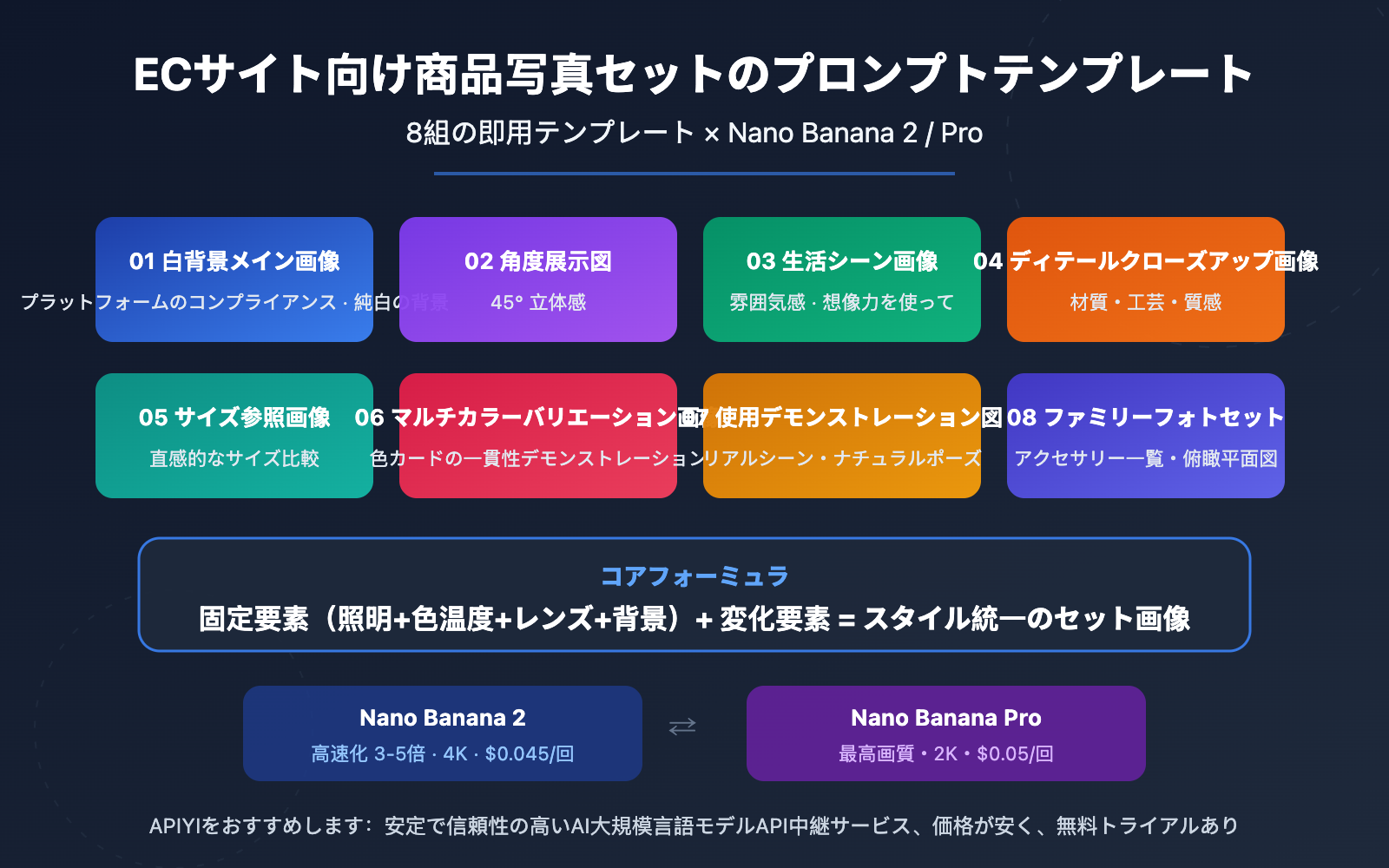
著者注:Nano Banana 2およびNano Banana Pro画像生成モデル向けの、すぐに使える8組のEC商品画像セット用プロンプトテンプレートを共有します。白背景メイン画像、シーン画像、詳細画像など、一般的なニーズをカバーしています。
EC運営において、商品画像の視覚的一貫性はコンバージョン率に直接影響します。多くの販売者がAIで商品画像を生成する際に直面する最大の課題は、毎回生成されるスタイルが統一されず、視覚的に連続した商品画像セットを形成できないことです。
本記事では、実戦で検証済みの8組のEC商品画像セット用プロンプトテンプレートを共有します。Nano Banana 2とNano Banana Proの2つのモデルに対応しており、白背景メイン画像、シーン画像、詳細画像、比較画像などの完全な商品画像セットを迅速に一括生成するのに役立ちます。
コアバリュー: 本記事を読むことで、コピーしてすぐに使えるEC商品画像セット用プロンプト体系を手に入れ、「1商品 → 統一スタイルの8枚の商品画像セット」という効率的なワークフローを実現できます。
EC商品画像セットプロンプトテンプレート 核心ポイント
| ポイント | 説明 | 価値 |
|---|---|---|
| 8組のプロンプトテンプレート | メイン画像、シーン、詳細、比較など、全画像タイプをカバー | 1商品で完全な画像セットを生成可能 |
| スタイル固定フォーミュラ | 「照明 + 角度 + 背景 + 色温度」の4要素を固定 | 全画像セットの視覚的統一を確保 |
| Nano Banana 2モデル対応 | Nano Banana 2とProの両方に同時対応 | 必要に応じて速度または画質を優先して選択 |
| プラットフォーム準拠パラメータ | 淘宝、Amazonなどのプラットフォームのサイズと背景要件に対応 | 二次調整なしで即掲載可能 |
EC商品画像セットプロンプトテンプレートの核心ロジック
EC商品画像セットの鍵は、1枚の画像がどれだけ美しいかではなく、一連の画像間のスタイル一貫性にあります。従来の撮影では、照明、カメラ位置、後処理の色調補正を統一して実現していましたが、AI生成ではプロンプト内の「固定パラメータ」を通じて保証する必要があります。
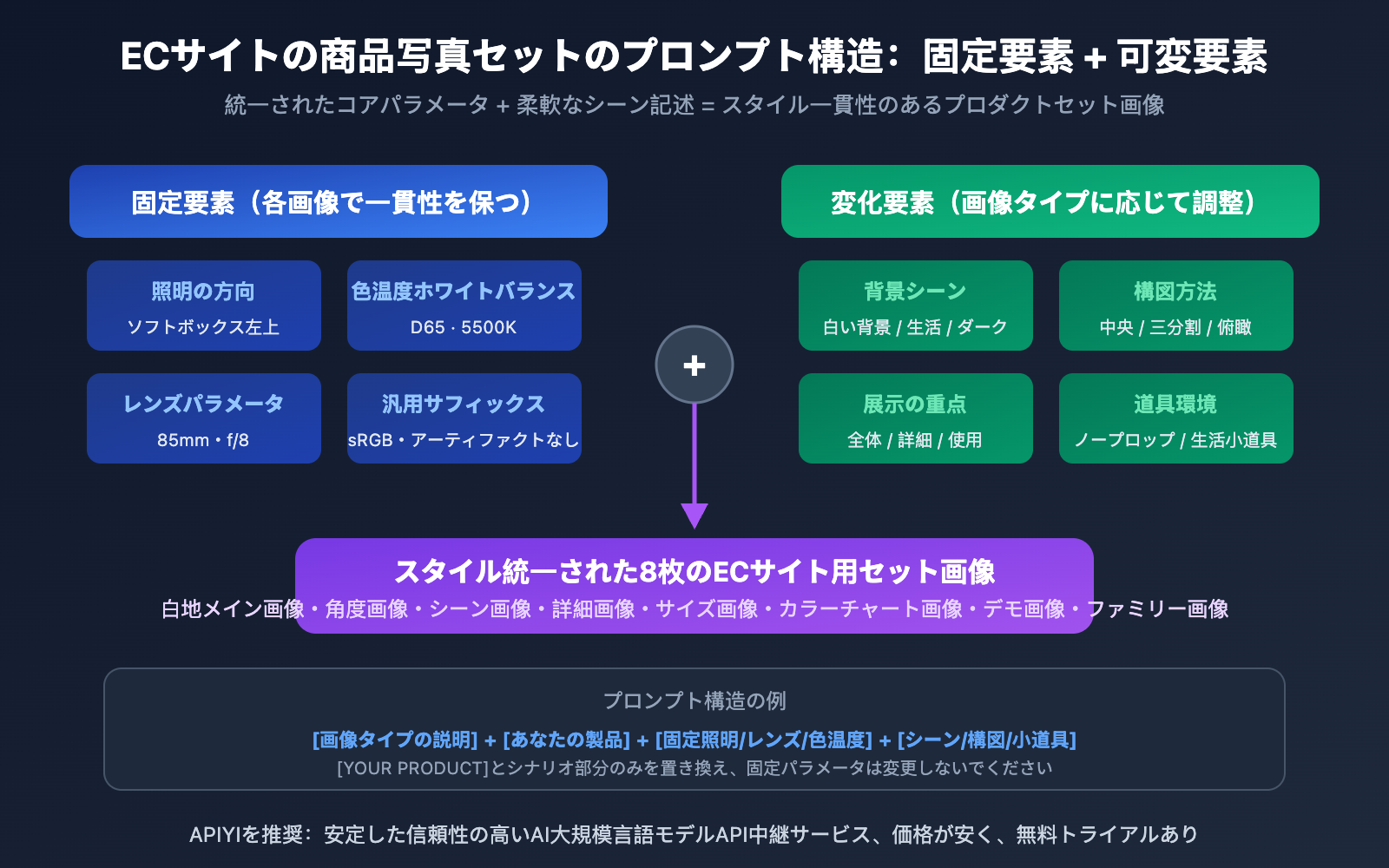
私たちがまとめた核心フォーミュラは、固定要素 + 可変要素 = スタイル統一された画像セットです。固定要素には照明の方向、色温度、商品の配置角度スタイルが含まれます。可変要素は背景シーン、構図方法、展示の重点です。各テンプレートはこのロジックに従っており、商品説明を置き換えるだけで一括使用できます。
EC商品画像セットプロンプトテンプレートのモデル選択
Nano Banana 2とNano Banana Proはそれぞれ異なる側面に重点を置いています。Nano Banana 2はGemini 3.1 Flashアーキテクチャをベースにしており、生成速度が3~5倍速く、最大4K解像度をサポートしているため、画像を一括生成するECシナリオに適しています。Nano Banana ProはGemini 3 Proアーキテクチャをベースにしており、画質が最も繊細で、極限の質感を必要とする高級商品に適しています。両者のプロンプト形式は完全に互換性があり、実際のニーズに応じて柔軟に切り替えることができます。
8つの完全なEC商品画像プロンプトテンプレート
以下の8つのテンプレートは、EC商品画像の全シーン要件をカバーしています。各テンプレートには固定パラメータ(一貫性を保つ)と置換可能パラメータ(必要に応じて変更)が明記されており、Nano Bananaに直接コピーして使用できます。
テンプレート 1:白背景メイン画像(プラットフォーム準拠)
白背景メイン画像はECプラットフォームの最も基本的な要件で、淘宝、Amazon、拼多多はいずれもメイン画像が純白背景であることを要求しています。
Ultra-realistic studio photograph of [YOUR PRODUCT] on a pure white seamless background,
centered composition, product fills 85-90% of frame,
shot with 85mm prime lens, f/8 sharpness, ISO 100,
softbox high-key lighting with gentle contact shadow under product,
natural accurate colors, no props, no text, no logos, no watermark,
square 1:1 composition, commercial product photography
置換可能パラメータ:
[YOUR PRODUCT]:あなたの商品説明に置き換えてください。例:a matte black wireless Bluetooth speakerまたはa red leather crossbody bag with gold hardwaresquare 1:1 composition:プラットフォームの要件に応じてアスペクト比を調整してください。Amazonメイン画像は1:1推奨、詳細画像は3:4が使用可能です。
テンプレート 2:45度アングル展示画像
45度アングルは、製品の立体感とデザインの詳細を展示するのに最適な角度で、画像セットの2〜3枚目に適しています。
Professional product photograph of [YOUR PRODUCT],
three-quarter view at 45-degree angle from slightly above,
on a seamless light gray gradient background (#f0f0f0 to #ffffff),
studio softbox lighting from upper left with subtle fill light from right,
f/5.6 aperture for slight depth of field,
sharp focus on product front, gentle bokeh on rear edge,
natural material textures preserved, no artificial smoothing,
commercial e-commerce photography style
テンプレート 3:ライフスタイルシーン画像
シーン画像は、製品の使用雰囲気を伝え、購入者が所有した後の体験を想像するのに役立ちます。
Lifestyle product photography of [YOUR PRODUCT] in a [SCENE SETTING],
natural window light from the left side creating soft warm shadows,
product placed on [SURFACE DESCRIPTION],
surrounded by [2-3 COMPLEMENTARY PROPS],
shallow depth of field f/2.8 with product in sharp focus,
warm color temperature 5500K, cozy and inviting atmosphere,
editorial style composition with rule of thirds placement,
high resolution commercial photography
置換可能パラメータ:
[SCENE SETTING]:modern minimalist living room/bright kitchen countertop/cozy home office desk[SURFACE DESCRIPTION]:smooth white marble countertop/rustic wooden table/clean linen tablecloth[2-3 COMPLEMENTARY PROPS]:a small potted plant and a ceramic cup/scattered coffee beans and a notebook
テンプレート 4:製品詳細クローズアップ画像
詳細画像は、素材、工芸、品質感を展示するために使用され、客単価を上げるための重要な画像です。
Extreme close-up macro product photography of [PRODUCT DETAIL AREA],
shot with 100mm macro lens at f/4,
focused on [SPECIFIC TEXTURE/DETAIL],
single directional studio light from upper right creating texture-revealing shadows,
preserve natural grain and material texture, no plastic sheen,
dark background gradient from #1a1a2e to #16213e for contrast,
showing fine craftsmanship details, stitching, and material quality,
ultra-sharp commercial photography, 8K detail level
置換可能パラメータ:
[PRODUCT DETAIL AREA]:the leather strap connection point of the bag/the speaker's aluminum mesh grille[SPECIFIC TEXTURE/DETAIL]:woven leather texture and metal buckle/brushed aluminum finish and precise ventilation holes
テンプレート 5:サイズ参照比較画像
サイズ参照画像は、購入者が製品の大きさを直感的に理解するのに役立ち、サイズの期待違いによる返品を減らします。
Product size reference photograph of [YOUR PRODUCT]
placed next to [COMMON REFERENCE OBJECT] for scale comparison,
both items on a clean white surface,
top-down flat lay composition shot directly from above,
even studio lighting with minimal shadows,
f/11 for maximum depth of field ensuring both items in sharp focus,
neutral color temperature, accurate color reproduction,
clean informational style, commercial product photography
一般的な参照物の選択:
| 製品サイズ | 推奨参照物 | 英語での説明 |
|---|---|---|
| 小物(イヤホン、時計) | コインまたはクレジットカード | a standard credit card |
| 中物(スピーカー、水筒) | スマートフォンまたは手のひら | an iPhone 15 Pro |
| 大物(バッグ、家電) | 雑誌またはノートパソコン | a 13-inch laptop |
テンプレート 6:マルチカラー変種展示画像
マルチカラー展示画像は、1つのリンクで複数のカラーオプションを展示するために使用され、角度と照明が完全に一致している必要があります。
Product color variant display of [YOUR PRODUCT] in [COLOR],
identical three-quarter view at 30-degree angle,
on pure white background,
consistent softbox lighting setup: key light upper left,
fill light right side, rim light from behind,
f/8 sharpness, same exact camera position and framing,
accurate color reproduction matching real product color,
uniform white balance D65, commercial product photography
重要なヒント:複数の色を生成する場合、[COLOR]以外のすべてのパラメータを変更せずに保持してください。例えば、in matte black / in pearl white / in navy blue / in rose goldを順番に生成すると、角度が完全に一致する一組のカラーチャート画像が得られます。
テンプレート 7:製品使用デモンストレーション画像
使用デモンストレーション画像は、製品が使用されている状態を展示し、機能性製品や着用製品に適しています。
Product in-use demonstration photograph of [USAGE SCENARIO],
natural lifestyle setting with [ENVIRONMENT DETAILS],
product clearly visible and in focus as the main subject,
candid natural pose, not overly staged,
warm natural lighting simulating golden hour,
f/3.5 aperture creating natural background separation,
authentic and relatable atmosphere,
editorial commercial photography style,
high resolution output
置換可能パラメータ:
[USAGE SCENARIO]:a person wearing the wireless earbuds while jogging in a park/hands holding the portable charger while sitting at a cafe[ENVIRONMENT DETAILS]:outdoor morning light, tree-lined path/modern cafe interior with warm ambient lighting
テンプレート 8:セット画像 / ファミリー写真
ファミリー写真は、セット製品やアクセサリーの組み合わせの完全な内容物を展示するために使用されます。
Product flatlay photograph showing complete set contents of [PRODUCT SET],
all items arranged in organized grid layout on [BACKGROUND SURFACE],
top-down overhead perspective shot directly from above,
each item clearly separated with equal spacing,
even diffused studio lighting with no harsh shadows,
f/11 maximum sharpness across all items,
clean minimal style, accurate colors,
items labeled with subtle positioning,
commercial catalog photography style
配置の提案:メイン製品を中央に大きく配置し、アクセサリーをサイズ順に均等な間隔で周囲に配置します(Nano Bananaは説明に基づいて構図を自動的に最適化します)。
EC商品画像プロンプトテンプレート スタイル固定テクニック
テンプレートを理解するのは第一歩に過ぎません。画像セットを「一組に見せる」本当の鍵はスタイル固定にあります。以下は、実戦でまとめた4つのコア固定パラメータです。
EC商品画像プロンプトの4要素固定法
| 固定要素 | 役割 | 推奨固定値 | 頻繁な変更は非推奨 |
|---|---|---|---|
| 照明方向 | 影の一貫性を決定 | softbox lighting from upper left |
左右光源の混用を避ける |
| 色温度ホワイトバランス | 色調の統一を決定 | white balance D65, 5500K |
冷暖色温度の混用を避ける |
| レンズパラメータ | 遠近感の統一を決定 | 85mm lens, f/8 |
広角と望遠の混用を避ける |
| 背景処理 | 視覚的連続性を決定 | 一貫した背景スタイルを使用 | 白背景とシーン画像の混在配置を避ける |
EC商品画像プロンプトの共通サフィックス
以下のサフィックスは、スタイルをさらに統一し、プラットフォーム要件を満たすために、任意のテンプレートの末尾に追加できます:
, high resolution output,
sRGB color space,
no chromatic aberration,
preserve natural grain texture, no plastic sheen,
no AI artifacts, photorealistic quality
過度な平滑化の防止:Nano Bananaは時々製品素材を過度に滑らかにレンダリングすることがあります。preserve natural grain texture, no plastic sheenを追加することで、プラスチック感を効果的に回避できます。
色彩の正確性:match to reference sRGB color space; remove warm cast; uniform white balanceを追加することで、同一バッチで生成される画像の色調が一致することを保証します。
🎯 実戦アドバイス: まずNano Banana 2で構図とスタイルを確認するためのスケッチを素早く作成し、満足したらNano Banana Proで最終的な高画質バージョンを生成することをお勧めします。APIYI apiyi.comプラットフォームを通じてこれら2つのモデルを呼び出すことで、統一されたインターフェースで柔軟に切り替えられ、個別に設定する必要はありません。
电商向け画像セットプロンプトテンプレート API クイックスタート
極簡示例
以下は、APIを使用してNano Banana 2でEC製品画像を生成する最もシンプルなコードです。10行で実行できます:
import requests, base64, json

API_KEY = "your-apiyi-api-key"
ENDPOINT = "https://api.apiyi.com/v1beta/models/gemini-3.1-flash-image-preview:generateContent"

payload = {
    "contents": [{"parts": [{"text": "Ultra-realistic studio photograph of a matte black wireless speaker on pure white seamless background, centered, fills 85% of frame, 85mm lens, f/8, softbox high-key lighting, gentle contact shadow, no text, no watermark, 1:1 composition"}]}],
    "generationConfig": {"responseModalities": ["IMAGE"], "imageConfig": {"aspectRatio": "1:1", "imageSize": "2K"}}
}

response = requests.post(ENDPOINT, headers={"Content-Type": "application/json", "x-goog-api-key": API_KEY}, json=payload, timeout=120)
image_data = response.json()["candidates"][0]["content"]["parts"][0]["inlineData"]["data"]
with open("product_main.png", "wb") as f:
    f.write(base64.b64decode(image_data))
バッチ生成用の完全なコードを見る
import requests
import base64
import json
import os
import time

API_KEY = "your-apiyi-api-key"
ENDPOINT = "https://api.apiyi.com/v1beta/models/gemini-3.1-flash-image-preview:generateContent"

# 製品説明 - ここを変更するだけ
PRODUCT = "a matte black portable Bluetooth speaker with fabric mesh exterior"

# 8種類の画像セットプロンプトテンプレート
TEMPLATES = {
    "01_main_white": f"Ultra-realistic studio photograph of {PRODUCT} on a pure white seamless background, centered, fills 85-90% of frame, 85mm lens, f/8, ISO 100, softbox high-key lighting, gentle contact shadow, natural colors, no props, no text, no watermark, 1:1 composition",

    "02_angle_45": f"Professional product photograph of {PRODUCT}, three-quarter view at 45-degree angle, light gray gradient background, studio softbox from upper left, f/5.6, sharp focus on front, commercial photography",

    "03_lifestyle": f"Lifestyle product photography of {PRODUCT} on a modern wooden desk, natural window light from left, next to a small potted plant and notebook, f/2.8 with product in sharp focus, warm 5500K atmosphere",

    "04_detail": f"Extreme close-up macro of {PRODUCT} fabric mesh texture and aluminum edge detail, 100mm macro lens f/4, directional light revealing texture, dark background, ultra-sharp 8K",

    "05_scale": f"Size reference photograph of {PRODUCT} placed next to an iPhone 15 Pro, top-down flat lay on white surface, even lighting, f/11 sharp focus, clean informational style",

    "06_in_use": f"Product in-use photograph of a person's hand picking up {PRODUCT} from a cafe table, warm natural lighting, f/3.5 background blur, candid authentic atmosphere",

    "07_packaging": f"Product flatlay showing {PRODUCT} with charging cable, carrying pouch, and user manual arranged in grid layout, top-down view, even studio lighting, catalog style",

    "08_hero": f"Dramatic product photograph of {PRODUCT} on dark surface with subtle blue accent lighting from behind, moody atmosphere, f/4, sharp focus, premium brand feel"
}

headers = {"Content-Type": "application/json", "x-goog-api-key": API_KEY}
os.makedirs("product_photos", exist_ok=True)

for name, prompt in TEMPLATES.items():
    print(f"Generating {name}...")
    payload = {
        "contents": [{"parts": [{"text": prompt}]}],
        "generationConfig": {
            "responseModalities": ["IMAGE"],
            "imageConfig": {"aspectRatio": "1:1", "imageSize": "2K"}
        }
    }

    response = requests.post(ENDPOINT, headers=headers, json=payload, timeout=120)
    result = response.json()

    image_data = result["candidates"][0]["content"]["parts"][0]["inlineData"]["data"]
    with open(f"product_photos/{name}.png", "wb") as f:
        f.write(base64.b64decode(image_data))
    print(f"  Saved: product_photos/{name}.png")
    time.sleep(2)  # リクエスト頻度の制御

print("Done! 8 product photos generated.")
推奨: APIYI apiyi.com でNano Bananaシリーズモデルを呼び出し、従量制で1回あたり$0.045(解像度無制限)で利用できます。8枚の画像セットをバッチ生成するコストは$0.36未満です。プラットフォームはNano Banana 2とNano Banana Proの両方をサポートしており、1つのAPIキーで柔軟に切り替え可能です。
电商向け画像セットプロンプトテンプレート モデル比較と選択
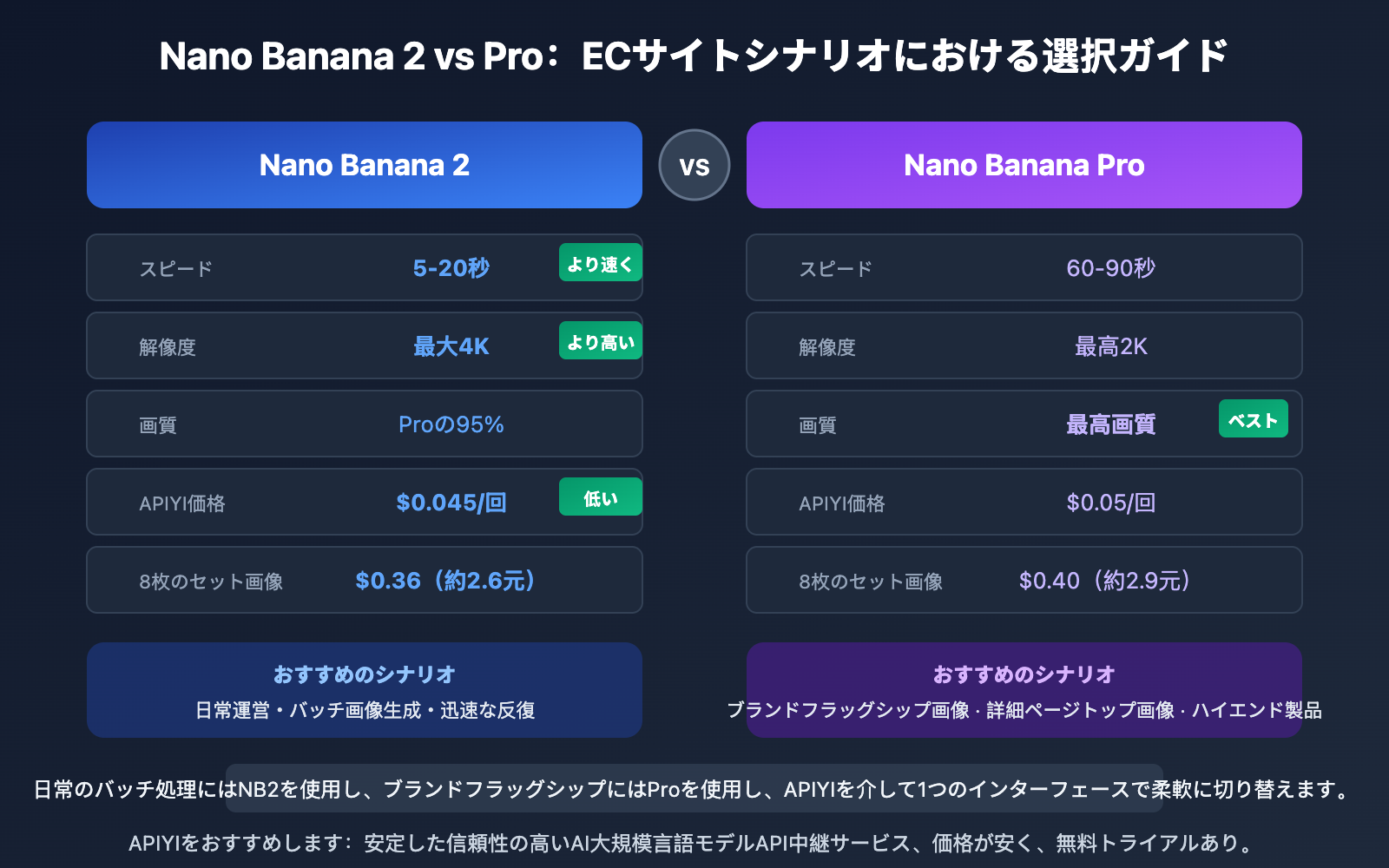
| 比較項目 | Nano Banana 2 | Nano Banana Pro | ECシナリオ推奨 |
|---|---|---|---|
| 生成速度 | 5-20 秒 | 60-90 秒 | バッチ生成にはNB2 |
| 最大解像度 | 4K(4096px) | 2K(2048px) | 大画面表示にはNB2 |
| 画質レベル | Proの95% | 最高画質 | 高級製品にはPro |
| 文字レンダリング | 優秀(97%+) | 最適(98%+) | 文字オーバーレイが必要ならPro |
| キャラクター一貫性 | 5キャラクター | 5キャラクター | モデル画像は両方OK |
| 物体忠実度 | 14枚参照画像 | 14枚参照画像 | 製品再現は両方OK |
| APIYI従量制価格 | $0.045/回 | $0.05/回 | NB2はコスパが高い |
| 推奨シナリオ | 日常運用、バッチ生成 | ブランドフラッグシップ画像、詳細ページトップ画像 | 必要に応じて組み合わせ使用 |
💡 選択推奨: 日常的なEC運用にはNano Banana 2をお勧めします。高速でコストが低く、解像度も高いです。高級製品のブランドトップ画像や、極限の素材質感が必要な場合にのみNano Banana Proを使用してください。APIYI apiyi.comプラットフォームで両モデルを同時に接続し、画像の用途に応じて柔軟に切り替えることをお勧めします。
電子商取引用商品画像セットのプロンプトテンプレート プラットフォーム対応パラメータ
各電子商取引プラットフォームは商品画像に対して異なるサイズとフォーマット要件があります。以下のパラメータは Nano Banana の imageConfig 設定に直接使用できます。
| 電子商取引プラットフォーム | メイン画像アスペクト比 | 推奨解像度 | 背景要件 | Nano Banana パラメータ |
|---|---|---|---|---|
| 淘宝/天猫 | 1:1 | 800×800 以上 | 白または明るい色 | aspectRatio: "1:1", imageSize: "1K" |
| Amazon | 1:1 | 2000×2000 | 純白 RGB(255,255,255) | aspectRatio: "1:1", imageSize: "2K" |
| 拼多多 | 1:1 | 750×750 以上 | 白背景 | aspectRatio: "1:1", imageSize: "1K" |
| 抖音電商 | 3:4 | 900×1200 | 制限なし | aspectRatio: "3:4", imageSize: "1K" |
| 小红书 | 3:4 | 1080×1440 | 制限なし | aspectRatio: "3:4", imageSize: "2K" |
| Shopify | 1:1 | 2048×2048 | 制限なし | aspectRatio: "1:1", imageSize: "2K" |
🎯 プラットフォームヒント: Amazon はメイン画像の背景要件が最も厳しく、純白(RGB 255,255,255)でなければなりません。プロンプトに
pure white seamless backgroundと明記し、生成後に画像編集ツールで最終確認を行うことをお勧めします。
よくある質問
Q1: 生成された複数の画像のスタイルが統一されないのはなぜですか?
スタイルが統一されない根本的な原因は、プロンプト内の「変数」が多すぎることです。解決策は、本記事の「4要素固定法」を使用することです:照明の方向、色温度(ホワイトバランス)、レンズパラメータ、背景処理を固定します。具体的な操作としては、これら4つの固定パラメータを「基本サフィックス」として作成し、各画像のプロンプトの末尾に追加します。さらに、Nano Banana の参照画像機能(最大14個のオブジェクト参照画像をサポート)を使用することで、製品外観の一貫性をさらに向上させることができます。
Q2: 電子商取引用商品画像8枚セットの生成コストはいくらですか?
APIYI apiyi.com プラットフォーム経由で Nano Banana 2 を呼び出す場合、従量課金は $0.045/回で、8枚セットのコストは $0.36(約2.6元)です。ボリュームディスカウントプランを使用する場合、1K解像度では1枚あたり約 $0.025、8枚でわずか $0.20 です。従来の電子商取引用商品撮影が数百元から数千元かかることに比べると、AI生成のコストパフォーマンスの優位性は非常に明らかです。
Q3: 参照画像を使用して製品外観の再現性を向上させるにはどうすればよいですか?
Nano Banana 2 および Pro は、最大14枚の参照画像のアップロードをサポートしています。API呼び出し時に、製品の実物写真を contents 内の画像部分として渡し、目標シーンを説明するテキストプロンプトと組み合わせるだけです。以下のことをお勧めします:
- 異なる角度から撮影した2〜3枚の製品実物写真をアップロードする
- テキストプロンプトに
maintain exact product appearance from reference imagesと明記する - APIYI apiyi.com プラットフォームで APIキーを取得し、参照画像の効果を迅速にテストする
Q4: Nano Banana で生成された画像には透かしが入りますか?
Nano Banana のすべての出力画像には、自動的に Google SynthID の不可視透かしが含まれます。これはデジタル透かし技術の一種で、肉眼では見えず、商品画像の通常の使用や出品には影響しません。ただし、一部のプラットフォームではAI生成画像に注釈が必要な場合があるため、ターゲットプラットフォームの最新ポリシーを確認することをお勧めします。
まとめ
ECサイト向け商品画像セットのプロンプトテンプレートの核心ポイント:
- 固定4要素:光の方向、色温度、レンズパラメータ、背景スタイルはセット画像の統一性を保つ鍵
- 8種類のテンプレートで全シーンをカバー:白背景メイン画像、角度画像、シーン画像、詳細画像、サイズ画像、カラーチャート画像、使用例画像、ファミリーショット
- 2つのモデルを柔軟に組み合わせ:Nano Banana 2は一括生成に適し(高速・低コスト)、Proはブランドメイン画像に適す(最高画質)
- プラットフォームパラメータを直接対応:淘宝、Amazon、TikTokなどのプラットフォームのサイズ比率にワンクリックで設定
このプロンプト体系を習得すれば、商品の撮影から出品までの画像準備時間を数時間から10分以内に短縮できます。APIYI apiyi.com プラットフォームを通じてNano Bananaシリーズモデルにアクセスし、1回あたり$0.045から、8枚セットの画像コストを3元未満にすることをお勧めします。
📚 参考資料
-
Google Nano Banana 2 公式ドキュメント: 画像生成API完全リファレンス
- リンク:
ai.google.dev/gemini-api/docs/image-generation - 説明: 公式APIパラメータとベストプラクティスガイド
- リンク:
-
Google Nano Banana 開発者ガイド: テキストから画像への開発チュートリアル
- リンク:
blog.google/innovation-and-ai/technology/developers-tools/build-with-nano-banana-2/ - 説明: 公式推奨の開発統合方法とサンプルコード
- リンク:
-
APIYI Nano Banana 2 接続ドキュメント: APIYIプラットフォームのNano Banana呼び出しガイド
- リンク:
docs.apiyi.com/en/api-capabilities/nano-banana-2-image - 説明: 従量制と定額制料金プランの詳細説明を含む
- リンク:
著者: APIYI 技術チーム
技術交流: より多くのAI画像生成テクニックとECサイト向け商品画像セットの実践経験については、APIYI docs.apiyi.com ドキュメントセンターをご覧ください