作者注:分享 8 组即用型电商套图提示词模板,覆盖白底主图、场景图、细节图等常见需求,适用于 Nano Banana 2 和 Nano Banana Pro 图像生成模型
电商运营中,产品图的视觉一致性直接影响转化率。很多卖家在使用 AI 生成产品图时遇到的最大痛点是:每次生成的风格不统一,无法形成一套视觉连贯的产品套图。
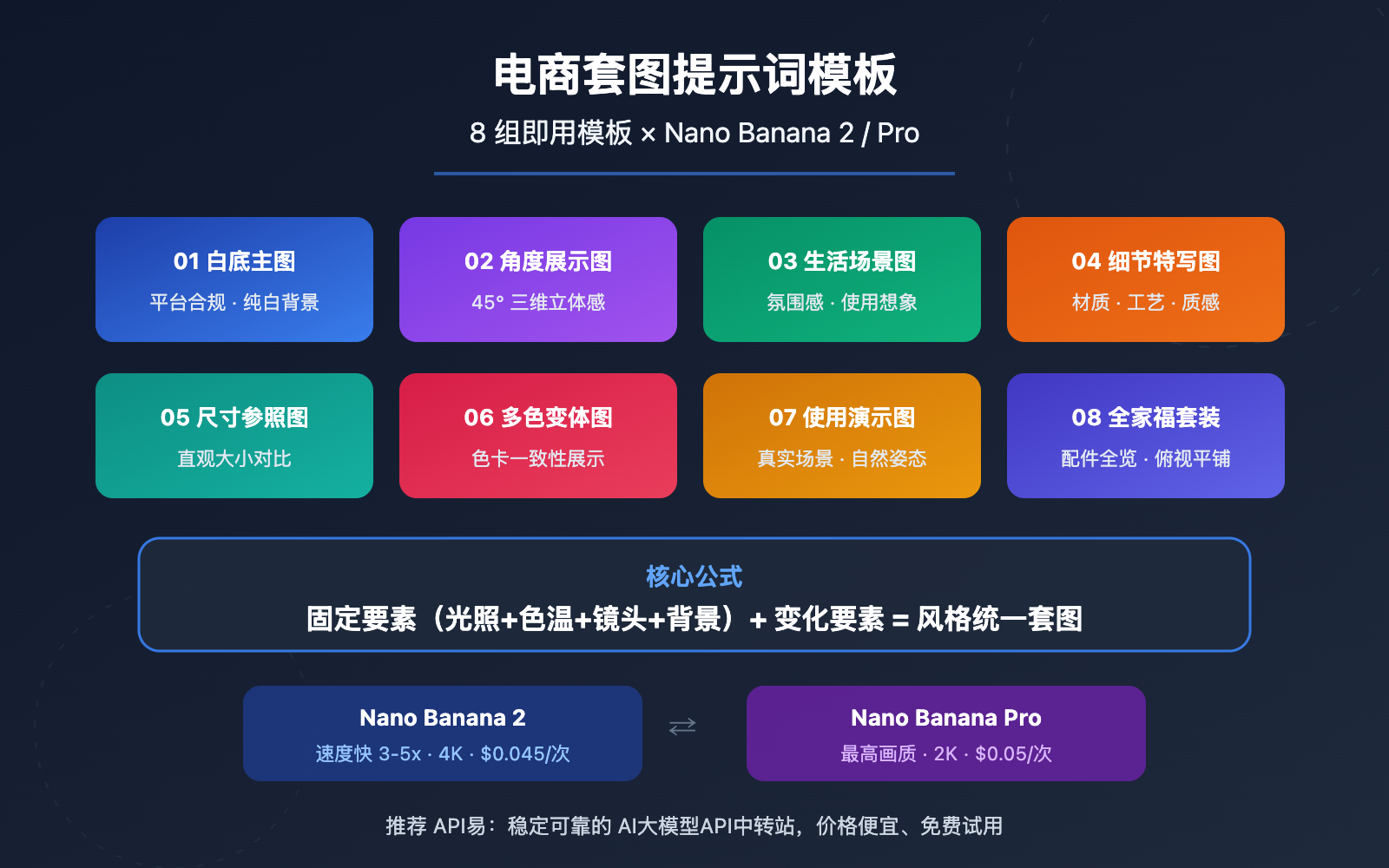
本文分享 8 组经过实战验证的电商套图提示词模板,适用于 Nano Banana 2 和 Nano Banana Pro 两款模型,帮助你快速批量生成白底主图、场景图、细节图、对比图等完整产品套图。
核心价值: 读完本文,你将获得一套可直接复制使用的电商套图提示词体系,实现「一个产品 → 一套统一风格的 8 张产品图」的高效工作流。
电商套图提示词模板 核心要点
| 要点 | 说明 | 价值 |
|---|---|---|
| 8 组提示词模板 | 覆盖主图、场景、细节、对比等全套图片类型 | 一个产品即可生成完整套图 |
| 风格锁定公式 | 固定「光照 + 角度 + 背景 + 色温」四要素 | 确保全套图片视觉统一 |
| Nano Banana 双模型适配 | 同时适用 Nano Banana 2 和 Pro | 按需选择速度或画质优先 |
| 平台合规参数 | 针对淘宝、亚马逊等平台的尺寸和背景要求 | 无需二次调整即可上架 |
电商套图提示词模板的核心逻辑
电商套图的关键不在于单张图有多精美,而在于一组图片之间的风格一致性。传统摄影通过统一布光、机位和后期调色来实现,AI 生成则需要通过提示词中的「固定参数」来保证。
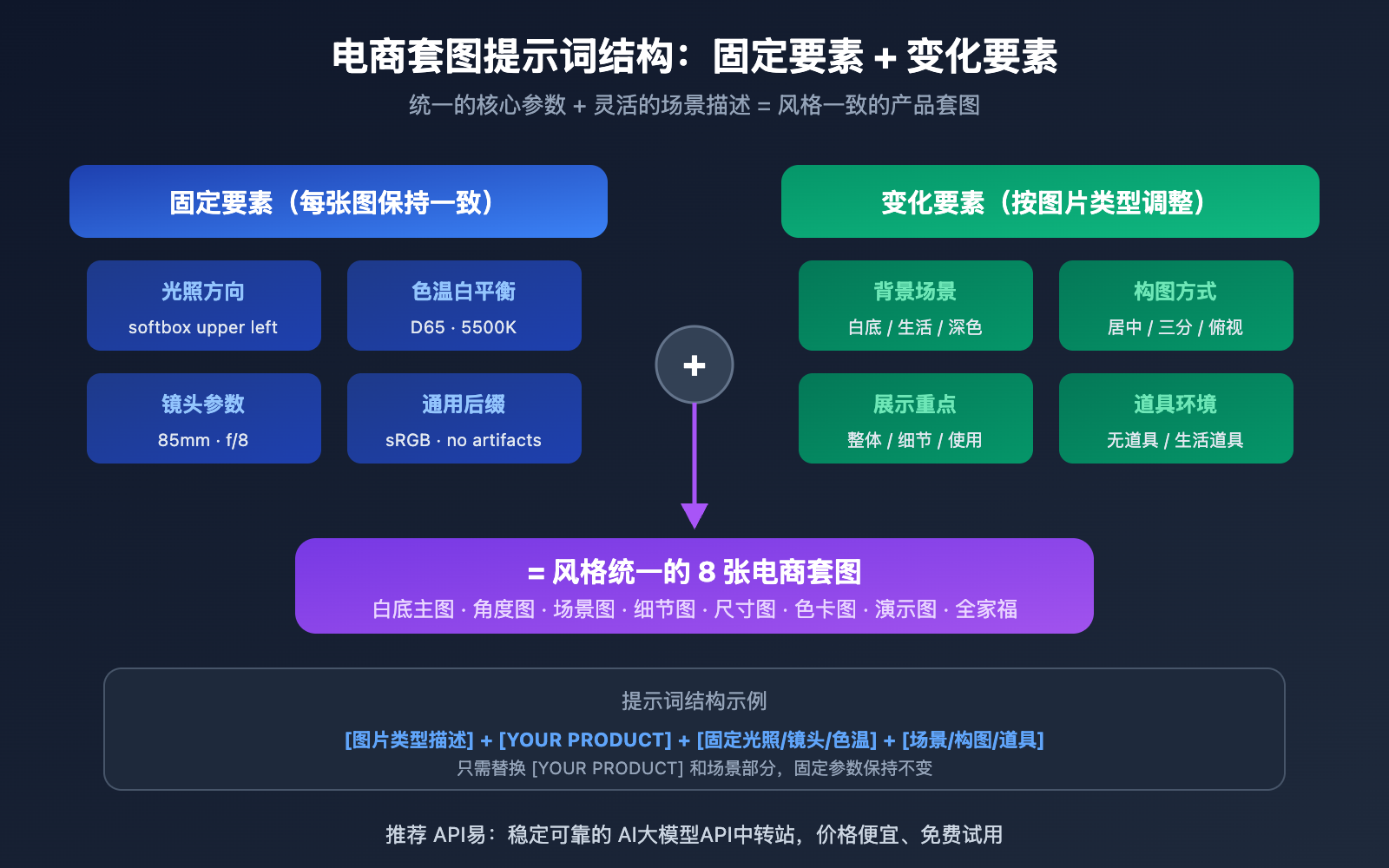
我们总结出的核心公式是:固定要素 + 变化要素 = 风格统一的套图。固定要素包括光照方向、色温、产品摆放角度风格;变化要素则是背景场景、构图方式、展示重点。每组模板都遵循这个逻辑,让你只需替换产品描述即可批量使用。
电商套图提示词模板的模型选择
Nano Banana 2 和 Nano Banana Pro 各有侧重。Nano Banana 2 基于 Gemini 3.1 Flash 架构,生成速度快 3-5 倍,支持最高 4K 分辨率,适合批量出图的电商场景;Nano Banana Pro 基于 Gemini 3 Pro 架构,画质最细腻,适合需要极致质感的高端产品。两者的提示词格式完全兼容,可根据实际需求灵活切换。
电商套图提示词模板 完整 8 组模板
以下 8 组模板覆盖电商产品图的全场景需求。每组模板均标注了固定参数(保持一致)和可替换参数(按需修改),直接复制到 Nano Banana 即可使用。
模板 1:白底主图(平台合规)
白底主图是电商平台最基础的要求,淘宝、亚马逊、拼多多均要求主图为纯白背景。
Ultra-realistic studio photograph of [YOUR PRODUCT] on a pure white seamless background,
centered composition, product fills 85-90% of frame,
shot with 85mm prime lens, f/8 sharpness, ISO 100,
softbox high-key lighting with gentle contact shadow under product,
natural accurate colors, no props, no text, no logos, no watermark,
square 1:1 composition, commercial product photography
可替换参数:
[YOUR PRODUCT]:替换为你的产品描述,例如a matte black wireless Bluetooth speaker或a red leather crossbody bag with gold hardwaresquare 1:1 composition:根据平台要求调整比例,亚马逊主图推荐 1:1,详情图可用 3:4
模板 2:45 度角展示图
45 度角是展示产品立体感和设计细节的最佳角度,适合作为套图中的第 2-3 张。
Professional product photograph of [YOUR PRODUCT],
three-quarter view at 45-degree angle from slightly above,
on a seamless light gray gradient background (#f0f0f0 to #ffffff),
studio softbox lighting from upper left with subtle fill light from right,
f/5.6 aperture for slight depth of field,
sharp focus on product front, gentle bokeh on rear edge,
natural material textures preserved, no artificial smoothing,
commercial e-commerce photography style
模板 3:生活场景图
场景图用于传达产品的使用氛围,帮助买家想象拥有后的体验。
Lifestyle product photography of [YOUR PRODUCT] in a [SCENE SETTING],
natural window light from the left side creating soft warm shadows,
product placed on [SURFACE DESCRIPTION],
surrounded by [2-3 COMPLEMENTARY PROPS],
shallow depth of field f/2.8 with product in sharp focus,
warm color temperature 5500K, cozy and inviting atmosphere,
editorial style composition with rule of thirds placement,
high resolution commercial photography
可替换参数:
[SCENE SETTING]:modern minimalist living room/bright kitchen countertop/cozy home office desk[SURFACE DESCRIPTION]:smooth white marble countertop/rustic wooden table/clean linen tablecloth[2-3 COMPLEMENTARY PROPS]:a small potted plant and a ceramic cup/scattered coffee beans and a notebook
模板 4:产品细节特写图
细节图用于展示材质、工艺和品质感,是提升客单价的关键图片。
Extreme close-up macro product photography of [PRODUCT DETAIL AREA],
shot with 100mm macro lens at f/4,
focused on [SPECIFIC TEXTURE/DETAIL],
single directional studio light from upper right creating texture-revealing shadows,
preserve natural grain and material texture, no plastic sheen,
dark background gradient from #1a1a2e to #16213e for contrast,
showing fine craftsmanship details, stitching, and material quality,
ultra-sharp commercial photography, 8K detail level
可替换参数:
[PRODUCT DETAIL AREA]:the leather strap connection point of the bag/the speaker's aluminum mesh grille[SPECIFIC TEXTURE/DETAIL]:woven leather texture and metal buckle/brushed aluminum finish and precise ventilation holes
模板 5:尺寸参照对比图
尺寸参照图帮助买家直观理解产品大小,减少因尺寸预期不符导致的退货。
Product size reference photograph of [YOUR PRODUCT]
placed next to [COMMON REFERENCE OBJECT] for scale comparison,
both items on a clean white surface,
top-down flat lay composition shot directly from above,
even studio lighting with minimal shadows,
f/11 for maximum depth of field ensuring both items in sharp focus,
neutral color temperature, accurate color reproduction,
clean informational style, commercial product photography
常用参照物选择:
| 产品尺寸 | 推荐参照物 | 英文描述 |
|---|---|---|
| 小件(耳机、手表) | 硬币或信用卡 | a standard credit card |
| 中件(音箱、水杯) | 手机或手掌 | an iPhone 15 Pro |
| 大件(背包、电器) | 杂志或笔记本电脑 | a 13-inch laptop |
模板 6:多色系变体展示图
多色系展示图用于一个链接展示多个颜色选项,需要保证角度和光照完全一致。
Product color variant display of [YOUR PRODUCT] in [COLOR],
identical three-quarter view at 30-degree angle,
on pure white background,
consistent softbox lighting setup: key light upper left,
fill light right side, rim light from behind,
f/8 sharpness, same exact camera position and framing,
accurate color reproduction matching real product color,
uniform white balance D65, commercial product photography
关键提示:生成多色时,除了 [COLOR] 外其他所有参数保持不变。例如依次生成 in matte black / in pearl white / in navy blue / in rose gold,即可得到一组角度完全一致的色卡图。
模板 7:产品使用演示图
使用演示图展示产品被使用时的状态,适合功能性产品和穿戴类产品。
Product in-use demonstration photograph of [USAGE SCENARIO],
natural lifestyle setting with [ENVIRONMENT DETAILS],
product clearly visible and in focus as the main subject,
candid natural pose, not overly staged,
warm natural lighting simulating golden hour,
f/3.5 aperture creating natural background separation,
authentic and relatable atmosphere,
editorial commercial photography style,
high resolution output
可替换参数:
[USAGE SCENARIO]:a person wearing the wireless earbuds while jogging in a park/hands holding the portable charger while sitting at a cafe[ENVIRONMENT DETAILS]:outdoor morning light, tree-lined path/modern cafe interior with warm ambient lighting
模板 8:组合套装图 / 全家福
全家福图用于展示套装产品或配件组合的完整内容物。
Product flatlay photograph showing complete set contents of [PRODUCT SET],
all items arranged in organized grid layout on [BACKGROUND SURFACE],
top-down overhead perspective shot directly from above,
each item clearly separated with equal spacing,
even diffused studio lighting with no harsh shadows,
f/11 maximum sharpness across all items,
clean minimal style, accurate colors,
items labeled with subtle positioning,
commercial catalog photography style
排列建议:主产品居中放大,配件按大小依次环绕排列,间距保持均匀(Nano Banana 会根据描述自动优化构图)。
电商套图提示词模板 风格锁定技巧
掌握模板只是第一步,真正让套图「看起来像一套」的关键在于风格锁定。以下是我们在实战中总结的 4 个核心锁定参数。
电商套图提示词的 4 要素锁定法
| 锁定要素 | 作用 | 推荐固定值 | 不建议频繁更改 |
|---|---|---|---|
| 光照方向 | 决定阴影一致性 | softbox lighting from upper left |
避免混用左右光源 |
| 色温白平衡 | 决定色调统一 | white balance D65, 5500K |
避免混用冷暖色温 |
| 镜头参数 | 决定透视感统一 | 85mm lens, f/8 |
避免混用广角和长焦 |
| 背景处理 | 决定视觉连贯性 | 统一使用一种背景风格 | 避免白底和场景图混排 |
电商套图提示词的通用后缀
以下后缀可以追加到任意模板末尾,用于进一步统一风格和满足平台要求:
, high resolution output,
sRGB color space,
no chromatic aberration,
preserve natural grain texture, no plastic sheen,
no AI artifacts, photorealistic quality
防止过度平滑:Nano Banana 有时会将产品材质渲染得过于光滑,加入 preserve natural grain texture, no plastic sheen 可以有效避免塑料感。
色彩准确性:加入 match to reference sRGB color space; remove warm cast; uniform white balance 确保同一批次生成的图片色调一致。
🎯 实战建议: 建议先用 Nano Banana 2 快速出一版草图确认构图和风格,满意后再用 Nano Banana Pro 生成最终的高画质版本。通过 API易 apiyi.com 平台调用这两个模型,可以用统一接口灵活切换,无需分别配置。
电商套图提示词模板 API 快速上手
极简示例
以下是通过 API 调用 Nano Banana 2 生成电商产品图的最简代码,10 行即可运行:
import requests, base64, json

API_KEY = "your-apiyi-api-key"
ENDPOINT = "https://api.apiyi.com/v1beta/models/gemini-3.1-flash-image-preview:generateContent"

payload = {
    "contents": [{"parts": [{"text": "Ultra-realistic studio photograph of a matte black wireless speaker on pure white seamless background, centered, fills 85% of frame, 85mm lens, f/8, softbox high-key lighting, gentle contact shadow, no text, no watermark, 1:1 composition"}]}],
    "generationConfig": {"responseModalities": ["IMAGE"], "imageConfig": {"aspectRatio": "1:1", "imageSize": "2K"}}
}

response = requests.post(ENDPOINT, headers={"Content-Type": "application/json", "x-goog-api-key": API_KEY}, json=payload, timeout=120)
image_data = response.json()["candidates"][0]["content"]["parts"][0]["inlineData"]["data"]
with open("product_main.png", "wb") as f:
    f.write(base64.b64decode(image_data))
查看批量生成套图的完整代码
import requests
import base64
import json
import os
import time

API_KEY = "your-apiyi-api-key"
ENDPOINT = "https://api.apiyi.com/v1beta/models/gemini-3.1-flash-image-preview:generateContent"

# 产品描述 - 修改这里即可
PRODUCT = "a matte black portable Bluetooth speaker with fabric mesh exterior"

# 8 组套图提示词模板
TEMPLATES = {
    "01_main_white": f"Ultra-realistic studio photograph of {PRODUCT} on a pure white seamless background, centered, fills 85-90% of frame, 85mm lens, f/8, ISO 100, softbox high-key lighting, gentle contact shadow, natural colors, no props, no text, no watermark, 1:1 composition",

    "02_angle_45": f"Professional product photograph of {PRODUCT}, three-quarter view at 45-degree angle, light gray gradient background, studio softbox from upper left, f/5.6, sharp focus on front, commercial photography",

    "03_lifestyle": f"Lifestyle product photography of {PRODUCT} on a modern wooden desk, natural window light from left, next to a small potted plant and notebook, f/2.8 with product in sharp focus, warm 5500K atmosphere",

    "04_detail": f"Extreme close-up macro of {PRODUCT} fabric mesh texture and aluminum edge detail, 100mm macro lens f/4, directional light revealing texture, dark background, ultra-sharp 8K",

    "05_scale": f"Size reference photograph of {PRODUCT} placed next to an iPhone 15 Pro, top-down flat lay on white surface, even lighting, f/11 sharp focus, clean informational style",

    "06_in_use": f"Product in-use photograph of a person's hand picking up {PRODUCT} from a cafe table, warm natural lighting, f/3.5 background blur, candid authentic atmosphere",

    "07_packaging": f"Product flatlay showing {PRODUCT} with charging cable, carrying pouch, and user manual arranged in grid layout, top-down view, even studio lighting, catalog style",

    "08_hero": f"Dramatic product photograph of {PRODUCT} on dark surface with subtle blue accent lighting from behind, moody atmosphere, f/4, sharp focus, premium brand feel"
}

headers = {"Content-Type": "application/json", "x-goog-api-key": API_KEY}
os.makedirs("product_photos", exist_ok=True)

for name, prompt in TEMPLATES.items():
    print(f"Generating {name}...")
    payload = {
        "contents": [{"parts": [{"text": prompt}]}],
        "generationConfig": {
            "responseModalities": ["IMAGE"],
            "imageConfig": {"aspectRatio": "1:1", "imageSize": "2K"}
        }
    }

    response = requests.post(ENDPOINT, headers=headers, json=payload, timeout=120)
    result = response.json()

    image_data = result["candidates"][0]["content"]["parts"][0]["inlineData"]["data"]
    with open(f"product_photos/{name}.png", "wb") as f:
        f.write(base64.b64decode(image_data))
    print(f"  Saved: product_photos/{name}.png")
    time.sleep(2)  # 控制请求频率

print("Done! 8 product photos generated.")
建议: 通过 API易 apiyi.com 调用 Nano Banana 系列模型,按次计费仅 $0.045/次(不限分辨率),批量生成 8 张套图成本不到 $0.36。平台同时支持 Nano Banana 2 和 Nano Banana Pro,一个 API Key 即可灵活切换。
电商套图提示词模板 模型对比与选择
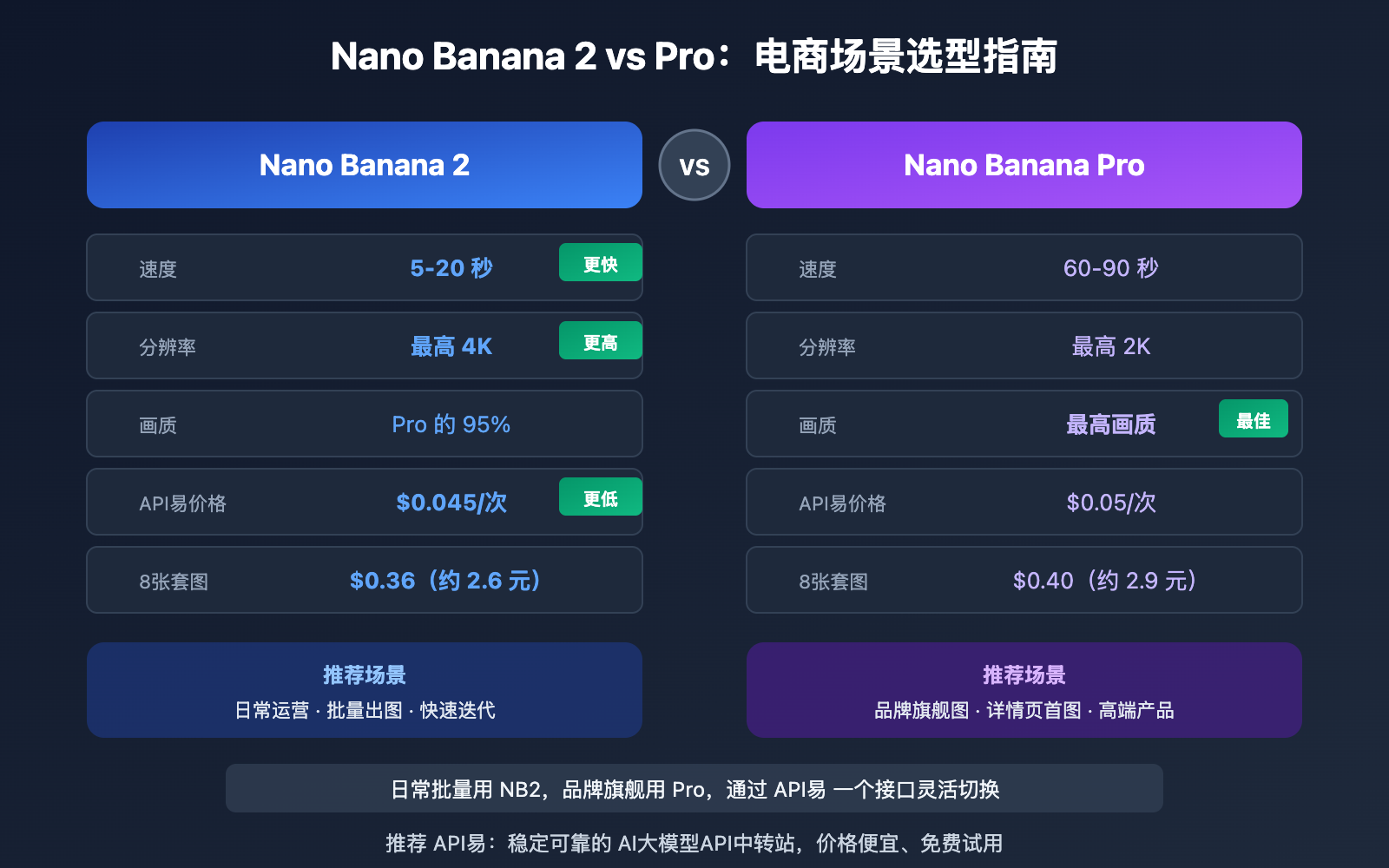
| 对比项 | Nano Banana 2 | Nano Banana Pro | 电商场景建议 |
|---|---|---|---|
| 生成速度 | 5-20 秒 | 60-90 秒 | 批量出图选 NB2 |
| 最大分辨率 | 4K(4096px) | 2K(2048px) | 大图展示选 NB2 |
| 画质水平 | Pro 的 95% | 最高画质 | 高端产品选 Pro |
| 文字渲染 | 优秀(97%+) | 最佳(98%+) | 需要文字叠加选 Pro |
| 角色一致性 | 5 角色 | 5 角色 | 模特图两者皆可 |
| 物体保真度 | 14 张参考图 | 14 张参考图 | 产品还原两者皆可 |
| API易按次价格 | $0.045/次 | $0.05/次 | NB2 性价比更高 |
| 推荐场景 | 日常运营、批量生成 | 品牌旗舰图、详情页首图 | 按需组合使用 |
💡 选择建议: 日常电商运营推荐 Nano Banana 2,速度快、成本低、分辨率更高。仅在拍摄高端产品品牌首图、需要极致材质质感时使用 Nano Banana Pro。建议通过 API易 apiyi.com 平台同时接入两个模型,根据图片用途灵活切换。
电商套图提示词模板 平台适配参数
不同电商平台对产品图有不同的尺寸和格式要求,以下参数可直接用于 Nano Banana 的 imageConfig 配置。
| 电商平台 | 主图比例 | 推荐分辨率 | 背景要求 | Nano Banana 参数 |
|---|---|---|---|---|
| 淘宝/天猫 | 1:1 | 800×800 以上 | 白底或浅色 | aspectRatio: "1:1", imageSize: "1K" |
| 亚马逊 | 1:1 | 2000×2000 | 纯白 RGB(255,255,255) | aspectRatio: "1:1", imageSize: "2K" |
| 拼多多 | 1:1 | 750×750 以上 | 白底 | aspectRatio: "1:1", imageSize: "1K" |
| 抖音电商 | 3:4 | 900×1200 | 不限 | aspectRatio: "3:4", imageSize: "1K" |
| 小红书 | 3:4 | 1080×1440 | 不限 | aspectRatio: "3:4", imageSize: "2K" |
| Shopify | 1:1 | 2048×2048 | 不限 | aspectRatio: "1:1", imageSize: "2K" |
🎯 平台提示: 亚马逊对主图背景要求最严格,必须是纯白(RGB 255,255,255),建议在提示词中明确写
pure white seamless background并在生成后用图片编辑工具做最终确认。
常见问题
Q1: 为什么生成的多张图风格不统一?
风格不统一的根本原因是提示词中的「变量」太多。解决方法是使用本文的「4 要素锁定法」:固定光照方向、色温白平衡、镜头参数和背景处理。具体操作是将这 4 个固定参数写成一个「基础后缀」,追加到每张图的提示词末尾。另外,使用 Nano Banana 的参考图功能(最多支持 14 张物体参考图)可以进一步提升产品外观的一致性。
Q2: 一套 8 张电商产品图的生成成本是多少?
通过 API易 apiyi.com 平台调用 Nano Banana 2,按次计费为 $0.045/次,8 张套图成本为 $0.36(约 2.6 元人民币)。如果使用按量计费方案,1K 分辨率下单张约 $0.025,8 张仅需 $0.20。相比传统电商产品摄影动辄几百到几千元的成本,AI 生成的性价比优势非常明显。
Q3: 如何用参考图提升产品外观还原度?
Nano Banana 2 和 Pro 均支持上传最多 14 张参考图片。在 API 调用时,将产品实拍照作为 contents 中的图像部分传入,配合文字提示词描述目标场景即可。建议:
- 上传 2-3 张不同角度的产品实拍照
- 在文字提示中明确写
maintain exact product appearance from reference images - 通过 API易 apiyi.com 平台获取 API Key,快速测试参考图效果
Q4: Nano Banana 生成的图片有水印吗?
Nano Banana 所有输出图像会自动包含 Google SynthID 不可见水印,这是一种数字水印技术,肉眼不可见,不影响产品图的正常使用和上架。但需要注意的是,AI 生成图片在部分平台可能需要标注,建议了解目标平台的最新政策。
总结
电商套图提示词模板的核心要点:
- 固定 4 要素:光照方向、色温、镜头参数、背景风格是套图统一的关键
- 8 组模板覆盖全场景:白底主图、角度图、场景图、细节图、尺寸图、色卡图、使用图、全家福
- 双模型灵活搭配:Nano Banana 2 适合批量生成(快、便宜),Pro 适合品牌首图(极致画质)
- 平台参数直接适配:针对淘宝、亚马逊、抖音等平台的尺寸比例一键设置
掌握这套提示词体系后,一个产品从拍摄到上架的图片准备时间可以从数小时缩短到 10 分钟以内。推荐通过 API易 apiyi.com 平台接入 Nano Banana 系列模型,按次计费 $0.045 起,8 张套图成本不到 3 元。
📚 参考资料
-
Google Nano Banana 2 官方文档: 图像生成 API 完整参考
- 链接:
ai.google.dev/gemini-api/docs/image-generation - 说明: 官方 API 参数和最佳实践指南
- 链接:
-
Google Nano Banana 开发者指南: 从文本到图像的开发教程
- 链接:
blog.google/innovation-and-ai/technology/developers-tools/build-with-nano-banana-2/ - 说明: 官方推荐的开发集成方法和示例代码
- 链接:
-
API易 Nano Banana 2 接入文档: API易平台的 Nano Banana 调用指南
- 链接:
docs.apiyi.com/en/api-capabilities/nano-banana-2-image - 说明: 包含按次和按量计费方案的详细说明
- 链接:
作者: APIYI 技术团队
技术交流: 更多 AI 图像生成技巧和电商套图实战经验,欢迎访问 API易 docs.apiyi.com 文档中心