Author’s note: Using Qwen3.5-4B-GLB-3D-Coder as an example, this breaks down the “text → Three.js → GLB” code intermediary layer workflow and lays out actionable steps you can put into practice.
Getting a Large Language Model to directly produce usable 3D files is a challenge many indie developers and small game teams have run into. A 4B-parameter community fine-tuned model offers a different angle: have the model write Three.js code, then let the browser export GLB, splitting generation and export into two steps.
This isn’t just another roundup of text-to-3D tools. Assets exported by Qwen3.5-4B-GLB-3D-Coder can already be imported into the Godot editor, and community developer Naoki Kishida used assets it generated to build a playable 3D RPG demo. This article focuses on the reusable engineering methods behind this pipeline.
Core value: By the end, you’ll understand why the code intermediary layer works and how to run the full process from prompt to Godot asset locally or in the cloud.
Three.js Code Intermediary Layer: Key Takeaways
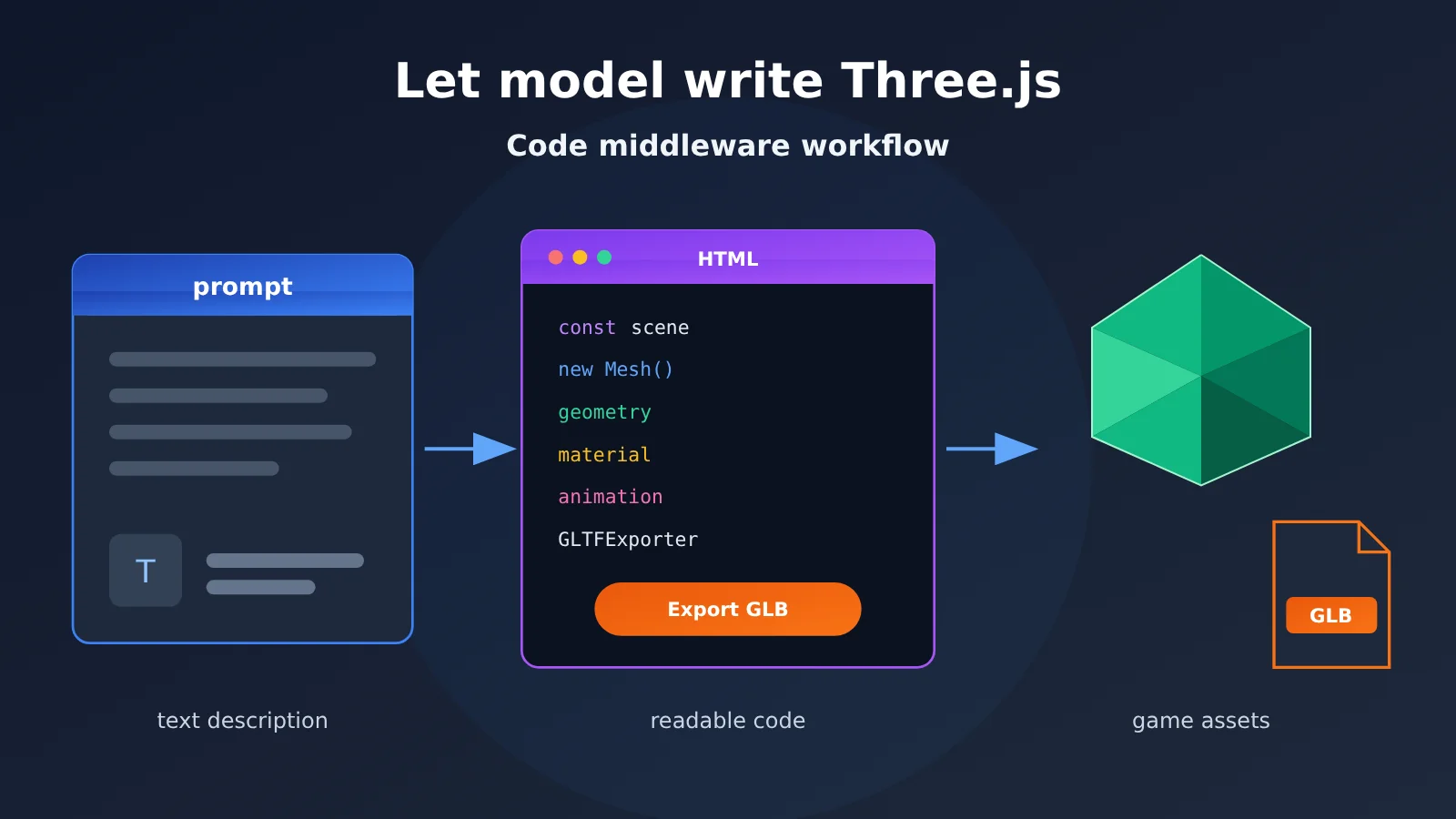
The “code intermediary layer” means the model doesn’t directly output the final binary file—it outputs a runnable program, and that program generates the final artifact. In this case, the model outputs a self-contained HTML file containing a Three.js scene and an “Export GLB” button.
| Point | Description | Value for Developers |
|---|---|---|
| Model output | A single HTML file containing a Three.js scene and an export button | You can read and modify it directly—it’s not a black-box file |
| Final artifact | A GLB downloaded after clicking the button in the browser | Importable into Godot and other tools that support GLB |
| Training scope | Covers 25 game asset domains—characters, weapons, vehicles, modular buildings, and more | One tool can cover most placeholder needs in the prototyping stage |
| How to run | Ships in two GGUF quantized versions, Q4_K_M and Q8_0 | Runs locally via tools like LM Studio |
| Quality positioning | Low-poly game assets, not aimed at photorealistic or film-grade production | Suited for prototypes, placeholders, and stylized projects |
Worth noting: Qwen3.5-4B-GLB-3D-Coder is an independent preview release from developer CCORE, fine-tuned on Qwen/Qwen3.5-4B—it’s not an official Qwen release. According to the model card, most generated results are usable on the first try, especially with English prompts, but some assets still need retries or manual code tweaks.
How the Three.js Code Intermediary Layer Works
The whole pipeline boils down to six steps: input a description, generate HTML, save the file, preview in the browser, export GLB, import into the engine. The first two steps are handled by the model; the export is done by code running in the browser, so the model never has to spell out the binary contents of a GLB directly.
If the asset needs to move—say a door that opens—the system prompt tells the model to add animation and include it in the exported GLB. Without an explicit request, the model generates static assets by default. So if you want animation, say so clearly in your prompt.
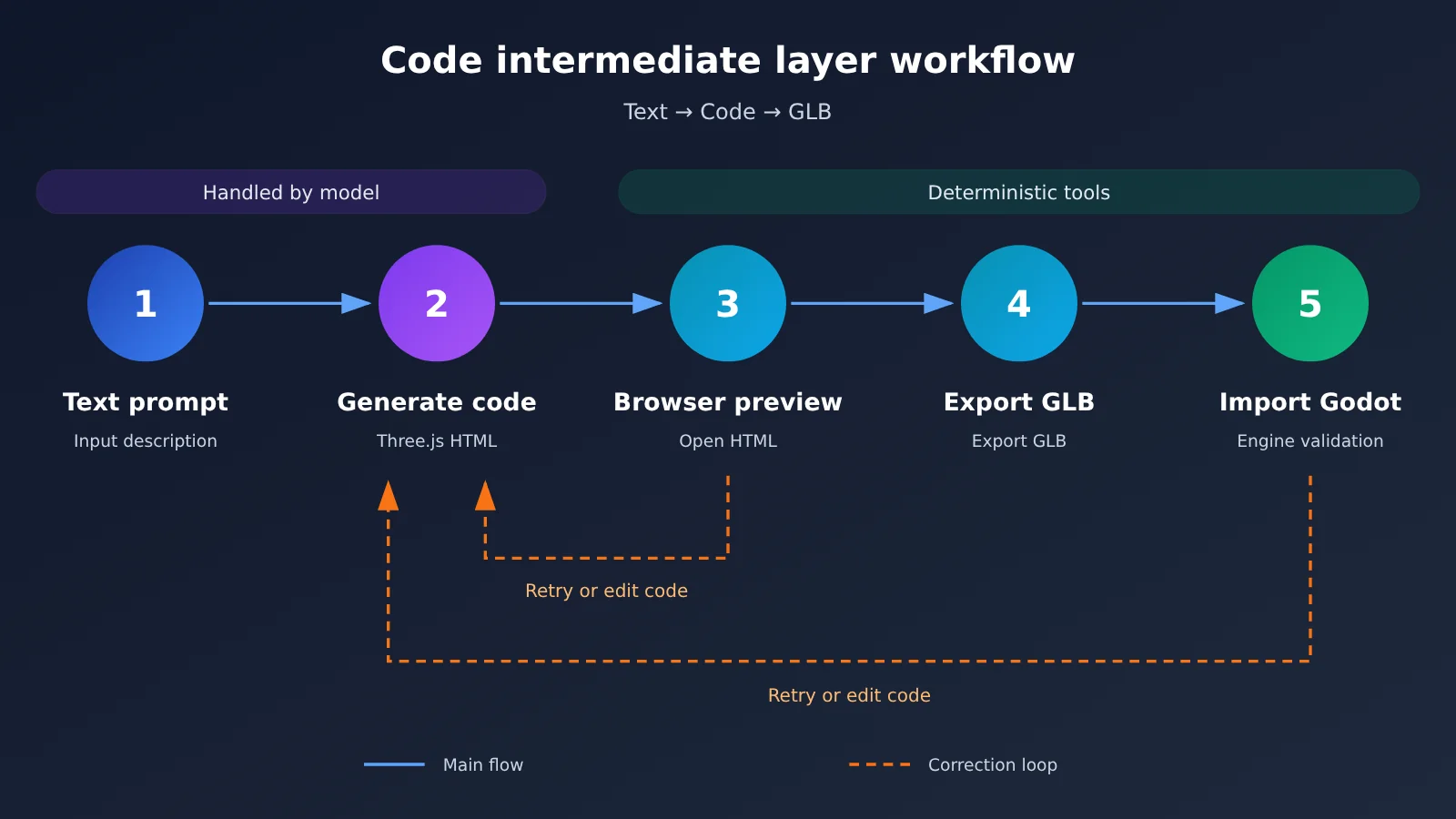
5 Workflow Lessons from a Three.js Code Intermediate Layer
The comparison below reflects our engineering judgment based on this case, not benchmark results. Different 3D generation approaches have their own applicable scopes; here, we only compare the structural differences between these two approaches.
| Comparison Dimension | Directly Generating 3D Files | Three.js Code Intermediate Layer |
|---|---|---|
| Model Output | Meshes or binary assets | Readable text code |
| Handling After Errors | Usually requires regeneration or entering a modeling tool for repair | Geometry, materials, and animation can be modified locally |
| Preview Before Export | Depends on a dedicated viewer | Open the HTML in a browser to view |
| Animation Support | Depends on the specific model and pipeline | Can be described by code and exported with the GLB |
| Where It Excels | Depends on the specific approach | Low-poly assets with clear structure |
| Main Limitation | Output is not easy to edit at a fine-grained level | High-detail or photorealistic assets are outside its design scope |
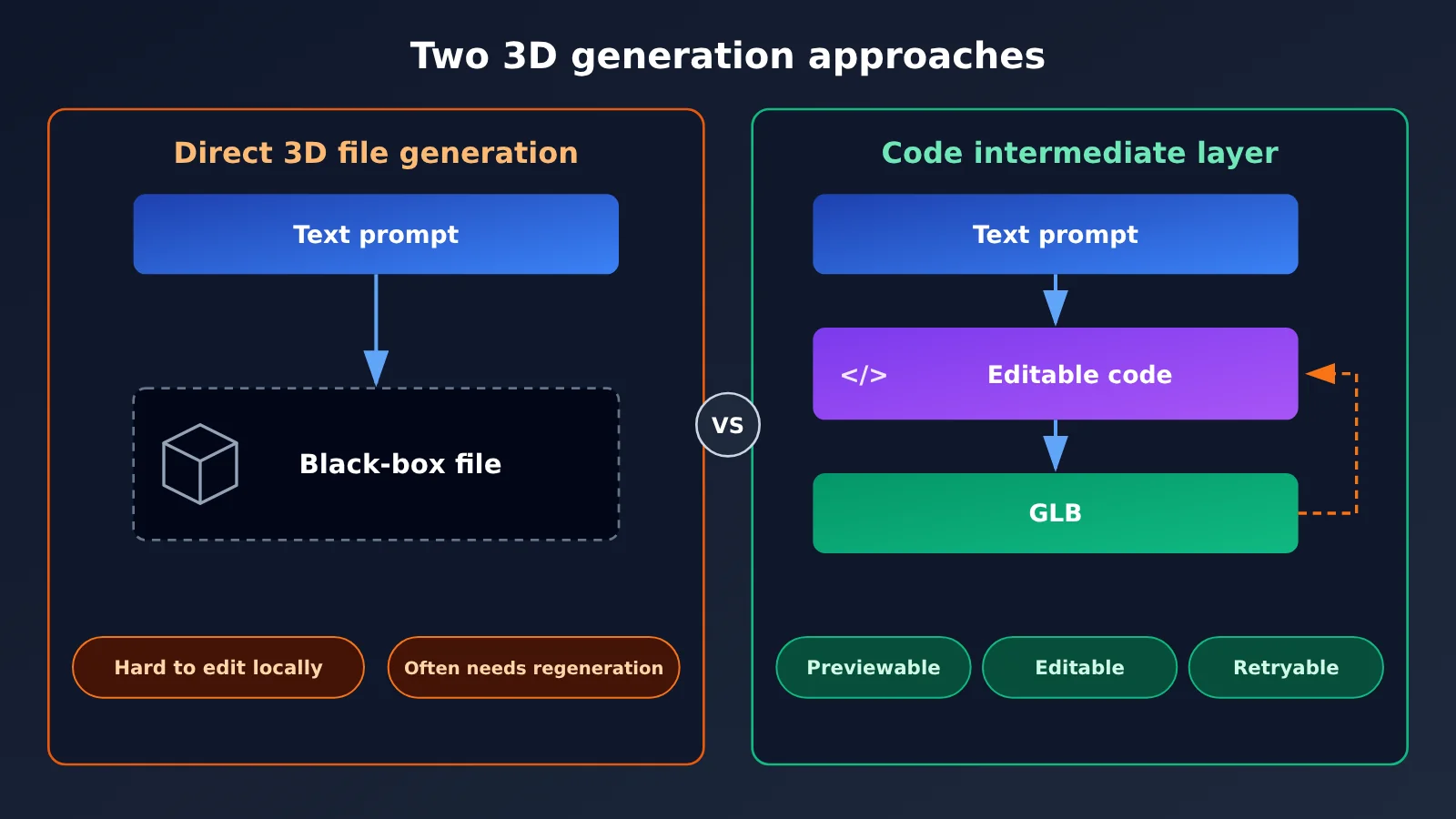
Lesson 1: Choose the representation layer the model is good at. The code model’s strength is outputting structured text, and Three.js turns 3D assets into a programming problem. This model has only 4B parameters, yet it can handle asset generation tasks; the key is that the task has been transformed into a form it can handle.
Lesson 2: Make intermediate artifacts inspectable. The HTML file is both the generation result and the debugging entry point. When materials are misplaced or an animation loop goes wrong, you can often patch it manually instead of regenerating from scratch, which greatly reduces the cost of a single failure.
Lesson 3: Leave the final step to deterministic tools. The details of the file format don’t need to be the probabilistic model’s byte-by-byte responsibility. The Three.js ecosystem itself has export capabilities such as GLTFExporter; the model only needs to write the logic that calls the export. Generally, the more steps you hand off to mature tools, the less format-level uncertainty there is.
Lesson 4: Narrow tasks plus fixed conventions are more practical than generalization capability. This model’s system prompt is fixed, and the output format is strictly limited to a single HTML file. At the same time, training data across 25 domains ensures coverage of asset types. Clear task boundaries give a small model enough room to perform.
Lesson 5: Validate at the real destination. Looking good in the browser doesn’t mean the asset is usable; the model card also shows the result after importing into the Godot editor. The author’s next goal is related: achieving reliable one-shot generation and automatically completing generation, testing, and optimization within an agent framework.
This approach isn’t limited to game assets. OpenSCAD scripts can generate CAD models, Blender Python can drive modeling workflows, and SVG and Mermaid can describe graphics and diagrams. Whenever the target format is hard to generate directly, ask: is there a layer of code that can reliably produce it?
Technical suggestion: If you want to compare how different models write Three.js, you can use APIYI apiyi.com to call multiple models with the same set of prompts, then evaluate them uniformly with the acceptance checklist below.
Three.js Code Middle Layer Quick Start: Local Deployment
The following uses LM Studio as an example. You won’t need to write any extra code. LM Studio can load GGUF models directly, and you can search for Qwen3.5-4B-GLB-3D-Coder in the model browser, or download the files from Hugging Face and load them locally.
Step 1: Choose a GGUF quantization
The model card doesn’t publish exact VRAM requirements, so test against your own hardware. CPU inference works too, but it’ll be noticeably slower.
| Version | Characteristics | Recommended for |
|---|---|---|
| Q4_K_M | Smaller file, lower memory usage, faster inference, with some quality loss | Laptop GPUs, limited hardware, rapid iteration |
| Q8_0 | Larger file, closer to full precision | Plenty of VRAM; better first-pass success on complex assets |
Watch for version updates: Both quantized versions had their weights replaced on November 2, 2026. The author says visual quality improved noticeably, but the file names didn’t change. If you downloaded them before then, delete and re-download them; otherwise you may still be using the old version.
Step 2: Configure the system prompt and sampling parameters
This model was fine-tuned around a specific instruction format, so use the system prompt from the model card as-is, and don’t rewrite it yourself:
Create game assets for the Godot editor, which uses GLB files. Create whatever the user requests as a good-quality low-poly asset using only Three.js in one complete standalone HTML file. The HTML must show the asset and include an Export GLB button that downloads a working GLB. If the requested asset needs animation, add it and include the animation in the exported GLB; otherwise make it static.
After you paste it into the system message field in LM Studio, set the sampling parameters recommended by the author. These values are starting points from the author’s testing, not hard requirements; you can adjust them after you get things working.
| Parameter | Recommended value | Where to set it |
|---|---|---|
temperature |
0.8 | LM Studio generation parameters |
top_k |
40 | LM Studio generation parameters |
top_p |
0.95 | LM Studio generation parameters |
min_p |
0.0 | LM Studio generation parameters |
Step 3: Generate and export the GLB
Keep user prompts short and specific, and use English when possible. Start with Create a blue goblin brute or Build a jungle siege platform; if you need animation, phrase it like Create a wooden gate with an opening animation. Then follow these steps:
- Send the prompt and wait for the model to output a complete HTML file.
- Save the output as an
.htmlfile. - Open the file in a browser and confirm the asset renders correctly.
- Click the “Export GLB” button and download the
.glbfile. - Import the GLB into Godot or another tool that supports the format.
If the page is blank, open your browser’s developer tools and check the console for errors. Some scripts may run into browser local-file restrictions when opened by double-clicking. In that case, run python -m http.server in the file directory and access the page through the local address.
Step 4: Check assets against a checklist
Don’t rely only on the preview in the browser. Check the following for every asset:
- Structure: Are all parts present, and are there any obvious misalignments or intersections?
- Materials: Do the colors and materials match the preview after import?
- Animation: Is the animation actually written into the GLB and playable in the engine?
- Scale and origin: Do the proportions and pivot meet the scene’s needs? You may need to adjust this manually.
- Fixability: For small issues, edit the code first; for structural issues, regenerate.
Three.js code middle layer: cloud access options
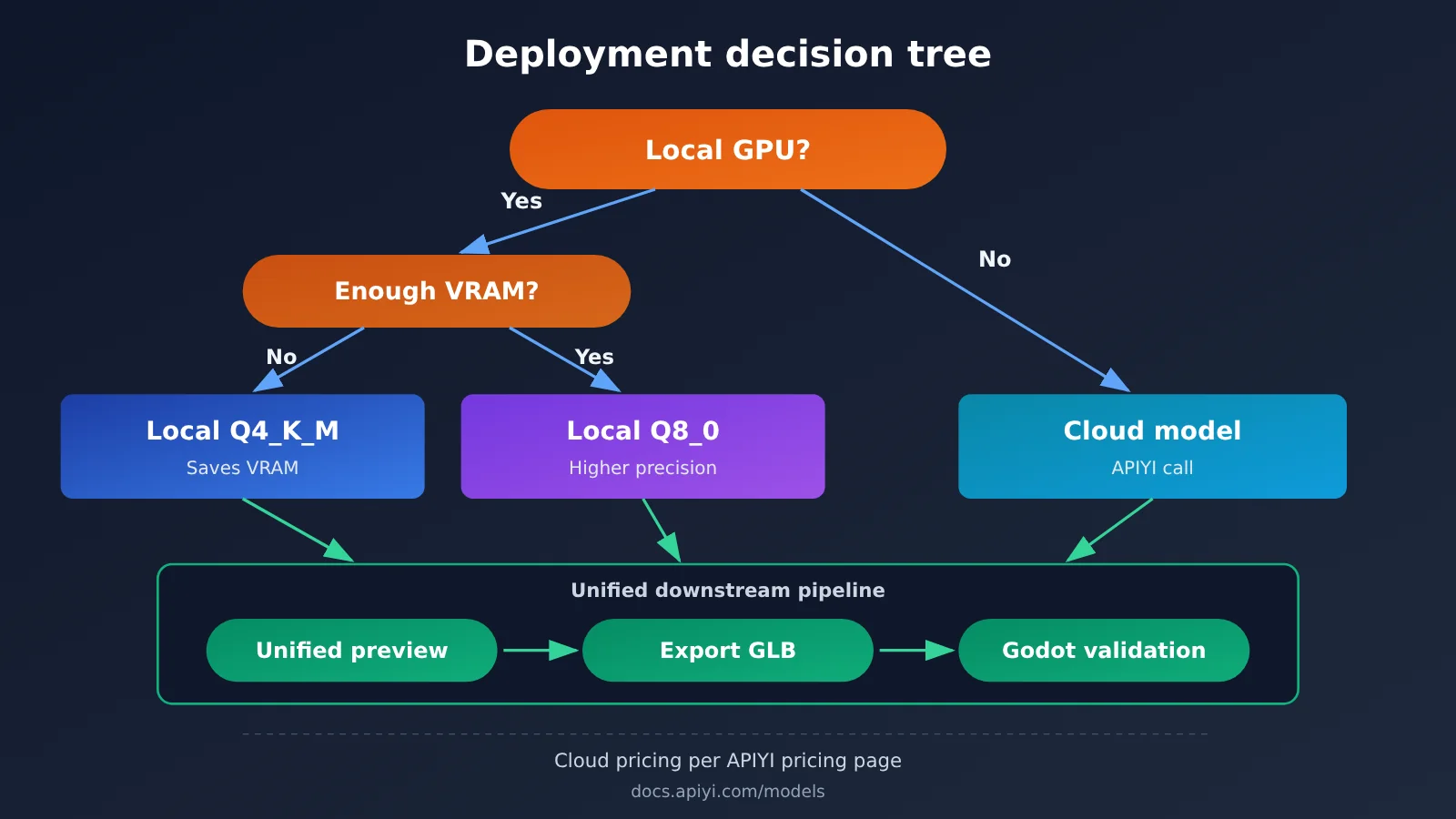
One of the nice things about a code middle layer is that it isn’t tied to any particular model. As long as a model can write runnable Three.js, it can plug into the same pipeline. Based on publicly available information, Qwen3.5-4B-GLB-3D-Coder is currently distributed in GGUF format and is mainly intended for local inference. If your machine isn’t well suited to running it, or you want to compare results against general-purpose coding models, you can go through a cloud API instead.
APIYI offers API access to a range of models and is compatible with both OpenAI and Anthropic interface formats, so existing clients usually just need to change the endpoint URL, the key, and the model name. Keep in mind that whether the fine-tuned model above is available via cloud call depends on what the model list actually shows. For configuration details, see the APIYI docs: docs.apiyi.com.
| Option | Key characteristics | Best suited for | Cost basis | Available on |
|---|---|---|---|---|
| Local fine-tuned model | Fine-tuned on GLB assets, works offline once downloaded | Batch-generating placeholder assets, offline operation | No per-call fee, but you supply the hardware | GGUF runtimes such as LM Studio |
| Cloud general-purpose coding model | No local compute needed, easy to switch and compare | Limited hardware, trying more complex prompts | Per APIYI pricing page | APIYI apiyi.com and each model’s official channels |
| Local + cloud hybrid | Run volume locally, hand tricky assets to the cloud | Teams that want both cost control and success rate | Cloud portion per APIYI pricing page | Local tools plus an API platform |
Steps to invoke a Three.js generation model through the API
- Create an API key in the APIYI console, and confirm the current endpoint URL from the docs — don’t copy an address from a third-party tutorial.
- Pick the OpenAI or Anthropic interface format based on your existing client, then fill in
base_urland the API key. - Choose the model you want to test from the model list, and put its name in the
modelfield. - Put the system prompt from earlier into the system message. General-purpose models weren’t fine-tuned for this task, so you can add constraints like “output only complete HTML.”
- Save the response as an
.htmlfile. The preview, export, and acceptance steps that follow are the same as in the local option.
LM Studio’s local server also exposes an OpenAI-compatible interface. That means you can use the same client to switch between local and cloud — you just change the endpoint URL and the model name. As a result, the preview, export, and acceptance stages downstream of the code middle layer don’t need to change at all.
Billing note: Per-model pricing, input/output billing rules, and cache pricing can all change. This article doesn’t list specific numbers; always go by the actual data on the APIYI pricing page: https://docs.apiyi.com/models.
Frequently Asked Questions (FAQ)
Q1: What is the Three.js code intermediary layer workflow?
It means having the model write a Three.js program first, which then renders and exports the GLB, instead of having the model output a 3D file directly. This lets you preview and modify the result before exporting.
Q2: Can Qwen3.5-4B-GLB-3D-Coder output GLB directly?
No. What it outputs is a standalone HTML file that you need to open in a browser and click the “Export GLB” button to get a GLB file.
Q3: Is the exported GLB only usable in Godot?
No. The system prompt targets the Godot workflow, but GLB is a universal format that Unity, Blender, and web-based 3D viewers can also import. That said, how well it works after import still needs to be verified separately in each tool.
Q4: What application scenarios is this model best suited for?
It’s best suited for low-poly style game prototypes and placeholder assets, such as NPCs, weapons, vehicles, modular buildings, and traps. If you need highly customized production-grade assets, expect to do manual adjustments after import.
Q5: Without a suitable GPU, how can I try this workflow through an API?
You can call the coding models in the model list through APIYI apiyi.com, and configure the OpenAI or Anthropic format endpoint according to the documentation. After the model outputs HTML, the subsequent preview and export are all done in your local browser.
Q6: How is the cost of cloud calls calculated?
Each model has its own unit price and billing basis. Please check the APIYI pricing page directly: https://docs.apiyi.com/models. It’s recommended to first run a small number of prompts, then estimate costs based on actual usage.
Q7: Is the vision projection file required?
No, it’s not required. The optional BF16 vision projection file is about 644 MiB and is used to input reference images in runtime environments that support Qwen3.5 multimodal GGUF. If you only use text prompts, you can skip downloading it.
Q8: What are the current limitations of this approach?
It’s currently a preview version. The training set leans toward simple prompts, so its generalization ability for complex or uncommon requirements is limited, and it isn’t aimed at realistic assets. The author plans to release the dataset and Safetensors weights, and to train a larger version with roughly 100,000 samples and a context length of 8K to 128K tokens, but these haven’t been released yet.
Key Takeaways: Three.js Code as an Intermediary Layer
- Core idea: Let the model write runnable Three.js, then let a program export it to GLB.
- Key advantage: The intermediate artifact can be previewed, read, and edited in pieces, which lowers the cost of failure.
- Getting started locally: Load the GGUF in LM Studio, paired with a fixed system prompt and the recommended sampling parameters.
- Version note: Weights downloaded before November 2 should be deleted and re-downloaded.
- Where it fits: Good for low-poly prototypes and placeholder assets, not for photorealistic or film-grade production.
- Cloud route: You can hook up models through APIYI using the OpenAI or Anthropic format and compare the results.
- Extending the approach: The same intermediary-layer design works well for Blender Python, OpenSCAD, and similar scenarios.
Conclusion
The lesson from Qwen3.5-4B-GLB-3D-Coder isn’t just that a small model can generate game assets — it’s that the model redraws the division of labor between the model and its tools:
- The model handles expression: It turns natural-language descriptions into clearly structured Three.js code.
- The tools handle realization: The browser and the export logic produce a standard GLB file.
- Validation decides usability: An asset isn’t really finished until it’s imported into the target engine and passes inspection.
Start by running a simple static prop through the entire pipeline, then gradually test animation and more complex assets. If you want to compare several cloud models, you can call them all through APIYI in a single interface — see docs.apiyi.com for integration details, and refer to https://docs.apiyi.com/models for actual pricing data.
📚 References
- Qwen3.5-4B-GLB-3D-Coder Model Overview: Model positioning, 25 asset domains, and the roadmap ahead
- Link:
mindstudio.ai/blog/qwen3-5-4b-glb-3d-coder-model -
Description: A good starting point for understanding the project as a whole and seeing community use cases
-
Qwen3.5-4B-GLB-3D-Coder Local Run Guide: Generation mechanics, quantized versions, and suitability analysis
- Link:
mindstudio.ai/blog/qwen3-5-4b-glb-3d-coder-local -
Description: Useful for evaluating whether the model fits your project’s needs
-
LM Studio Configuration Guide: System prompt, sampling parameters, and GLB export steps
- Link:
mindstudio.ai/blog/run-qwen3-5-glb-3d-coder-locally -
Description: Follow along step by step to complete a local deployment
-
APIYI Docs and Pricing Page: API integration instructions and model pricing data
- Link:
docs.apiyi.comanddocs.apiyi.com/models - Description: For API configuration and billing details, the latest content here is the source of truth
Author: APIYI Technical Team
Technical Support: If you run into any issues during integration, feel free to reach out via the APIYI website at apiyi.com. For more resources, check out the documentation center at docs.apiyi.com