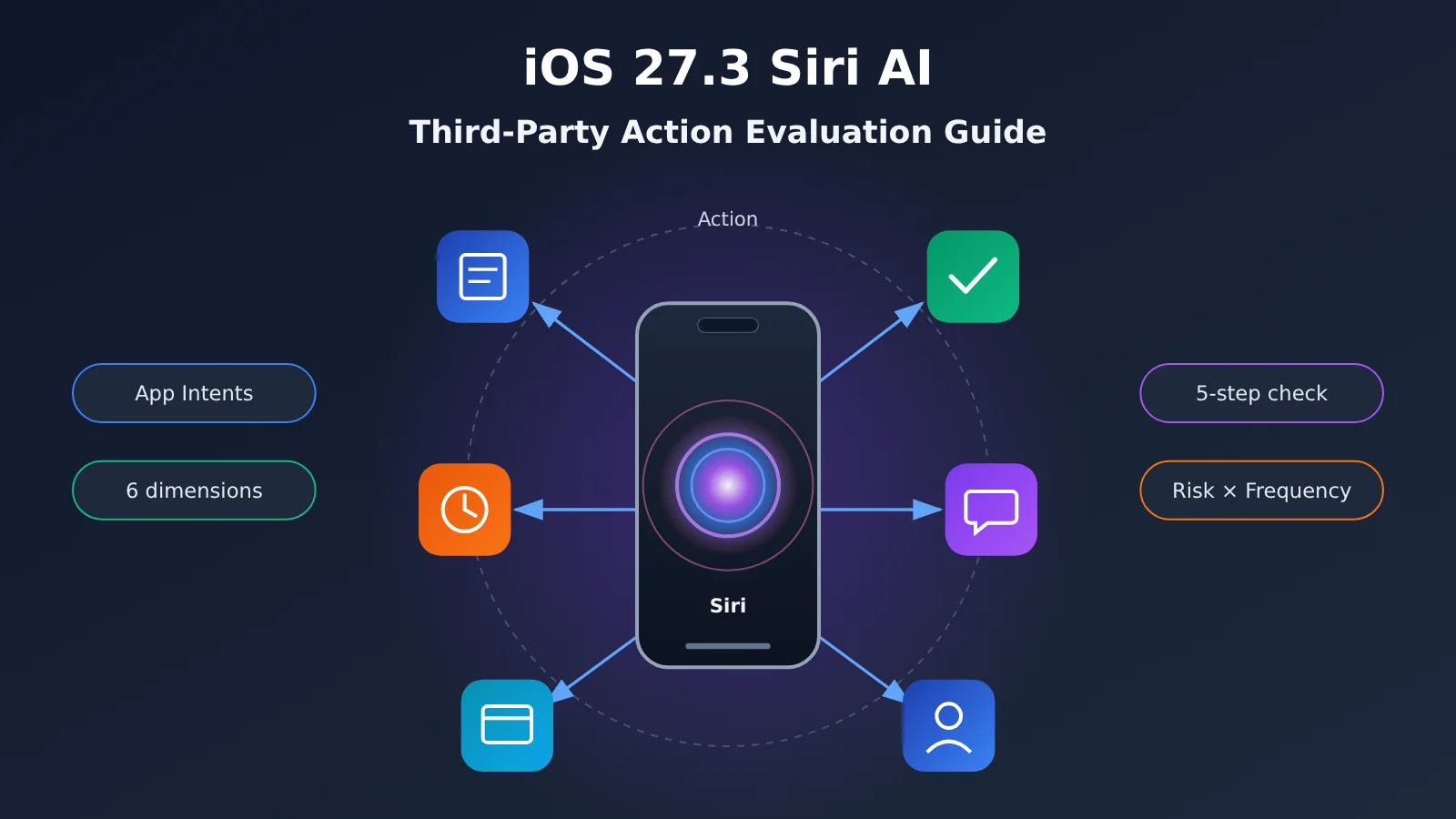
Author’s note: A look at iOS 27.3 opening up Siri AI third-party actions — the 6 dimensions app developers need to evaluate, a 5-step rollout process, and the common questions, to help you decide “should we integrate, what should we do first, and how do we validate it.”
If you maintain an iOS app, you’ve probably been hit with the same question recently: now that iOS 27.3 has opened up Siri AI third-party actions, should our app integrate — and if so, what first? This isn’t just about a system version. It’s about whether users will keep “opening the app and tapping a button,” or start “saying one sentence to Siri and getting the whole thing done.”
This isn’t a news piece rehashing the keynote. As of writing (November 5, 2026), the public information we can verify is limited. For the exact API names, availability scope, and regional differences in iOS 27.3, go by Apple’s Developer documentation and Release Notes. What this article covers is an evaluation framework — one that holds up no matter what the final shape of the rollout turns out to be.
The core value: by the end of this article you’ll have a checklist for evaluating iOS 27.3 Siri AI third-party actions, plus a 5-step validation flow you can use to judge integration value at minimal cost.
iOS 27.3 Siri AI Third-Party Actions: Key Takeaways
Let’s start with a table that shows what this means for developers. The “capability descriptions” here are based on Apple’s existing App Intents system and the general expectations around Siri deeply invoking third-party apps. Refer to official sources for specifics.
| Point | Description | Value for developers |
|---|---|---|
| Action entry point migration | Users can directly trigger in-app features via natural-language Siri commands | Reach paths for high-frequency actions get shorter, and retention logic will shift |
| App Intents is the foundation | Third-party actions will most likely still be carried by declarations like App Intents and App Entity | Teams that have already done Shortcuts integration start faster |
| Semantic understanding goes to the system | Siri handles parsing user speech into intents and parameters | Developer focus shifts from “writing dialogue” to “defining actions well” |
| Privacy and context | System-level on-device and Private Cloud Compute processing handles personal context | You need to re-examine which data can be exposed to the system |
| Regional differences | The China-region version of Apple AI has reportedly started testing | Apps targeting users in China need separately scheduled evaluation |
A closer look at iOS 27.3 Siri AI third-party actions
The first point is that “action definition” now carries more weight. In the past, Shortcuts integration was mostly a nice-to-have. Once Siri can proactively invoke third-party actions based on natural-language understanding, the titles, descriptions, and parameter summaries you declare in App Intents (such as IntentDescription and parameterSummary) become Siri’s main basis for deciding whether it should call you at all. Vague naming and unclear parameter design lead directly to intent-matching failures, and what users experience is “Siri doesn’t understand me.”
The second point is business boundaries. Not every feature is suited to being triggered by voice and AI. Irreversible actions like payments, deletions, and publishing need a confirmation step. Lightweight actions like lookups, logging, and state toggling are natural first candidates. When evaluating, rank features by “risk × frequency” rather than exposing everything at once.
Why iOS 27.3 Siri AI Third-Party Actions Are Worth Evaluating Now
Zoom out a bit, and you’ll see the AI entry point shifting from the “search box” and “app icons” toward “conversation.” According to GeekPark’s morning briefing on November 4, 2026, ChatGPT’s search volume has already reached roughly 20% of Google’s, and the China-market version of Apple Intelligence has entered testing. Put those two data points together and the message is pretty clear: users now ask AI first and act second, and system-level assistants are taking over that step.
For app developers, evaluating now pays off more than waiting for a full rollout. Two reasons. First, the quality of your App Intents declarations takes several rounds of refinement — the earlier you start iterating, the more data you’ll have. Second, the rollout pace and capability boundaries of the China-market AI may differ from the overseas version, so mapping out your feature list in advance lets you move fast when the window opens.
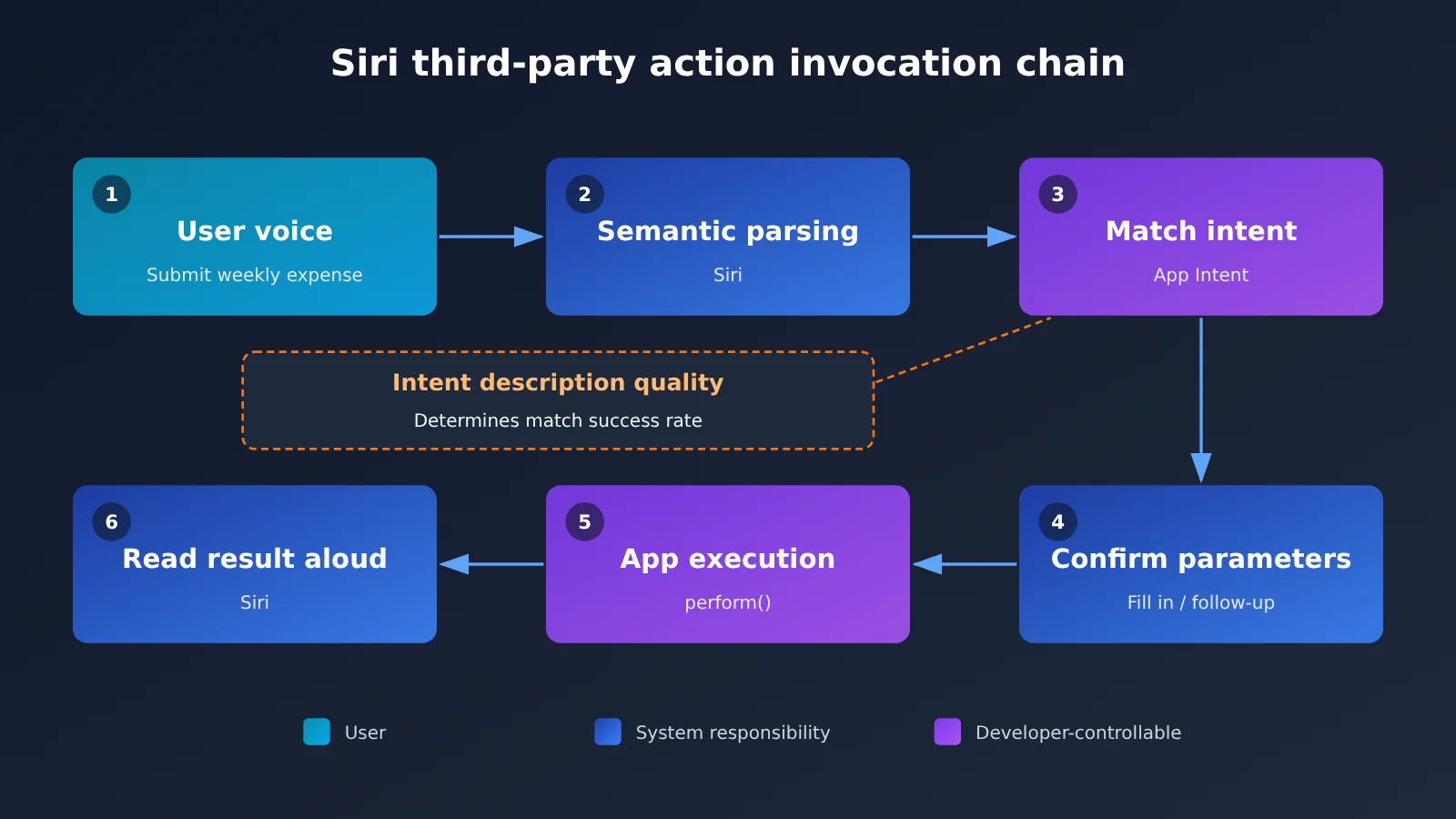
The diagram above shows a typical chain for Siri invoking third-party actions. Across that chain, the parts developers control are the “intent declaration” and “execution and return” — semantic parsing is the system’s job. So the core of your evaluation is this: can your intent declarations be matched accurately? If you want to estimate match quality before integrating, you can start by having a Large Language Model simulate user phrasings for offline testing. You can run that kind of test against multiple models through APIYI at apiyi.com — we’ll dig into it in the quick-start section below.
6 Evaluation Dimensions for Third-Party Siri AI Operations in iOS 27.3
The table below is the checklist we recommend teams walk through item by item in review meetings. Each item includes a key question and a suggested deliverable, so you can assign it directly to the responsible owner.
| Evaluation dimension | Key questions | Suggested deliverable | Owner |
|---|---|---|---|
| Feature selection | Which features are used frequently, low-risk, and suitable for completing with a single sentence? | Candidate intent list (sorted by priority) | Product |
| Intent design | Are the title, description, and parameters clear and unambiguous? | Intent specification document | Product + iOS |
| Data exposure | Which App Entities can be retrieved by the system? | Data classification and de-identification plan | Security + Backend |
| Confirmation and rollback | How should irreversible actions be confirmed a second time, and how should failures be communicated? | Interaction confirmation guidelines | Design + iOS |
| Server-side capabilities | Does intent execution require calling backend AI capabilities? | API and cost assessment | Backend |
| Region and version | How should capability differences between the mainland China version and international versions be handled? | Version compatibility matrix | iOS + QA |
The “server-side capabilities” item is the easiest to overlook. When many intents execute, they don’t just change a local state—they also generate summaries, rewrite copy, and extract structured information. These AI capabilities usually run on your own backend, so model selection and invocation costs need to be evaluated separately. If your team hasn’t decided which model to use yet, you can compare different models through the same API format on APIYI apiyi.com before making a decision.
Common Pitfalls in iOS 27.3 Siri AI Intent Design
The most common problem in intent design is naming things in developer language. For example, you call an intent “Sync Data,” but users say “Help me update this” or “Refresh the list.” Another problem is having too many parameters. Siri then has to ask follow-up questions repeatedly, which is worse than just opening the App. In practice, it’s best to keep the required parameters for the first batch of intents to 1–2, and give the rest reasonable defaults.
iOS 27.3 Siri AI third-party actions quick start: a 5-step evaluation process
There’s no code involved in this section. Instead, we’re giving you an evaluation process you can actually put into practice, so your team can reach a “should we build this, and if so, which parts first” conclusion within one to two weeks.
- Inventory candidate features: Pull the top 20 features by usage frequency from your analytics data, filter out high-risk operations like payments and deletions, and you’re left with 5-8 candidates.
- Write intent specs: For each candidate, spell out the title, one-line description, parameters with defaults, and return content — mapping to the
title,description,parameterSummaryand other fields in App Intents. - Generate simulated utterances: Use a Large Language Model to generate 30-50 varied colloquial user phrasings for each intent, covering dialects, elliptical sentences, slips of the tongue, and so on.
- Run offline matching tests: Then have a Large Language Model play the role of “intent router” — feed it the intent specs and user utterances, have it output the matched intent and parameters, and tally accuracy and confusion pairs.
- Iterate and verify on device: Rewrite the intent descriptions based on the confusion results, then test with Siri on a test device and record how the real matching goes.
Steps 3 and 4 give you the best return on effort in the whole process. They don’t depend on the system version, so you can start today. Offline test results aren’t the same as Siri’s real-world behavior, but they surface problems early — things like “these two intent descriptions are too similar” or “this parameter name is ambiguous.”
Parameter configuration for iOS 27.3 Siri AI offline testing
For offline testing, we recommend configuring model invocation parameters as shown in the table below. The parameter names use the common OpenAI-compatible interface style; Anthropic format has corresponding fields.
| Parameter | When generating simulated utterances | When testing intent routing | Notes |
|---|---|---|---|
model |
Pick a model that’s good at creative expression | Pick a model with stable instruction following | You can use different models for the two steps |
temperature |
On the high side, e.g. 0.8-1.0 | On the low side, e.g. 0-0.2 | The former wants variety, the latter wants stability |
response_format |
Plain text or a JSON list | Require JSON output | Makes it easy for scripts to tally accuracy |
max_tokens |
Loosen appropriately based on the number of utterances | A smaller value is fine | Controls per-call cost |
base_url |
Fill in per the APIYI docs | Fill in per the APIYI docs | Refer to docs.apiyi.com for the address |
APIYI provides API access to the GPT, Claude, and other model families covered in this article, and is compatible with both OpenAI and Anthropic interface formats. If you already have test scripts built on the OpenAI SDK or Anthropic SDK, you basically just need to swap the api_key and base_url. See the documentation center at docs.apiyi.com for the endpoint address and usage instructions.
🚀 Quick start: We suggest registering at APIYI apiyi.com and grabbing some test credits first, then running a round of “simulated utterances + intent routing” offline testing with 2-3 models. For specific pricing and billing details, refer to the actual data on the pricing page at docs.apiyi.com/models — just estimate your budget as needed.
Comparing iOS 27.3 Siri AI Integration Approaches
Different teams have different resources and user bases, so there’s no need for a one-size-fits-all integration approach. Here’s how four common strategies stack up.
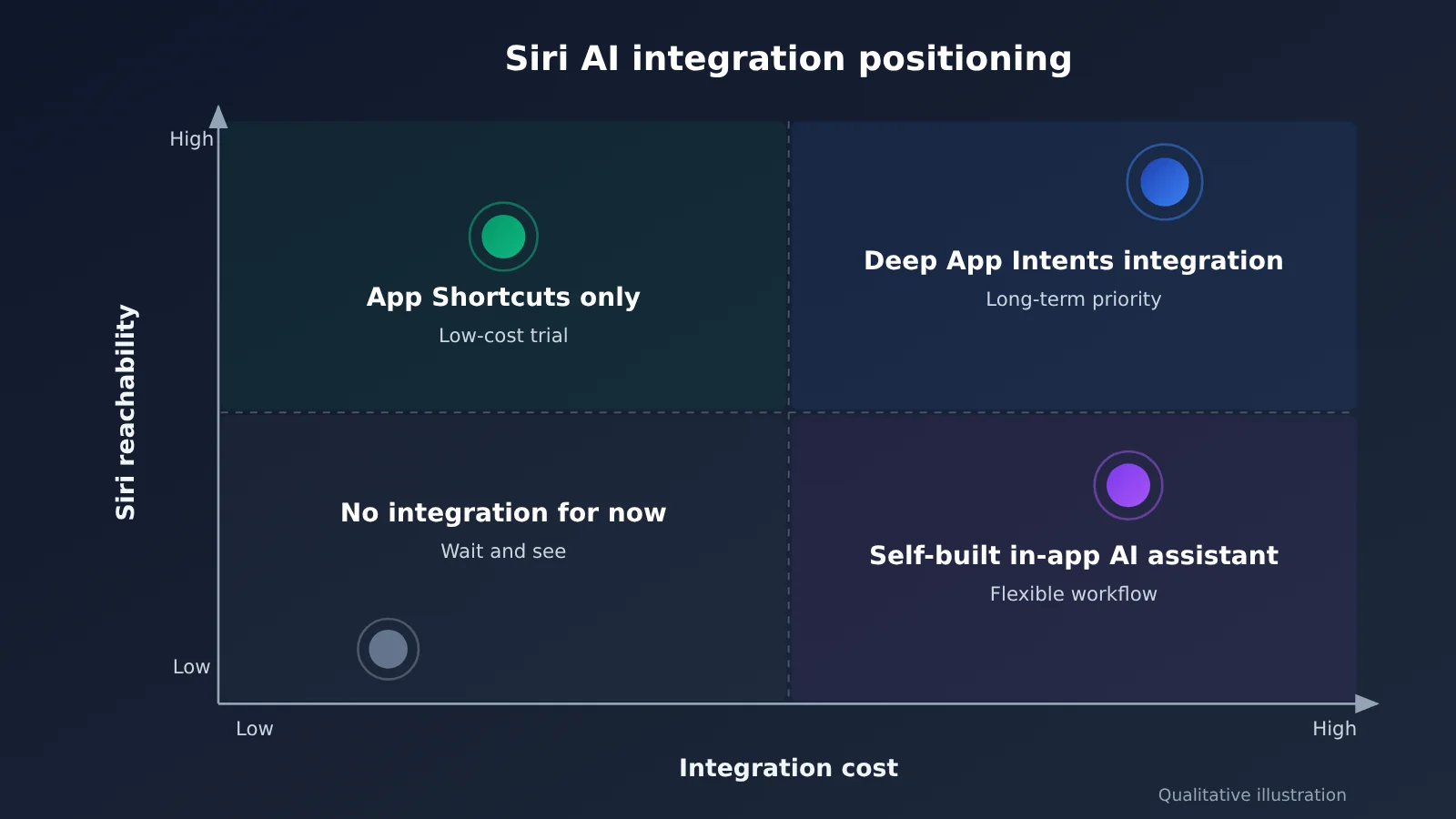
| Approach | Key characteristics | Best for | Main risks |
|---|---|---|---|
| Deep App Intents integration | Declares App Entities and multiple intents, fully participating in Siri AI orchestration | Utility, productivity, and high-frequency action apps | Significant design and testing effort |
| App Shortcuts only | Ships a handful of preset shortcut phrases, low cost | Small and mid-sized teams wanting to test the waters first | Limited natural language coverage |
| Self-built in-app AI assistant | Uses a Large Language Model inside the app for conversation and actions | Complex businesses that need custom flows | Bypasses the system entry point, so reach depends on users opening the app |
| Hold off for now | Wait and see how official capabilities and China-market availability develop | Low-frequency, heavily regulated businesses | May miss the entry-point migration window |
Benchmarking deep integration: Deep App Intents integration wins on system-level reach — users can complete actions without ever opening the app. But it demands finely tuned intent design and carries the highest testing cost. For high-frequency utility apps, it’s still the most worthwhile long-term investment.
Benchmarking the self-built AI assistant: An in-app assistant gives you more freedom over flow control and brand experience, and you can tailor multi-turn conversations to your business. But it doesn’t go through the Siri entry point, so its visibility at the system level is lower. The safer play is to run both in parallel: system intents handle the lightweight entry points, while complex flows are picked up by the in-app assistant.
💡 How to choose: Which approach you pick depends on how often your features get used and what your risk profile looks like. The cost and reach positions in the chart are qualitative illustrations, so validate them against your own team’s testing. For the model capabilities your in-app assistant needs, you can quickly compare and verify options through a unified interface at APIYI apiyi.com.
Choosing server-side models for iOS 27.3 Siri AI
Whichever approach you choose, intent execution and the in-app assistant may both need server-side Large Language Models. The table below outlines selection directions by task type and doesn’t cover specific pricing.
| Task type | Capability focus | Model directions to consider | Where to access |
|---|---|---|---|
| Generating simulated user utterances | Language diversity, conversational tone | GPT series, Claude series | APIYI apiyi.com, official APIs |
| Intent routing and parameter extraction | Instruction following, structured output | GPT series, Claude series | APIYI apiyi.com, official APIs |
| Content summarization / rewriting at execution time | Chinese-language expression, speed | Lightweight general-purpose models | APIYI apiyi.com, official APIs |
| Multi-turn in-app assistant | Long context, tool calling | Flagship general-purpose models | APIYI apiyi.com, official APIs |
💰 A note on cost: Input pricing, output pricing, and cache pricing vary considerably across models, so this article doesn’t list specific numbers. For all pricing, refer to the actual data on the APIYI pricing page at docs.apiyi.com/models, and estimate your monthly cost using the real token consumption from offline tests.
Frequently Asked Questions (FAQ)
Q1: What are iOS 27.3 Siri AI third-party actions?
They refer to Siri using AI to understand a user’s natural language and directly invoke features declared by third-party apps. Developers describe “what I can do” through mechanisms like App Intents, and the system handles understanding and orchestration. For the exact scope of what’s opened up, refer to Apple’s official documentation.
Q2: How is this different from the old SiriKit and Shortcuts?
SiriKit was initially limited to a fixed set of domains, while Shortcuts relied more on users manually configuring actions or preset phrases. The appeal of Siri AI third-party actions is stronger natural language understanding—the system proactively matches based on intent descriptions. That makes the quality of your intent descriptions more critical than ever.
Q3: When will iOS 27.3 officially launch, and when will it be available in mainland China?
We don’t have a verifiable exact date right now, so we won’t speculate. Public reports indicate that the mainland China version of Apple Intelligence has entered testing. We recommend following Apple Developer News and Release Notes, and getting test devices onto the Beta channel as early as possible.
Q4: Which types of apps should be evaluated first?
Mainly these categories:
– **Productivity tools**: “one-sentence logging” in to-dos, expense tracking, calendars, and notes
– **Life services**: checking order status, viewing membership points, scheduling reminders
– **Content apps**: resuming playback, saving the current item, switching playlists
Q5: Without a test device running the new system, what can I prepare now?
You can start with steps 1–4 from this article: inventory your features, write intent specs, generate simulated utterances, and run offline matching tests. Offline testing requires calling a Large Language Model—you can register at APIYI apiyi.com to get test credits. APIYI is compatible with both OpenAI and Anthropic API formats, so you can just change the `base_url` in your existing scripts and it’ll run.
Q6: Roughly how much does offline testing cost?
Cost depends on the number of intents, the number of simulated utterance variants, and the model you choose. We don’t provide estimated figures—run a small batch first, record token consumption, then convert using the actual per-unit prices listed on the APIYI pricing page at docs.apiyi.com/models.
Q7: What are the known risks of integrating Siri AI third-party actions?
– **Uncontrollable matching**: final routing is decided by the system, and offline tests can only serve as a reference
– **Data exposure**: App Entities are retrieved by the system, so you need proper data masking and permissions
– **Accidental actions**: irreversible operations must require a second confirmation
– **Regional differences**: capabilities may differ between the mainland China version and overseas versions, so you need version compatibility handling
iOS 27.3 Siri AI Third-Party Actions: Key Takeaways
- The entry point is shifting: users are moving from “opening an app” to “saying one sentence to Siri”
- Declaring is competing: the quality of intent titles, descriptions, and parameters decides whether you get matched
- Light before heavy: for the first batch of intents, pick only high-frequency, low-risk features with few parameters
- Offline first: use a Large Language Model to simulate phrasings and run routing tests — you can start today
- Two tracks in parallel: system intents handle the entry point, while the in-app AI assistant takes on complex flows
- China-market edition is a separate track: the China-market AI is already in testing, so it needs its own schedule and a compatibility review
- Costs are documented: model invocation can be unified through APIYI; see docs.apiyi.com/models for pricing
Conclusion
The core takeaways for third-party actions in iOS 27.3 Siri AI:
- The evaluation focus is action definition: Siri handles the understanding, and developers handle describing their features clearly and unambiguously.
- Expose features in batches by risk and frequency: for the first batch, fewer intents is better than more — make confirmations and failure messages solid.
- Trade offline testing for a first-mover advantage: you don’t have to wait on the OS version; you can iterate on intent descriptions right now.
Our advice: hold a review this week, run your candidate features through the 6 dimensions in this article, then use the 5-step process to get a first offline accuracy number. By the time the official capabilities and China-market progress become clear, you’ll already have a validated intent list in hand.
For the model invocation that offline testing and server-side AI capabilities require, we recommend validating through APIYI at apiyi.com. The platform is compatible with both the OpenAI and Anthropic API formats; see docs.apiyi.com for documentation, and docs.apiyi.com/models for pricing.
📚 References
- Geek Park · Geek Morning Brief: Mainland China version of Apple AI begins testing, ChatGPT search volume reaches 20% of Google’s, and other updates
- Link:
geekpark.net/news/373427 -
Note: Source of this article’s industry background information, published on November 4, 2026
-
Apple Developer · App Intents Documentation: Official documentation for App Intents, App Entity, and App Shortcuts
- Link:
developer.apple.com/documentation/appintents -
Note: Intent declarations and field meanings follow this documentation as the authoritative source
-
APIYI Documentation Center: API format,
base_url, and SDK integration guide - Link:
docs.apiyi.com -
Note: OpenAI / Anthropic compatible integration methods
-
APIYI Model Pricing Page: Input, output, and cache unit prices for each model
- Link:
docs.apiyi.com/models - Note: All pricing-related content in this article follows the actual data on this page
Author: APIYI Technical Team
Technical discussion: Feel free to reach out to us on the APIYI apiyi.com homepage. More integration resources are available at the docs.apiyi.com documentation center.