Author’s note: For the same 10-minute consulting session — where the model has to watch the user’s screen and answer — how much does each of the four AI real-time multimodal Agent routes cost, and at what usage level does self-hosting actually pay off?
The product description often boils down to one sentence: “A ten-minute consulting session where the model has to watch the user’s screen and answer.” But the cost estimate spreadsheet is due this week. This article takes four AI real-time multimodal Agent routes, runs them through the same usage assumptions, and calculates them line by line, then hands you a usage model where you can swap in your own numbers.
This isn’t a “each has its strengths” compromise analysis. The article will clearly call out which route’s costs suddenly jump as usage grows, and under what conditions self-hosting is cheaper than calling an API. All numbers are arithmetic examples based on public pricing, not our actual bills.
Core value: Once you’ve read it, you can plug your own session duration, turn count, and daily active users into the formula and get the per-session and monthly costs for all four routes.
What Are the Four Routes for a Real-Time Multimodal AI Agent?
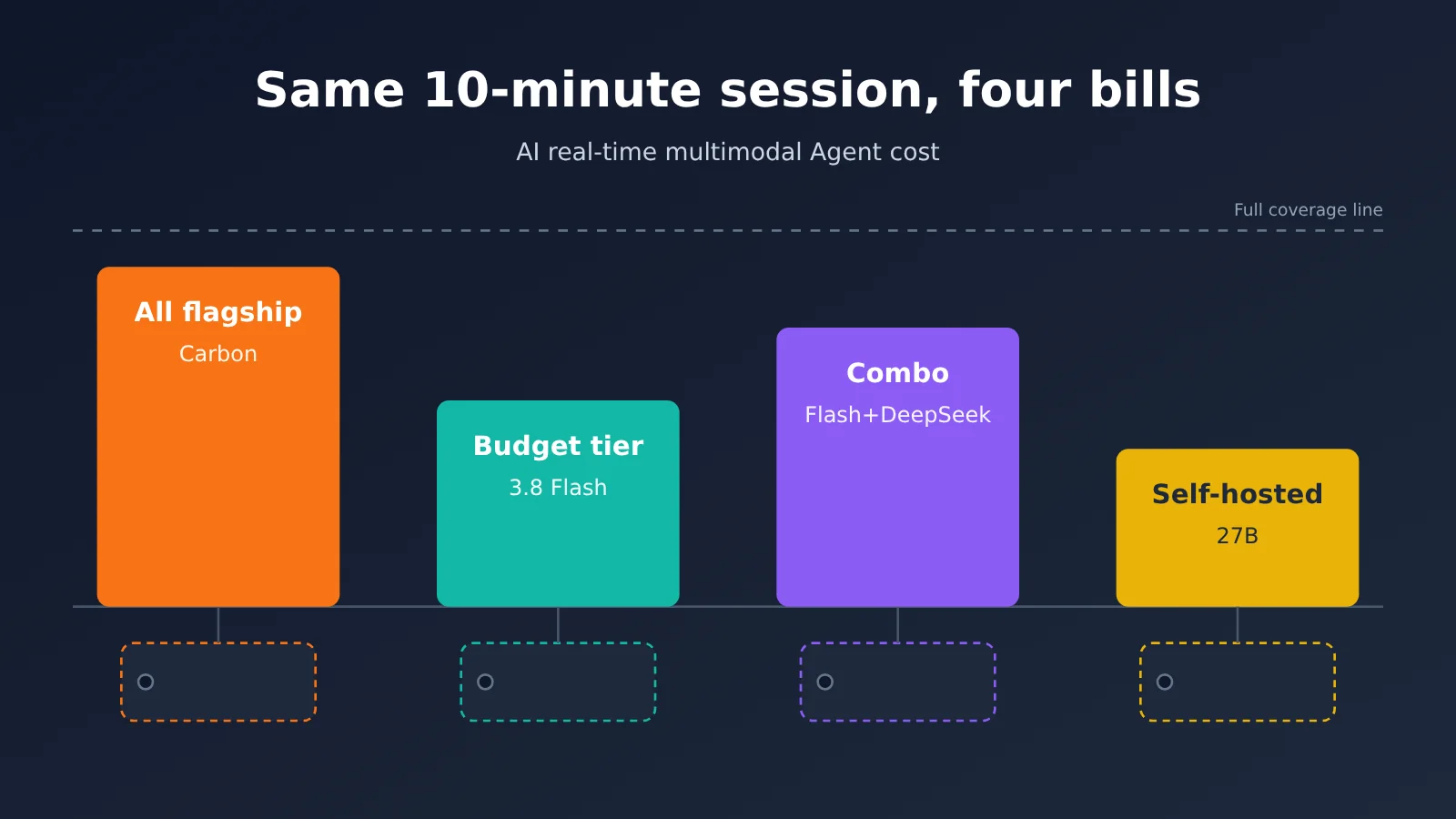
Before we start doing the math, let’s clarify what each of the four routes does and which scenarios it fits. The difference between the four routes isn’t whether they work—it’s who looks at the visuals, who writes the response script, and what unit you pay in.
- Route 1: All-flagship.
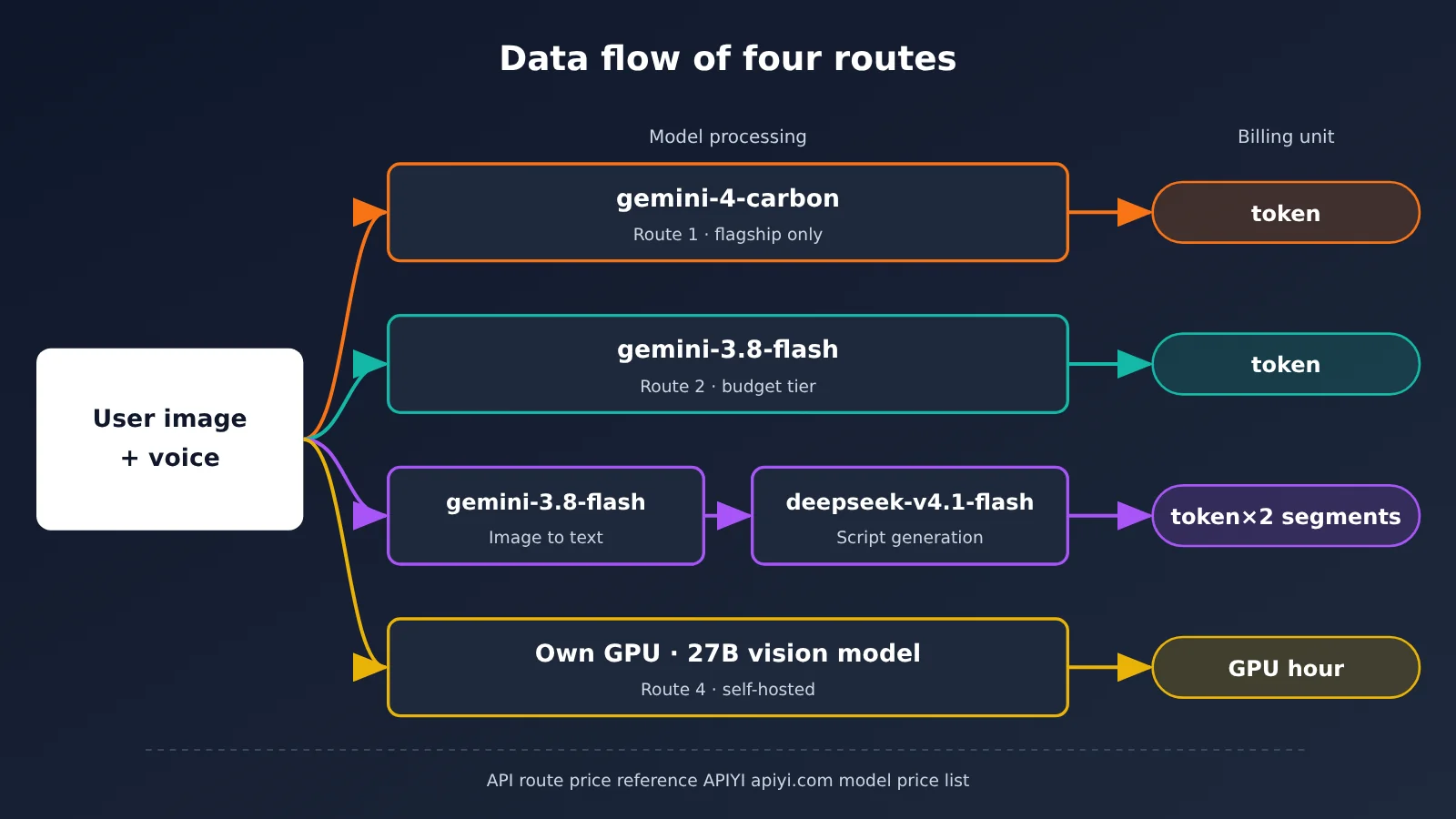
gemini-4-carbondirectly watches the full video segment and gives a conclusion. This fits scenarios that demand the highest judgment quality and have high value per session, such as initial medical screening or remote equipment fault diagnosis. - Route 2: Single-vendor budget tier. Switch to
gemini-3.8-flash. APIYI’s documentation states that it’s the most video-token-efficient tier, making it suitable for customer service scenarios where the visuals only need a rough look and the conversation itself isn’t complex. - Route 3: Multi-model combination. First,
gemini-3.8-flashconverts the visuals into a structured description, thendeepseek-v4.1-flashgenerates the response script. This split is necessary because DeepSeek, GLM, Claude, GPT, and Grok don’t support video input—the visuals must first be translated into text by a model that can watch video. This route fits script-heavy, visual-light scenarios. - Route 4: Self-hosted. Deploy a 27B-level vision model on your own GPU. Here, cost is no longer calculated per token; instead, it’s the GPU hourly price multiplied by occupied duration, then divided by the number of concurrently running sessions. It fits teams that already have GPUs on hand or have very high request volumes.
The Same Usage Model for AI Real-Time Multimodal Agent Costs
Every route uses the same usage figures. You can swap each row in the table for your own product’s numbers.
| Usage item | Assumed value | Basis / notes |
|---|---|---|
| Session length | 600 seconds, video shown to the model the whole time | The “ten-minute consultation” from the product description |
| Video tokens | About 70 per second → about 42,000 for 600 seconds | APIYI video understanding docs; roughly 700 prompt_tokens for 10 seconds at 540p, varying about 30% with resolution |
| Text input | About 20,000 tokens | System prompt plus 20 turns of conversation history |
| Output | About 4,000 tokens | Around 200 per turn |
| Total per session | 62,000 input (42,000 of it video) + 4,000 output | Arithmetic sum |
| Monthly volume | 1,100 sessions | 50 per day × 22 days per month |
One caveat: this is an arithmetic example, not a measured bill. Video tokens themselves swing by about 30%, so the video portion should be read as a range. Take Route 1 as an example: video input comes to about $0.084, give or take roughly $0.025. The model also assumes the 600 seconds of video is billed only once across the whole session. If your implementation resends the accumulated video every turn, video tokens multiply by the number of turns — which is exactly where the “costs suddenly jump” problem comes from later on.
Prices for On-Platform Models for AI Real-Time Multimodal Agents
The prices below come from the APIYI model price master list, as of 2026-11-25 12:49 (UTC+8). The three price fields are input, output, and cache read, in USD per million tokens.
| Model | Input | Output | Cache read | Endpoint | Video support |
|---|---|---|---|---|---|
gemini-4-carbon |
2 | 10 | 0.1 | chat / gemini | Yes (text, image, video, audio) |
gemini-4-hydrogen |
1.5 | 7.5 | 0.075 | chat / gemini | Yes |
gemini-3.8-flash |
0.75 | 3.75 | 0.075 | chat / gemini | Yes; docs say it’s the most token-efficient for video |
gemini-3.1-flash-lite |
0.25 | 1.5 | 0.025 | chat / gemini | Yes |
deepseek-v4.1-flash |
0.3 | 1.2 | 0.006 | chat / messages | No |
| Available platform | APIYI apiyi.com — call all of the models above with a single Key |
According to the APIYI model page, gemini-4-carbon has a context window of 1,048,576 and a max output of 65,536, with input supporting video and audio. In other words, 600 seconds of video plus 20 turns of history is nowhere near filling its context — context length won’t be the bottleneck here. Price and request body size are the real constraints.
🎯 Technical tip: Three of the four API routes need both Gemini and DeepSeek at the same time. Call them through APIYI apiyi.com with the same Key and the same
base_url(https://api.apiyi.com/v1) — you just change themodelparameter to switch, which makes it easy to validate this usage model against real requests.
Core Differences Between the Four Routes for Real-Time Multimodal AI Agents
Per-Call and Monthly Costs for the Four Routes
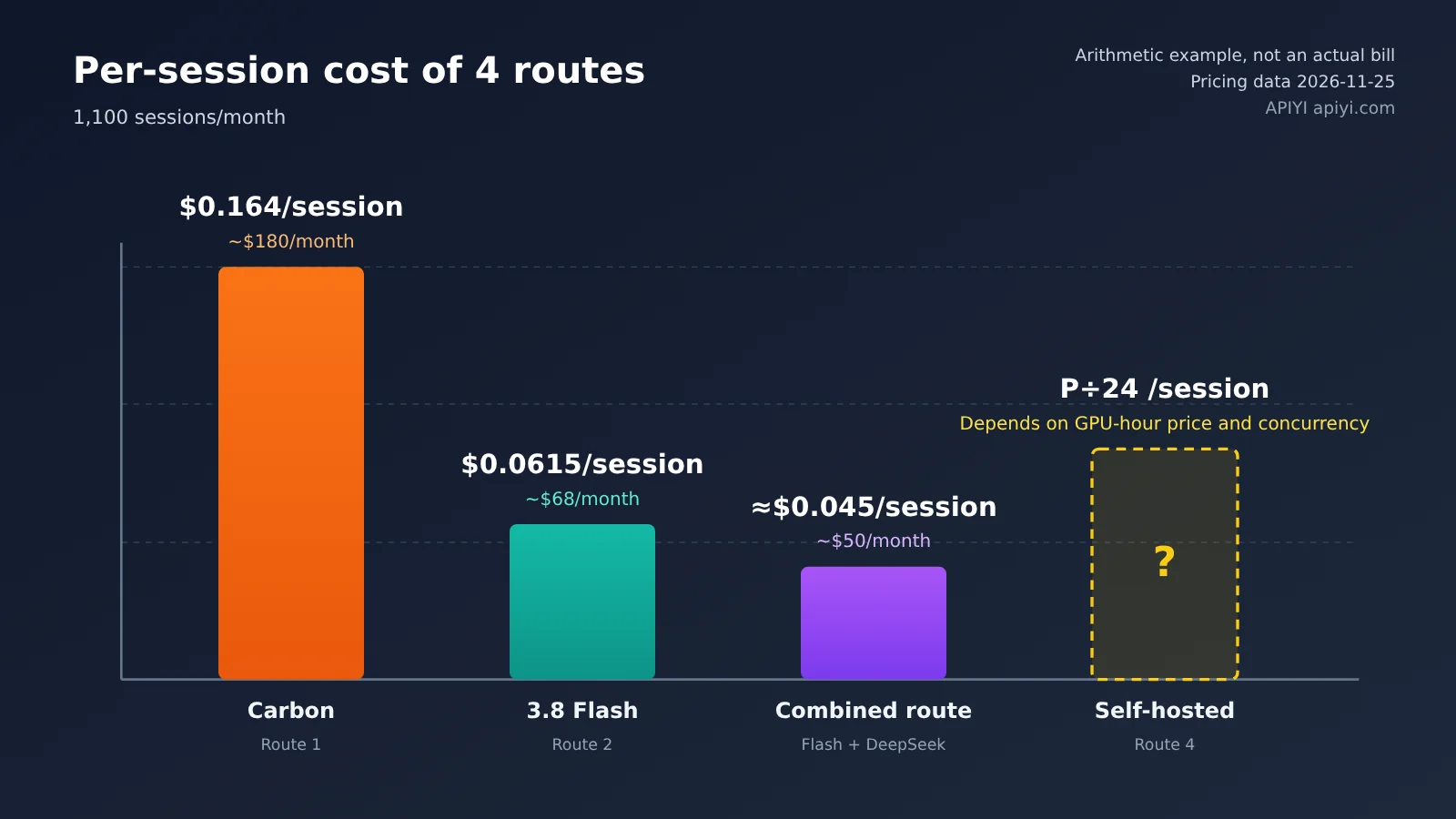
Route 1 (Carbon): 62,000 × 2 ÷ 1e6 + 4,000 × 10 ÷ 1e6 = 0.124 + 0.040 = $0.164 per call, multiplied by 1,100 calls ≈ $180/month. Video accounts for $0.084 of that, more than half of the per-call cost.
Route 2 (3.8 Flash): 62,000 × 0.75 ÷ 1e6 + 4,000 × 3.75 ÷ 1e6 = 0.0465 + 0.015 = $0.0615 per call, about $68/month. The unit price is about 37% of Route 1.
Route 3 (Combined): Flash only processes 42,000 video tokens ($0.0315) and outputs an 800-token visual description ($0.003). DeepSeek receives 20,000 text tokens plus the 800-token description, calculated as 20,800 × 0.3 ÷ 1e6 ≈ $0.0062, and outputs 4,000 tokens for $0.0048. Total ≈ $0.045 per call, or about $50/month. The savings mainly come from handing the 20,000 text input tokens and 4,000 output tokens to the cheaper DeepSeek.
Route 4 (Self-hosted): Let P be the GPU hourly price. A 10-minute session occupies 1/6 hour, and one GPU runs 4 streams concurrently, so the per-call cost is P × (1/6) ÷ 4 = P ÷ 24, and the monthly cost is 1,100 × P ÷ 24 ≈ 45.8 × P. This result only holds when you pay for actual usage time; see the next section for the flat monthly dedicated case.
| Comparison dimension | Route 1 Carbon | Route 2 3.8 Flash | Route 3 Combined | Route 4 Self-hosted |
|---|---|---|---|---|
| Per-call cost | $0.164 | $0.0615 | ≈ $0.045 | P ÷ 24 |
| Monthly (1,100 calls) | about $180 | about $68 | about $50 | 45.8 × P (on-demand) / 720 × P (dedicated) |
| Video cost share | about 51% | about 51% | about 70% | not token-based |
| Engineering complexity | Lowest, single call | Low | Medium, two calls must be chained | High, inference service must be operated in-house |
| Biggest cost risk | Resending frames, amplified at $2/M | Resending frames | Description losing detail, causing rework | Idle GPU, rent can’t be amortized |
Routes 1 and 2 have almost identical video cost shares because their input/output ratios are the same. Route 3’s video share is actually higher because its text portion has been squeezed to the cheapest level, so the main remaining expense is “looking at the visuals.” That also means if Route 3 wants to cut costs further, it can only work on the video tokens—lowering media_resolution or reducing repeated frame sends.
Break-Even Formula for Self-Deploying a Real-Time Multimodal AI Agent
Whether self-deployment pays off comes down to utilization. At the usage level in this article, you’re looking at 1,100 runs × 1/6 hour ÷ 4 concurrent lanes ≈ 45.8 GPU-hours per month, while a single GPU has 720 hours in a month—so utilization is only about 6%. If the GPU is on a dedicated monthly plan, you’re paying for 720 × P but using only 45.8 × P. Most of the rent is paying for idle time.
| Item | Formula | Meaning |
|---|---|---|
| Cost per run (at full concurrency) | P ÷ 24 | GPU-hour price P, 4-way concurrency, each run takes 1/6 hour |
| Pay-as-you-go, break even with Route 3 | P ÷ 24 < 0.045 → P < about $1.08 / GPU-hour | Only below this GPU-hour price is it cheaper than the combined route |
| Pay-as-you-go, break even with Route 2 | P ÷ 24 < 0.0615 → P < about $1.48 / GPU-hour | Only below this GPU-hour price is it cheaper than 3.8 Flash |
| Dedicating one GPU, break even with Route 3 | 720 × P < N × 0.045 → N > 16,000 × P | Monthly session count N needs to exceed this value |
| Monthly capacity ceiling for one GPU | 720 × 6 × 4 = 17,280 runs | With 4-way concurrency and requests around the clock |
We’re deliberately not giving specific GPU rental numbers here, because prices vary widely by machine type, region, and contract—plug in your own P. The conclusion is right there in the formula: to break even with a dedicated GPU, monthly sessions need to grow by an order of magnitude from 1,100. Another approach is to use the same GPU during idle periods to run other batch jobs. If you already have a GPU on hand and only count electricity and depreciation, P drops a lot—and that’s when self-deployment has a chance to come in below Route 2 and Route 3.
Three Budget-Eating Pitfalls of Real-Time Multimodal AI Agents
The prices above are just theory. Once you actually ship this, the three issues below will knock your bill off its estimate — and sometimes the bill looks pleasantly cheap even though the results are quietly wrong.
| Pitfall | Symptom | What to do |
|---|---|---|
| 20MB request body limit | Gemini only accepts Base64 data URIs, and encoding inflates the payload by roughly a third | Estimate raw video at about 14MB; if it goes over, extract frames or split it into chunks. APIYI doesn’t support the Files API, so all media must be passed inline |
media_resolution setting |
LOW / MEDIUM / HIGH directly determines how many tokens the visuals consume | For “just get the gist” tasks, drop to LOW; only use HIGH for OCR and small text |
| Video silently dropped | Public direct video links aren’t accepted — you may get an invalid argument error, or a 200 response with the video thrown away |
Check usage.prompt_tokens every time; if it’s only a few dozen, treat it as a failure |
The first pitfall directly shapes how you implement the session. 600 seconds of footage can’t easily fit under 14MB in one shot, so real-time scenarios basically have to send in segments — and the way you segment determines whether frames get billed twice. The second pitfall is the cheapest optimization available: the ~70 tokens per second figure is an estimate for the default setting, and dropping a tier noticeably reduces video tokens. For Route 3, it’s pretty much the only cost you can still squeeze.
The third pitfall is the sneakiest. Once the video is dropped, the model will still “make up” an answer from the text, return a 200, and keep the bill low — so it looks like you saved money. Models that don’t support video carry a similar risk: GPT and GLM silently drop video and still return a 200. If you really need to use them, extract frames first and pass them in as multiple images.
Read usage before you trust the answer
Make this check part of every call: set base_url="https://api.apiyi.com/v1" and model="gemini-3.8-flash", then read response.usage.prompt_tokens first before reading choices[0].message.content. Calculate the expected value as “seconds × 70 × (1 ± 30%)” — for example, a 10-second clip should land around 700. If it’s actually only a few dozen, mark it as failed and retry; don’t show the answer to the user.
This check doubles as a reconciliation tool. Log every prompt_tokens and completion_tokens, and after a week you can replace this article’s 42,000 and 4,000 with real numbers. You can also cross-check your own logs line by line against the usage details in the APIYI apiyi.com console.
🚀 Quick start: Grab a few real user screen recordings, call
gemini-4-carbonandgemini-3.8-flashon APIYI apiyi.com, compare theirprompt_tokensand answer quality, and then decide which row to fill into your estimate table. The free trial quota for new users is enough to get this done.
AI Real-Time Multimodal Agent Scenario Recommendations
When to Choose Route 1: Carbon
- High value per session: the cost of one wrong judgment far outweighs $0.164 — remote diagnostics or high-ticket consulting, for example.
- Visual detail drives the conclusion: you need a single model that both reads the image and reasons its way to a conclusion, with no “re-telling” step in between that loses information.
When to Choose Route 2: 3.8 Flash
- You want to ship fast with a single call: the least engineering work, at roughly 37% of Carbon’s unit price.
- Moderate visual information: you need to see the image, but don’t depend on small text or fine-grained recognition — you can pair it with the LOW tier to cut costs further.
When to Choose Route 3: The Combination
- Lots of dialogue, little imagery: the real value is in the conversation itself, and the image only supplies context — shopping assistants, practice partners, and so on.
- You can accept two calls: you’ll need to design structured fields for the image description so DeepSeek doesn’t end up with too little information.
When to Choose Route 4: Self-Hosted
- You already have GPUs, or your request volume is an order of magnitude higher than this article’s: check it against the break-even formula, and only consider dedicated GPUs once N exceeds 16,000 × P.
- Data can’t leave your premises: here the decision driver is compliance rather than cost — but you still need to work out the real unit price based on utilization.
Decision Guide for AI Real-Time Multimodal Agents
You can decide in three steps. First, use the usage model from this article together with your own daily active users to work out a monthly range, and confirm whether a budget in the $50–$180 tier is acceptable. Second, use a real screen recording to read usage and replace the estimated video token figure. Third, only when your monthly session count approaches single-GPU capacity should you pull out the self-hosting formula and work through it in earnest.
💡 Recommendation: None of the four routes wins across every scenario. Choose Carbon when quality is critical, 3.8 Flash when time-to-launch matters most, the hybrid when the script is the main workload, and look at self-hosting only when volume is large or you already have GPUs. We suggest running the first three routes on APIYI apiyi.com with the same key, then letting the actual
usagedata drive your choice.
FAQ
Q1: Where does the cost of an AI real-time multimodal agent mainly go?
With the usage described in this article, it goes to video. In routes one and two, video accounts for roughly half of the per-call cost; in route three, about 70%. So the optimization priority is: first control repeated sending of frames, then tune `media_resolution`, and only after that consider switching models.
Q2: How much cheaper is route three than route two, and is it worth writing an extra call?
About $0.045 vs $0.0615 per call, roughly $18 a month difference. If your script turns and output volume are larger than in this article, the gap keeps widening, because the text portion is entirely switched to DeepSeek’s lower pricing. If the script is small, the maintenance cost of that extra call may outweigh the savings.
Q3: When are these prices from?
All taken from the APIYI model price master table, data timestamped 2026-11-25 12:49 (UTC+8). Prices may change, so before filling in your table, verify the input, output, and cache-read prices on the model page at APIYI apiyi.com.
Q4: Why can’t I just let DeepSeek or Claude look at the frames?
According to the APIYI video understanding documentation, GPT, Grok, Claude, GLM, and DeepSeek all don’t support video input — GPT and GLM in particular silently drop the video and still return 200. If you really need to use them, you have to extract frames first and pass them in as multiple images.
Q5: How can one codebase call both Gemini and DeepSeek?
Use the OpenAI-compatible interface, set `base_url` to `https://api.apiyi.com/v1`, and just switch the `model` parameter — for example, between `gemini-3.8-flash` and `deepseek-v4.1-flash`. Sign up at APIYI apiyi.com to get a key and free trial credits.
Q6: What are the uncertainties in this estimate?
Video tokens fluctuate by about 30%; this article assumes frames are billed only once, while a real implementation may send them repeatedly; in route three, the prompt tokens Flash consumes when generating descriptions aren’t counted separately; for self-hosting, the P value and concurrency depend on your GPU and model. This article also doesn’t compare end-to-end voice latency — you’ll need to measure that yourself.
Key Takeaways: AI Real-Time Multimodal Agent Costs
- Same usage profile: 62,000 input tokens per run (42,000 of them video), 4,000 output tokens, 1,100 runs per month.
- Prices across the four routes: Carbon at roughly $180/month, 3.8 Flash at roughly $68/month, the combined route at roughly $50/month, and self-hosting at 45.8 × P.
- Where sudden cost spikes come from: the visuals get re-sent every turn, so video tokens multiply with the number of turns.
- Self-hosting break-even point: at only ~6% utilization, you’d need more than 16,000 × P monthly sessions to match the combined route.
- Three gotchas: the 20MB request body limit, the
media_resolutionlevel, andprompt_tokensshowing only a few dozen. - How to get started: use the same API key on APIYI to run all three API routes, and read the usage numbers before trusting the answer.
Summary
The core cost takeaways for an AI real-time multimodal agent:
- Standardize usage before comparing prices: all four routes have to use the same usage model, otherwise the comparison means nothing.
- Video is the biggest cost driver: controlling how often visuals get re-sent and at what level is more effective than switching models.
- Self-hosting comes down to utilization: at around 1,100 runs/month, the rental cost won’t amortize—run the math first, then decide.
This week, I’d suggest working up an estimate with the model in this article; next week, swap in real usage data for those numbers. To quickly validate the actual token consumption of the three API routes, try APIYI at apiyi.com.
📚 References
-
APIYI Video Understanding Docs: the per-second token basis, the 20MB cap, the list of models that don’t support video, and how to self-check
prompt_tokens- Link:
docs.apiyi.com/api-capabilities/video-understanding - Why it matters: this is the source for the usage model in this article and for pitfall #3
- Link:
-
APIYI Gemini Multimodal Docs: the three
media_resolutiontiers, inline requests up to 20MB, and no Files API support- Link:
docs.apiyi.com/api-capabilities/gemini/multimodal - Why it matters: check this when you need to tune frame token consumption
- Link:
-
APIYI Model Page for gemini-4-carbon: context window, max output, input modalities
- Link:
docs.apiyi.com/models/gemini-4-carbon - Why it matters: this is the spec reference for the flagship route
- Link:
-
APIYI Model Price Master List: all prices in this article, with data as of 2026-11-25 12:49 (UTC+8)
- Link:
docs.apiyi.com/models - Why it matters: verify the latest prices before filling in the estimate table
- Link:
Author: APIYI Technical Team
Technical Discussion: Feel free to reach out through the APIYI website homepage — more resources are available at the docs.apiyi.com documentation center.