This article explains how to tell whether you’ve hit a quota, a rate limit, or a concurrency cap when you see
You've reached your rate limitor HTTP 429 — and how to handle each type compliantly.
Bottom line up front: 429 just means “too many requests.” On its own, it tells you nothing about which dimension of limit you’ve hit. To work out which cap you tripped, you need the structured error fields returned by whoever actually served the response, the rate-limit headers, and usage data from the backend.
- Quota or spend cap: balance exhausted, daily quota maxed out, or a hard spend ceiling. You have to wait for the reset time, or hand it off to whoever owns billing. This is the one you shouldn’t keep retrying.
- Rate limit: RPM, TPM, and similar metrics hitting the ceiling inside a time window. The client should honor
Retry-After, or use a bounded number of backoff attempts with jitter, while smoothing out the send cadence. - Concurrency cap: the number of in-flight requests reaches the limit. You need to cap in-flight slots and release them properly when a request completes or is cancelled.
There’s also a precondition that can change the conclusion: if the request goes through APIYI apiyi.com or your own gateway, you first have to confirm which layer returned the 429, then check the account or project belonging to that layer.
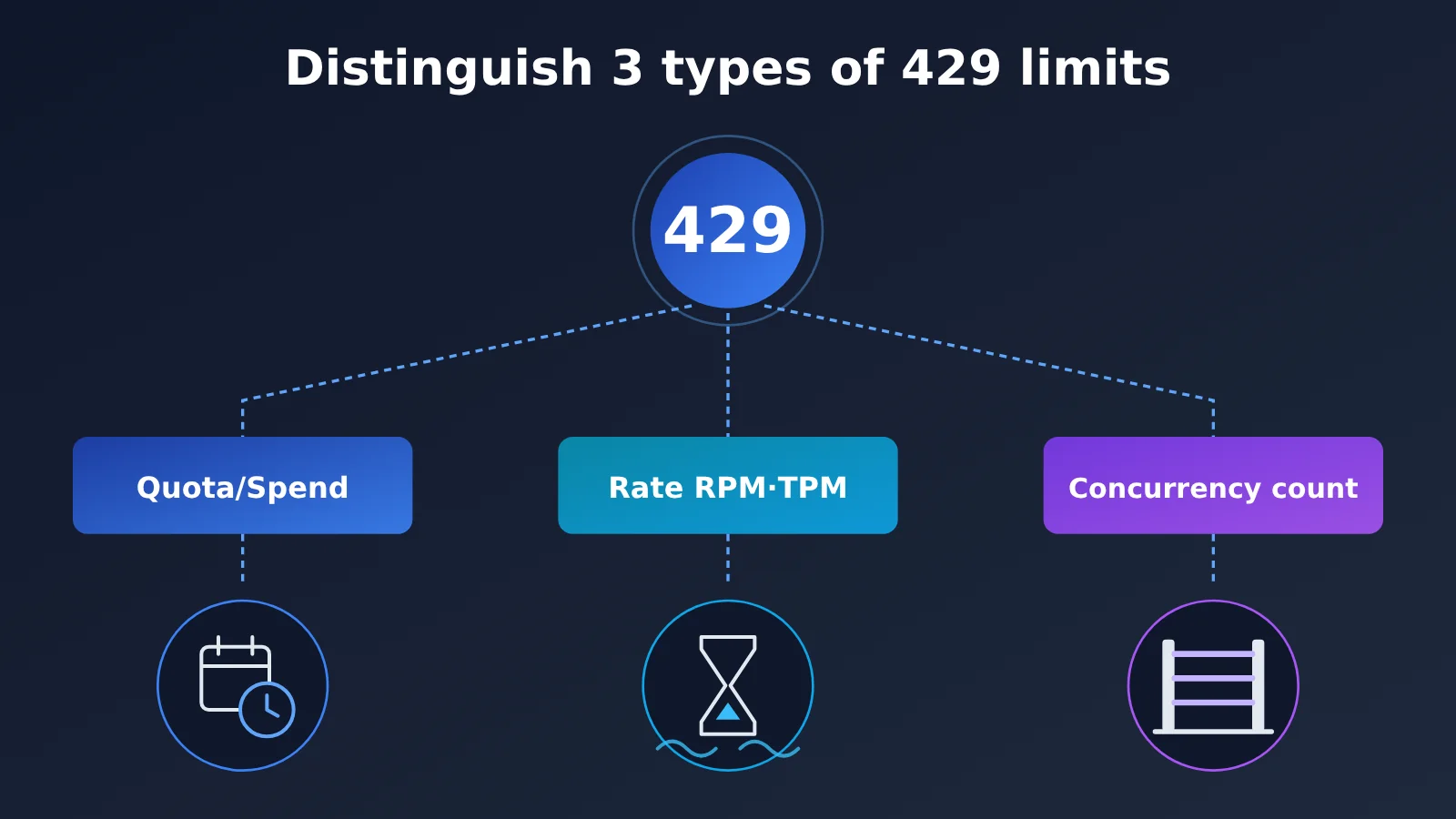
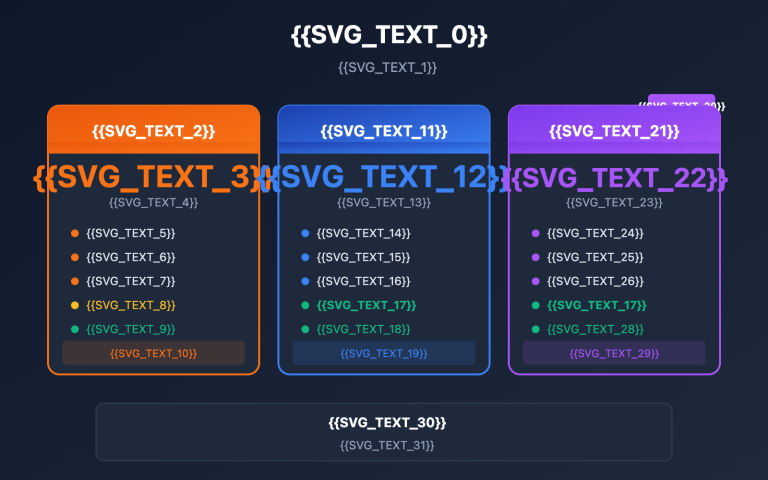
429 Rate Limit Troubleshooting Knowledge Map
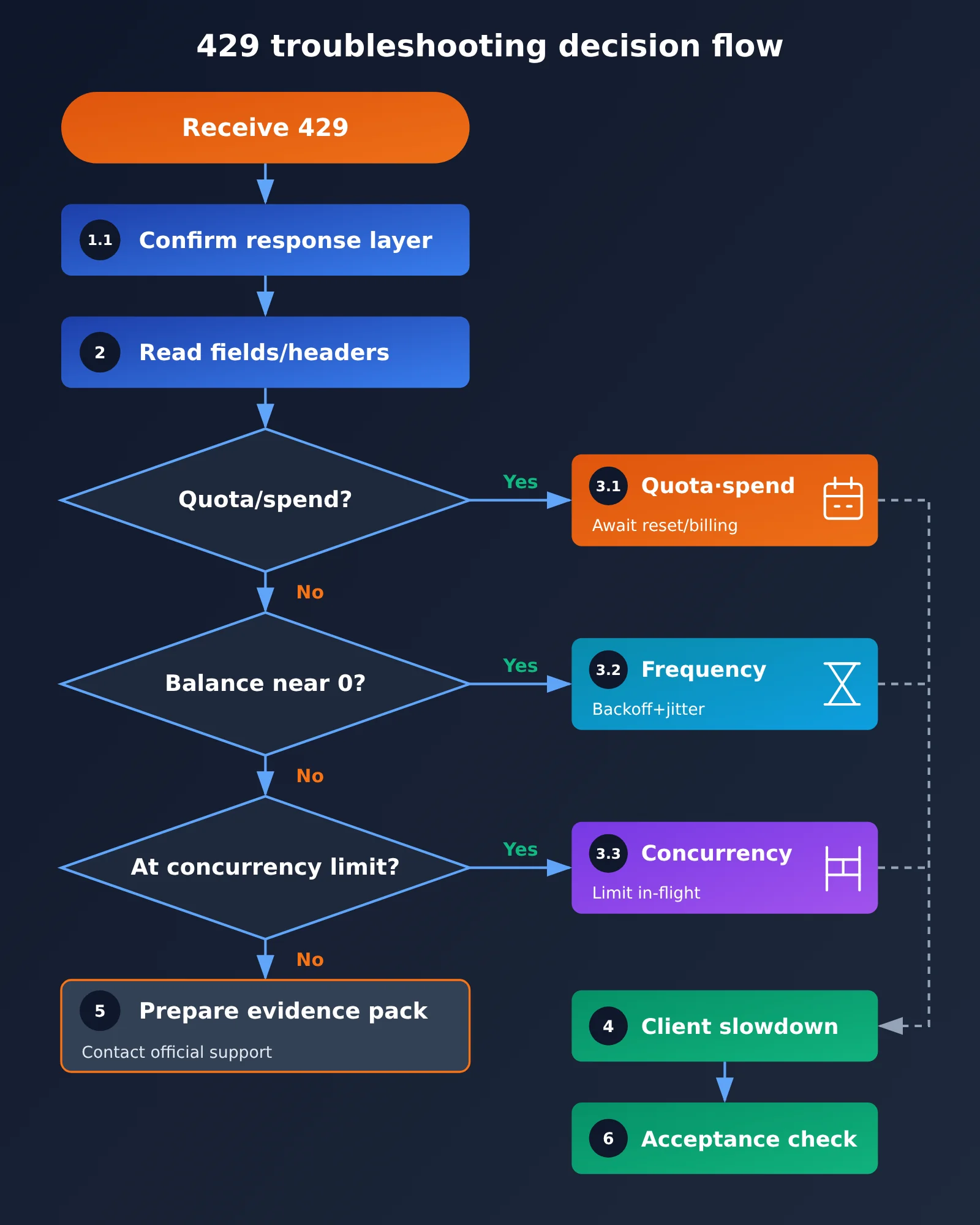
Figure notes: First identify the returning layer, then read the structured fields, then rule out the three categories of cause in order: quota, frequency, and concurrency. Each category is handled differently, but in the end all of them converge on the same layer of the client-side queue for unified pacing. If none of the three can explain the failure, assemble the evidence and hand it to the actual returning party’s official support. The node numbers in the diagram map one-to-one to the section numbers below.
Index: Reading order for 429 troubleshooting
- Section 1, identify the returning layer and the three framings: This is the prerequisite for everything that follows. Get the returning layer wrong and you’ll also be looking in the wrong place in the backend.
- Section 2, vendor-specific fields: OpenAI, Gemini, Claude, and DeepSeek — look up whichever you need; the subsections are parallel to each other.
- Section 3, use logs to determine which limit was hit: Use the fields you read in Section 2, plus the three framings from Section 1, to make a call against real logs.
- Section 4, client-side compliant pacing: Put the conclusions from Section 3 into code.
- Section 5, evidence packet and official support: For cases Section 3 can’t explain.
- Section 6, acceptance check: To confirm the fix has taken effect.
To Know: Terms you need to understand 429
| Term | Brief explanation |
|---|---|
| HTTP 429 | “Too Many Requests” as defined by RFC 6585. The exact counting method and the limiting party are up to the service provider, and the response may include Retry-After |
Retry-After |
Indicates the earliest moment you may retry. The HTTP spec allows either integer seconds or an HTTP date; individual vendors may support only one of the two |
| QPS / RPM / RPD | Requests per second, per minute, and per day, respectively |
| TPM / ITPM / OTPM | Tokens per minute, plus Claude’s separate input and output tokens per minute |
| In-flight count | Requests already sent but not yet completed; unfinished streaming requests count too |
| Request ID | The identifier a vendor or gateway assigns to each request — key evidence when filing a support ticket |
1 Locating the layer that returns the 429, and the three categories of limits
1.1 First, figure out which layer returned the 429
You've reached your rate limit is a message meant for humans. It might show up in the platform’s error body, or come from an SDK exception, or be paraphrased by the app UI. Once you see it, check four things on the actual request chain: the request host and path, the HTTP status code, the response content type, and the raw error body. That one line on the screen alone won’t tell you where the limit came from.
If the chain runs through APIYI apiyi.com or a gateway you built yourself, you need to correlate client logs, gateway logs, and any upstream request ID you can get hold of, confirm which layer rejected the request, and then check that layer’s account or project console. When a team has several projects, there’s one more check: which project does the credential in use belong to, and is that the same console you’re looking at?
1.2 How to tell quota, rate, and concurrency limits apart
| Dimension | What’s measured | Typical symptom | How to tell | What to do |
|---|---|---|---|---|
| Quota / spend | Balance, daily request count, hard budget cap — at the org, project, or workspace level | Rejected even at very low traffic, and waiting a few minutes doesn’t help | Structured error code, quota status in the console | Wait for the reset, hand it to the billing owner, request more quota through the official channel |
| Rate | Counts within a time window such as QPS, RPM, TPM | Errors when traffic bursts or long contexts arrive together; recovers after a while | Remaining-requests and remaining-tokens response headers, time-series curve | Honor Retry-After, back off within limits, smooth out your sending |
| Concurrency | Requests in flight at the same time, including streams that haven’t finished | Sending isn’t dense, but errors pile up once there are many long answers | Compare in-flight peak against the concurrency cap you’ve been allocated | Cap the number of in-flight slots and release them correctly |
These three thresholds are measured separately and can also be in play at the same time. “It errors even at very low traffic” is only a clue — on its own it’s not evidence that you’ve hit the quota ceiling. What’s actually reliable is the vendor’s structured error fields and the console status.
2 Error fields and response headers for 429 rate limits across vendors
Different vendors encode the same 429 in very different ways. The table below sums up the fields you can check, and the subsections that follow break each one down — so you can look up whichever vendor you’re using.
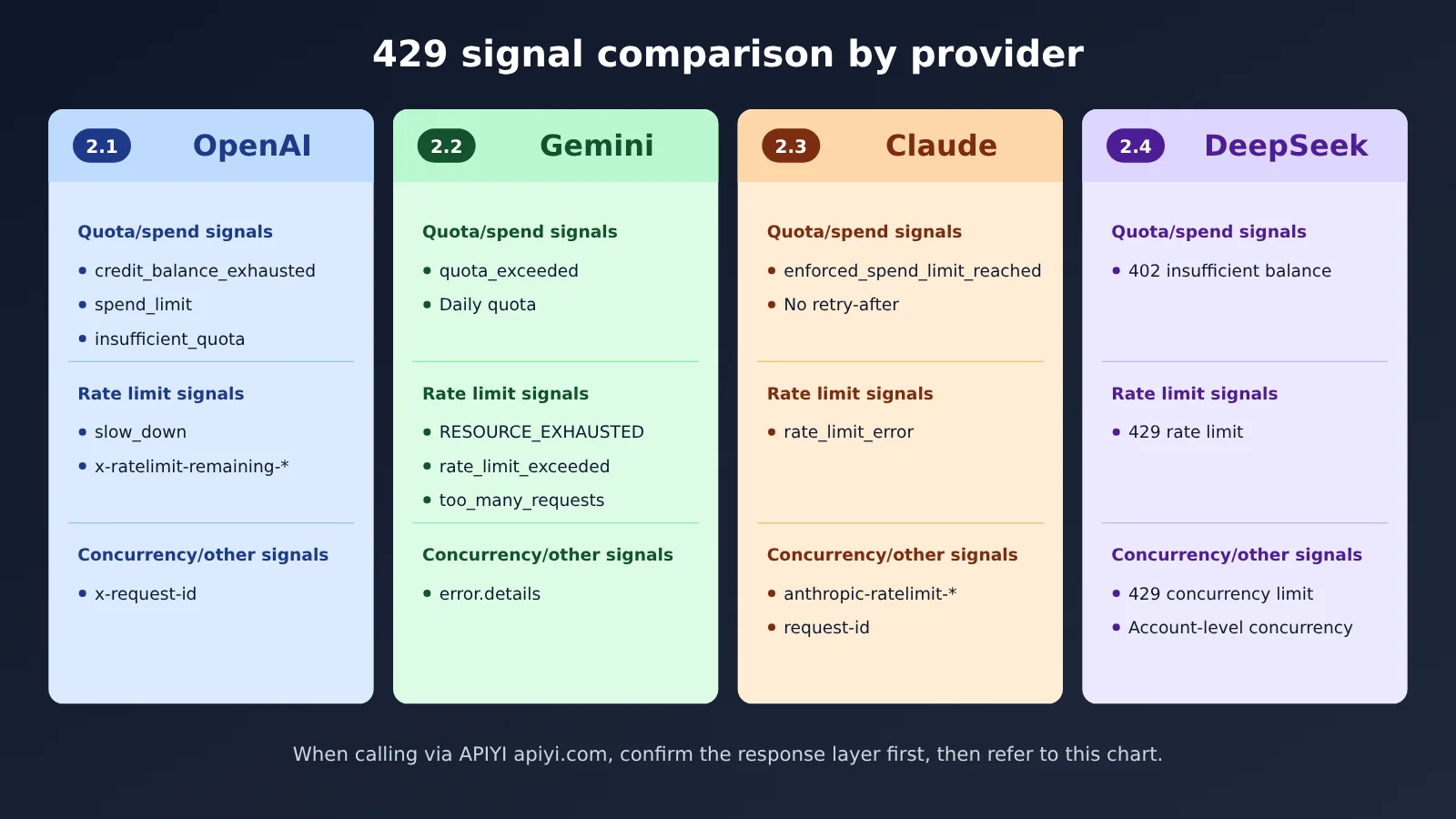
| Vendor | Quota / spend signals | Rate signals | Key response headers / IDs | Where to check in the console |
|---|---|---|---|---|
| OpenAI | credit_balance_exhausted, organization_spend_limit_exceeded, project_spend_limit_exceeded, organization_usage_limit_exceeded; error.type may be insufficient_quota |
slow_down and similar |
x-ratelimit-remaining-requests/tokens, x-ratelimit-reset-*, x-request-id |
Organization Limits, project, hard spend limits |
| Gemini | quota_exceeded from Interactions; 402 prepaid balance exhausted |
rate_limit_exceeded, too_many_requests, RESOURCE_EXHAUSTED |
error.details |
AI Studio project, model, tier limits |
| Claude | error.details.error_code=enforced_spend_limit_reached |
rate_limit_error |
anthropic-ratelimit-*-remaining/-reset, request-id |
Console’s Rate limits, Usage, Spend limits |
| DeepSeek | 402 insufficient balance | 429 rate or concurrency limit reached | Refer to the error table | Account-assigned limits |
2.1 OpenAI API’s 429 fields
For OpenAI’s 429 response, you need to read both error.code and error.type. The official error table lists billing-related codes such as credit_balance_exhausted, organization_spend_limit_exceeded, project_spend_limit_exceeded, and organization_usage_limit_exceeded; their broader error.type may be insufficient_quota. slow_down means the request rate is rising too quickly.
For rate limits, check x-ratelimit-remaining-requests, x-ratelimit-remaining-tokens, and the corresponding x-ratelimit-reset-requests and x-ratelimit-reset-tokens. If project-level token limits apply, the response may also include fields such as x-ratelimit-remaining-project-tokens. Keep x-request-id; you’ll need it when submitting a support request.
2.2 Google Gemini Developer API’s 429 fields
An HTTP 429 returned by generateContent may include error.status=RESOURCE_EXHAUSTED, where error.code is the HTTP status code in numeric form and error.details provides additional context. The same symbolic status also appears in the HTTP 402 returned when the endpoint’s prepaid balance is exhausted, so you must read it together with the HTTP status. The Interactions API uses a string-form error.code: rate_limit_exceeded means the per-minute or per-second request count or token limit has been hit, quota_exceeded means the daily quota has been hit, and too_many_requests means too many requests in a short period. Streaming errors from this API may also be delivered through SSE error events.
Gemini’s RPM, input TPM, and RPD limits apply independently and accumulate per project, with RPD resetting at midnight Pacific Time. Some accounts may also hit a rolling ten-minute spend rate limit, so even when both the daily quota and per-minute usage have headroom, bursts of high-cost requests can still trigger a 429. Google Cloud’s enterprise Agent platform has its own separate capacity and billing framework; 429s from pay-as-you-go endpoints may also come from insufficient shared capacity, and you’ll need to locate the cause using that product’s own documentation.
2.3 429 Fields in the Claude Messages API
In Claude’s HTTP 429 responses, error.type may be rate_limit_error. Note that the organization-level monthly tier spend cap also uses this type; to distinguish it, check whether error.details.error_code is enforced_spend_limit_reached. These responses don’t include retry-after, and usage only recovers at 00:00 UTC on the first day of the next month, or after a limit increase is approved.
For normal rate limits, check RPM, input ITPM, and output OTPM separately by model category; they can also be triggered when traffic spikes. Relevant response headers include anthropic-ratelimit-requests-remaining, anthropic-ratelimit-input-tokens-remaining, anthropic-ratelimit-output-tokens-remaining, and their respective -reset headers. Reset times use RFC 3339 format. Anthropic explicitly notes that minute-level limits may also be enforced over shorter intervals.
2.4 429 Fields in DeepSeek’s Native API
DeepSeek’s error table lists insufficient balance as 402 and request rate or concurrency hitting its cap as 429. Model inference concurrency is measured at the account level: it starts counting when the request is sent and ends when the model response is complete, and all API keys under the same account share this limit. The independent Search and Fetch endpoints each have their own account-level QPS, and the Files API’s upload parsing can also return 429 when the number of concurrent in-flight requests reaches its limit. Whichever endpoint you call, check that endpoint’s quota.
3 Use Request Logs to Determine Which Limit Triggered a 429
When diagnosing, plot requests per second and per minute, input volume, output volume, retry volume, in-flight count, and remaining budget on the same timeline. The three cases below correspond to 3.1, 3.2, and 3.3 in the knowledge map.
3.1 Case: Quota or Spend Cap Is Hit
Suppose the actual logs from the Interactions API show quota_exceeded, and the project’s daily request curve has already reached the model’s daily limit. You can determine that the daily quota is exhausted. Tasks should be queued according to the daily quota, and the UI can show the converted next available execution time. If OpenAI returns a project spend cap code instead, ask someone with permission to manage that project to check the hard limit and the organization’s limit. Organization balance and project limits are configured in different places.
A common trait of this type of issue is that retries won’t succeed before the reset time. The right approach is to put the request into a “pending reset” or “pending billing handling” state instead of putting it back into the immediate queue.
3.2 Case: Request Rate or Token Rate Is Hit
Suppose the per-minute request curve is flat, but when a new batch of long documents arrives, the input token headroom drops to zero first. This means the bottleneck is TPM or ITPM, not RPM. To handle it, estimate the input budget each large request needs and queue it separately. Save both the estimated value and the actual measured value so you can calibrate later. If the output token limit is the one being hit, shorten the output length, for example by lowering max_tokens.
Another case is requests bunching up when hourly jobs start. In that case, merge duplicate requests locally, set a fixed dispatch rate for the queue, and stagger the start times of the various scheduled jobs. Also confirm whether different models share the same limit, and whether short-window peaks exceed the prorated value of the per-minute limit.
3.3 Case: Concurrency Cap Is Hit
Concurrency usage can be understood with a rough formula: average in-flight requests ≈ requests arriving per second × average processing seconds. For example, assume 3 requests arrive per second and each takes 10 seconds on average; then about 30 requests are in flight at the same time on average. This is only an estimate to illustrate the relationship; rely on monitoring data in practice.
Suppose the number of requests submitted per second and tokens per minute stay roughly flat, but as longer responses increase, the in-flight peak rises and hits the concurrency cap allocated to DeepSeek. When verifying, count only requests that have actually been sent; tasks still queued and not yet sent should be counted separately. To handle it, reduce the number of streaming requests released at once, and record completion and cancellation for each request. Long tasks can go into a separate queue with a fixed slot allocation, leaving room to serve short tasks. Once monitoring returns to normal, ramp traffic back up starting from low concurrency, staying within the provider’s cap.
4 Client-Side Compliance Rate Limiting: Handling 429 Rate Limits
All backoff logic should live in a single queue layer, with these rules:
- When a valid
Retry-Afteris present, treat it as the earliest retry moment. - When the response header is missing, fall back to a bounded number of exponential backoff attempts with jitter added in.
- When tracking total wait time and total attempt count, include the SDK’s built-in automatic retries.
- Once the request deadline passes, release the in-flight request, then let business rules decide whether it goes into the delayed queue.
Also, once an error is confirmed to be quota- or spend-related, stop retrying immediately. This section covers client-side backoff only — it doesn’t touch any approach for getting around quotas or rate limits.
4.1 Minimal Example: Detecting 429 and Respecting Retry-After
import time, random, openai

client = openai.OpenAI(
    api_key="YOUR_API_KEY",
    base_url="https://api.apiyi.com/v1",  # APIYI OpenAI-compatible endpoint
    max_retries=0,  # Disable the SDK's automatic retries; this layer handles them uniformly
)

def call_once(messages, attempt_max=4):
    for attempt in range(attempt_max):
        try:
            return client.chat.completions.create(model="gpt-4o-mini", messages=messages)
        except openai.RateLimitError as e:
            ra = e.response.headers.get("retry-after")
            wait = float(ra) if ra and ra.isdigit() else min(30, 2 ** attempt) * random.uniform(0.5, 1.0)
            print("429:", e.response.headers.get("x-request-id"), "wait", round(wait, 1))
            time.sleep(wait)
    raise RuntimeError("超过最大尝试次数,转入延迟队列或人工处理")
This code only demonstrates a minimal end-to-end loop, and it doesn’t yet distinguish quota-type errors. For production, use the full version below: it classifies the error first, then decides whether to retry, while a semaphore limits the number of in-flight requests.
View the full implementation code (classification + concurrency slots + deadline)
import asyncio, random, time
from email.utils import parsedate_to_datetime
import openai

client = openai.AsyncOpenAI(
    api_key="YOUR_API_KEY",
    base_url="https://api.apiyi.com/v1",
    max_retries=0,
)

# Quota/spend type: do not enter immediate retry
HARD_CODES = {
    "credit_balance_exhausted", "organization_spend_limit_exceeded",
    "project_spend_limit_exceeded", "organization_usage_limit_exceeded",
    "insufficient_quota", "quota_exceeded", "enforced_spend_limit_reached",
}

MAX_INFLIGHT = 8                 # Below the allocated concurrency limit; adjust incrementally based on monitoring
inflight = asyncio.Semaphore(MAX_INFLIGHT)

def classify(e: openai.APIStatusError) -> str:
    body = e.body if isinstance(e.body, dict) else {}
    err = body.get("error", body) if isinstance(body, dict) else {}
    fields = {str(err.get("code", "")), str(err.get("type", ""))}
    details = err.get("details")
    if isinstance(details, dict):
        fields.add(str(details.get("error_code", "")))
    if fields & HARD_CODES or e.status_code == 402:
        return "quota"
    return "transient"

def parse_retry_after(value):
    if not value:
        return None
    if value.strip().isdigit():
        return float(value)
    try:  # HTTP date format
        return max(0.0, parsedate_to_datetime(value).timestamp() - time.time())
    except (TypeError, ValueError):
        return None

def log_evidence(e, kind):
    h = e.response.headers
    print({
        "ts": time.strftime("%Y-%m-%dT%H:%M:%S%z"),
        "status": e.status_code, "kind": kind,
        "request_id": h.get("x-request-id") or h.get("request-id"),
        "remaining_req": h.get("x-ratelimit-remaining-requests"),
        "remaining_tok": h.get("x-ratelimit-remaining-tokens"),
    })  # Don't log keys, auth headers, or the original request's business content

async def call(messages, model="gpt-4o-mini", deadline_s=60, attempt_max=5):
    start = time.monotonic()
    for attempt in range(attempt_max):
        async with inflight:  # Completion, exception, and cancellation all release the slot
            try:
                return await client.chat.completions.create(model=model, messages=messages)
            except openai.RateLimitError as e:
                kind = classify(e)
                log_evidence(e, kind)
                if kind == "quota":
                    raise  # Hand off to the pending-reset/billing handling state
                wait = parse_retry_after(e.response.headers.get("retry-after"))
        if wait is None:
            wait = min(30, 2 ** attempt) * random.uniform(0.5, 1.0)
        if time.monotonic() - start + wait > deadline_s:
            raise TimeoutError("超过请求截止时间,转入延迟队列")
        await asyncio.sleep(wait)  # Waiting doesn't occupy an in-flight slot
    raise RuntimeError("超过最大尝试次数")
Quick start tip: Start by running the code above with the free trial quota at APIYI apiyi.com. Watch what the actual error body and response headers look like when a 429 comes back, then decide which fields
classifyneeds to match. Error formats can vary depending on which layer returns them, so go by the response you actually receive.
4.2 Client-side parameters for the three types of limits
| Limit type | Client-side adjustments | What not to do |
|---|---|---|
| Quota / spend | Mark it as “pending reset,” show the reset time in the UI, notify the billing owner | Keep putting it back on the immediate queue |
| Request rate | Queue send rate, stagger scheduling times, coalesce duplicate requests locally | Ignore Retry-After or retry infinitely |
| Token rate | Estimate the input budget, shorten the context, lower max_tokens |
Stare only at RPM and ignore token headroom |
| Concurrency | MAX_INFLIGHT, a separate queue for long tasks, release the slot on cancel |
Resend after a local abort without confirming upstream state |
On that last row, you need to distinguish two cases: aborting a request locally doesn’t mean the upstream is done processing it. When a streaming request is cancelled by the client, the upstream may still have counted the usage. So your logs should record “local cancel” and “upstream complete” as two separate states.
5 Assemble the 429 Evidence Package and Contact Official Support
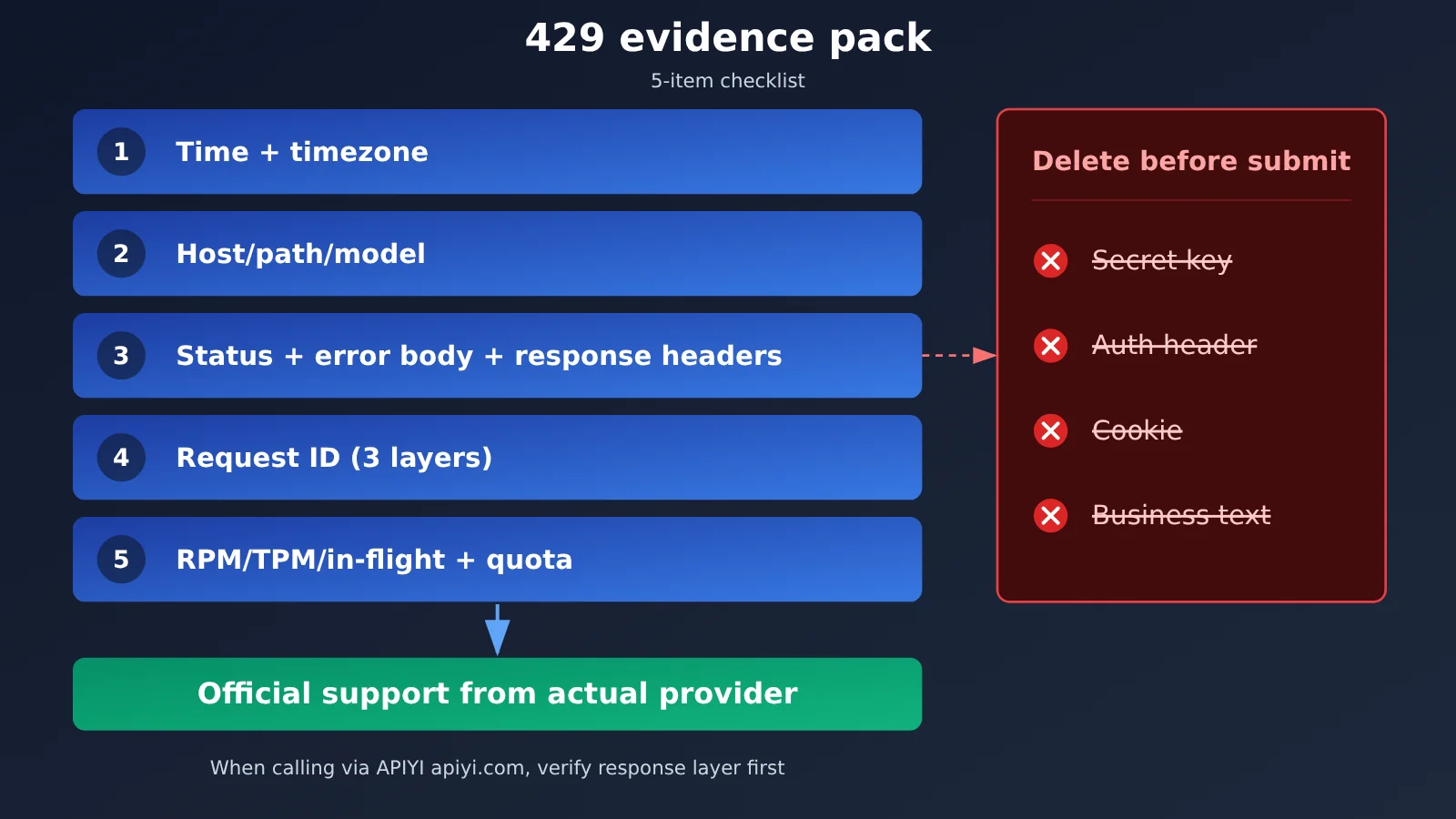
If the dashboard still shows plenty of headroom while the failures keep happening, fill in the gaps with a safe sample and send it to the support channel of the party that actually returned the error. Store the platform’s relayed error separately from the raw response — don’t just submit the single line of text shown in the UI.
| Evidence item | Content | Purpose |
|---|---|---|
| Time | Absolute time plus timezone | Align with the backend usage window |
| Request target | Host, path, model, project or organization | Identify which entity the limit applies to |
| Response | HTTP status, redacted error body, available response headers | Determine which dimension the limit comes from |
| Request ID | x-request-id, request-id, the gateway’s own ID |
Lets support look up the request |
| Same-window metrics | RPM, TPM, in-flight count, corresponding backend quota | Prove whether the cap was actually reached |
Before you submit, strip out keys, auth headers, cookies, and your actual business content. The official channels are as follows: OpenAI’s Help Center has a support entry point; Google’s troubleshooting page lists technical feedback and billing support channels; Claude’s documentation explains how request IDs are used and where to request a quota increase; DeepSeek’s concurrency page provides an account-expansion ticket. If your requests go through APIYI apiyi.com, you can start by contacting APIYI technical support with the platform-side request records, to confirm whether the limit comes from the platform layer or from the original vendor.
6 Acceptance: Confirming the 429 Rate Limit Handling Works
Once the handling is in place, use the following checks to verify the results:
- Correct classification: Spot-check the most recent 429s. Each one should map to exactly one category—quota, rate, or concurrency—or should already be in the official support process.
- No retries for quota-related errors: In the logs, retry counts for quota or spend errors should be 0, and tasks should remain in a pending-reset or pending-billing state.
- Rate-related errors respect the wait: The actual retry interval should be no shorter than
Retry-After, and the total attempt count should include the SDK’s automatic retries. - Concurrency stays under control: The in-flight peak should remain within
MAX_INFLIGHT, and both canceled and timed-out requests should release their slots. - Evidence is traceable: Any 429 should be correlatable by request ID across records from the client, gateway, and upstream provider.
If all five are met, your 429 handling has moved from guesswork to evidence-based handling. If you want to compare rate-limiting behavior across multiple models, you can use APIYI apiyi.com to switch models with the same code and validate.
References
- RFC 6585 Section 4 (429 definition):
rfc-editor.org/rfc/rfc6585.html - RFC 9110 Section 10.2.3 (Retry-After):
rfc-editor.org/rfc/rfc9110.html - OpenAI error codes and rate limits:
developers.openai.com/api/docs/guides/rate-limits - Gemini Developer API rate limits and error format:
aistudio.google.com/docs/rate-limits - Claude error format and quotas:
platform.claude.com/docs/en/api/rate-limits - DeepSeek concurrency rules and error codes:
api-docs.deepseek.com/zh-cn/quick_start/rate_limit/
Author: APIYI Technical Team
Technical contact: Feel free to reach us via the APIYI apiyi.com homepage. For more integration docs, see the docs.apiyi.com documentation center.