Author’s note: A selection comparison between the AI video models MAGI-2 and Kling 4.0, broken down across four dimensions—image quality specs, control methods, audio capabilities, and per-second pricing—to help commercial production teams and individual creators decide on their primary model.
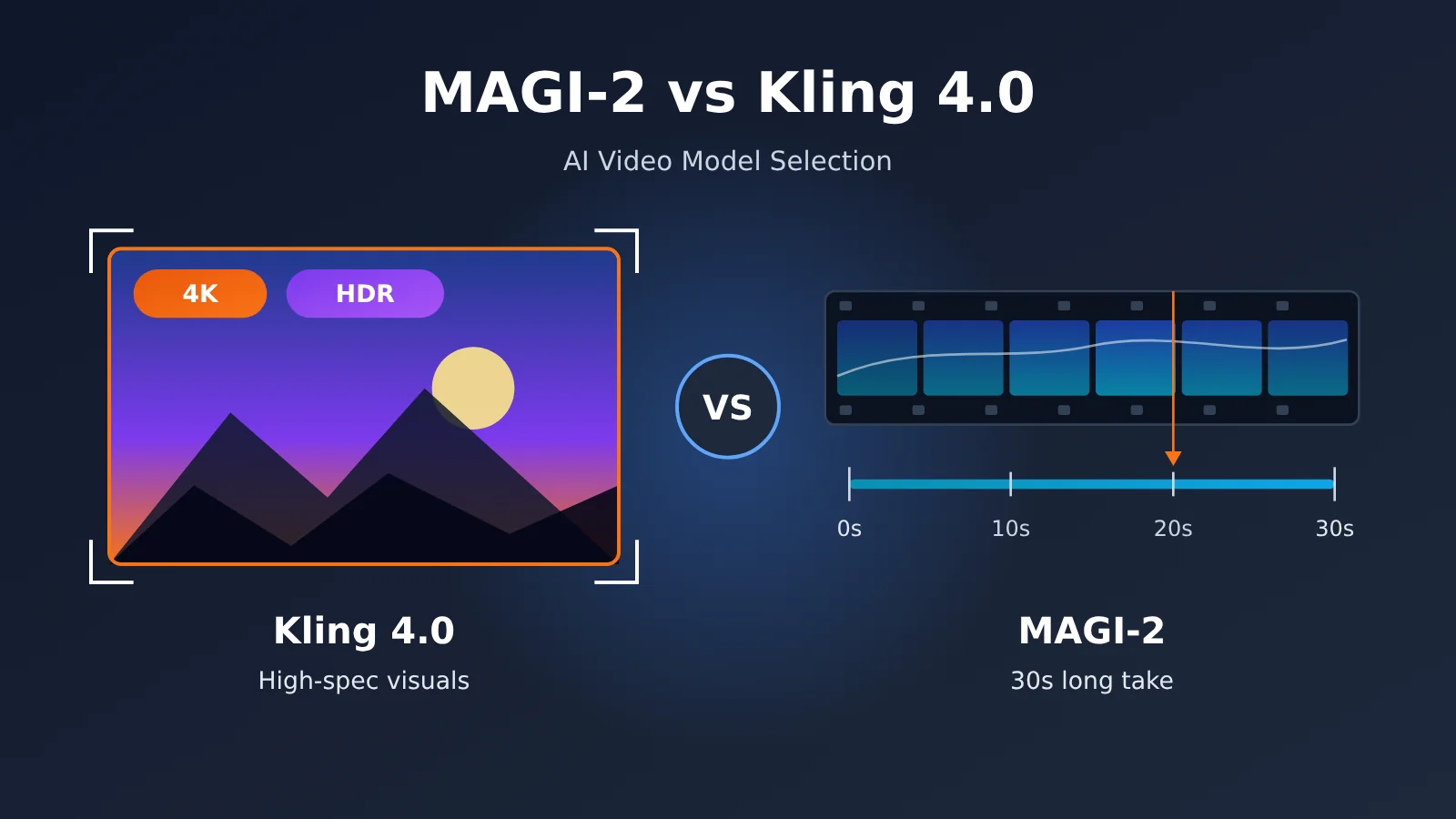
AI video model selection added another question this week. In the early hours of November 25, 2026 (Beijing time), Sand.ai released MAGI-2: up to 30 seconds per generation, 1080p, with visuals and audio generated simultaneously, and an officially self-reported price of $0.08 per second. On the other side, Kling 4.0 has been open to everyone since October 15, 2026, with native 4K and 10-bit HDR officially available starting November 19, 2026, plus multi-keyframe support and Mandarin-accented dialogue.
This isn’t a “who’s stronger” ranking. The two models take two different paths: Kling 4.0 pushes delivery specs and control granularity higher, while MAGI-2 pushes down the cost of a single clip’s duration and swaps the control method for assets plus a timeline. All vendor figures below are labeled as either officially self-reported or quoted directly from official documentation; third-party claims will note who said them and on what date.
Core value: After reading this, you’ll have four comparison tables—image quality specs, references and control methods, audio capabilities, and per-second pricing—plus the spots where each model is most likely to trip you up, so you can judge whether 4K HDR and multi-keyframe are must-haves for your project.
Core Differences Between MAGI-2 and Kling 4.0: Start With Image Quality Specs
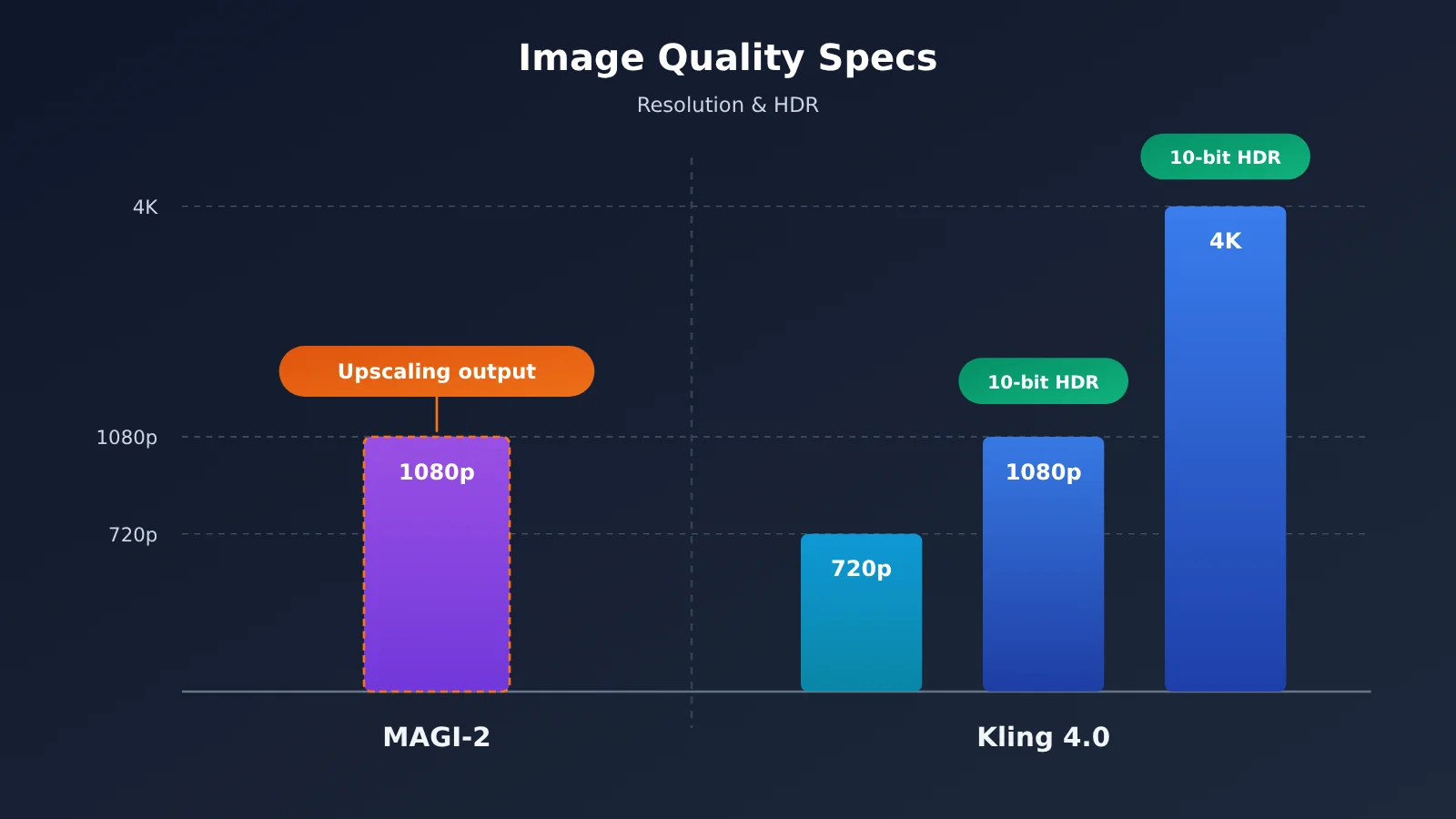
Let’s put the hard specs on the table first. A lot of people assume the “30-second long shot” is MAGI-2’s exclusive selling point, but Kling 4.0 can also generate up to 30 seconds in a single run (3–30 seconds, in 1-second steps, default 10 seconds). What really separates the two is the resolution ceiling, HDR, and how you control it.
| Comparison dimension | MAGI-2 (official self-reported) | Kling 4.0 (official docs) |
|---|---|---|
| Single-run duration | Up to 30 seconds | 3–30 seconds, 1-second steps, default 10 seconds |
| Resolution ceiling | 1080p | 720p / 1080p / 4K |
| HDR | Not mentioned in official materials | 1080p and 4K support 10-bit HDR |
| Frame rate | 25fps | Not listed separately in official materials |
| Aspect ratio | 6 aspect ratios | 21:9 / 16:9 / 1:1 / 9:16 / Auto |
| Text within the frame | Reference image re-injected during the upscaling stage to improve text clarity | Supports multiple languages, emoji, logo (2026-11-04 user guide) |
| API model ID | Invoked through official launch channels | kling-v4 |
Where MAGI-2’s 1080p Actually Comes From
MAGI-2’s official technical blog spells it out: 1080p goes through a latent spatiotemporal upscaler, and during the upscaling stage the original reference image is re-injected to improve face consistency and text clarity in 30-second long shots. In other words, MAGI-2’s 1080p is a product of the upscaling stage, not native 1080p generation. That barely matters for social platform deliverables, but if you’re doing big-screen placement or secondary cropping, you need to factor this in.
The model itself is also much bigger than the previous generation. The blog gives 480B total parameters and roughly 28B activated parameters, using a Multi-Head Latent MoE structure; the previous generation, MAGI-2 Preview (2026-08), had 114B total parameters and about 6B activated. Pretraining data was expanded to 4T tokens, roughly 3x that of Preview.
Who Actually Needs Kling 4.0’s 4K HDR
The point of 10-bit HDR is the color grading space. Teams shooting commercial films often hand footage to a colorist, and 8-bit footage pushed with curves tends to band — 10-bit preserves more midtones. If your deliverable goes into an editing suite for another grading pass, or needs to be intercut with live-action footage, Kling 4.0’s 4K HDR is a genuine delivery spec, not decoration on a spec sheet.
Conversely, if the final video goes straight to a vertical platform with no post grading, 1080p is already enough, and the 4K HDR premium is hard to recoup. That’s the core judgment of this article: first confirm whether there’s a grading step in your delivery chain, then decide whether to pay for 4K HDR.
How MAGI-2 and Kling 4.0 handle control: the keyframe route vs. the source-material route
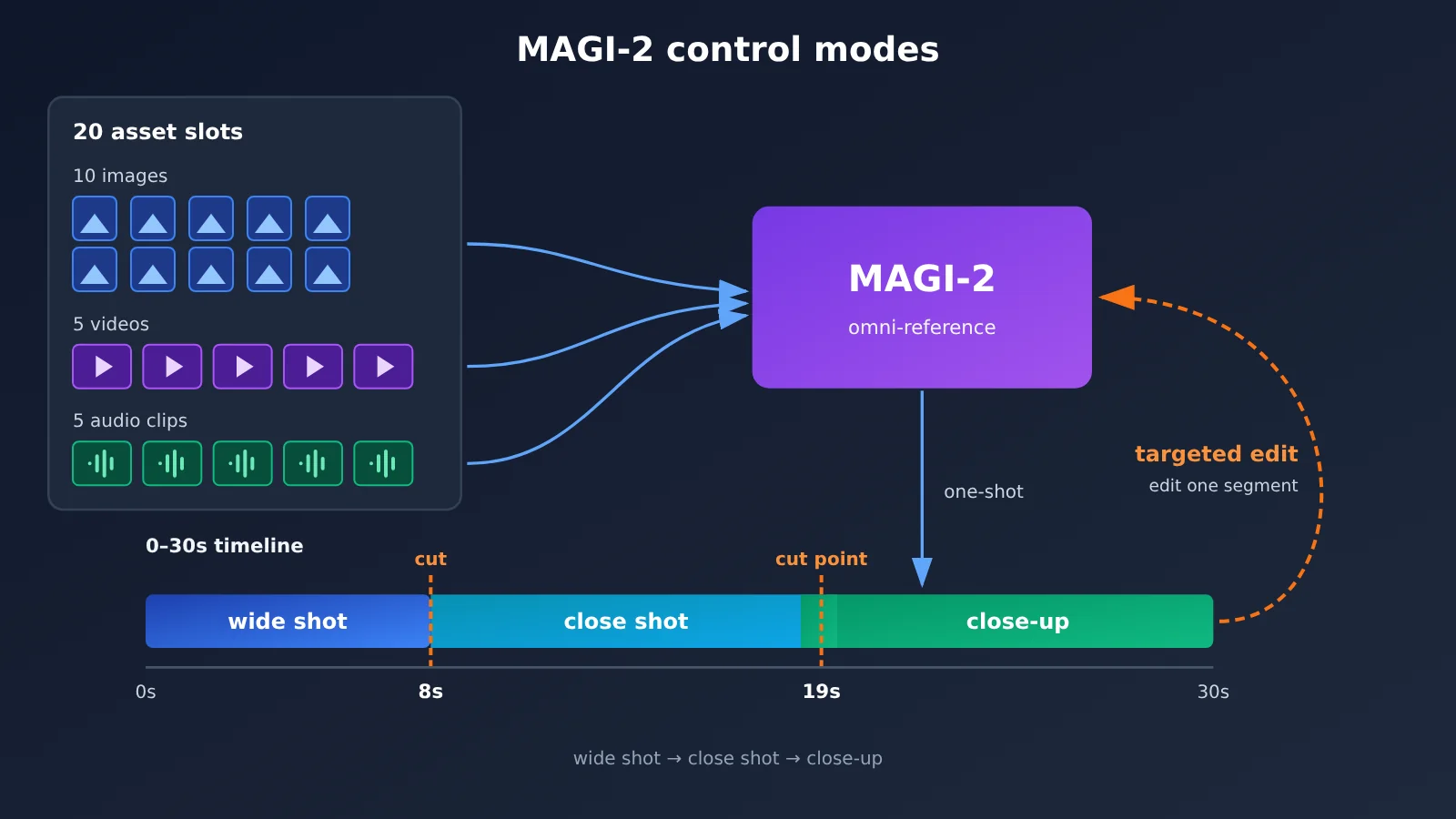
This is where the two models diverge the most, and it’s the part that shapes your workflow the most. Kling 4.0’s philosophy is “tell the model what the picture should look like”: keyframes, elements, and sound references stacked layer on layer. MAGI-2’s philosophy is “give the model a pile of material, then tell it which second to cut at”: multimodal assets plus timeline cut points, plus targeted edits on existing video.
| Control | Kling 4.0 (official docs) | MAGI-2 (official tech blog) |
|---|---|---|
| Keyframes | Up to 10 | No keyframe spec; timeline cut points instead |
| Reference images | 10 | 10 (inside omni-reference) |
| Reference videos | 5 clips, ≤30 seconds total | 5 clips |
| Reference audio / sound | Sound reference | 5 audio clips |
| Elements | Up to 7, 3 of which are video elements | No separate spec |
| Per-request total cap | Up to 15 items combined across reference categories | Up to 20 media assets per request |
| Shot-cut control | Through keyframe arrangement | You can specify the second to cut at and the shot size to cut to |
| Re-editing existing video | Not listed separately in official materials | Targeted editing supported |
Kling 4.0: 10 keyframes + elements + sound reference + accent
Kling 4.0 is built for projects where “the picture has to match the storyboard exactly.” With 10 keyframes, you can feed in your storyboard frame by frame and let the model fill in the motion between them; the 7 elements lock down consistency for products, characters, or props. One thing to watch: the individual caps add up to far more than 15, but references are capped at 15 items across all categories — on complex ad jobs you’ll hit that overall ceiling first.
MAGI-2: 20 assets + timeline cut points + targeted editing
MAGI-2’s omni-reference takes up to 20 media assets per request (10 images + 5 videos + 5 audio clips), a wider ceiling than Kling 4.0’s total cap. The more distinctive feature is timeline control: you can literally write “cut to a close-up at second 8” and tell a multi-shot story inside a single 30-second clip. Targeted editing of existing video is the right fit for rework scenarios where “the whole thing’s fine, I just want to change one segment” — no need to regenerate the entire clip.
Audio Capability Differences Between MAGI-2 and Kling 4.0
Both models “come with sound the moment they deliver a shot,” but they emphasize different things. According to the official MAGI-2 blog, a single backbone generates visuals and audio at once—including dialogue lip-sync, foley, ambient sound, and music—rather than relying on post-production dubbing. Its strength is sound-image synchronization, paired with 5 reference audio segments to steer the sound direction.
Kling 4.0’s audio capability leans more toward “delivery configuration”: dual-channel stereo; dialogue supports Chinese, English, Japanese, Korean, Spanish, Portuguese, German, French, and Hindi, with Chinese also offering accents such as Beijing, Taiwanese, Northeastern, Sichuanese, and Cantonese, plus voice reference. If you’re producing regional ads with dialects, or multi-language version rollouts, Kling 4.0’s accent options are a capability with no counterpart in MAGI-2’s official materials.
MAGI-2’s official docs also admit the shortcomings in audio: the layering and physical realism of complex soundscapes are still insufficient. For scenes with mixed multiple sound sources (like a noisy street market plus dialogue plus background music), it’s recommended to leave headroom for post-production mixing.
MAGI-2 and Kling 4.0 Per-Second Pricing: Three Separate Calculations
Pricing is the easiest thing to get muddled. Here we break it into three separate calculations: MAGI-2’s official per-second price, Kling 4.0’s official API list price, and the actual price of similar models on APIYI. They use different bases, so they can’t be merged into a single number.
Item One: Putting Both Official Price Lists on a Per-Second Basis
| Spec (one 30-second clip) | MAGI-2 official price | Kling 4.0 official API price (no input video) | Kling 4.0 with input video (0.6x) |
|---|---|---|---|
| 720p | Not offered | $0.157/sec, about $4.71 | $0.094/sec, about $2.82 |
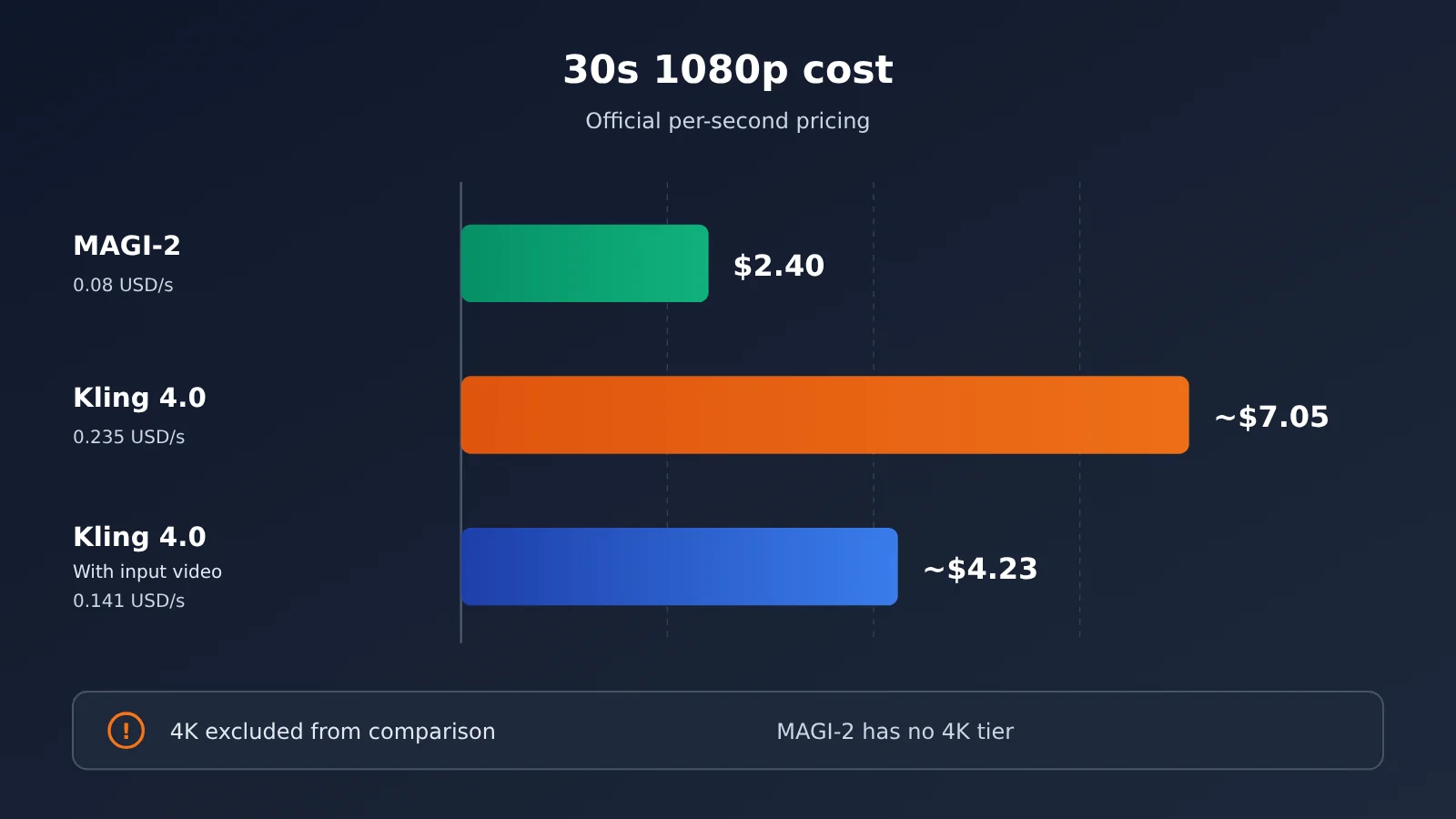
| 1080p | $0.08/sec, $2.40 | $0.235/sec, about $7.05 | $0.141/sec, about $4.23 |
| 4K | No 4K tier, so it sits this one out | $0.549/sec, about $16.47 | $0.329/sec, about $9.87 |
Take the same 30-second 1080p clip: MAGI-2 comes to $2.40, while Kling 4.0 without an input video runs about $7.05. On the 4K tier, Kling 4.0 charges $0.549/sec — but MAGI-2 has no 4K option at all, and stacking a 4K price against a 1080p one isn’t a fair comparison. On top of that, Kling 4.0 Flash covers 3–20 seconds at up to 720p for $0.094/sec (no input), which makes it a solid choice for quick drafts, though it can’t reach a 30-second long take.
MAGI-2 made its debut on the Higgsfield platform and its API. A third-party site, onvid.ai (2026-11-24), lists a duration range of 4–30 seconds and $2.40 for a 30-second clip, which lines up with the official per-second pricing.
The Second Calculation: Comparable Models You Can Actually Call on APIYI
Now let’s see whether it can run directly on APIYI. MAGI-2 isn’t listed yet — we’ll get it up as soon as we can; specific model names and prices are subject to the platform’s model list. Kling 4.0 also isn’t available on the APIYI side right now; the “upcoming video models” section of the docs only goes as far as Kling 3.0. If you need to run a long take or a video with an audio track on APIYI apiyi.com today, here are the models currently on the shelf:
| Model ID | Resolution & On-Platform Price | Duration & Capabilities | Where to Call |
|---|---|---|---|
wan3.0-video |
480P $0.0294 / 720P $0.0588 / 1080P $0.1176 per second | Up to 30 seconds, one ID covers every mode, audio track on by default | APIYI |
doubao-seedance-2-5-260628 |
Billed per token (SeeDance2 tier 0.18x); 720p/30 sec $8.1761, 1080p/5 sec $3.0873 | 4–30 seconds, up to 30 reference images, audio track on by default | APIYI |
wan2.7-t2v / wan2.7-i2v |
720P $0.084 / 1080P $0.14 per second | Audio-driven lip sync is supported only by wan2.7-i2v‘s driving_audio |
APIYI |
| HappyHorse 1.1 | 720P $0.126 / 1080P $0.224 per second | Up to 9 reference images | APIYI |
MiniMax-H3 |
768P only, $0.03 per second | 4–15 seconds, 9 images + 3 videos + 3 audio references, audio track can’t be turned off | APIYI |
Converted at on-platform prices, a single 30-second 1080P wan3.0-video clip comes to about $3.53, which makes it the closest thing on the shelf to “30-second long take + 1080P.” Seedance 2.5’s pre-authorization hold is calculated at $0.135 per second, and 1080p is only supported by the 2.5 and 2.0 standard editions. This calculation reflects APIYI’s actual on-platform prices, which aren’t measured the same way as the two vendors’ official rate cards above.
💰 Pricing advice: Keep the three calculations strictly separate. The official rate card determines “how much you’ll spend going through the launch channel,” while on-platform pricing determines “how much it costs to run one clip on APIYI apiyi.com today.” The latter is governed by the platform’s pricing page, and you should check the per-second and per-token billing methods separately.
Point 3: Don’t Get Thrown Off by a Single Cost Example or Personal Opinion
The launch partner’s official account once posted a cost example: “This video cost $1.44.” At $0.08 per second, that works out to roughly 18 seconds — and it’s the vendor’s own sample footage, so it doesn’t reflect what your project will cost. X user @chetaslua (2026-11-24) argues that MAGI-2 covers about 90% of what people use Seedance 2.5 for, at nearly 6.5x lower cost. That’s a personal opinion — neither official data nor a replication test — so treat it as a lead only when you’re picking a model.
Getting Started with MAGI-2 and Kling 4.0: Prototype on Similar Models with APIYI First
Before MAGI-2 and Kling 4.0 hit the shelves, you can build out your workflow on models that are already available, and then swap in just the model ID once the new ones go live. APIYI’s base URL is https://api.apiyi.com/v1 — OpenAI-compatible, with one token covering every model currently available, so you don’t need a separate account for each vendor.
- Sign up at APIYI apiyi.com and create a token — new users get free trial credit.
- Set the header
Authorization: Bearer <your APIYI token>, and usehttps://api.apiyi.com/v1as the base_url for the general video endpoints. - To create a Seedance 2.5 task, use
POST https://api.apiyi.com/seedance/api/v3/contents/generations/taskswithmodelset todoubao-seedance-2-5-260628. MiniMax-H3goes throughPOST /hailuo/v2/video_generation;oxygen-1.0goes through/v1/videosat $0.02 per second with a built-in audio track — great for low-cost prototyping.- For the Wan series, check the api-capabilities/image-video-models docs for endpoints and parameters; when you need lip-sync, use
wan2.7-i2vand passdriving_audio.
Model IDs are case-sensitive. Writing MiniMax-H3 as minimax-h3 will throw an error outright. Version numbers use dots, as in wan3.0-video and wan2.7-i2v. The same rule applies to any new video models added later — copying the ID straight from the model list is the safest bet.
🚀 Quick start: We suggest first running a 30-second 1080P clip with
wan3.0-videoon APIYI apiyi.com, then running the same prompt through Seedance 2.5 to compare reference image consistency and audio track quality. Both share the same token — switching over just means changing themodelfield.
Where MAGI-2 and Kling 4.0 each tend to get stuck
Spec sheets only tell you what a model can do. In real projects, it’s usually the limitations that slow you down. Here’s a breakdown by model.
Kling 4.0 bottlenecks
- 4K cost: $0.549 per second. A 30-second clip runs about $16.47, and the budget climbs fast when you’re iterating across multiple versions.
- Total reference cap: The individual categories add up to a lot, but the combined total is capped at 15 items, and reference videos combined must still be ≤30 seconds.
- Flash isn’t long enough: Kling 4.0 Flash maxes out at 720p and 20 seconds, so you can’t use it to produce a 30-second sample.
- Same-name trap: Kling 4.0 is a video model, while Kling Image 4.0—launched on 2026-11-17—is an image model. The official English name is just Kling 4.0, not Kling Video 4.0, so don’t search for the wrong model.
MAGI-2 bottlenecks
- Spec ceiling: It tops out at 1080p, and that comes from the upscaling stage. Official materials don’t mention HDR, so there’s limited room for color grading.
- Officially acknowledged limitations: Very high-speed motion occasionally has trajectory and continuity problems; in medium-to-long shots, local motion in 2D animation can look too smooth; and complex soundscapes lack enough layering.
- Instruction triggerability: The official team says post-training RL makes visual reasoning, implicit narrative, and cross-language instruction following harder to trigger. Internally, they view it as similar to an alignment tax, so complex prompts may take several attempts.
- Inconsistent open-source messaging: The blog says 480B total parameters and that it “will be open-sourced,” while the launch post says “open-source weights for the 400B model are coming soon.” The official team hasn’t explained the two numbers, and there’s no timeline or license. onvid.ai (2026-11-24) estimates that 400B weights in 16-bit would be about 800GB, and the 114B preview already needs 8 data-center GPUs—so self-hosting is a high bar.
- Concurrency: orcarouter.ai (2026-11-24) says the standard plan can only run one generation at a time; parallelism is reserved for the enterprise plan. If you need batch output, plan ahead.
MAGI-2 vs Kling 4.0: Use Case Recommendations
When to Choose Kling 4.0
- Commercial delivery: You need 4K and 10-bit HDR to leave the colorist some headroom, or you’ll be intercutting with live-action footage.
- Strict storyboard fidelity: You already have a finished storyboard and want to lock composition frame by frame with 10 keyframes.
- Dialect and multilingual rollouts: You need accents like Beijing, Cantonese, or Sichuan, or dialogue versions in multiple languages.
- In-frame brand elements: You need multilingual text and logos placed inside the shot itself.
When to Choose MAGI-2
- Low-cost 30-second single-take storytelling: The same 30 seconds at 1080p costs $2.40 at list price — perfect for lots of trial and error.
- Asset-driven creation: You already have plenty of images, videos, and audio on hand and want to feed in 20 assets in one go.
- Precise shot cutting: You want to specify cut points and shot sizes by the second, and tell a multi-shot story in a single clip.
- Localized rework: Targeted edits to an existing video, without redoing the whole thing.
MAGI-2 vs Kling 4.0: Decision Guidance
Bringing the four comparisons together, three questions settle it: Does your delivery pipeline involve color grading? Must the storyboard be reproduced frame by frame? Can your per-clip budget absorb the 1080p ~$7 tier or the 4K ~$16 tier? If the answer is yes to all three, Kling 4.0 fits better. If it’s no to all three, MAGI-2’s per-second pricing and timeline control are easier to work with. Somewhere in between, look at which bottleneck hurts your project more.
💡 Recommendation: Before locking in a primary model, run your prompts, reference assets, and post-production workflow through a comparable model already available on APIYI apiyi.com. Once MAGI-2 or Kling 4.0 goes live, just swap the model ID for a side-by-side comparison — that way you won’t have to tear down and rebuild your entire workflow.
FAQ
Q1: What is MAGI-2?
MAGI-2 is an AI video model released by Sand.ai on 2026-11-24. It turns text, images, video, and audio into 1080p video with sound, up to 30 seconds long, at an official price of $0.08/second. The official blog states 480B total parameters with roughly 28B active.
Q2: What’s the biggest difference between MAGI-2 and Kling 4.0?
Both can generate 30 seconds in a single pass. The difference is that Kling 4.0 offers 4K, 10-bit HDR, 10 keyframes, and Chinese-accented dialogue; MAGI-2 tops out at 1080p, but its per-second price is lower, and its control approach relies on 20 assets plus timeline cut points and directed edits.
Q3: Is MAGI-2’s Elo improvement trustworthy?
The company self-reports an average Elo of 1150.3 across four tasks on AA Video Arena v2.1, versus 998.5 for Preview — an improvement of 151.8. This is vendor-reported data, not third-party retesting, so treat it as a reference only and verify with your own footage.
Q4: Can I call MAGI-2 or Kling 4.0 on APIYI right now?
MAGI-2 isn’t listed yet — we’ll get it up as soon as we can; model names and pricing are subject to the platform’s model list. Kling 4.0 isn’t available on APIYI either, and the “video models coming soon” doc currently only goes up to Kling 3.0. For now, you can build your pipeline on APIYI at apiyi.com using Seedance 2.5, `wan3.0-video`, wan2.7, HappyHorse, and `MiniMax-H3`.
Q5: On APIYI, which option gets me closest to a “30-second 1080P long take”?
Start with `wan3.0-video`: up to 30 seconds, an audio track by default, and an on-platform price of $0.1176/second for 1080P. If reference image count matters more, Seedance 2.5 supports up to 30 reference images over 4–30 seconds. Both are called with the same token at `https://api.apiyi.com/v1` — note that model IDs are case-sensitive, and pricing is subject to the apiyi.com pricing page.
Q6: Are Kling 4.0 and Kling Image 4.0 the same thing?
No. Kling 4.0 is a video model with the API model ID `kling-v4`; Kling Image 4.0 is an image model launched on 2026-11-17. Keep them straight when searching docs and comparing prices, or the specs and prices you get won’t match up at all.
Q7: Can I self-deploy MAGI-2’s open-source weights?
Right now the company only says “open-sourcing soon” — the blog says 480B, the launch post says 400B, and there’s no timeline or license. Based on third-party estimates from onvid.ai, the weights are around 800GB, which makes self-deployment a high bar for individuals and small teams. In the short term, a hosted API is the more realistic route.
MAGI-2 vs. Kling 4.0: Key Takeaways
- 30 seconds isn’t the dividing line: both models can hit 30 seconds in a single pass — the difference is in specs and control.
- 4K HDR matters if you grade: if delivery involves color grading or editing, Kling 4.0’s 10-bit HDR is worth paying for.
- Different control approaches: Kling works with keyframes plus elements, while MAGI-2 works with source footage plus timeline cut points.
- Compare prices per second: for 30 seconds at 1080p, MAGI-2 costs $2.40 and Kling 4.0 about $7.05.
- MAGI-2’s 1080p is an upscaled output: watch for detail loss if you’re delivering to large screens or cropping again.
- Start with models that are already available: build your workflow on
wan3.0-videoor Seedance 2.5 at APIYI apiyi.com, then just swap the model ID once the new ones go live.
Summary
Choosing between MAGI-2 and Kling 4.0 really comes down to “delivery specs vs. per-clip cost”:
- On specs: Kling 4.0 offers 4K, 10-bit HDR, and multilingual accented dialogue, making it a good fit for commercial work headed into a color grading pipeline.
- On cost and narrative: MAGI-2 delivers 30 seconds at 1080p for $0.08/second, and with timeline cut points and targeted editing it’s well suited to rapid iteration and one-take narratives.
- On limitations: Kling 4.0 is held back by 4K costs and its total reference cap, while MAGI-2 is capped at 1080p and struggles with fast motion, with its open-source status still unclear.
If you need to get started today, you can compare the video models currently available under a single token through APIYI apiyi.com, lock in your prompts and asset workflow, and then run a like-for-like comparison once the new models are listed.
📚 References
-
MAGI-2 official technical blog: parameter scale, omni-reference, the amplifier mechanism, and the limitations the team itself acknowledges
- Link:
sand.ai/blog/magi-2 - Notes: the primary source for this article’s technical claims about MAGI-2
- Link:
-
MAGI official release post: duration, resolution, per-second pricing, and details on the open-source weights
- Link:
x.com/magiai_hq/status/2125290721003680155 - Notes: where the “$0.08 per second” and “400B open-source weights” figures come from
- Link:
-
onvid.ai third-party analysis (2026-11-24): duration ranges, 30-second unit price, and weight-size estimates
- Link:
onvid.ai - Notes: third-party figures, not official data
- Link:
-
orcarouter.ai third-party page (2026-11-24): parameter details and concurrency limits
- Link:
orcarouter.ai - Notes: third-party figures, not official data
- Link:
-
APIYI model list and video capability docs: available models, in-site pricing, and endpoints
- Link:
docs.apiyi.com/models - Notes: models and pricing should be taken from here; for video endpoints, see api-capabilities/image-video-models
- Link:
Author: APIYI technical team
Technical discussion: Feel free to reach us through the APIYI apiyi.com homepage. Model IDs and endpoint documentation for video models are available in the docs.apiyi.com documentation center.