Author’s note: Gemini 4 Neon’s official output is text only — it doesn’t produce a video file directly. This article explains where those clips circulating online actually come from, how to turn the code into a finished video, and the difference between the two billing models.
Gemini 4 Neon launched on 2026-11-18, and within days a 15-second motion graphic of “Neon introducing itself” showed up on social platforms. Plenty of folks who make short videos and product demos saw it and immediately wanted to use it to produce a video directly. Let’s start with the bottom line: Neon won’t hand you an mp4 — it hands you a piece of code, and you render the finished video yourself, locally.
This isn’t meant to rain on your parade. Google DeepMind’s model card and the AI Studio model page both state plainly that Neon outputs text only; image generation and audio generation are not supported. This article separates the official line, the community demos, and what you can actually put into practice, so you can judge whether this path fits your content.
Key takeaway: Get clear in 3 minutes on what Gemini 4 Neon can and can’t do, and which route to take when you want to “get a video out” — plus how each one is billed.
Can Gemini 4 Neon Generate Video? Let’s Get Three Takeaways Straight First
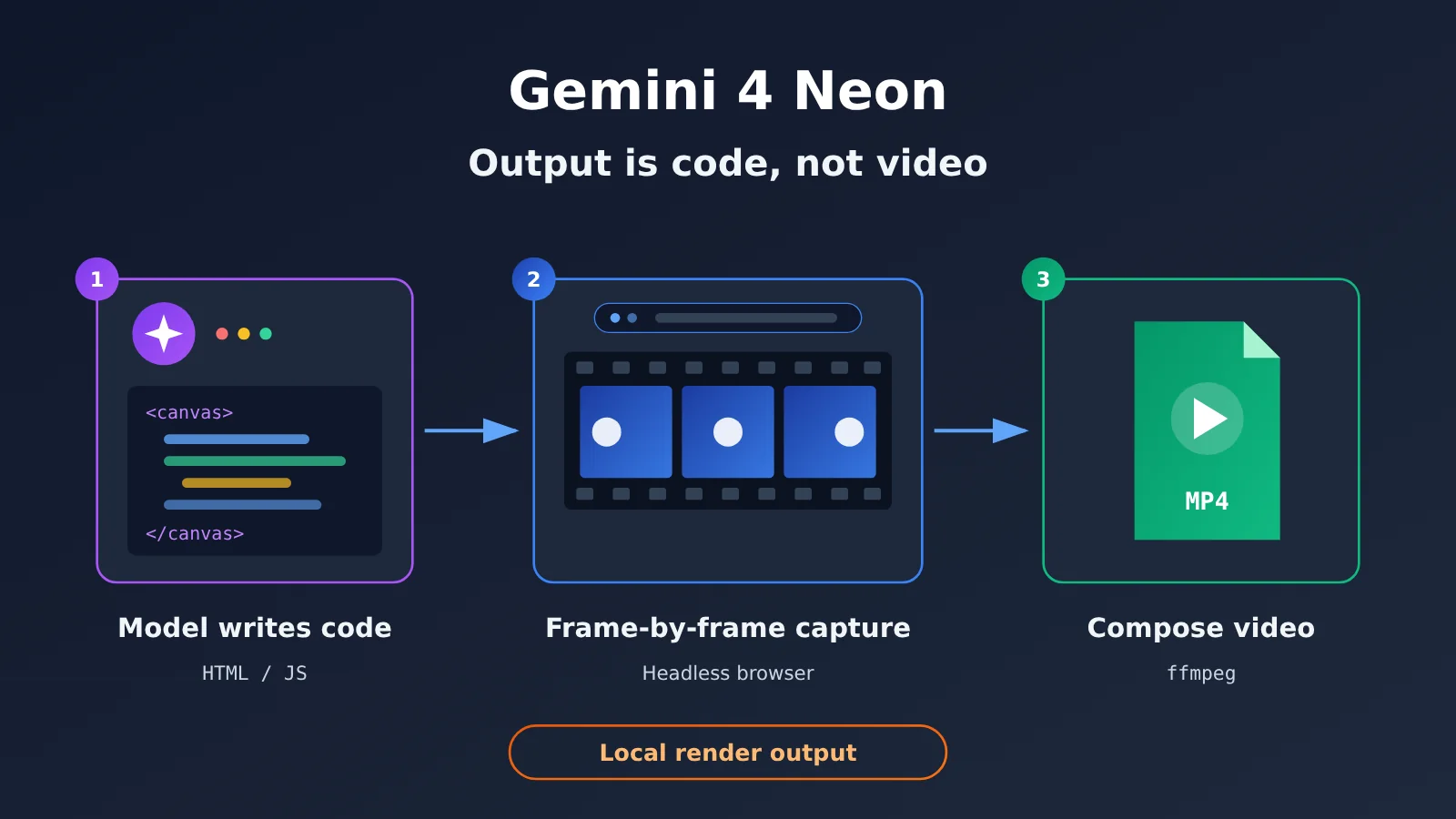
If you just want one sentence: Gemini 4 Neon is a text model — it can write animation code, but it can’t output video files directly. The three takeaways below are what we most want you to walk away with; each one gets expanded on in the sections that follow.
- Don’t count on it handing you an mp4: The official model card and AI Studio both list the output as text only, with
Image generationandAudio generationmarked Not supported. What you get is always text — code included. - A “Neon video” is really something you render from code: The model writes HTML/JS, canvas, or Three.js code, then a headless browser screenshots it frame by frame, and finally
ffmpegstitches it all together. This approach suits motion graphics, title cards, line art, and explainer clips — not photorealistic people or live-action texture. - Run two separate cost estimates: Having Neon write code is billed by token; if you genuinely want the model to spit out video pixels, you’ll need to switch to a video model like
oxygen-1.0, which bills by the second. Different units, so you can’t directly compare which one is cheaper.
If what you need is “a shot of a person that looks like live action,” go straight to a video model; if it’s “a brand motion piece, a data animation, or a product feature explainer,” the code-to-video route is worth a try.
Gemini 4 Neon Key Facts at a Glance
Let’s start with the launch itself. The table below draws from Google’s official blog, the DeepMind model card, and GitHub Copilot’s changelog; the benchmark scores are self-reported by the vendor.
| Item | Details |
|---|---|
| Release date | 2026-11-18 (Google official blog: Introducing Gemini 4 Neon) |
| Publisher | Google / Google DeepMind |
| Official positioning | Frontier-class model for complex software engineering, knowledge work, and scientific workflows |
| Model lineage | Per the model card, derived from Gemini 4 Carbon |
| Context | Unified 1M-token context, 64K default synchronous output, up to 1M with long decode |
| Self-reported benchmarks | Vals Index #2 (70.9%), #1 on Legal Research Bench and Tax Agent Bench, Chartography 73.5%, Agents Last Exam v1.1 75.8% |
| Third-party supplements | DataCamp (2026-11-19) compiled LVBench at 89.0% and noted that its multimodal scores are very close to GPT-6.2 Sol |
| Ecosystem access | GitHub Copilot changelog (2026-11-18): GA in Copilot, billed at the provider’s public pricing |
The positioning makes it clear: Neon’s home turf is writing code, doing analysis, and running agent workflows — not generating media. It can “understand” video but can’t “generate” video, and those two things should be kept separate.
Gemini 4 Neon Input and Output: Officially Text-Only
The model page in AI Studio lists capabilities item by item; here’s a faithful summary. Note that the input side supports video — that’s exactly where a lot of the confusion comes from: being able to read video doesn’t mean being able to write video.
| Capability | AI Studio’s official label | What it means for video creators |
|---|---|---|
| Input | Text, images, video, audio, PDF | You can throw reference clips at it to analyze pacing and shots |
| Output | Text only | You only get text and code, no mp4 |
Image generation |
Not supported | No image output; visual assets have to be drawn with code |
Audio generation |
Not supported | No voiceover; audio tracks must be prepared separately |
Code execution |
Supported | Can run code in-session to help debug |
Computer use |
Supported | Can drive operation-oriented agent tasks |
| Context | 1,048,576 | Long shot lists and long code fit in one go |
| Max output | 65,536 (default synchronous) / 1,048,576 (long decode) | Long animation code can be output in a single pass |
So any claim that you can “one-click a finished video with Neon” doesn’t hold up. It can help you write an excellent “blueprint” for the final cut, but the construction has to happen on your own machine.
How That 15-Second “Gemini 4 Neon Video” Came to Be
On 2026-11-18, community user Chetaslua posted that Neon had made a motion design self-introduction for itself — pure JS code, no external assets whatsoever. The clip runs about 15 seconds and falls under the motion graphics category. Worth noting: the post didn’t disclose the prompt, so outsiders have no way to reproduce exactly how it was asked or how many rounds of revision it went through.
On 2026-11-20, Sulat rounded up community works from the first two days after launch, including a 3D robot dog, a card game, and this 15-second motion graphic. The article also recorded claims from Cognition: Neon scored 46.2% on FrontierCode 2.0, at roughly $4.38 per task, and has already been integrated into Devin Desktop and Devin CLI. All of this is self-reported by the author or the vendor — not official Google feature documentation.
What these works share is clear: the visuals are all drawn with code, then rendered into a video. So the accurate way to put it is “a video rendered from animation code written with Neon,” not “Neon generated a video.” The difference looks like mere wording, but it actually determines what tools you need to prepare and how much time you’ll spend.
A Three-Step Pipeline for Code-Generated Video with Gemini 4 Neon
Code-generated video is a common industry practice — it’s not some Neon-exclusive feature, and any model that’s good at writing front-end code can play a part. Neon’s edge is its long context window and solid coding chops, which make it well suited to writing longer, more complex animations.
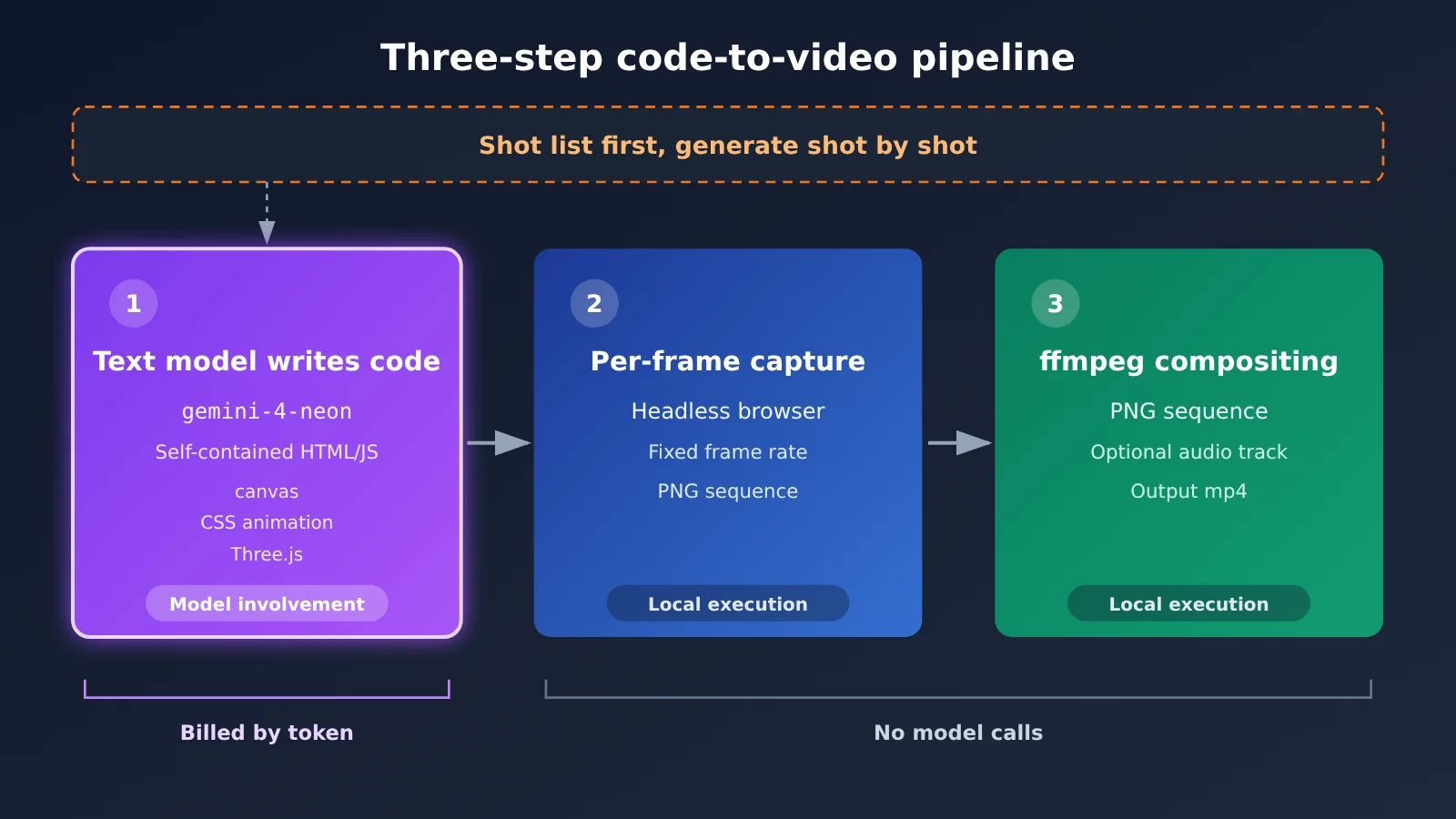
| Step | What it does | Common tools | Does the model take part? |
|---|---|---|---|
| 0. Shot list | Spell out how many seconds each shot runs and what happens on screen | Doc or spreadsheet | The model can draft it |
| 1. Write code | Generate self-contained HTML/JS with no external assets | canvas 2D, CSS animation, Three.js |
Yes, billed by token |
| 2. Frame-by-frame capture | Screenshot each frame as PNG at a fixed frame rate | Headless browser (e.g., Puppeteer, Playwright) | No, runs locally |
| 3. Composite the video | Combine the PNG sequence into mp4, optionally with an audio track | ffmpeg |
No, runs locally |
Step 1: Have Neon write the code. When you call it through the API, set the model ID to gemini-4-neon. On APIYI apiyi.com it exposes both chat and gemini endpoints — to hook it up the OpenAI-compatible way, just set base_url to https://api.apiyi.com/v1, and the SDK usage is the same as calling any other chat model. Your prompt needs to nail down three things: single file, zero external assets, and the canvas size plus total duration.
Step 2: Frame-by-frame screenshots. This is the step where things most often go wrong. If the animation depends on a live requestAnimationFrame clock, a slow screenshot loop will make frames skip or stutter. A more robust approach is to ask the model in your prompt to expose something like a renderAt(t) function, and have the screenshot script call it frame by frame with t = frame index / frame rate, so every frame is a deterministic image.
Step 3: ffmpeg compositing. Once you have a sequence like frame_0001.png, composite it with a command along the lines of ffmpeg -framerate 30 -i frame_%04d.png -c:v libx264 -pix_fmt yuv420p out.mp4. If you need background music or voiceover, prep a separate audio file and mix it in, since Neon itself doesn’t support audio generation.
Writing shot lists for longer Gemini 4 Neon pieces
When a piece runs past a dozen seconds or so and has a lot of shots, it’s better not to have the model write the whole thing in one pass. A more reliable approach is to write the shot list first — for example, “Shot 1: 0 to 3 seconds, the logo draws itself in from the center; Shot 2: 3 to 7 seconds, three feature cards slide in one after another” — then generate the code shot by shot.
The upside here is that if one shot isn’t right, you only re-run that shot, which keeps token spend and debugging effort lower. Neon’s 1M context window lets you feed in the whole shot list plus the code for shots you’ve already finished, which helps keep the style consistent.
🚀 Getting started tip: Start with a roughly 5-second title card or logo animation to get the three-step pipeline working end to end, then scale up to a full explainer video. Sign up at APIYI apiyi.com to get free trial credits, and use a small number of tokens to verify that your prompt and screenshot script actually work together.
Gemini 4 Neon Code Video: What It’s Good At and What It Isn’t
At its core, code-generated video is “drawing with code,” so its capabilities are completely different from those of video generation models. The table below helps you quickly match it to the right use case.
| Content type | Code-generated video performance | Why |
|---|---|---|
| Brand motion graphics, logo animations | Good at it | Geometric shapes and path animations are where code shines |
| Title cards, title animations, data visualization | Good at it | Text and charts can be precisely controlled in position and timing |
| Line art, flat illustration-style explainer videos | Good at it | Consistent style, and each shot can be edited individually |
| Simple 3D scenes (product model showcases) | Fairly doable | Depends on how you write Three.js; the more complex it gets, the harder it is to get right in one pass |
| Photorealistic people, expressions, live-action texture | Basically impossible | No ready-made assets, and code struggles to simulate realistic lighting and human bodies |
| Cinematic camera moves, natural scenes | Not recommended | Leave these to video generation models |
Its biggest advantage is that it’s controllable, editable, and rerunnable: if the text is wrong, change one line of code; if the color is off, swap a color value. You won’t run into the “everything changed after regeneration” problem. The downsides are just as obvious: there are no ready-made cinematic assets, so if you want realism, you’ll need a different tool.
Gemini 4 Neon vs. Video Models: Keep the Two Bills Separate
If your content mixes animated text cards with realistic live-action shots, the most practical setup is to run both tracks side by side: write code for the animated pieces with Neon, and hand the realistic shots to a video model. The two are billed in completely different units, so let’s lay them out separately below.
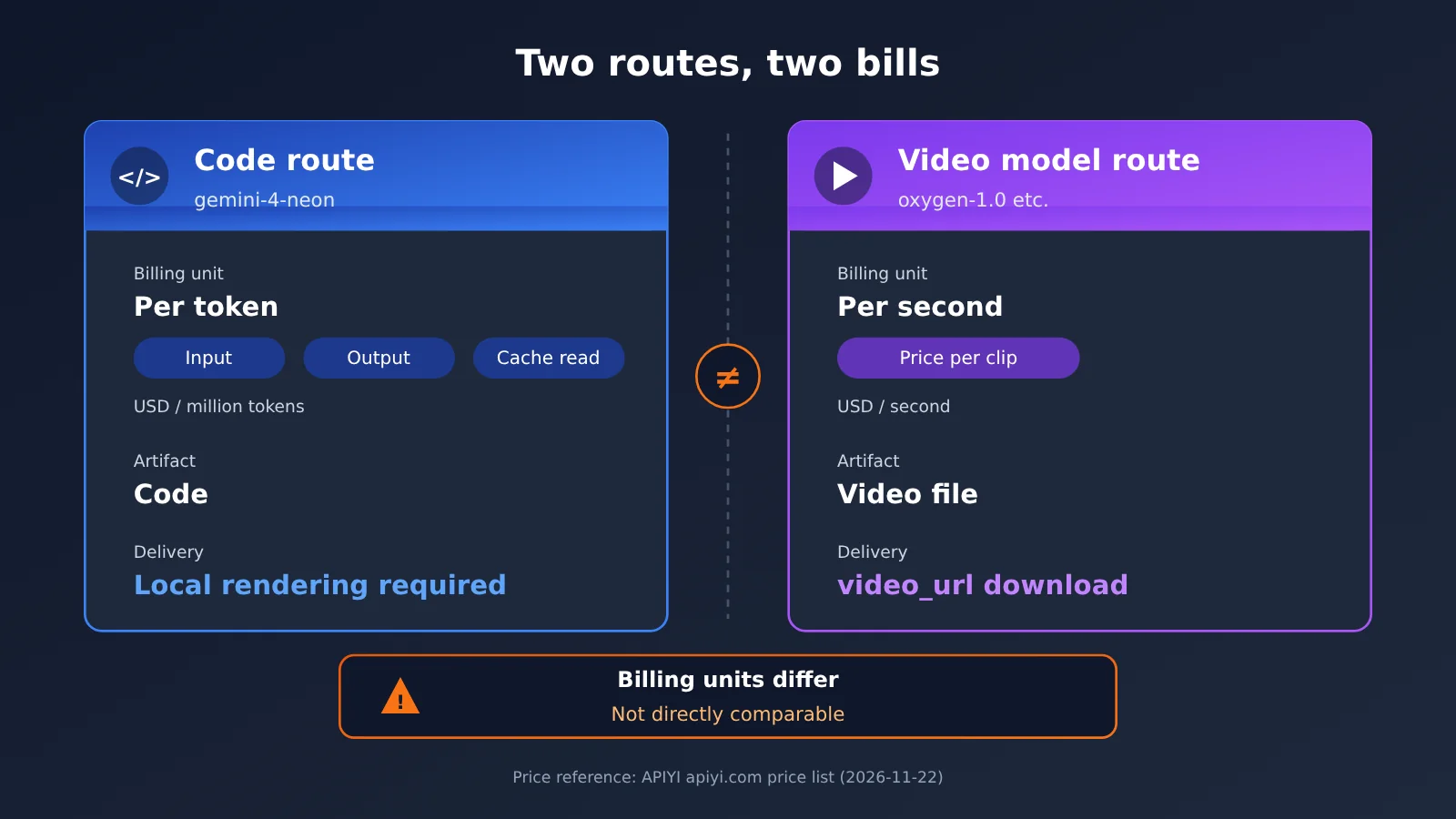
| Item | Code route: gemini-4-neon |
Video model route: oxygen-1.0 |
|---|---|---|
| Output | Text (HTML/JS code) | Video file; on success you get a video_url to download |
| Billing unit | Per token: input 3, output 15, cache read 0.15 (USD per million tokens) | Per second: $0.02/sec, same price for 480p and 768p |
| Duration range | Theoretically unlimited, depends on the code and rendering | 4 to 15 seconds |
| Invocation method | chat or gemini endpoint | OpenAI Videos compatible: submit with POST /v1/videos, poll with GET /v1/videos/{id} |
| Extra costs | Local rendering time, retries | Automatic refund on failure |
| Price source | APIYI apiyi.com price master list (2026-11-22 09:58) | Same as left |
The video model bill is easy to read: a 15-second 768p Oxygen clip at $0.02/second comes to $0.30 — one flat price per clip.
The code route needs a token estimate first: cost ≈ input tokens ÷ 1 million × 3 + output tokens ÷ 1 million × 15, then multiply by the number of retries. It depends on how long the code is, how detailed the shot list is, and how many rounds of revisions you go through. For the same 15 seconds, a simple text card and a complex 3D scene can differ wildly in token volume. So you can’t put these two prices side by side and ask which is cheaper — estimate your tokens based on the kind of video you’re actually making, then decide.
At the protocol level, both routes can be accessed with the same API key. The video models page on APIYI apiyi.com also lists Seedance 2.0 / 2.5, MiniMax-H3, Wan2.7 and other video models, all served through https://api.apiyi.com/v1. One thing worth noting: APIYI is a gateway, not a model host — upstream content policies and rate limits pass through unchanged, so content review rules are governed by each model provider.
Impact analysis of the Gemini 4 Neon release
What it means for short-video and motion-graphics creators
- A lower barrier to motion design: Title cards and logo animations that used to be hand-built in After Effects can now be described in natural language and handed to the model to write as code. Great for small teams without a dedicated motion designer.
- You’ll need some engineering chops: Headless-browser screenshots and
ffmpegcompositing are unavoidable steps. At minimum, someone has to be able to get the script running—or better, package the whole thing as an internal team tool. - Content style will feel more “programmatic”: Code-generated footage naturally leans flat, geometric, and data-driven. That suits product demos and explainers, but not narrative content.
What it means for the AI video toolchain
- “Text model + rendering pipeline” and “video generation models” will coexist for a long time: The former wins on controllability and editability, the latter on realism. They complement each other rather than compete.
- Claims need to be more rigorous: Community demos spread fast, and headlines like “model X can produce video” easily lead people to misjudge what a model can actually do. When you see a claim like that, check the Output section of the official model card first—it’s more reliable than watching a demo.
FAQ
Q1: Can Gemini 4 Neon generate video files directly?
No. Both the DeepMind model card and AI Studio state that Neon’s output is text only, with `Image generation` and `Audio generation` both marked Not supported. It can write animation code, but turning that into a video file requires you to capture frames locally and composite them with `ffmpeg`.
Q2: Is that 15-second Neon motion-graphics clip online an official feature?
No. It’s a demo posted by community user Chetaslua on 2026-11-18. According to the author, it’s pure JS code with no external assets, and the post doesn’t disclose the prompt. It shows that Neon is quite good at writing animation code, but it doesn’t mean Google offers a “generate video” feature.
Q3: When was Gemini 4 Neon released?
It was announced on the official Google blog on 2026-11-18 and became GA in GitHub Copilot the same day. Google positions it as a frontier model for complex software engineering, knowledge work, and scientific workflows, with a 1M-token context window.
Q4: What kinds of content is code-generated video best suited to?
Mainly these scenarios:
– **Product feature demos**: UI elements sliding in, feature cards appearing one after another
– **Data and knowledge explainers**: Animated charts, process animations, line-art explainer videos
– **Brand motion graphics**: Logo animations, opening and closing title cards
Realistic people and live-action-style shots don’t work well here—leave those to video generation models.
Q5: How do I call Neon and a video model at the same time?
You can access both types of models with the same key:
1. Sign up at APIYI apiyi.com and get an API key plus free trial credits
2. Write code with `gemini-4-neon`, calling it through the chat endpoint, with `base_url` set to `https://api.apiyi.com/v1`
3. When you need realistic shots, call `oxygen-1.0`, submitting via `POST /v1/videos` and checking status with `GET /v1/videos/{id}`
Q6: What are the limitations of the code-generated footage approach?
First, you need a local rendering environment—you have to set up both the headless browser and `ffmpeg` yourself. Second, complex 3D scenes often don’t come out right on the first try and need several rounds of revision, which drives up token costs. Third, there’s no voiceover capability, so you’ll need to prepare the audio track separately. When realistic footage is required, switching to a video model is less hassle than forcing it out of code.
Gemini 4 Neon Video Creation Key Takeaways
- Text output only: Both the official model card and AI Studio make it clear — Neon doesn’t generate images, doesn’t generate audio, and certainly doesn’t produce mp4 files.
- Community demos ≠ official capabilities: The 15-second motion graphics are a video rendered from code, and that’s the community’s own account of it.
- A three-step pipeline: The model writes HTML/JS code, a headless browser captures screenshots frame by frame, and
ffmpegassembles them into a video. - What it’s good at — and what it isn’t: Motion effects, title cards, and explainer videos are all feasible; photorealistic people and live-action texture are basically out of reach.
- For longer pieces, write a shot list first: Generate shot by shot and re-run shot by shot — cost and risk both stay more manageable.
- Keep the two costs separate: Neon is billed by token,
oxygen-1.0is billed by second — different units, so you can’t compare them directly. - Unified access: Through APIYI apiyi.com, one key lets you call both text models and video models.
Summary
The core message about Gemini 4 Neon comes down to three points:
- It’s a text model: It can read video, but it only outputs text — saying “Neon makes videos” isn’t accurate.
- Finished videos come from a rendering pipeline: Write code, capture frame by frame, assemble with
ffmpeg— a good fit for motion-graphics-style content. - Choose your route based on your needs: Motion graphics take the code route and are billed by token; photorealistic shots go through a video model and are billed by second.
Our suggestion: first run a 5-second title-card animation through the whole pipeline, then decide whether your team wants to lock this setup in. When choosing models and checking prices, you can see gemini-4-neon alongside models like oxygen-1.0 on the APIYI apiyi.com price overview and video model pages, and estimate the two costs separately based on the kind of footage you’re producing.
📚 References
-
Official Google Blog: Introducing Gemini 4 Neon
- Link:
blog.google - Notes: Release date, official positioning, and Google’s self-reported benchmarks
- Link:
-
DeepMind Model Card: Gemini 4 Neon
- Link:
deepmind.google/models/model-cards/gemini-4-neon - Notes: Input/output modalities, context window, and output length
- Link:
-
AI Studio Model Page: Gemini 4 Neon capabilities table
- Link:
aistudio.google.com/docs/models/gemini-4-neon - Notes: Item-by-item listing confirming that both image generation and audio generation are unsupported
- Link:
-
GitHub Copilot Changelog: 2026-11-18 update
- Link:
github.blog/changelog - Notes: Details on Neon reaching GA in Copilot
- Link:
-
DataCamp: Gemini 4 Neon benchmark roundup (2026-11-19)
- Link:
datacamp.com - Notes: Third-party compiled multimodal benchmark data
- Link:
Author: APIYI Technical Team
Technical Discussion: For integration questions about video models and text models, you can reach us from the APIYI homepage at apiyi.com. For more API documentation, see the docs.apiyi.com documentation center.