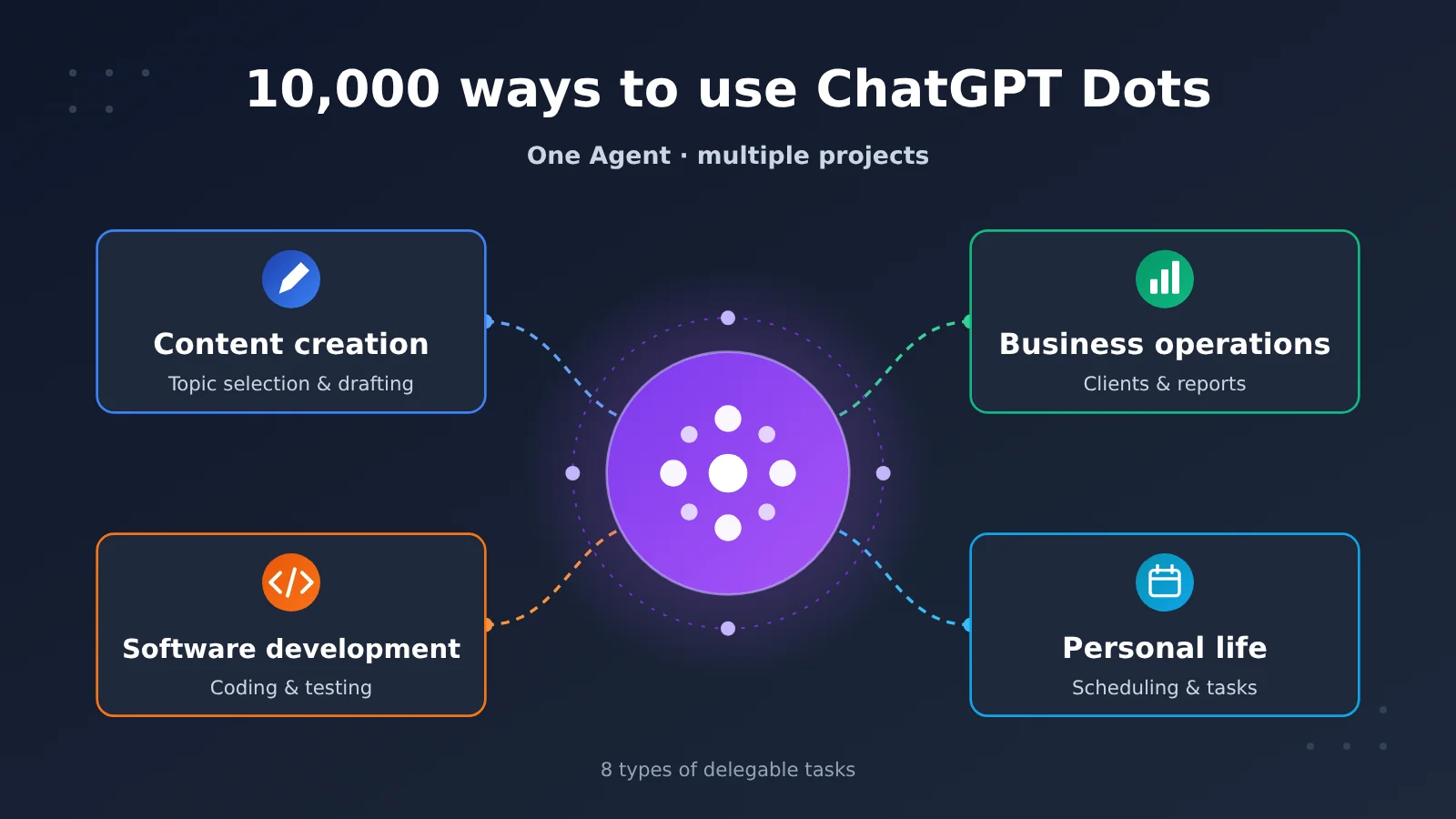
Summary: This article organizes ChatGPT Dots use cases into four categories—content creation, business operations, software development, and personal life—and draws on OpenAI’s official examples, Axios’s hands-on testing, and Reddit users’ own accounts to explain which work is suitable for delegation, how to delegate it, and where the execution boundaries lie.
The core value of ChatGPT Dots is taking on work that needs sustained momentum. Released by OpenAI on September 29, 2026, Dots is a persistent personal Agent with its own cloud computer and browser. It can combine memory with connected apps, work on multiple projects at once, and keep going after the user steps away. To figure out what Dots can do for you, look at the kind of work you can hand over: multi-source, long-running, multi-step, context-dependent, and with an end result a person can review. Axios’s hands-on testing and Reddit users’ feedback show that Dots can already carry research, organization, and final production quite far. Anything involving money, accounts, or outbound sending still needs human confirmation, and every output needs human review.
Below, a table first lays out the product facts and eligibility for Dots. Then, for four groups—content creators, business managers, developers, and everyday users—it breaks down official examples and real-world cases one by one. Each scenario follows the same structure: “task, process, result, limits.” After that, it discusses how long-running work depends on memory, proactive research, and scheduled tasks, and closes with a set of screening criteria and a delegation method to help you decide which work on your plate you can hand off.
To Know: ChatGPT Dots Terminology Primer
| Term | Explanation |
|---|---|
| Dots | A persistent personal Agent product in ChatGPT; each Dot is an AI assistant that works for you continuously |
| Cloud Computer | The remote computer and browser that a Dot itself uses, so it can keep working even when your own computer is off |
| Plugins | Extensions that connect apps and data—such as Gmail, Slack, and CRM—into ChatGPT |
| CRM | A system for managing customer relationships and sales matters |
| MCP | A protocol that lets model applications connect to external tools and data |
| Proactive Research | When no new messages arrive, a Dot reads through authorized data sources on its own to surface clues worth alerting you about |
| Task Delegation | Handing over the goal, materials, and delivery requirements, then letting the Agent drive the work forward |
| Workflow | The steps—and their order of dependency—required to produce a piece of work |
| Codex / Work Tasks | Programming tasks and complex work tasks that a Dot can launch separately, billed according to their respective quotas or rules |
| Custom Rules | Behavior rules you set for a Dot, for example “ask me before sending an email” |
| Auto-review | A mechanism that automatically checks instructions, rules, and safety requirements before a sensitive operation |
| Reviewing Deliverables | Checking the accuracy and completeness of the output, and whether the operations were actually completed |
1 What Is ChatGPT Dots: How a Persistent Personal Agent Works
1.1 Core Capabilities of ChatGPT Dots
Regular ChatGPT works in conversation turns: you ask, it answers. Dots changes the unit of work to “projects”—you hand it a goal, and it keeps pushing forward across multiple sessions and dates, handing things back to you whenever it needs your judgment or approval.
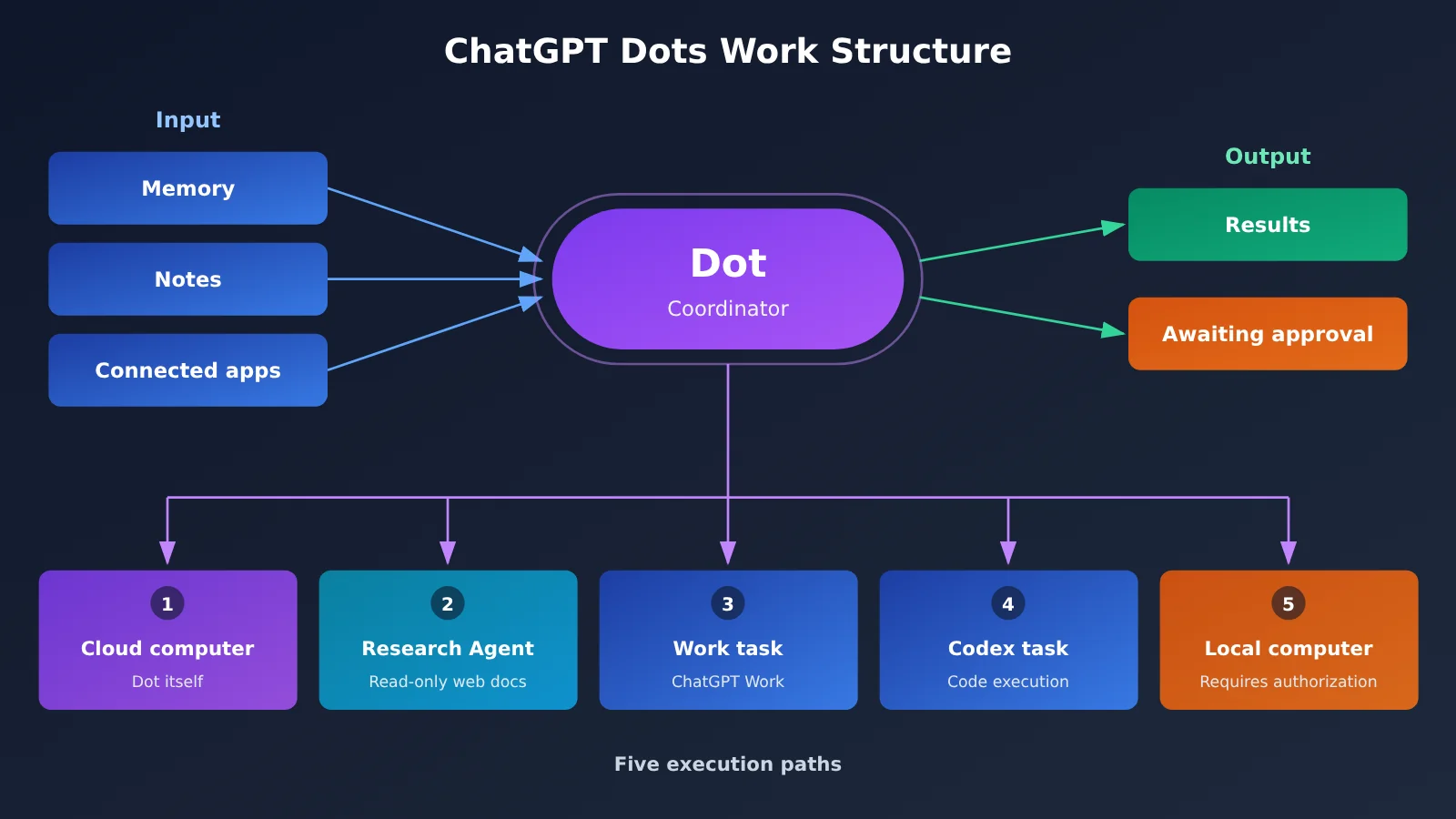
This way of working relies on a combination of capabilities. A Dot has its own cloud computer, so it can open websites, organize files, and produce reports and presentations. It can draw on ChatGPT memory, its own notes, and data from connected apps to build project context. And it can break complex tasks into pieces, spin up background agents to work in parallel, then pull the results together. You can reach the same Dot through the ChatGPT web app, desktop app, iOS, Android, Slack, and Microsoft Teams—and its memory stays continuous when you switch channels.
| Item | Details |
|---|---|
| Release date | September 29, 2026, officially launched by OpenAI |
| Product positioning | Persistent personal AI agent that can advance multiple projects at once |
| Execution environment | Its own cloud computer and browser; optional connection to your local computer, off by default |
| App ecosystem | Integrated with the OpenAI plugin ecosystem; at launch described as able to connect to more than 4,000 apps (actual availability depends on account and permissions) |
| Personal subscription eligibility | ChatGPT Pro 100, Pro 200, Pro 500; must be 18 or older; currently excludes the European Economic Area, UK, and Switzerland; rolling out gradually |
| Enterprise eligibility | Business Premium, Enterprise, and eligible Edu and Healthcare workspaces |
| Enterprise rollout timeline | November 4–18, 2026 is the admin preview period; from November 18, eligible workspaces are enabled by default |
| Communication channels | ChatGPT apps, Slack, Microsoft Teams; iMessage/RCS in limited testing in select regions |
1.2 How Are ChatGPT Dots Costs Calculated?
The cost basis differs for individual and business users, so it’s worth looking at them separately. Individual users get Dots eligibility through a ChatGPT Pro subscription. Pro 100, Pro 200, and Pro 500 cost $100, $200, and $500 per month, respectively. The official Dots documentation for individual Pro does not list a separate monthly Dot fee. Work or Codex tasks that a Dot starts separately consume according to the corresponding product’s quota rules, and consumption depends on factors such as the model, context, reasoning, and tool calls.
Current documentation for enterprise workspaces states that you can choose a flat rate by type of work or pay based on usage. Enabled Dots start being billed on November 18, 2026; the preview period is free. Tasks delegated to Work or Codex are charged separately, and the exact amount is subject to the pricing that actually applies to the workspace.
| Usage method | Cost source | Notes |
|---|---|---|
| Individual Pro user’s Dot | Pro 100 / 200 / 500 subscription fee | Official docs do not list a separate monthly Dot fee |
| Work / Codex tasks delegated by Dot | Usage quota of the corresponding product | Consumption varies with task complexity; quotas have limits |
| Enterprise workspace Dot | Flat rate by work type or usage-based billing | Billed starting November 18; amount subject to actual pricing |
| Self-built delegation workflow (design proposal) | Model API usage-based billing | Can call multiple models with one key through APIYI apiyi.com |
2 One of the ways to use ChatGPT Dots: multi-platform production for content creators
2.1 From a single interview to show notes and social content
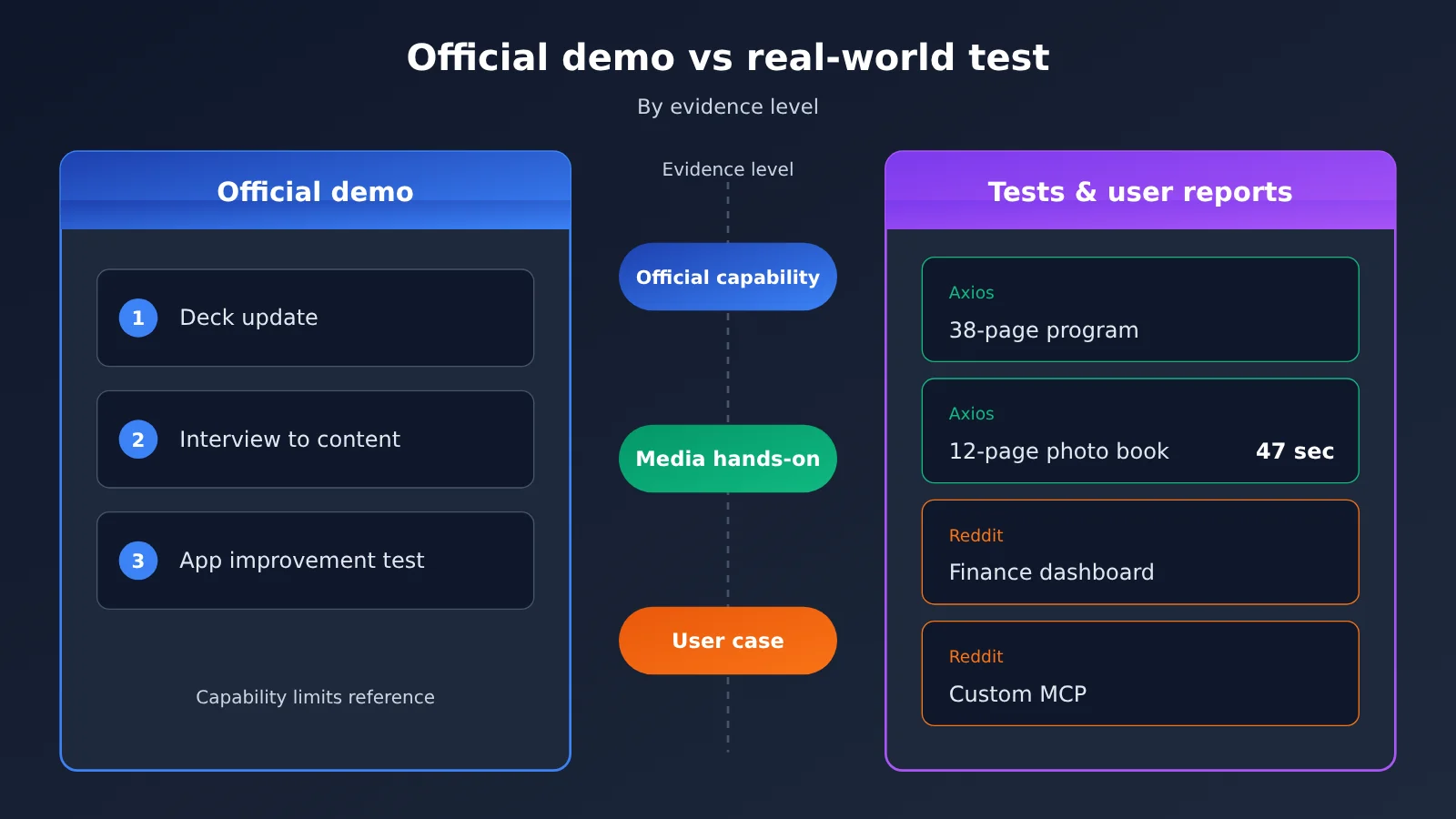
OpenAI’s official help documentation lists “creating content” as a typical Dots task, and the product introduction page specifically showcases a workflow designed for creators. This type of work is characterized by multiple stages sharing the same source material and the same style, making it well suited to an Agent that continuously learns about you.
- Task: Turn one interview into show notes and produce social media content for multiple platforms.
- Process: Dot learns the creator’s expression style and the account’s audience, finds clips in the interview material suitable for editing, writes show notes, and creates social posts.
- Result: A content package with a consistent style; after the creator revises one version, Dot adjusts the other versions in sync and optimizes the next batch based on historical feedback.
- Limitation: Automatic publishing depends on third-party platform permissions and API support. You can use Custom Rules to require “ask before publishing” or to prohibit publishing outright.
2.2 A topic radar that runs continuously
Within the scope of the official capabilities, creators can also set topic collection as a long-term task: monitor authorized information sources, spot new events, connect them with past topics, and regularly summarize candidate topics and source summaries. This is a use case built from a combination of scheduled tasks and proactive research; the factual summaries it produces need to be checked against their sources one by one. Axios’s testing also found that long documents produced by Dots contained questionable statistics.
3 ChatGPT Dots Use Case 2: Projects, Clients, and Data Follow-up for Business Managers
3.1 Official Example: A Continuously Updated Presentation
The “prepare a presentation” example in the official help docs shows how Dots differs from one-shot generation tools.
- Task: Prepare a business report for management and keep it updated as new information comes in.
- Process: Gather data, organize customer feedback, research business changes, and update the presentation.
- Outcome: A deck that always reflects the latest situation, with the Dot continuing to track subsequent changes.
- Limitation: Data definitions and conclusions still need manager confirmation; the Dot handles preparation and updates.
The official showcase page also mentions organizing customer feedback and monitoring sales data: reading reports, comparing day-over-day and week-over-week changes, spotting anomalies, and analyzing causes alongside customer feedback. These are classic “multiple sources plus ongoing change” tasks.
3.2 User Accounts: CRM, Email, and Financial Dashboards
In a Reddit thread about how people use Dots, several users shared business-related cases. The following are all firsthand user accounts and have not been verified by the company or a third party:
- Cross-system project management: One user connected Dot to Cloudflare, CRM, and Gmail at the same time to manage a cross-system project. The main benefit was spending less time moving information between tools.
- Team email and calendar reminders: A user had Dot keep an eye on team email, communications, and calendars and flag anything worth noticing. This depends on app connections and explicit authorization—Dot can only read data you’ve authorized it to access.
- Customer financial dashboard: A user said they built a customer financial dashboard in about an hour—work that used to take 4 to 5 days. That’s a personal productivity experience.
- Daily business reporting: A user had Dot update Google Sheets daily and weekly. Compared with scheduled scripts, Dot can not only run on a schedule but also use context to decide what should be updated.
| Scenario | Official materials | Third-party or user cases |
|---|---|---|
| Content production | Interviews into show notes and social content | Axios: WNBA commemorative program booklet |
| Project management | Presentation kept continuously updated | Reddit user account: Cloudflare, CRM, and Gmail collaboration |
| Development | Modify an app and run tests | Reddit user account: custom MCP, Chrome extension |
| Connect an inbox to get work done | Reddit user account: proactive reminders about missed emails | |
| Finance | Materials and business workflows | Reddit user account: customer financial dashboard |
| Travel and shopping | Product research and assisted actions | Axios: Atlanta game trip, WNBA card shopping |
4 ChatGPT Dots Use Case Three: Developers, from Writing Code to Building Tools
4.1 Official Example: Improving an Application
“Improving an application” is the third typical task type explicitly listed by the official team, and its workflow covers the entire development process.
- Task: Discuss what needs to be improved in the application and deliver changes that can be reviewed.
- Execution: Define the scope of changes, create a plan, write code, and run tests.
- Deliverable: A code change ready for review, plus an explanation of the implementation approach and trade-offs.
- Limitations: Codex cloud tasks require the repository and environment to be set up in advance; permissions for GitHub and similar services must be granted ahead of time.
Building on the same capabilities, developers can also hand Pull Request tracking, Issue triage, CI status monitoring, and API migration checklist organization to Dot—provided the relevant environments and permissions are already in place.
4.2 User Reports: Custom MCPs and Chrome Extensions
Reddit users reported that Dot helped them develop, test, and install custom MCPs, and also helped create and install Chrome extensions. These two examples show that the Agent’s scope has expanded from using ready-made tools to building tools. The installation step usually requires connecting to a local computer, and the official documentation notes that installing software may require approval each time.
Another user spent an entire day testing how Dots execute tasks; this is also a user report. He handed hundreds of PDFs and thousands of pages of documents to Dot for review. The task spanned multiple days, and Dot was able to retain progress. When he tried to start a separate legal research task, he ran into a situation where the execution environment was unavailable. After connecting a Linux computer, Dot dispatched the task to that computer. He observed Dot’s cloud computer, a Linux computer, and a background research Agent running at the same time, and explicitly noted that he had not verified how quota is calculated for these execution paths.
5 ChatGPT Dots Use Case Four: Travel, Scheduling, and Shopping for Everyday Users
5.1 Axios Hands-On Test: From Travel Planning to Commemorative Albums
Axios reporter Ina Fried published a comparison test of Dots and Meta Muse on October 20, 2026 — one of the most thorough third-party hands-on tests to date.
- Task: Plan a trip to Atlanta to watch the WNBA Finals, organize a purple-themed watch party, create a commemorative program booklet and photo album, and buy merchandise.
- Execution process: Both agents spotted that the game date had been moved up and that tickets weren’t on sale yet, and each offered flight options. Dots also flagged conflicts between the travel plans and the user’s existing schedule.
- Results: Dots produced an 8-page party package with detailed cooking instructions that accounted for dietary preferences; it created a 38-page commemorative program booklet whose visual presentation the author rated fairly positively; and it built a 12-page photo album in 47 seconds.
- Limitations: Both agents included questionable statistics in their program booklets; the 47-second figure was the measured result for that particular photo-album task.
5.2 The Shopping Step Exposes the Limits of Execution
The test of buying WNBA cards best illustrates the current boundaries. Both agents could compare products and prices. Muse got stuck at the Target login step, while Dots guided the user to switch to the Target app and continue using saved account and payment information, with the user completing the final step.
The author’s conclusion: these agents are already quite good at multi-step planning, information organization, and content creation, but the results still need human editing and fact-checking, and she’s not yet willing to fully hand over operations involving accounts and money. That aligns with the official rules: changing passwords and transferring funds require the user to take over, and shopping with saved bank cards requires user approval.
6 ChatGPT Dots for Long-Term Work: Helping AI Remember Projects and Keep Making Progress
6.1 How Memory and Proactive Research Split the Work
Long-term work depends on two layers of capability. The first is context: ChatGPT memory, notes Dot builds up on its own, current task materials, and data from authorized apps together form the project background. Dot’s own notes and ChatGPT memory live in different data layers. When you start a new task, relevant background is retrieved on demand—the full history isn’t loaded every time.
The second layer is proactive research. When there are no new messages, Dot reads through authorized data sources and connects new information to existing projects—for example, spotting that a price in a project file conflicts with the contents of an email, or that a deadline has shifted—and then flags it for you. Proactive research itself is read-only: it can’t message other people, modify content through plugins, or operate a browser or computer. Any follow-up action has to go through the normal permission and approval flow.
6.2 Scheduled Tasks and Event Monitoring
Industry intelligence, competitor tracking, and recurring reports are good fits for scheduled tasks. When you create one, be clear about what to check, when it runs, which time zone to use, when it ends, which changes should trigger a notification, and where the results should go.
Event monitoring is for connected services that support event triggers—for example, kicking off an investigation when a new Bug shows up in Slack and preparing a fix for you to review. After you add Dot to a Slack channel, it won’t automatically monitor everything; you need to explicitly specify which event types to watch. Also, stopping a running task and canceling a recurring schedule are two separate operations, so check each one independently.
7 What’s Worth Handing Over to ChatGPT Dots
7.1 Five screening criteria
The more a task matches the following traits, the more you gain by handing it to Dots:
- It requires reading multiple information sources.
- It spans multiple steps.
- It requires ongoing attention to changes.
- It requires retaining historical context and adjusting plans based on new information.
- A human can review the final output.
| Work type | Task characteristics | Representative use cases | Better-suited tool |
|---|---|---|---|
| Information gathering | Multiple sources, continuously updated | Industry intelligence, competitor tracking | Dots |
| Content production | Multi-step, consistent style | Interview write-ups, social content | Dots |
| Project management | Long cycle, changing status | Project progress, client follow-up | Dots |
| Data analysis | Multiple files, continuous verification | Financial dashboards, sales reports | Dots, with human confirmation of conclusions |
| Software development | Planning, execution, testing | App improvements, MCP, extensions | Dots plus a Codex environment |
| Fixed-format conversion | Fixed input/output rules | Batch text format conversion | Traditional scripts or automation tools |
7.2 When traditional automation is the better fit
If a task is just converting one piece of text into another in a fixed format, or moving the same field from spreadsheet A to spreadsheet B every day, a simple script is more stable, cheaper, and easier to troubleshoot. Dots’ strength lies in judgment and coordination — tasks with fully deterministic rules can simply be handed to a script.
8 How to Use ChatGPT Dots Correctly
8.1 The Five-Step Delegation Method
- Define the goal clearly: Write out exactly what deliverable you want, for example “a sales report document updated before 9 AM on Monday.”
- Provide the source materials: Specify the email labels, folders, spreadsheets, and websites the Dot is allowed to read, so it doesn’t have to guess on its own.
- Specify the delivery format: Explain the file format, length, storage location, and notification channel.
- Set authorization boundaries: Use Custom Rules to distinguish four types of behavior—”execute directly,” “execute after prior authorization,” “ask me first,” and “hand it back to me.” For example, you might allow it to organize a specified folder, but require confirmation before sending emails or making purchases.
- Check the final result: Verify the data, the sources, and whether the actions were actually completed. Once an externally sent message has been read by the recipient, it can’t be fully recalled.
8.2 Permissions and Data Essentials
Plugin permissions connected to ChatGPT are shared across ChatGPT, Work, Codex, and Dots, and can be managed in one place on the plugin page. Disconnecting an app connection stops new access, but information already obtained is retained; deleting a Dot deletes its own context, yet the independent Work/Codex conversations and files it created remain. Data from Business, Enterprise, and Edu workspaces isn’t used for model training by default, while personal accounts are governed by the “Improve the model for everyone” setting. The official documentation also notes that protections against Prompt Injection can’t eliminate every risk, so it’s best not to hand unrestricted account and payment permissions to a Dot.
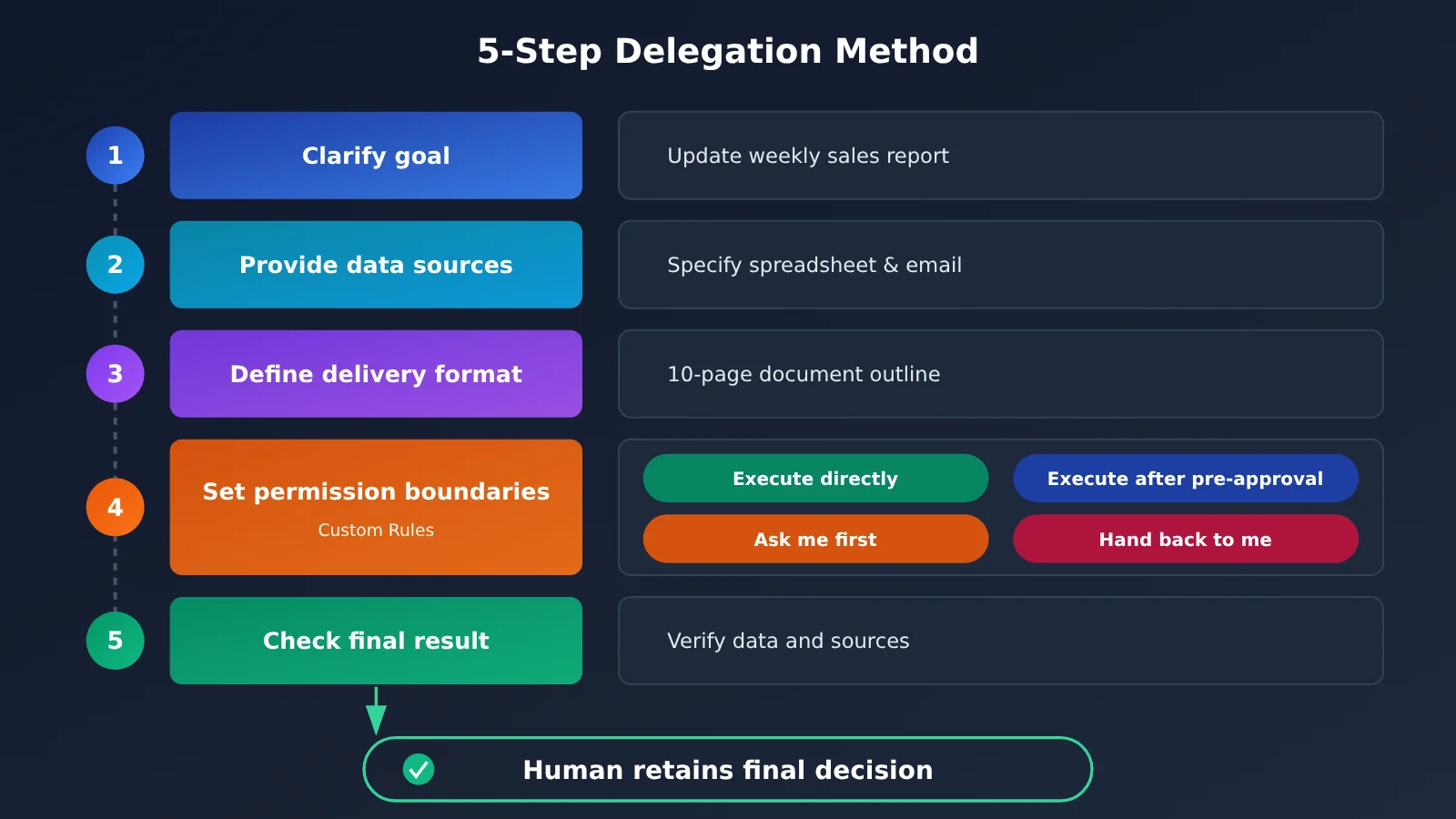
Illustration note: This five-step delegation method also applies to self-built Agent workflows. If developers want to replicate the “delegation sheet” structure in their own systems, they can connect multiple models through the OpenAI-compatible interface from APIYI apiyi.com to validate it.
8.3 Reusing the Delegation Template in Your Own System (Design Proposal)
Dots is a product inside ChatGPT and doesn’t have a developer-facing API yet. Developers can borrow its delegation approach: write the “goal, sources, deliverable, authorization, review” into a structured delegation brief, have the model output an execution plan first, and then let a human approve it. The code below is a design proposal that shows how the calls would work — this article doesn’t include any run results:
import openai, json

client = openai.OpenAI(
    api_key="YOUR_API_KEY",
    base_url="https://api.apiyi.com/v1"  # APIYI OpenAI-compatible endpoint
)

brief = {"goal": "更新本周销售汇报", "sources": ["sales.xlsx", "客户反馈邮件"],
         "deliverable": "10 页以内文稿大纲", "ask_before": ["发送邮件", "修改原始数据"]}

resp = client.chat.completions.create(
    model="gpt-4.1",
    messages=[{"role": "user", "content": "根据委派单输出分步执行计划,并标出需人工批准的步骤:\n" + json.dumps(brief, ensure_ascii=False)}]
)
print(resp.choices[0].message.content)
View the full delegation-brief wrapper code (design proposal)
import openai
import json
from typing import List

def plan_delegation(goal: str, sources: List[str], deliverable: str,
                    ask_before: List[str], model: str = "gpt-4.1") -> str:
    """
    Turn the delegation brief into an execution plan, listing the steps that require
    human approval separately.
    This is a design-proposal example; for production you'll need to add tool calling,
    approvals, and logging yourself.
    """
    client = openai.OpenAI(
        api_key="YOUR_API_KEY",
        base_url="https://api.apiyi.com/v1"
    )
    system_prompt = (
        "你是任务协调 Agent。请输出:1. 分步计划;2. 每步所需资料来源;"
        "3. 需要人工批准的步骤;4. 交付物验收清单。只读资料,不执行外部操作。"
    )
    brief = {
        "goal": goal,
        "sources": sources,
        "deliverable": deliverable,
        "ask_before": ask_before,
    }
    try:
        resp = client.chat.completions.create(
            model=model,
            messages=[
                {"role": "system", "content": system_prompt},
                {"role": "user", "content": json.dumps(brief, ensure_ascii=False)},
            ],
            max_tokens=1500,
        )
        return resp.choices[0].message.content
    except Exception as e:
        return f"Error: {e}"

if __name__ == "__main__":
    print(plan_delegation(
        goal="整理竞品本周动态并更新对比表",
        sources=["竞品官网更新页", "行业新闻源"],
        deliverable="对比表更新说明,附来源",
        ask_before=["对外发送", "覆盖原表格"],
    ))
🚀 Quick start: If you want to try out the delegation-brief idea first, you can sign up at APIYI (apiyi.com) for free trial credits, then use the same key to switch between models like GPT, Claude, and Gemini and compare how well they break down tasks and flag approval steps. If you’re planning to hook into Responses API tool calling and state management, it’s worth running compatibility tests against the specific model first.
ChatGPT Dots FAQ
Q1: What is ChatGPT Dots?
Dots is a persistent personal agent that OpenAI released on September 29, 2026. It has its own cloud computer and browser, can combine memory with connected apps to advance multiple projects over the long term, and proactively hands back to you the items that need your decision.
Q2: How is Dots different from a regular ChatGPT conversation?
A regular conversation is organized around question-and-answer turns; Dots is organized around delegated projects. Dots can keep working across days, advance multiple tasks in parallel, conduct proactive research and scheduled checks, and operate apps, create files, and run workflows.
Q3: Who can use Dots right now?
As of November 16, 2026, individual users need a Pro 100, Pro 200, or Pro 500 subscription, must be at least 18 years old, and must be in a region outside the European Economic Area, the UK, and Switzerland, with access rolling out gradually. On the enterprise side, Business Premium, Enterprise, and eligible Edu and Healthcare workspaces are included, with eligible workspaces opening by default starting November 18. Free and Plus are not on the supported list.
Q4: What kinds of work is Dots best suited to take on?
It’s best for work that spans multiple sources, runs over a long period, involves many steps, needs context, and produces a reviewable deliverable — for example, turning interviews into multi-platform content, reporting documents that are continuously updated, competitor tracking, code improvement and testing, and coordinating travel and schedules. Format conversions with fixed rules are better suited to traditional scripts.
Q5: Can developers build Dots-like delegated workflows through an API?
Dots itself is used inside ChatGPT. Developers can borrow its delegation structure to build their own workflows:
1. Register at APIYI apiyi.com and get an API key and free trial credits;
2. Set base_url to `https://api.apiyi.com/v1` and use the delegation brief example in this article;
3. Compare task-decomposition quality across multiple models, then gradually add tool calls and human approval steps.
Q6: What are the known limitations of Dots?
Outputs may contain incorrect data — the anniversary program booklet from the Axios test contained questionable statistics; website logins may fail, and the execution environment may be unavailable; changing passwords or transferring funds requires the user to take over; parallelism and quotas both have limits; and external actions already completed can’t necessarily be undone.
Q7: How do you control model costs when building your own agent?
Tier tasks by complexity: use lightweight models for research and formatting, and strong reasoning models for planning breakdowns and key judgments. With pay-as-you-go calls through APIYI apiyi.com, you can switch models flexibly under the same endpoint, which makes it easy to measure the actual consumption of each task type.
Core Takeaways for Using ChatGPT Dots
- What it is: Dots is OpenAI’s always-on personal agent. Its unit of work is a delegated project, not a single question-and-answer exchange.
- Four scenario categories: content creation, business operations, software development, and personal life all have official examples or hands-on cases behind them.
- Evidence tiers: official capability claims, Axios’s hands-on reporting, and Reddit users’ self-reports carry different levels of credibility — keep them separate.
- Screening criteria: work that draws on multiple sources, runs over a long time horizon, involves many steps, depends on context, and produces reviewable output is the best candidate for delegation.
- Where the line is: money, passwords, purchases, and anything sent to the outside world stay under human confirmation, and every output needs a human review.
- Pricing: individuals go through the Pro subscription; businesses are billed either by a flat rate tied to work type or by usage; Work/Codex are billed separately.
- Building your own: developers can borrow the structure of a delegation brief and use APIYI apiyi.com’s unified interface to validate multi-model approaches.
Summary of How to Use ChatGPT Dots
Dots’ “ten thousand use cases” really boil down to one test: if a piece of work has you constantly switching tools, tracking changes, remembering background context, and finally shipping a finished deliverable, it’s worth considering handing it over.
- What you can delegate: turning interviews into multi-platform content, reports that keep updating, CRM and email follow-ups, code improvements and testing, travel and schedule coordination.
- How to delegate: state the goal clearly, specify the sources, define the deliverable format, set authorization boundaries with Custom Rules, and check the results yourself.
- Where the boundaries are: keep any step that touches money or accounts for yourself, verify statistics and facts one by one, and confirm parallel capacity and quotas against your actual account.
If you already have a Pro subscription, start with a recurring report or a long-running project document. And if you’re a developer who wants to put the same delegation approach into your own product, try APIYI apiyi.com’s free credits to quickly see how different models break down a task.
📚 References
-
OpenAI official announcement Introducing dots: product positioning, the cloud computer, and multi-project execution
- Link:
openai.com/index/introducing-dots - Note: the authoritative source for the release date and core capabilities
- Link:
-
ChatGPT Learn – Meet dots / Tasks and memory: product overview, subscription eligibility, and how tasks and memory work
- Link:
learn.chatgpt.com/docs/dots - Note: detailed coverage of proactive research, scheduled tasks, and parallel tasks
- Link:
-
OpenAI Help Center – Getting started with your dot: setup, computer connection, and typical task examples
- Link:
help.openai.com/en/articles/20001530-getting-started-with-your-dot - Note: the source for the three official representative task types
- Link:
-
OpenAI Help Center – Dots privacy, security, and safety FAQs: permissions, approvals, and data policies
- Link:
help.openai.com/en/articles/20001529-dots-privacy-security-and-safety-faqs - Note: Custom Rules, Auto-review, and the rules for high-risk operations
- Link:
-
ChatGPT Learn – Enterprise Dots admin guide: billing and management for enterprise workspaces
- Link:
learn.chatgpt.com/docs/enterprise/dots-admin-guide - Note: enterprise billing methods and launch timing
- Link:
-
Axios – I tested Dots and Muse. Here’s where they shine.: a media hands-on test published October 20, 2026
- Link:
axios.com/2026/10/20/battle-of-bots-openai-meta-ai-agents-test - Note: specific findings on travel, document creation, and shopping
- Link:
-
Reddit r/ChatGPT and r/OpenAI user discussions: Dots usage tips and tests of how execution works
- Link:
reddit.com/r/ChatGPT/comments/1x45n0w/what_are_the_coolest_use_cases_for_your_dots - Note: individual user accounts, for experience reference only
- Link:
Author: APIYI Technical Team
Technical contact: Reach us through the APIYI homepage — more integration resources are available at the docs.apiyi.com documentation center