
Author’s note: Saltline uses code to describe the generation rules for geometry, textures, and sound, so its distribution size is very small—but some of the workload shifts to runtime computation on the player’s device.
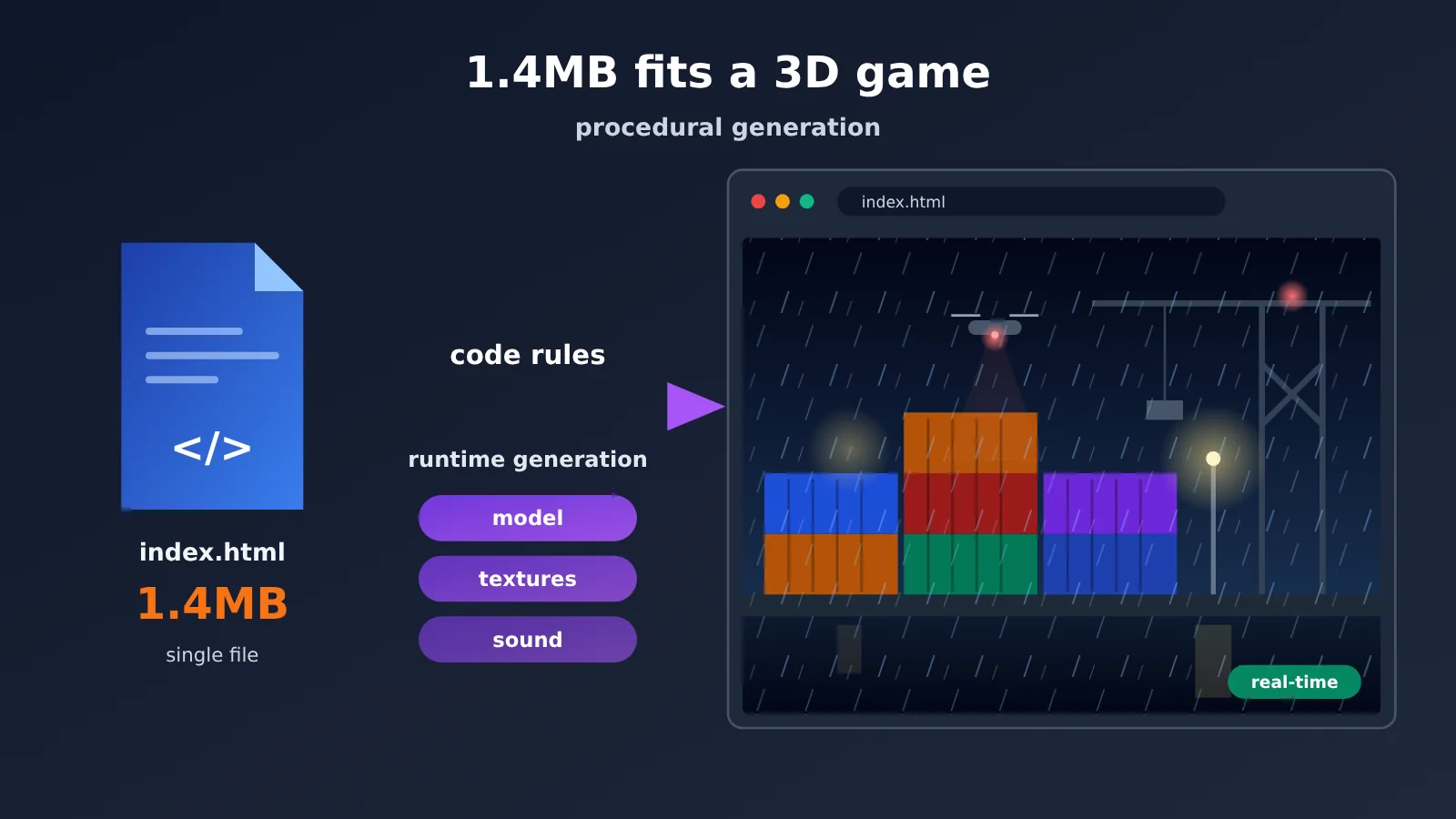
Saltline is only about 1.4MB because its single HTML file stores rules for generating models, textures, and sound, not pre-made model files, textures, and sound effects. After the browser opens the file, JavaScript and shaders build the rainy-night harbor, containers, and drones locally in real time. Procedural generation changes how game assets are represented and delivered: downloads shrink dramatically, while the workload of building geometry on the CPU and computing pixels on the GPU increases accordingly. File size, runtime memory, and GPU load are three separate costs.
Below, I’ll first break down what makes up this 1.4MB file, then compare it with traditional game asset production. Next, I’ll use three examples—containers, metal materials, and rain—to explain how procedural geometry, procedural textures, shaders, and procedural sound each work. Then I’ll analyze the runtime costs behind the small size, and finally provide a runnable code sample that demonstrates how to use an API to have a Large Language Model generate a similar procedural scene.
To Know: A Quick Primer on Procedural 3D Game Terminology
| Term | Explanation |
|---|---|
| Procedural geometry | Creating vertices and model shapes from parameters and rules — for example, generating a box from its width, height, and depth |
| Procedural texture | Computing surface color and patterns with mathematical functions (like noise) |
| Shader | A small program that runs on the GPU, determining the position of each vertex and the color of each pixel |
| Noise function | Algorithms such as Perlin and Simplex that generate natural, irregular random patterns |
| Instanced rendering | Drawing a large number of similar objects in a single draw call — in Three.js this maps to InstancedMesh |
| WebGL | The GPU graphics interface exposed by the browser, letting web pages render 3D scenes |
| Three.js | A JavaScript-based web 3D graphics library that wraps concepts like scene, camera, and material |
| HTML | The file format that organizes web content and code — all of Saltline’s core code lives in a single HTML file |
| Distribution size | The amount of file data players need to download |
| Runtime memory | The memory occupied while the program executes, including geometry and textures generated at runtime |
| GPU load | The amount of computation the graphics processor must complete each frame |
| Token | The basic unit a Large Language Model uses to process text — and the unit of API billing |
1 What’s inside a 1.4MB HTML file: Saltline’s single-file architecture
1.1 What kind of AI-generated 3D game is Saltline?
On November 9, 2026, Anthropic engineer Felix Rieseberg publicly shared a Claude Fable 5.2 coding experiment: with a single prompt, he asked the model to build a small-scale first-person shooter that looked as close to a AAA game as possible, with no human feedback along the way. The result was Saltline.
The game is set in a container port on a rainy night. The player has to shut down three signal relay stations and then extract, while aerial patrol drones and ground-based mechanical hounds hunt them down. It supports first-person movement, shooting, interaction, and mission objectives, with rain, lighting, ambient audio, weapon effects, and graphics-quality settings. It’s a single-player, single-level playable prototype — “AAA” here is the ambition of the experiment and a visual analogy, not a shipping label. The “几猫·国产3A大作” (“JimaO — a domestic AAA blockbuster”) label circulating on Chinese social platforms refers to a Chinese-language version or a repackaged version of Saltline; the name came out of that spread.
The developer’s own figures, all estimates he posted on X and none of them third-party audited, are as follows:
- Development time: about 8 hours;
- Cost estimated from API pricing: about $550;
- Input tokens: about 445 million, a large share of which hit the cache;
- Output tokens: about 2.7 million.
Because so many of the input tokens were cached, you can’t simply multiply the total by the standard input price to reproduce that number, and the breakdown of the bill hasn’t been made public either. That $550 is a one-time generation cost — playing the game in a browser doesn’t call the model again.
1.2 What Goes Into index.html: Three.js, Generated Code, and External Fonts
The GitHub mirror repo gives exact numbers: the core file index.html is 1,425,707 bytes, about 1.43MB (1.36MiB). The file breaks down into four parts:
- Three.js runtime code: the entire 3D library is packed into the HTML, handling scenes, cameras, materials, and WebGL rendering;
- Scene and asset generation code: geometries, textures, and materials are built by JavaScript functions and shaders;
- Procedural audio code: the sound is synthesized by code too—there are no standalone audio files in the repo;
- Game logic: input control, enemy behavior, and mission flow.
There are no standalone image, video, or audio files in the repo. The only explicit external dependency is Google Fonts. On November 10, the developer added a note clarifying that everything in the game is code—textures and models are functions.
1.3 What Happens After You Open Saltline in the Browser
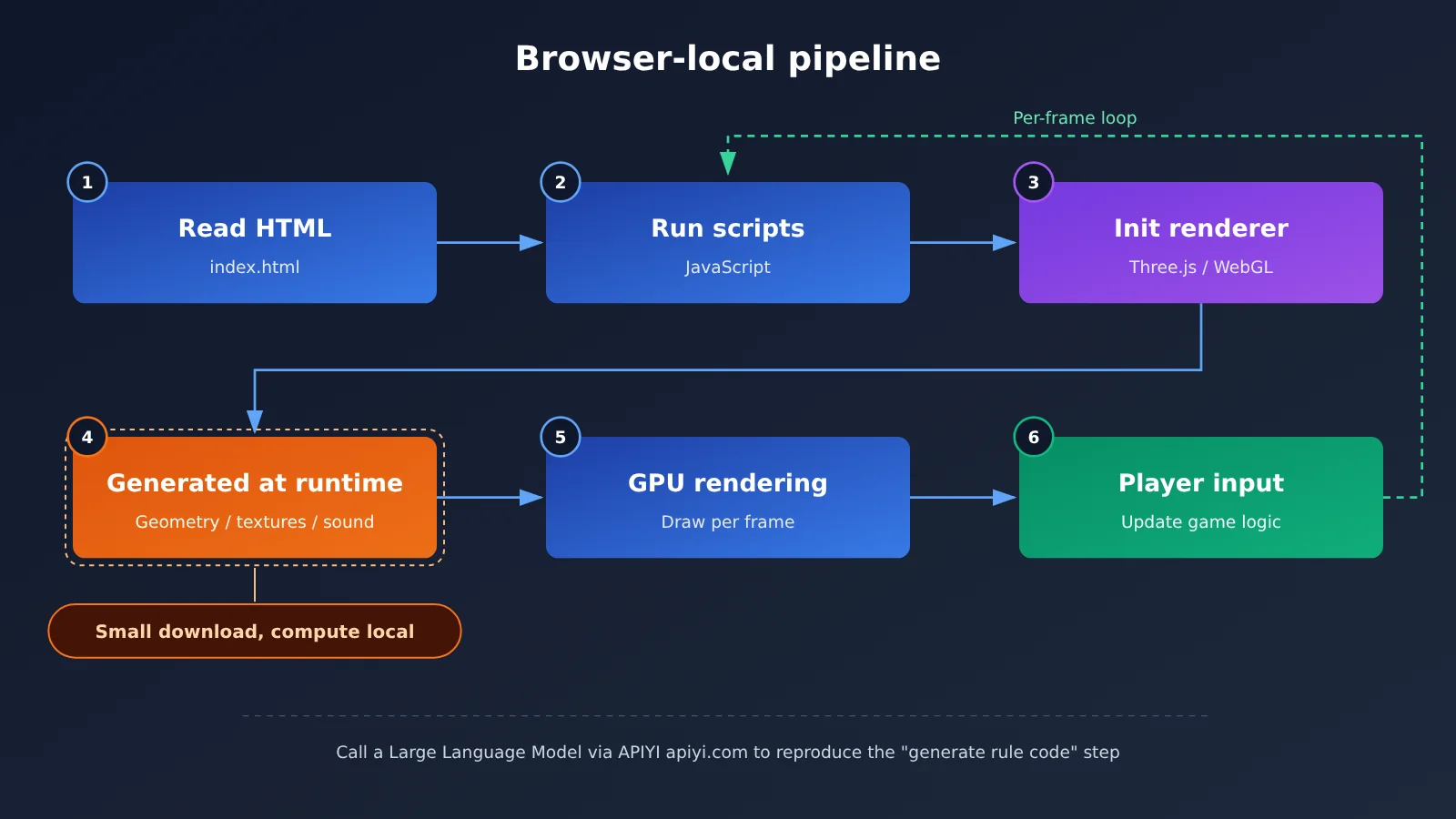
The runtime flow is a clean local pipeline: the browser reads the HTML → JavaScript starts executing → Three.js and the WebGL rendering environment initialize → code generates scene geometry, materials, textures, and sound → the GPU renders frame by frame → the player controls things with keyboard and mouse while the game logic keeps updating.
In that pipeline, the “generate assets” step happens on the player’s device. Saltline’s official experience page also warns that page initialization may take a while and that device performance affects startup speed; if it hangs on the loading screen, check WebGL 2 and browser hardware acceleration; if it stutters, switch to Low quality. Those warnings alone tell you how much of the computation happens at runtime.
2 How Traditional Games Create Models, Textures, and Sound
2.1 The Three Core Asset Types in Traditional 3D Games
The visuals and audio in traditional 3D games mainly come from prebuilt asset files:
- Model files: created by artists in modeling software and saved as data such as vertices, faces, and UV coordinates;
- Texture maps: multiple images such as diffuse, normal, roughness, and metallic maps, applied to model surfaces to provide detail;
- Audio files: audio recorded or synthesized and then exported, played when specific events are triggered.
These assets are created, optimized, compressed, and packaged, then distributed along with the game. The engine loads them at runtime, and its main job is to “read and display.”
2.2 Why Traditional Assets Take Up So Much Space
Prebuilt assets store results. A high-resolution texture needs to record the color value of every pixel; a detailed model needs to record the position of every vertex; a sound effect needs to record every sample. The richer the scene and the higher the resolution, the more result data has to be recorded, and the size grows linearly with it.
Procedural approaches store processes. A noise function takes only a few dozen lines of code, yet it can produce rust patterns at any resolution; a parameterized box function can generate shipping containers of any size. That’s the fundamental reason a complete port scene can fit in 1.4MB.
| Comparison dimension | Traditional prebuilt assets | Procedurally generated assets |
|---|---|---|
| What’s stored in the file | Final result data (vertices, pixels, samples) | Generation rules (functions, parameters, shaders) |
| Production method | Artists create each asset in specialized tools | Write code and parameters; computed at runtime |
| Distribution size | Grows with asset count and precision | Mostly determined by code size, usually very small |
| Main runtime work | Load, decode, display | Build geometry, compute textures, synthesize sound |
| Detail control | Artists can precisely control every detail | Depends on algorithmic expressiveness; tuning costs are high |
| Typical use cases | Characters, key props, realistic scenes | Repeated structures, natural surfaces, weather effects |
3 How AI Generates Game Assets with Code: Four Procedural Techniques
Procedural generation is a technique the game industry has relied on for years—Minecraft’s terrain and countless roguelike levels all depend on it. What’s new about Saltline is that a single AI model, in one continuous generation pass, wrote all the code for geometry, textures, shaders, audio, and game logic at once, cutting out the handoffs between modeling, materials, sound design, and programming.
| Layer | Generated Object | Technical Approach | Corresponding Example in Saltline |
|---|---|---|---|
| Geometry generation | Model shape | Vertices, faces, parametric geometry | Containers, warehouse, dock structures |
| Material generation | Surface properties | Color, roughness, metalness parameters | Container metal shells |
| Texture generation | Surface detail | Noise, fractals, Voronoi | Rust, stains, wear |
| Environment generation | Scene layout | Rules, random numbers, spatial relationships | Container stacking arrangement |
| Animation generation | Object motion | Mathematical functions, state changes | Drone patrols, falling raindrops |
| Sound generation | Sound effects | Oscillators, filters, noise | Rain, gunshots, ambient sound |
3.1 Procedural Geometry: Building a Container from Parameters
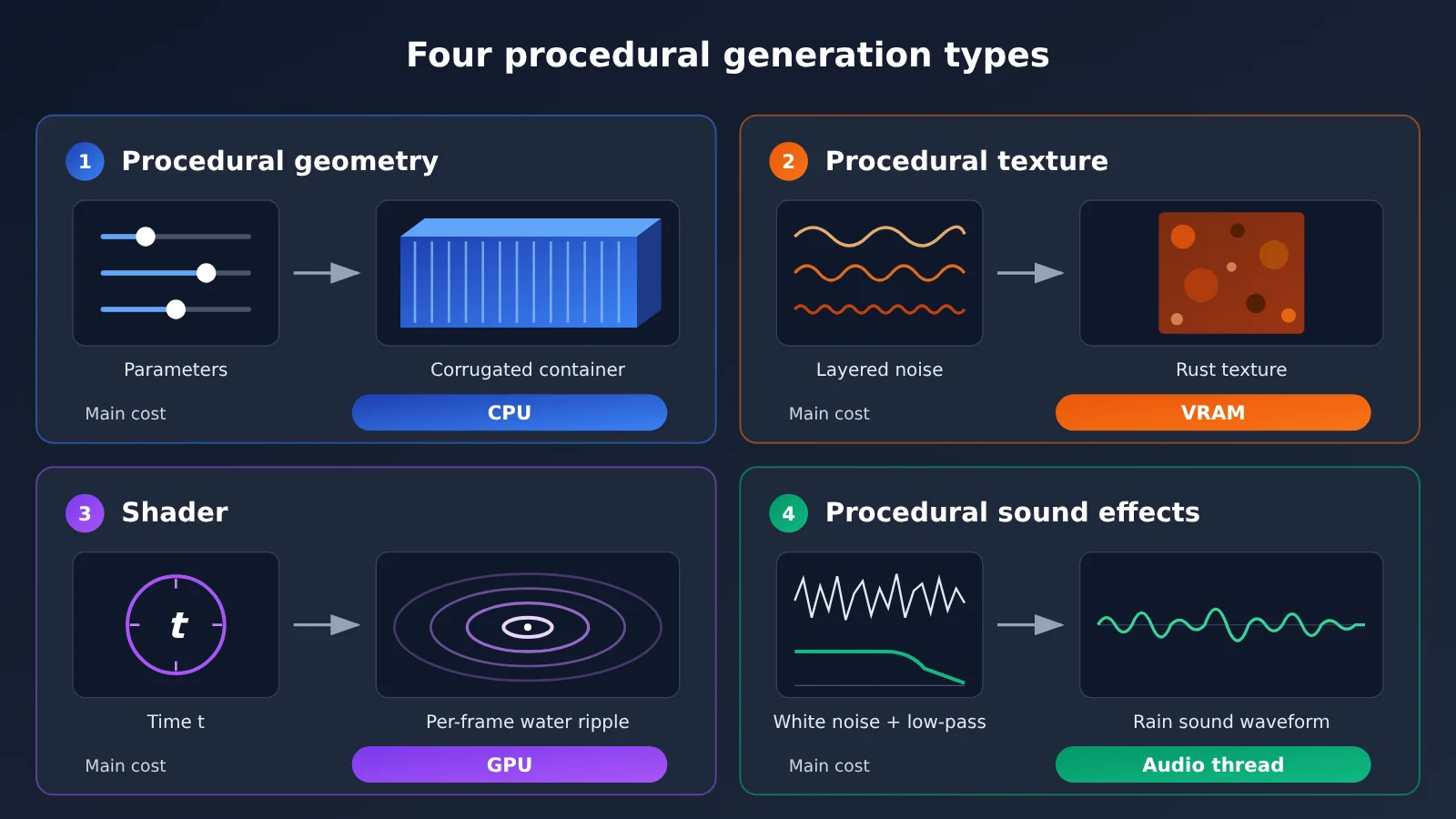
A shipping container is essentially a rectangular box with corrugated side panels. The procedural geometry approach works like this: generate a hexahedron from length, width, and height parameters, then offset the vertices along the sides using a sine function to simulate the ridges of corrugated steel. Three.js’s BufferGeometry lets you write directly into the vertex array, while BoxGeometry gives you a ready-made parametric box.
A port holds hundreds or thousands of containers, and they all share the same geometry data. That’s where InstancedMesh instantiated rendering comes in — you only need to store a transformation matrix (position, rotation, scale) and a color for each instance, and you can draw the entire container yard in a single draw call.
3.2 Procedural Textures: Painting Rust with Noise Functions
Procedural textures generate texture data through algorithms. Common algorithms include Perlin Noise, Simplex Noise, Voronoi, and fractal noise: overlay several layers of noise at different frequencies and you get a natural-looking distribution of rust spots; Voronoi can produce the blocky edges of peeling paint.
In Three.js, these textures are typically computed once during initialization and written into a DataTexture (filling a pixel array directly) or a CanvasTexture (drawn with Canvas 2D), then handed to materials like any ordinary texture map. Once a texture is generated, it stays resident in GPU memory, and the main runtime overhead is this VRAM footprint itself.
3.3 Shader: Computing Metal and Rain Pixel by Pixel on the GPU
Shaders run on the GPU, calculating the color of every pixel in real time based on inputs like coordinates, time, and lighting. The key difference from procedural textures is when the computation happens: a procedural texture can be precomputed into a single image, whereas a shader computes on the fly each frame without needing to generate a complete image.
A rainy night harbor is a textbook use case for shaders. The reflections on wet metal surfaces, the ripples on ground puddles that shift over time, and the falling streaks of rain can all be written as functions of time and recomputed every frame. Three.js’s ShaderMaterial lets you write vertex and fragment shaders directly to achieve these effects. The trade-off between the two approaches is straightforward: pre-generated textures cost memory but save compute; real-time shader computation saves memory but costs compute.
3.4 Procedural Sound Effects: Synthesizing Rain with Oscillators and Filters
The browser’s Web Audio API provides oscillators, noise buffers, and filter nodes. White noise run through a low-pass filter gets close to the sound of rain; a short burst of noise with a fast-decaying volume envelope is a gunshot; a low-frequency oscillator modulating pitch can simulate the hum of a drone. The Saltline repository contains no audio files at all—every sound is synthesized in real time by code like this.
4 The File Got Smaller, So Does It Run Lighter? A Cost Analysis of Procedural Generation
4.1 Distinguishing Distribution Size, Runtime Memory, and GPU Load
To gauge the “weight” of a 3D game, you need to look at at least three dimensions:
- Distribution size: how much data players download. Saltline has a huge advantage here.
- Runtime memory: vertex buffers, textures, and audio buffers generated at runtime all take up memory and VRAM. A 1.4MB program can easily create hundreds of MB of data at runtime.
- Computational load: the work the CPU and GPU need to do each frame. Complex shaders directly drive this up.
Conversely, a game with a large file size can also achieve excellent runtime efficiency through compression, chunked loading, and asset streaming. Judging the merits of a technical approach based only on file size will lead to one-sided conclusions.
4.2 Where procedural generation shifts the cost
| Technique | Costs it can reduce | Costs it can add |
|---|---|---|
| Procedural models | Model download and storage | CPU geometry build time |
| Shader textures | Image files and texture transfer | Per-frame real-time GPU computation |
| Procedural textures (pre-generated) | Image file downloads | Initialization computation and VRAM usage |
| Instanced rendering | Repeated draw calls | Scene management and instance data maintenance |
| Dynamically generated scenes | Number of prefab assets | Initialization and runtime computation |
| Procedural audio | Audio file storage | Real-time audio synthesis overhead |
Saltline’s slow startup and its need to offer a Low graphics option are exactly this table playing out in practice: the work you save during download gets paid for again at startup and on every frame you render.
4.3 Trade-offs between shaders, instanced rendering, and dynamic geometry
These three techniques each solve a different problem, and they work best when combined:
- Instanced rendering reduces the number of draw calls the CPU sends to the GPU. It’s the best fit for large numbers of repeated objects—container yards, streetlights, raindrop particles;
- Shaders move detail computation onto the GPU, which suits effects that change over time (rain, standing water, flickering lights). The trade-off: the more complex the fragment shader, the heavier the GPU load at high resolutions;
- Dynamic geometry suits structures that need to vary by parameter or that exist in limited numbers. The build cost is concentrated at initialization; once it’s built, it’s just an ordinary mesh.
The optimization pattern you’ll see most often in practice: anything that can be precomputed gets computed once at initialization and cached, and only what must change over time goes into a per-frame shader.
4.4 How Saltline Differs from Cloud Gaming and AI World Models
“AI making games” today maps to at least three technical approaches, and Saltline falls into the first one.
| Comparison | Local web-based game | Cloud gaming | AI world model |
|---|---|---|---|
| Representative examples | Saltline | GeForce NOW, Pixel Streaming | Genie 3, Muse/WHAMM, Oasis |
| Where AI comes in | Generates code during development | Usually not involved | Generates visuals frame by frame at runtime |
| Graphics generation | Rendered by the local GPU | Rendered by a cloud GPU, then streamed as video | Predicted and generated in real time by the model |
| Network requirements | Works offline after the first load | Requires a constant connection | Usually requires a constant connection |
| When costs are incurred | One-time development cost, then carried by the player’s device | Server cost on every play session | Inference cost on every play session |
| Key limitations | Browser and local hardware | Network latency, bandwidth | Consistency, latency, controllability |
Saltline puts the AI cost upfront, in the development phase. Once generation is done, the game rules are fixed by code, and runtime has nothing to do with the model. That’s what lets it run offline, and it also means the player’s device performance is the ceiling on the experience.
5 Procedural 3D Games Quick Start: Using an API to Have a Large Language Model Generate Scene Code
5.1 Minimal Example: Generate a Procedural Scene in One Call
The script below calls a Large Language Model through an OpenAI-compatible interface and asks it to output a single-file HTML page containing procedural shipping containers, noise-based rust, and shader rain. Use the actual model name from the platform’s model list:
import openai

client = openai.OpenAI(
    api_key="YOUR_API_KEY",
    base_url="https://api.apiyi.com/v1"  # APIYI unified interface: one key accesses multiple models
)

prompt = """生成一个单文件 HTML,用 Three.js(CDN 引入)实现:
1. 用 InstancedMesh 程序化生成 200 个随机颜色的集装箱堆场;
2. 用 DataTexture + 多层噪声生成锈迹纹理,不使用任何图片文件;
3. 用 ShaderMaterial 实现随时间下落的雨丝;
4. 用 Web Audio API 合成低通滤波白噪声作为雨声。
只输出完整 HTML 代码。"""

resp = client.chat.completions.create(
    model="your-model-name",  # Replace with the actual model name on the platform
    messages=[{"role": "user", "content": prompt}],
)
open("procedural_port.html", "w", encoding="utf-8").write(resp.choices[0].message.content)
After running it, open procedural_port.html in a browser to see the result. Saltline was a long-running generation process that took 8 hours and hundreds of millions of tokens; this example only demonstrates the minimal end-to-end loop for the same approach.
View the full implementation: handwritten reference code for procedural shipping containers, noise-based rust, shader rain, and synthesized rain sound
Below is a handwritten reference implementation to help you compare and understand the code structure the model generates. It puts the four techniques from Chapter 3 into a single file:
<!DOCTYPE html>
<html><head><meta charset="utf-8"><style>body{margin:0;background:#000}</style></head>
<body>
<script type="module">
import * as THREE from 'https://unpkg.com/[email protected]/build/three.module.js';

const renderer = new THREE.WebGLRenderer({ antialias: true });
renderer.setSize(innerWidth, innerHeight);
document.body.appendChild(renderer.domElement);
const scene = new THREE.Scene();
scene.fog = new THREE.Fog(0x0a0f18, 20, 120);
const camera = new THREE.PerspectiveCamera(60, innerWidth / innerHeight, 0.1, 500);
camera.position.set(0, 12, 40);
camera.lookAt(0, 0, 0);

// 1. Procedural texture: multi-octave value noise generates rust, written into a DataTexture
const size = 256, data = new Uint8Array(size * size * 4);
const rand = (x, y) => (Math.sin(x * 127.1 + y * 311.7) * 43758.5453) % 1;
function noise(x, y) {
  const xi = Math.floor(x), yi = Math.floor(y), xf = x - xi, yf = y - yi;
  const a = rand(xi, yi), b = rand(xi + 1, yi), c = rand(xi, yi + 1), d = rand(xi + 1, yi + 1);
  const u = xf * xf * (3 - 2 * xf), v = yf * yf * (3 - 2 * yf);
  return Math.abs(a + (b - a) * u + (c - a) * v + (a - b - c + d) * u * v);
}
for (let y = 0; y < size; y++) for (let x = 0; x < size; x++) {
  let n = 0, amp = 0.5, f = 4 / size;
  for (let o = 0; o < 4; o++) { n += noise(x * f, y * f) * amp; amp *= 0.5; f *= 2; }
  const rust = Math.min(1, n * 1.4), i = (y * size + x) * 4;
  data[i] = 120 + rust * 100; data[i + 1] = 110 - rust * 40; data[i + 2] = 100 - rust * 60; data[i + 3] = 255;
}
const rustTex = new THREE.DataTexture(data, size, size, THREE.RGBAFormat);
rustTex.wrapS = rustTex.wrapT = THREE.RepeatWrapping;
rustTex.needsUpdate = true;

// 2. Procedural geometry + instanced rendering: 200 containers share one geometry
const box = new THREE.BoxGeometry(6, 2.6, 2.4);
const mat = new THREE.MeshStandardMaterial({ map: rustTex, metalness: 0.6, roughness: 0.5 });
const containers = new THREE.InstancedMesh(box, mat, 200);
const m = new THREE.Matrix4(), color = new THREE.Color();
for (let i = 0; i < 200; i++) {
  const col = i % 10, row = Math.floor(i / 10) % 5, layer = Math.floor(i / 50);
  m.makeTranslation(col * 6.5 - 30, layer * 2.7 + 1.3, row * 3 - 7);
  containers.setMatrixAt(i, m);
  containers.setColorAt(i, color.setHSL(Math.random(), 0.5, 0.45));
}
containers.instanceMatrix.needsUpdate = true;
scene.add(containers);
scene.add(new THREE.HemisphereLight(0x6688aa, 0x111111, 0.6));
const lamp = new THREE.PointLight(0xffaa55, 80, 60);
lamp.position.set(0, 15, 10);
scene.add(lamp);

// 3. Shader: raindrop positions are computed on the GPU over time
const rainCount = 6000, pos = new Float32Array(rainCount * 3);
for (let i = 0; i < rainCount * 3; i++) pos[i] = (Math.random() - 0.5) * 80;
const rainGeo = new THREE.BufferGeometry();
rainGeo.setAttribute('position', new THREE.BufferAttribute(pos, 3));
const rainMat = new THREE.ShaderMaterial({
  uniforms: { uTime: { value: 0 } },
  transparent: true,
  vertexShader: `uniform float uTime;
    void main(){
      vec3 p = position;
      p.y = mod(p.y - uTime * 25.0, 40.0);
      gl_Position = projectionMatrix * modelViewMatrix * vec4(p, 1.0);
      gl_PointSize = 2.0;
    }`,
  fragmentShader: `void main(){ gl_FragColor = vec4(0.6, 0.7, 0.9, 0.5); }`
});
scene.add(new THREE.Points(rainGeo, rainMat));

// 4. Procedural audio: white noise through a lowpass filter simulates rain (starts after a page click)
addEventListener('click', () => {
  const ctx = new AudioContext();
  const buf = ctx.createBuffer(1, ctx.sampleRate * 2, ctx.sampleRate);
  const ch = buf.getChannelData(0);
  for (let i = 0; i < ch.length; i++) ch[i] = Math.random() * 2 - 1;
  const src = ctx.createBufferSource(); src.buffer = buf; src.loop = true;
  const lp = ctx.createBiquadFilter(); lp.type = 'lowpass'; lp.frequency.value = 1200;
  const gain = ctx.createGain(); gain.gain.value = 0.15;
  src.connect(lp).connect(gain).connect(ctx.destination); src.start();
}, { once: true });

const clock = new THREE.Clock();
renderer.setAnimationLoop(() => {
  rainMat.uniforms.uTime.value = clock.getElapsedTime();
  renderer.render(scene, camera);
});
</script>
</body></html>
整个文件里没有一张图片、一个模型文件或一段音频。锈迹纹理在初始化时计算一次(CPU 成本 + 显存),雨丝位置每帧都在顶点着色器中计算(GPU 成本),集装箱则通过一次绘制调用完成(降低 CPU 调用开销)。
快速上手建议:在生成程序化场景代码时,不同模型在 Three.js API 准确度和 Shader 写法上差异明显。通过 APIYI apiyi.com 用同一个 API key 切换多家模型,并排对比输出质量。新用户的免费测试额度足够跑完多轮对比。
5.2 编写提示词的三条实用技巧
把提示词写得像技术规格,比写成一句愿景效果更好:
- 明确技术要求:明确要求 InstancedMesh、DataTexture、ShaderMaterial 等具体 API,模型就会按程序化方式实现,而不是假设存在外部资源;
- 声明约束:写明“不使用任何图片、模型文件或音频文件”和“单文件 HTML”,与 Saltline 的约束保持一致;
- 要求性能分级:让模型提供低、中、高画质切换(例如减少雨滴数量、关闭阴影),对应 Saltline 提供 Low 画质的做法。
5.3 How to Estimate Generation Costs
Take Anthropic’s officially published pricing for Claude Fable 5.2 as a reference: $8 per million input tokens, $40 per million output tokens, $0.20 per million cache-read tokens, and $10 per million for 5-minute cache writes; the context window is 1M tokens, with a maximum output of 128K tokens. A single generation like the one in Section 5.1 usually consumes only a few thousand to a few tens of thousands of tokens. A long autonomous iteration run like Saltline’s 8-hour session repeatedly reads existing code, and the price difference from cache hits can significantly affect the total cost—so for long tasks, you’ll want to make the most of prompt caching.
Cost tip: When running long code-generation experiments, start by using small-scale prompts on APIYI apiyi.com to measure per-round token consumption, then estimate the total budget based on the number of iterations. The platform bills by usage, which makes it well suited for validating an approach incrementally—small first, then large.
6 Common Questions (FAQ)
Q1: What are procedurally generated 3D game assets?
Procedural assets use code and parameters to describe the rules for generating models, textures, and sounds, then compute the results at runtime. The file stores “how to draw it,” while a traditional asset file stores “the finished drawing.” Saltline’s shipping containers, rust, and rain sounds all fall into this category.
Q2: What’s the difference between procedural textures and shaders?
A procedural texture generates texture data through an algorithm, and can be precomputed into an image and loaded into VRAM. A shader is a program running on the GPU that can compute pixel colors directly during each frame. The former costs more memory and less compute, the latter the opposite — and the two are often used together.
Q3: When was Saltline released, and which model did it use?
It was released on November 9, 2026 by Anthropic engineer Felix Rieseberg, using Claude Fable 5.2 with a single prompt and no human feedback. The roughly 8 hours, ~$550, ~445 million input tokens, and 2.7 million output tokens are all the developer’s own estimates. On November 10 he added that the model and textures were generated entirely by code.
Q4: Which game scenarios suit procedural generation best?
– **Heavily repeated structures**: container yards, building clusters, vegetation — these work best combined with instanced rendering;
– **Natural surfaces**: rust, rock, wood grain, and other materials well suited to noise;
– **Dynamic weather and effects**: rain, puddle ripples, flickering lights — effects that change over time;
– **Size-sensitive distribution scenarios**: web mini-games, interactive ads, prototypes you can play instantly.
For protagonists and key story props that need precise artistic control, premade assets are still the better fit. Commercial projects usually go with a hybrid approach.
Q5: How do you use an API to have a Large Language Model generate procedural 3D scene code?
1. Register at APIYI apiyi.com and get an API key plus free trial credits;
2. Use the script from section 5.1 of this article and set base_url to `https://api.apiyi.com/v1`;
3. Spell out the constraints in the prompt — Three.js API, single file, no external resources — then open the result in a browser to verify.
Because the interface is OpenAI-compatible, switching between Claude, GPT, Gemini, and other models only requires changing the model parameter.
Q6: What are the known limitations of procedural generation?
– **Runtime cost**: initialization computation, VRAM usage, and the GPU load of complex shaders all get pushed onto the player’s device — Saltline itself needs a Low quality option and a fairly long initialization time;
– **Browser constraints**: Unity’s official docs note that the Web platform is limited in file system, threading, and memory, with limited mobile support;
– **Artistic controllability**: algorithmic expressiveness has its limits, and realistic characters and finely detailed props are hard to generate purely from code;
– **Engineering maturity**: AI can quickly produce playable prototypes, but the long-term optimization, testing, and content expansion a commercial game needs still require substantial engineering effort.
7 Key Takeaways for a 1.4MB 3D Game with Procedural Generation
- Where the size comes from: Saltline is about 1.4MB and stores generation rules, not images, models, or audio files.
- Four techniques: Procedural geometry, procedural textures, shaders, and procedural audio each own one layer, with a clear division of labor.
- Cost shift: The download gets smaller, while CPU build time, VRAM usage, and per-frame GPU work go up accordingly.
- Evaluation dimensions: Look at distribution size, initialization time, runtime memory, and per-frame GPU cost together.
- The role of AI: AI writes the generation code; procedural techniques themselves have been widely used in game development for years.
- Getting started: Use APIYI at apiyi.com to compare Three.js scene code generated by several models with a single key.
8 Summary: Game Development Is Moving from Making Assets to Writing Asset Generation Rules
Saltline shows a shift in how resources are expressed: traditional games ship “assets that have been made,” while procedural games ship “rules for generating assets.” AI code generation significantly lowers the barrier to this approach — a single model can write geometry, textures, shaders, audio, and game logic in one continuous generation, skipping the handoffs between different specialists.
This approach has clear boundaries. It shines in distribution size and deployment convenience, while shifting compute pressure onto the player’s device; it excels at repetitive structures, natural surfaces, and dynamic effects, but detailed art assets still depend on traditional production. Traditional asset production and procedural production will complement each other for a long time, and Saltline’s value lies in proving that a small-footprint program can still build a rich interactive scene.
If you want to verify this approach for yourself, start with the script in Section 5.1. It’s recommended to use APIYI at apiyi.com to call different models and generate procedural scenes, then compare how well they handle Three.js and shaders.
📚 References
- Saltline code mirror and README: single-file structure, byte counts, and developer data attribution
- Link:
github.com/realcodebear/saltline-fable-5.2 -
Note: Lets you inspect the programmatically generated code behind index.html directly
-
Saltline standalone demo page: play it online, plus notes on initialization and graphics settings
- Link:
saltline.games -
Note: The Chinese version lives at
saltline.games/zh -
Jimao Chinese-version GitHub repo: an archive of the version circulated domestically
- Link:
github.com/Megasu/jimao-3a-game -
Note: Includes offline run instructions and file size data
-
Claude Fable 5.2 model specs and pricing: official Anthropic documentation
- Link:
platform.claude.com/docs/en/models/fable-5-2/overview -
Note: Input, output, and cache pricing, plus context specs
-
Three.js official docs and examples: InstancedMesh, ShaderMaterial, BufferGeometry, DataTexture
- Link:
threejs.org/docsandthreejs.org/examples -
Note: The authoritative reference for the APIs used in this article’s code
-
MDN WebGL API: the browser’s GPU rendering interface
- Link:
developer.mozilla.org/en-US/docs/Web/API/WebGL_API -
Note: Helps you understand the rendering mechanics underneath Three.js
-
Unity WebGL technical overview: threads, memory, and mobile limitations on the web platform
- Link:
docs.unity.cn/6000.0/Documentation/Manual/webgl-technical-overview.html - Note: A useful reference for judging the engineering boundaries of browser games
Author: APIYI Technical Team
Technical discussion: Feel free to get in touch through the APIYI apiyi.com homepage — more integration docs are available in the docs.apiyi.com documentation center.