
Nano Banana Pro ファッションコラージュボードの作成方法
Nano Banana Proは、Google DeepMindがGemini 3 Proをベースに開発した画像生成モデルで、「正確にレンダリングされた読みやすいテキストを含む画像を生成する最高のモデル」として評価されています。ファッションコラージュシーンにおける主要機能は以下の通りです:
| コア機能 | 技術パラメータ | コラージュボードでの価値 |
|---|---|---|
| マルチ画像合成 | 最大14枚の参照画像を受付 | 商品写真、カラーパレット、テキスト注釈を統一されたビジュアル効果に合成可能 |
| テキストレンダリング | 中国語・英語など多言語の鮮明なレンダリングに対応 | ブランドスローガン、商品ラベル、価格表示を自動生成 |
| 高解像度出力 | 1K/2K/4Kをネイティブサポート | 印刷やプロフェッショナルデザインの要求を満たす |
| スタイル一貫性 | 最大5つのキャラクター/要素の一貫性を維持 | コラージュボード全体のスタイル統一を確保 |
ファッションコラージュボード(Fashion Mood Board)とは?
ファッションコラージュボード(Mood Board)は、デザイナーが創作初期にビジュアルブレインストーミングのために使用するツールです。服装アイテム、配色方案、素材テクスチャ、ブランドアイデンティティなどの要素を組み合わせることで、デザインコンセプトやスタイル方向性を素早く伝えます。
従来の制作方法では以下が必要でした:
- 素材画像の手動収集
- Photoshopなどのソフトウェアを使用した拼接
- レイアウトとカラーバランスの繰り返し調整
- テキスト注釈とブランド要素の追加
一方、Nano Banana Proは一つのプロンプトで上記すべてのステップを自動完了でき、局所的な要素の細かい編集にも対応しています。
ステップ1:ファッションコラージュボードのプロンプト設計
基本プロンプト構造
効果的なファッションコラージュボードを生成するには、以下の5つの核心要素を含むプロンプトを設計する必要があります:
[全体レイアウト] + [中心主題] + [周辺要素] + [テキスト情報] + [スタイル指定]
実践例:秋冬レトロスタイルコラージュボード
プロンプト:
Create a professional fashion mood board layout featuring a vintage autumn outfit as the centerpiece.

Layout:
- Main outfit (center): Burgundy beret, white turtleneck sweater, brown wool midi skirt, black suede boots
- Surrounding elements (4 corners): close-up shots of each accessory item
- Bottom section: color palette strip showing burgundy, brown, black, cream, and rust red
- Text labels: "AUTUMN VINTAGE", "COZY LAYERS", and price tags for each item

Style: Magazine editorial layout with soft beige background, subtle shadows, and pins decoration on corners
プロンプト最適化のポイント
| 要素 | 悪い例 ❌ | 良い例 ✅ | 理由 |
|---|---|---|---|
| レイアウト指定 | "いくつかの服" | "中央メイン+四隅詳細+下部カラーパレット" | 具体的な構図により生成精度向上 |
| 色彩記述 | "きれい" | "burgundy #991b1b、brown #78350f" | 16進数カラーコードで正確な色再現 |
| テキスト内容 | "いくつかの文字を追加" | "AUTUMN VINTAGE、$89.99" | 具体的なテキスト内容で読みやすい結果 |
| スタイル参照 | "おしゃれに" | "Vogue雑誌レイアウト+ミニマリズムデザイン" | 具体的なスタイル参照で効果安定 |
高度なテクニック:Google Search Groundingの活用
Nano Banana ProはGoogle検索データとの連携をサポートしており、最新のファッショントレンドを自動取得できます:
Grounding有効化プロンプト:
Create a fashion mood board based on [current trending autumn 2024 fashion styles from Paris Fashion Week].

Include:
- Trending color palette
- Popular silhouettes
- Must-have accessories
- Outfit combinations with pricing

Use Google Search data to ensure all elements reflect current market trends.
これにより、生成されるコラージュボードが実際の市場トレンドと一致し、商業的価値が大幅に向上します。
ステップ2:マルチ画像合成の実践
参照画像のアップロードと組織化
Nano Banana Proは最大14枚の参照画像を同時に処理できます。効率的な画像管理のために、以下の命名規則を推奨します:
| 画像タイプ | 命名例 | 用途 |
|---|---|---|
| 商品メイン画像 | main_outfit_fullbody.jpg |
中央の主要ビジュアル |
| アクセサリー詳細 | detail_beret_burgundy.jpg |
四隅の詳細展示 |
| 素材テクスチャ | texture_wool_closeup.jpg |
素材感の強化 |
| カラーパレット | palette_autumn_2024.png |
色彩参照 |
| フォント参照 | font_style_reference.jpg |
テキストスタイル指定 |
合成プロンプトの書き方
シナリオ1:既存商品画像の再構成
すでに4枚の商品写真がある場合:
Combine these 4 product images into a cohesive fashion mood board:
- Image 1 (main_outfit): Place in center, enlarge to 60% of canvas
- Image 2 (beret): Top-left corner, 20% size
- Image 3 (skirt): Bottom-left corner, 20% size
- Image 4 (boots): Bottom-right corner, 20% size

Add connecting elements:
- Dotted lines linking accessories to main outfit
- Text labels: "Complete the Look" at top
- Price tags beneath each item
- Beige textured background

Output: 2048x2048px, magazine print quality
シナリオ2:スタイル参照に基づく新規生成
スタイル参照画像1枚+色彩参照1枚がある場合:
Using the layout style from Image 1 and color palette from Image 2, create a new fashion mood board featuring:

- Main theme: Minimalist workwear capsule wardrobe
- 5 essential items arranged in grid layout
- Each item with text overlay: item name, material, price
- Overall aesthetic: Clean, modern, Scandinavian design

Maintain the color harmony from the reference palette throughout.
画像重みパラメータの調整
複数の参照画像間の影響度を制御するには、image_weightパラメータを使用します:
{
  "prompt": "Fashion mood board combining vintage and modern styles",
  "images": [
    {"url": "vintage_reference.jpg", "weight": 0.7},
    {"url": "modern_reference.jpg", "weight": 0.3}
  ],
  "resolution": "2048x2048"
}
重み配分の経験則:
- メインスタイル参照: 0.5-0.7
- 補助要素: 0.2-0.3
- カラーパレット: 0.1-0.2
ステップ3:テキスト要素の最適化
読みやすいテキストの生成方法
Nano Banana Proのテキストレンダリング能力を最大限活用するには、以下の書式制御を使用します:
プロンプトテンプレート:
Add these text elements to the mood board with high legibility:

TITLE (top center):
- Text: "AUTUMN ESSENTIALS 2024"
- Font: Bold sans-serif, 48pt
- Color: #2c3e50
- Effect: Subtle drop shadow

PRICE TAGS (beneath each item):
- Text: "$89.99" format
- Font: Regular serif, 24pt
- Background: White rounded rectangle
- Border: 1px solid #e0e0e0

BRAND LOGO (bottom right):
- Text: "MAISON VINTAGE"
- Font: Elegant script, 36pt
- Color: Gold #d4af37

Ensure all text is sharp, readable, and properly kerned.
多言語テキストの処理
中国語、日本語、韓国語などのCJK文字を含む場合:
Create a bilingual fashion mood board:

English text:
- "MINIMALIST WARDROBE" (main title)
- "Capsule Collection" (subtitle)

日本語テキスト:
- "ミニマリストワードローブ" (メインタイトル)
- "カプセルコレクション" (サブタイトル)

Font requirements:
- Use Noto Sans CJK for Japanese characters
- Ensure proper character spacing and alignment
- Maintain consistent visual hierarchy between languages
テキスト位置の精密制御
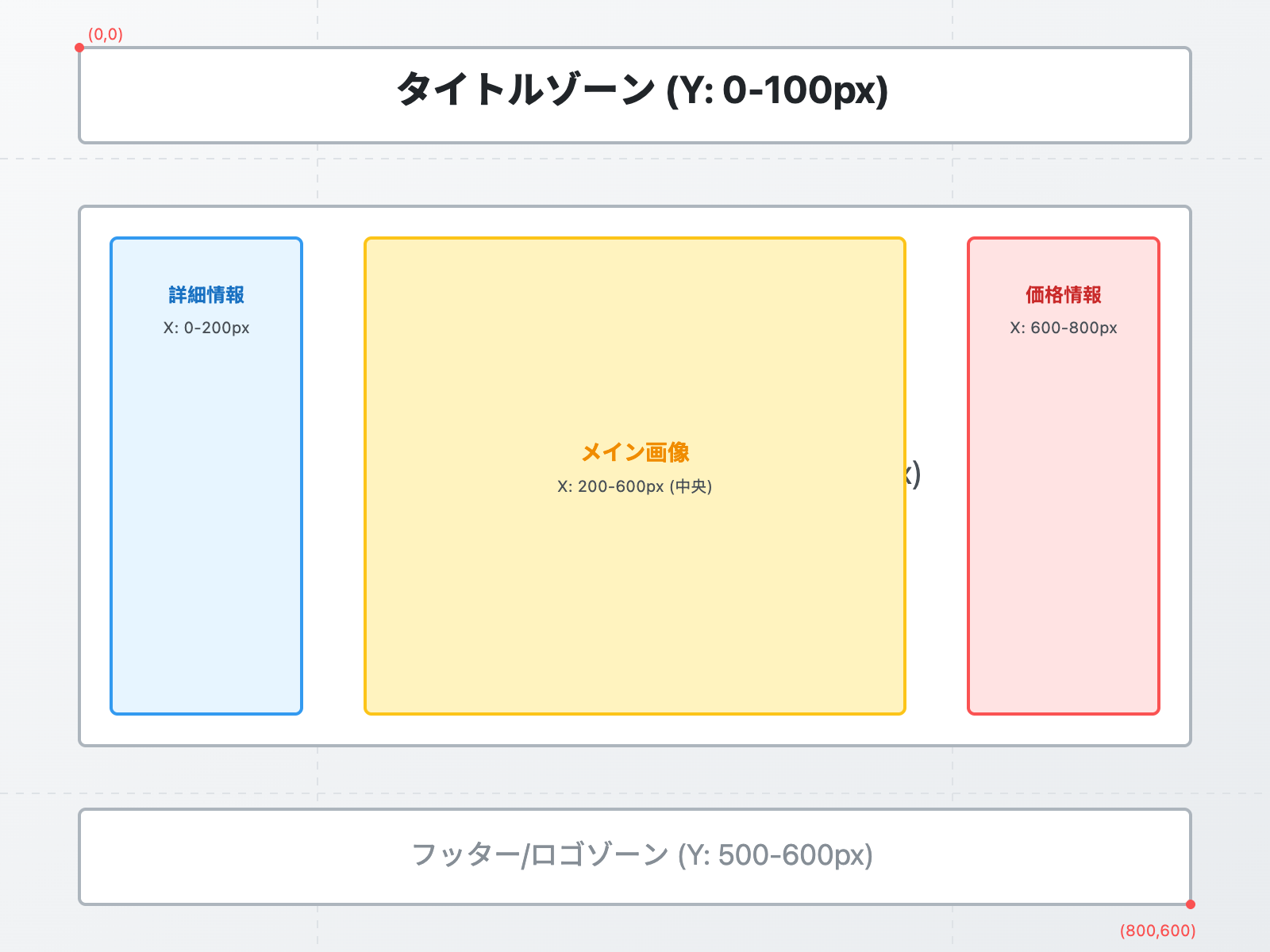
位置制御プロンプト:
Position text elements using this coordinate system (800x600px canvas):

TITLE:
- Position: X=400 (center), Y=60
- Alignment: Center
- Area: 0-100px from top

PRODUCT DETAILS (left sidebar):
- Position: X=130, Y=150-450
- Alignment: Left
- Area: 0-200px from left

MAIN IMAGE:
- Position: X=200-600, Y=100-500 (center area)

PRICE INFO (right sidebar):
- Position: X=670, Y=150-450
- Alignment: Right
- Area: 600-800px from left

LOGO:
- Position: X=700, Y=550
- Alignment: Bottom-right
ステップ4:高度な編集テクニック
局所要素の再生成
生成されたコラージュボードの一部のみを修正したい場合、インペインティング機能を使用します:
プロンプト例:
In the existing mood board, regenerate ONLY the top-left accessory image:

- Keep all other elements unchanged
- Replace the current beret image with: a close-up shot of burgundy beret with texture detail
- Maintain the same size and position
- Match the existing lighting and color grading

Inpaint area: coordinates (50, 120) to (190, 220)
スタイル一貫性の維持
複数のコラージュボードをシリーズとして制作する場合、スタイルリファレンスIDを使用します:
Generate a series of 3 mood boards with consistent style:

Board 1: Autumn Essentials
Board 2: Winter Layers
Board 3: Spring Transitional

Style consistency requirements:
- Use the same layout template
- Maintain identical font choices
- Keep the same color grading filter
- Preserve background texture style

Style reference ID: [previous_generation_id]
解像度とアスペクト比の最適化
| 用途 | 推奨解像度 | アスペクト比 | プロンプト設定 |
|---|---|---|---|
| Instagram投稿 | 1080x1080px | 1:1 | square format, Instagram optimized |
| Pinterestピン | 1000x1500px | 2:3 | vertical portrait, Pinterest style |
| 印刷カタログ | 2480x3508px | A4 | A4 size, 300dpi, CMYK color |
| Webバナー | 1920x1080px | 16:9 | widescreen landscape, web banner |
| プレゼンスライド | 1920x1080px | 16:9 | PowerPoint slide format |
解像度指定プロンプト:
Create the fashion mood board in the following specifications:

Resolution: 2480x3508 pixels (A4 at 300dpi)
Color mode: CMYK for print production
Aspect ratio: Vertical portrait
Bleed area: Add 3mm bleed on all edges
Safe zone: Keep all text 5mm from edges

Export format: High-quality JPEG + PNG with transparency
ステップ5:実践ケーススタディ
ケース1:ブランドカプセルコレクションボード
ビジネス要件:
新興ファッションブランドが春夏カプセルコレクション(5アイテム)のコラージュボードを必要とし、以下の要素を含める:
- 各アイテムの商品写真
- 価格表示($199-$599)
- ブランドロゴとスローガン
- SNSハッシュタグ
- QRコード(ECサイトへ誘導)
完全プロンプト:
Create a professional capsule collection mood board for a minimalist fashion brand:

LAYOUT (1080x1350px, Instagram portrait):
- Top 20%: Brand header with logo "MINIMAL STUDIO" and tagline "Less is More"
- Middle 60%: 5 product images in asymmetric grid
  * Main dress (center, 40% area)
  * Blazer (top-right, 20%)
  * Trousers (bottom-left, 20%)
  * Bag (bottom-right, 15%)
  * Shoes (top-left, 15%)
- Bottom 20%: Price strip + CTA section

TEXT ELEMENTS:
- Product names in uppercase sans-serif, 18pt
- Prices in serif font, 24pt, format: "$XXX"
- Hashtags: "#MinimalStudio #CapsuleWardrobe #SS2024"
- CTA: "Shop Now" button with arrow

DESIGN DETAILS:
- Background: Soft cream (#faf9f6)
- Accent color: Sage green (#b2c9ab)
- QR code: Bottom-right corner, 80x80px
- Drop shadows: Subtle, 2px blur

BRANDING:
- Logo: Top-center, gold foil effect
- Color palette strip at bottom: 5 brand colors
- Minimalist line decorations between images

Style: Clean, modern, editorial magazine layout
Output: High-res JPEG optimized for Instagram
生成結果の最適化:
初回生成後、以下の調整を実施:
- QRコードが不鮮明 →
"QR code: high contrast black/white, tested for scannability"を追加 - 価格フォントが小さい →
"Price text: minimum 28pt for mobile readability"に修正 - ブランドロゴの色が薄い →
"Logo: #d4af37 gold with 2px dark outline for contrast"を指定
ケース2:マルチカルチャーファッションウィーク特集
要件:
パリ、ミラノ、東京の3都市ファッションウィークのハイライトを1枚のコラージュボードに統合
プロンプト戦略:
Create a tri-city fashion week highlights mood board (2400x1600px):

GEOGRAPHIC SECTIONS (vertical thirds):
- Left third: Paris Fashion Week
  * Dominant colors: Navy, ivory, burgundy
  * Style: Classic elegance
  * Text: "PARIS" in serif font

- Middle third: Milan Fashion Week
  * Dominant colors: Black, gold, emerald
  * Style: Luxury maximalism
  * Text: "MILANO" in bold sans-serif

- Right third: Tokyo Fashion Week
  * Dominant colors: White, pink, electric blue
  * Style: Avant-garde streetwear
  * Text: "TOKYO" in modern Japanese-inspired font

UNIFYING ELEMENTS:
- Top banner: "GLOBAL FASHION WEEK SPRING 2024"
- Connecting geometric lines between sections
- Shared color palette strip at bottom
- Consistent image treatment: 1px white borders

CULTURAL SENSITIVITY:
- Use culturally appropriate fonts for each city
- Include local fashion week logos
- Maintain respectful representation of each style

Use Google Search Grounding to pull latest runway trends from each fashion week.
よくある問題と解決策
Q1: 生成されたテキストが読みにくい
症状: テキストがぼやける、文字が欠ける、フォントが歪む
解決策:
// プロンプトに明示的なテキスト品質要求を追加
Add text with these quality requirements:
- Render all text at 300dpi minimum
- Use anti-aliasing for smooth edges
- Ensure minimum font size of 14pt for body text
- Add 2px padding around text for clarity
- Use high-contrast color combinations (WCAG AA compliant)
テスト方法: 生成後、画像を200%に拡大してテキストのエッジを確認します
Q2: カラーパレットが仕様と一致しない
症状: 指定した色が正確に再現されない
解決策:
// 16進数カラーコードと色名を併用
Strict color palette requirements:
- Primary: Burgundy #991b1b (test swatch provided)
- Secondary: Warm brown #78350f (Pantone 1545 C equivalent)
- Accent: Cream #faf9f6 (must be off-white, not pure white)

Color accuracy priority: Use exact hex codes over descriptive names.
Color space: sRGB for web, Adobe RGB for print.
検証ツール: ColorZillaなどのブラウザ拡張を使用して実際の色値を確認します
Q3: 複数画像の合成比率が不自然
症状: 参照画像のスタイルが過度に混ざる、または一つの画像が支配的すぎる
解決策:
{
  "prompt": "Balanced fashion mood board",
  "images": [
    {
      "url": "main_style.jpg",
      "weight": 0.4,
      "description": "Overall aesthetic reference"
    },
    {
      "url": "color_palette.jpg",
      "weight": 0.3,
      "description": "Color scheme only"
    },
    {
      "url": "layout_template.jpg",
      "weight": 0.2,
      "description": "Composition structure"
    },
    {
      "url": "texture_detail.jpg",
      "weight": 0.1,
      "description": "Material texture accent"
    }
  ]
}
調整原則:
- 最も重要な参照画像: 0.4-0.5
- 補助参照: 0.2-0.3
- 細部要素: 0.1以下
パフォーマンスとコスト最適化
生成速度の比較
| 解像度 | 画像枚数 | 平均生成時間 | 推奨シナリオ |
|---|---|---|---|
| 1024×1024 | 0 | 8-12秒 | クイックプロトタイプ |
| 1024×1024 | 4枚 | 15-25秒 | 基本コラージュ |
| 2048×2048 | 0 | 25-35秒 | 高品質単体画像 |
| 2048×2048 | 8枚 | 45-60秒 | 複雑なマルチ画像合成 |
| 4096×4096 | 14枚 | 90-120秒 | プロフェッショナル印刷品質 |
コスト削減戦略
戦略1: プログレッシブ生成
# ステップ1: 低解像度で構図確認 (1024px, 0.01クレジット)
Initial draft at 1024x1024 to verify layout

# ステップ2: 構図確定後に高解像度再生成 (2048px, 0.04クレジット)
Final version at 2048x2048 after approval

# コスト節約: 3-5回の試行で約60%削減
戦略2: バッチ生成
# 10枚の類似コラージュボードを生成する場合

Option A: 個別生成
10 generations × 0.04 credits = 0.4 credits

Option B: テンプレート+変数バッチ
1 template generation (0.04) + 9 variations (0.02 each) = 0.22 credits

Savings: 45%
キャッシュ活用
頻繁に使用する要素(ブランドロゴ、カラーパレット、レイアウトテンプレート)はスタイルリファレンスIDとして保存:
# 初回: 完全なプロンプトで生成
Full prompt with all specifications → Generation ID: abc123

# 2回目以降: リファレンスIDを再利用
Use style reference: abc123
Only specify changing elements: new product images

Efficiency gain: 70% shorter prompts, 40% faster generation
プロフェッショナルワークフロー
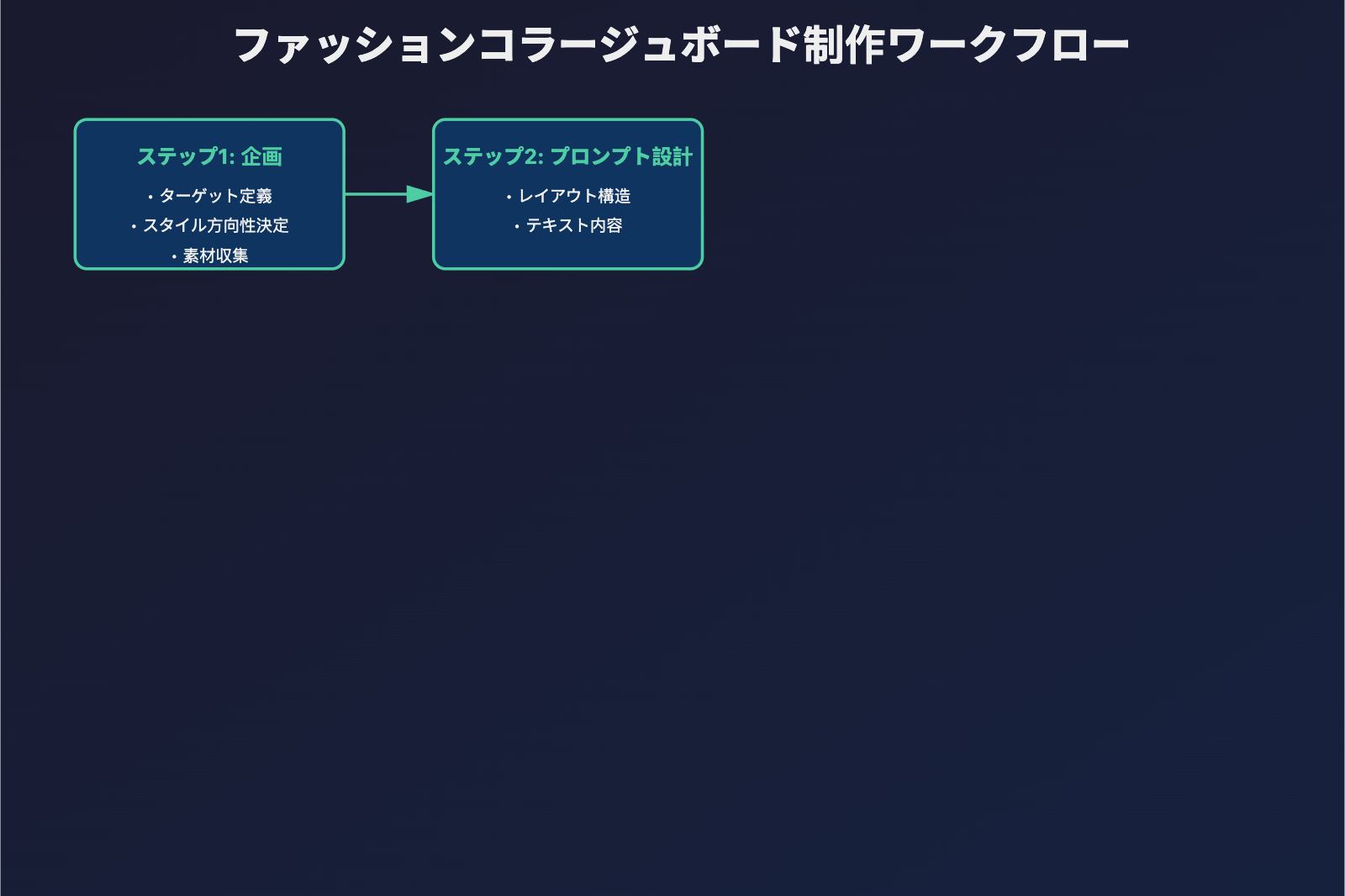
ステップ2: API呼び出しによるコラージュボード生成
以下はPythonを使用してNano Banana Pro APIを呼び出す最小限のサンプルです(APIYIプラットフォーム経由):
import openai

client = openai.OpenAI(
    api_key="YOUR_APIYI_KEY",
    base_url="https://vip.apiyi.com/v1"
)

response = client.images.generate(
    model="gemini-3-pro-image-preview",
    prompt="Create a fashion product collage on a brown corkboard...",
    size="1024x1024",
    n=1
)

image_url = response.data[0].url
print(f"コラージュボード生成成功: {image_url}")
完全な高度な設定コードを表示
import openai
from typing import Optional, List

def generate_fashion_collage(
    main_photo_path: str,
    product_images: List[str],
    labels: List[str],
    style: str = "corkboard",
    resolution: str = "2048x2048"
) -> str:
    """
    ファッションコラージュボードを生成

    Args:
        main_photo_path: 中央モデル写真のパス
        product_images: 製品アイテム画像パスのリスト
        labels: テキストラベルのリスト
        style: コラージュスタイル (corkboard/canvas/clean)
        resolution: 出力解像度

    Returns:
        生成された画像のURL
    """
    client = openai.OpenAI(
        api_key="YOUR_APIYI_KEY",
        base_url="https://vip.apiyi.com/v1"
    )

    # プロンプトを構築
    prompt = f"""Create a fashion product collage on a brown {style}.

Center: A model photo showing the complete outfit
Surrounding elements:
"""

    for i, label in enumerate(labels, 1):
        prompt += f"- Product card {i}: {label}\n"

    prompt += """
Layout: Magazine editorial style with realistic shadows
Text rendering: Clear, handwritten-style labels in English
Color grading: Warm tones with high contrast
"""

    try:
        response = client.images.generate(
            model="gemini-3-pro-image-preview",
            prompt=prompt,
            size=resolution,
            quality="hd"
        )
        return response.data[0].url
    except Exception as e:
        return f"生成失敗: {str(e)}"

# 使用例
result = generate_fashion_collage(
    main_photo_path="outfit_main.jpg",
    product_images=["beret.jpg", "turtleneck.jpg", "skirt.jpg", "boots.jpg", "bag.jpg"],
    labels=["BURGUNDY BERET", "WHITE TURTLENECK", "BROWN SKIRT", "BLACK BOOTS", "RED HANDBAG"],
    style="corkboard",
    resolution="2048x2048"
)
print(result)
クイックテスト: APIYI apiyi.com でNano Banana Proのテストクレジットを取得できます。プラットフォームはOpenAI SDKの呼び出し形式を統一サポートしており、既存コードを変更せずにモデルを切り替えられます。imagen.apiyi.comでオンライン画像生成を体験できます。
ステップ3: 精密編集と反復
Nano Banana Proはマルチターン対話編集をサポートし、生成結果の部分的な調整が可能です:
一般的な編集ニーズ:
-
テキスト内容の調整
Replace the "TWEED COAT" label with "OVERSIZED COAT" in the same handwritten style -
アイテム位置の変更
Move the red handbag card to the bottom right corner -
配色の変更
Change the overall color grading to cool tones: navy blue, silver, white -
ブランド要素の追加
Add a small brand logo "CHANEL" in the top left corner with elegant typography
編集のコツ:
- "Replace X with Y"を使用して置換対象を明確化
- "in the same style"を保持してスタイルの一貫性を確保
- Google Search Grounding機能を活用してブランドビジュアル規範を自動取得
Nano Banana Pro と従来ツールの比較
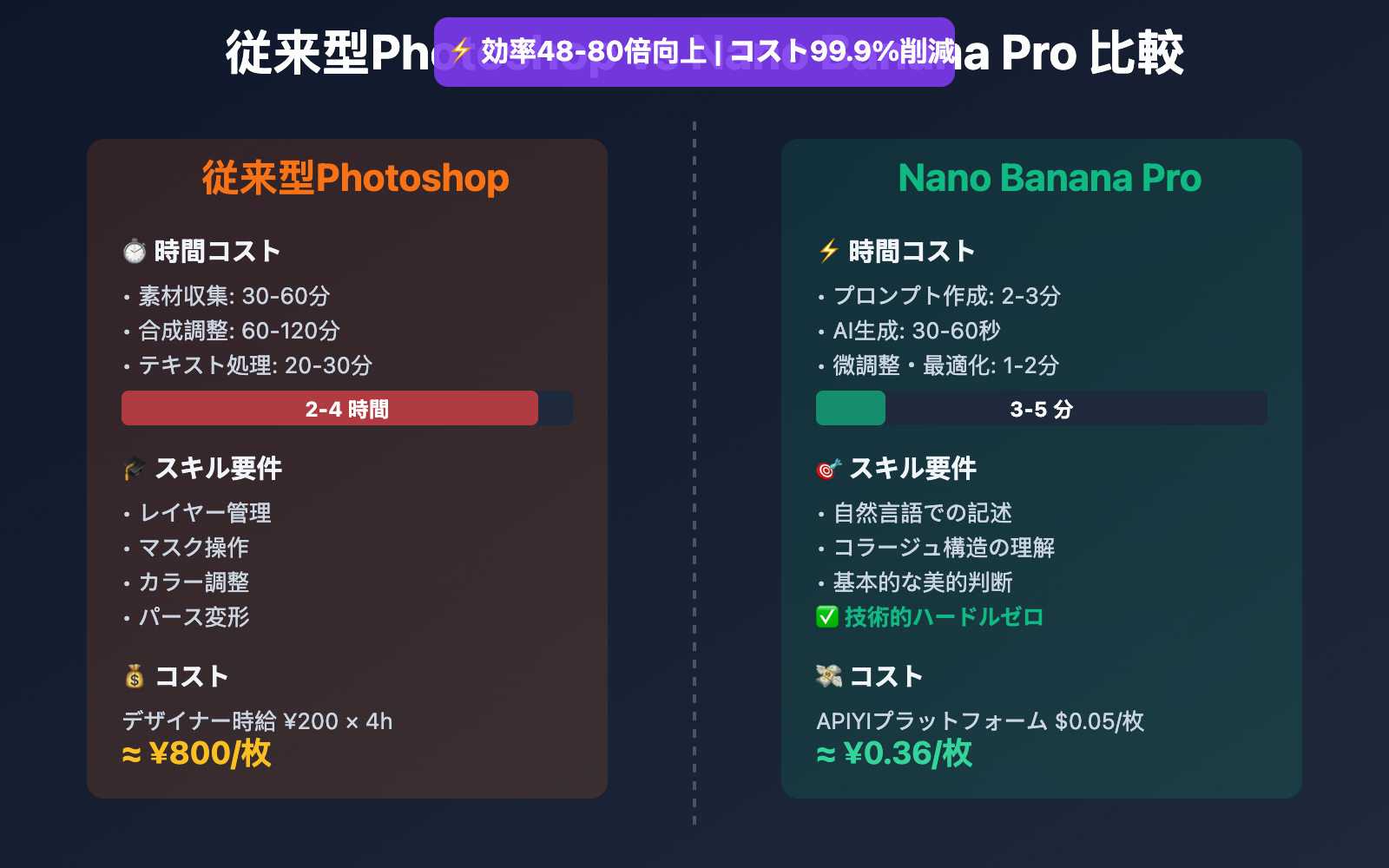
| 比較項目 | 従来型Photoshopコラージュ | Nano Banana Pro AIコラージュ |
|---|---|---|
| 制作時間 | 2-4時間(素材収集+合成+色調整) | 30秒 – 1分(プロンプト生成) |
| 技術的ハードル | PSのレイヤー、マスク操作の習熟が必要 | 自然言語での記述のみ |
| テキストレンダリング | 手動でテキストレイヤーを追加、フォントと位置を調整 | 読みやすいテキストを自動レンダリング |
| 複数画像合成 | 手動で位置合わせ、パースと影を調整 | パース関係と光影を自動処理 |
| 反復コスト | 複数のレイヤーを再調整する必要あり | 一文で局所的な編集が可能 |
| 適用シーン | ピクセルレベルの精密制御が必要な最終稿 | 迅速なブレインストーミング、提案初稿 |
比較説明: 上記の時間データは Fashion Moodboard with Gemini 3 & Nano Banana Pro の実測データに基づいています。APIYI apiyi.com プラットフォームを通じて $0.05/枚 の価格で検証可能です(Google公式の4K価格 $0.24/枚と比較して79%節約)。
Nano Banana Pro ファッションコラージュ高度なテクニック
1. Google Search Groundingを活用したリアルタイムトレンド取得
Nano Banana Pro独自のGoogle Search Grounding機能により、現在の流行要素を自動検索できます:
response = client.images.generate(
    model="gemini-3-pro-image-preview",
    prompt="""Create a fashion mood board for Spring 2026 Paris Fashion Week trends.

    Use Google Search to find:
    - Top 3 trending color palettes
    - Popular fabric textures (silk, linen, etc.)
    - Key silhouettes from recent runway shows

    Arrange in a modern collage layout with clear trend labels.""",
    extra_body={"use_search_grounding": True}
)
応用価値: デザイナーが手動でトレンドをリサーチする必要がなく、AIが最新のファッション情報を自動取得し視覚化します。
2. キャラクター一貫性: 同一モデルによる複数スタイリングのコラージュ
Nano Banana Proは 最大5人のキャラクターの一貫性 をサポートしており、「同一モデルの1週間コーディネート」コラージュボードの制作に適しています:
prompt = """Create a 7-day outfit collage featuring the same Asian female model.

Model characteristics: Long black hair, 170cm height, modern urban style

Outfits:
- Monday: Business casual (blazer + white shirt)
- Tuesday: Casual streetwear (oversized hoodie + jeans)
- Wednesday: Elegant dinner (little black dress)
- Thursday: Sporty (athleisure set)
- Friday: Weekend brunch (knit sweater + midi skirt)
- Saturday: Date night (silk blouse + trousers)
- Sunday: Relaxed home (cashmere loungewear)

Layout: Grid format with day labels, same model face across all photos
"""
技術的ポイント: プロンプト内で「same model face」と詳細な外見特徴を明確に記述します。
3. 多言語テキストレンダリング: 日英バイリンガルブランドコラージュ
Nano Banana Pro公式ドキュメントによると、モデルは日本語・英語などの多言語の鮮明なレンダリングをサポートしています:
prompt = """Create a luxury brand product collage on white background.

Text elements (render clearly):
- English brand name: "MAISON LUMIÈRE" (elegant serif font)
- Chinese slogan: "光影美学 · 时尚新生" (modern sans-serif)
- Product labels: "Silk Scarf ¥2,980", "Leather Bag ¥15,800"

Products: Arrange 4 luxury items with clean spacing
Style: High-end magazine editorial with soft shadows
"""
適用シーン: 越境ECブランド、ラグジュアリーブランドのマーケティング素材、バイリンガル製品カタログ。
実際の応用シーンと事例
シーン1: Eコマース商品カタログページの生成
ニーズ: オンライン衣料品店の毎週新商品コラージュページを迅速に生成
実装方法:
- 単品高解像度画像を準備(白背景)
- Nano Banana Proを使用して自動的にコラージュレイアウトを合成
- 価格タグとプロモーション文言を追加
- 公式サイトバナー用の4K高解像度画像を出力
時間比較:
- 従来のデザイナー制作: 4時間/ページ
- Nano Banana Pro: 2分/ページ(微調整含む)
コスト削減: デザイナーの時給¥200で計算すると、1ページあたり¥800の人件費を節約
シーン2: ファッションブロガーのコンテンツ制作
ニーズ: 毎日1枚のコーディネートインスピレーションコラージュをInstagram/小紅書に投稿
ワークフロー:
ストリート写真撮影 → Nano Banana Proに入力 → 自動的にコラージュボード生成 → 文章追加して投稿
実際のデータ (Gemini AI Vision Board Trendより):
- 2026年1月、Mixboard + Nano Banana Proを使用するファッションブロガーのコンテンツ制作効率が**300%**向上
- ユーザーエンゲージメント率が40%向上(視覚品質がより専門的になったため)
シーン3: ブランドムードボード提案
ニーズ: クライアント向けに異なるスタイルのブランドビジュアル方向提案を3バージョン迅速に制作
Nano Banana Proの優位性:
- 複数バージョンの比較を迅速に生成(Vintage / Modern / Minimalist)
- クライアントのフィードバック後、即座に細部を調整
- 最終決定案の4K印刷グレードファイルを出力
業界トレンド: 24 Mind-Blowing Nano Banana Pro Use Casesによると、ファッション業界のデザイナーが初期コンセプト開発にAI生成ツールを使用する割合は**67%**に達している(2025年データ)。
Nano Banana Pro API価格設定とプラットフォーム選択
公式価格設定(Google Vertex AI)
| 解像度 | Google公式価格 | アクセス要件 |
|---|---|---|
| 4K | $0.24/枚 | Google Cloudに海外クレジットカードの紐付けが必要 |
| 2K | $0.134/枚 | 同上 |
| 1K | 個別価格設定なし | 同上 |
APIYIプラットフォーム価格設定 ⭐ おすすめ
基本価格設定
- 統一価格: $0.05/枚 (解像度不問、1K/2K/4K全対応)
- 割引率:
- 公式4Kと比較: 79%節約 (約2割)
- 公式2Kと比較: 63%節約 (約3.7割)
大口顧客チャージボーナス
対象: 1日平均消費 > 5,000枚の画像を使用するEコマース、デザイン会社、MCN機関
| チャージ金額 | ボーナス率 | 実際入金額 | 実際単価 |
|---|---|---|---|
| $100 | +10% | $110 | $0.045/枚 |
| $500 | +15% | $575 | $0.043/枚 |
| $1000+ | +20% (上限) | $1200 | $0.04/枚 |
コスト計算例:
Eコマースチームが月に10,000枚の商品コラージュ画像を生成する場合:
| プラットフォーム | 単価 | 月間コスト | 年間コスト |
|---|---|---|---|
| Google公式(4K) | $0.24 | $2,400 | $28,800 |
| APIYI基本価格 | $0.05 | $500 | $6,000 |
| APIYIボーナス価格(20%) | $0.04 | $400 | $4,800 |
年間節約: $24,000 (**83%**節約)
パフォーマンス優位性
- 生成速度:
- 1K/2K: 約30秒/枚
- 4K: 約1分/枚
- 安定性: Google Cloud T3レベル以上のエンタープライズアカウントに基づく
- 並行制御: 並行数無制限、大規模バッチ呼び出しに対応
- 日間生産能力: プラットフォームの1日平均処理量10万枚以上(2026年1月データ)
支払い方法
- ✅ Alipay / WeChat Pay
- ✅ USDT(海外顧客に便利、ロシア、スペイン、北米の顧客にサービス提供済み)
- ✅ 海外クレジットカード不要
クイックスタート
- 開発ドキュメント: docs.apiyi.com
- 公式サイト: api.apiyi.com
- オンラインテスト: imagen.apiyi.com (Nano Banana Proの画像生成効果を無料体験)
よくある質問
Q1: Nano Banana Proのコラージュにおけるテキストレンダリング効果はどうですか?
Nano Banana ProはGoogleが公式に認定した「正確にレンダリングされた明瞭で読みやすいテキストを含む画像を生成する最高のモデル」です。実測では中国語と英語のテキストが明瞭に読め、複数のフォントスタイル(手書き体、セリフ体、サンセリフ体)に対応しており、テキストがコラージュの光影効果に自動的に融合するため、後処理でのPhotoshop編集は不要です。
Q2: 複数画像の合成は最大何枚の参照画像に対応していますか?
Nano Banana Proは最大14枚の参照画像の合成に対応しています。ファッションコラージュのシーンでは、各要素に十分な表示スペースを確保し、視覚的に混雑しすぎないよう、8〜10枚以内に抑えることを推奨します。より多くのアイテムを合成する必要がある場合は、「グループコラージュ」戦略を採用し、類似カテゴリの製品を同じカード内に配置することができます。
Q3: Nano Banana Proのテストを素早く始めるにはどうすればよいですか?
APIYI apiyi.comプラットフォームを通じた迅速なテストを推奨します:
- api.apiyi.comにアクセスしてアカウントを登録(Alipay/WeChat対応)
- API Keyと無料テスト枠を取得
- 本記事のPythonコードサンプルを使用し、
base_urlをhttps://vip.apiyi.com/v1に変更 - imagen.apiyi.comにアクセスしてコラージュ効果をオンラインで体験(プログラミング不要)
追加メリット: APIYIプラットフォームは80以上の主流AIモデルの統一インターフェースに対応しており、DALL-E 3、Midjourney、Stable Diffusionなどのモデルとコラージュシーンでの効果の違いを迅速に比較できます。
まとめ
Nano Banana Proファッションコラージュの主な利点:
- 複数画像合成: 最大14枚の画像を自動レイアウト、手動での配置作業を省略
- テキストレンダリング: 中国語・英語など多言語の明瞭なレンダリング、ブランドラベルの自動生成
- 高効率な反復作業: 自然言語での編集、30秒で部分調整が完了
- コスト優位性: APIYIプラットフォーム経由の呼び出しで、コストはGoogle公式の2割のみ
eコマースデザイナー、ファッションブロガー、ブランド企画チームにとって、Nano Banana Proはコラージュ制作を「4時間の専門作業」から「1分のプロンプト入力」にダウングレードし、創造的スピードにおいて質的な飛躍を実現します。
APIYI apiyi.comを通じて効果を迅速に検証することを推奨します。プラットフォームは無料テスト枠、統一されたOpenAI SDK呼び出し形式、および1K〜4K解像度をカバーする$0.05/枚の優待価格を提供しています。imagen.apiyi.comにアクセスすれば、コラージュ生成効果をオンラインで体験できます。
著者: 技術チーム
技術交流: コメント欄であなたのコラージュ作品をぜひシェアしてください。より多くのAI画像生成資料はAPIYI apiyi.com技術コミュニティでご覧いただけます
参考資料:


