Author’s note: Short-drama AI production can’t be judged by how good a single shot looks. This article lays out a multi-episode asset management method that runs from script breakdown all the way to change tracking, and shows how to connect models through an API to handle structured extraction and continuity checks.
On November 4, 2026, 36Kr reported that Alibaba is running an internal beta of an AI creation platform called Looogen, and likened it in the headline to “Alibaba’s Jimeng AI.” AI creation platforms keep popping up, and single-shot generation capabilities are getting easier and easier to come by. Our take: the competitive edge in short-drama AI production is shifting to whether you can keep multi-episode assets under control.
This isn’t a platform review, and it isn’t a tool ranking. There’s limited public information we can verify right now, so Looogen’s specific features should still be treated as pending official confirmation. What this article focuses on is a method teams can put into practice right away: how to keep characters, sets, props, and voices consistent across dozens of episodes—and how to map the blast radius when changes happen.
Core value: By the end of this article, you’ll know how to build a multi-episode asset management workflow covering asset IDs, version locking, shot cards, continuity checks, and change tracking. The text-processing steps in that workflow can be automated by connecting models through APIYI.
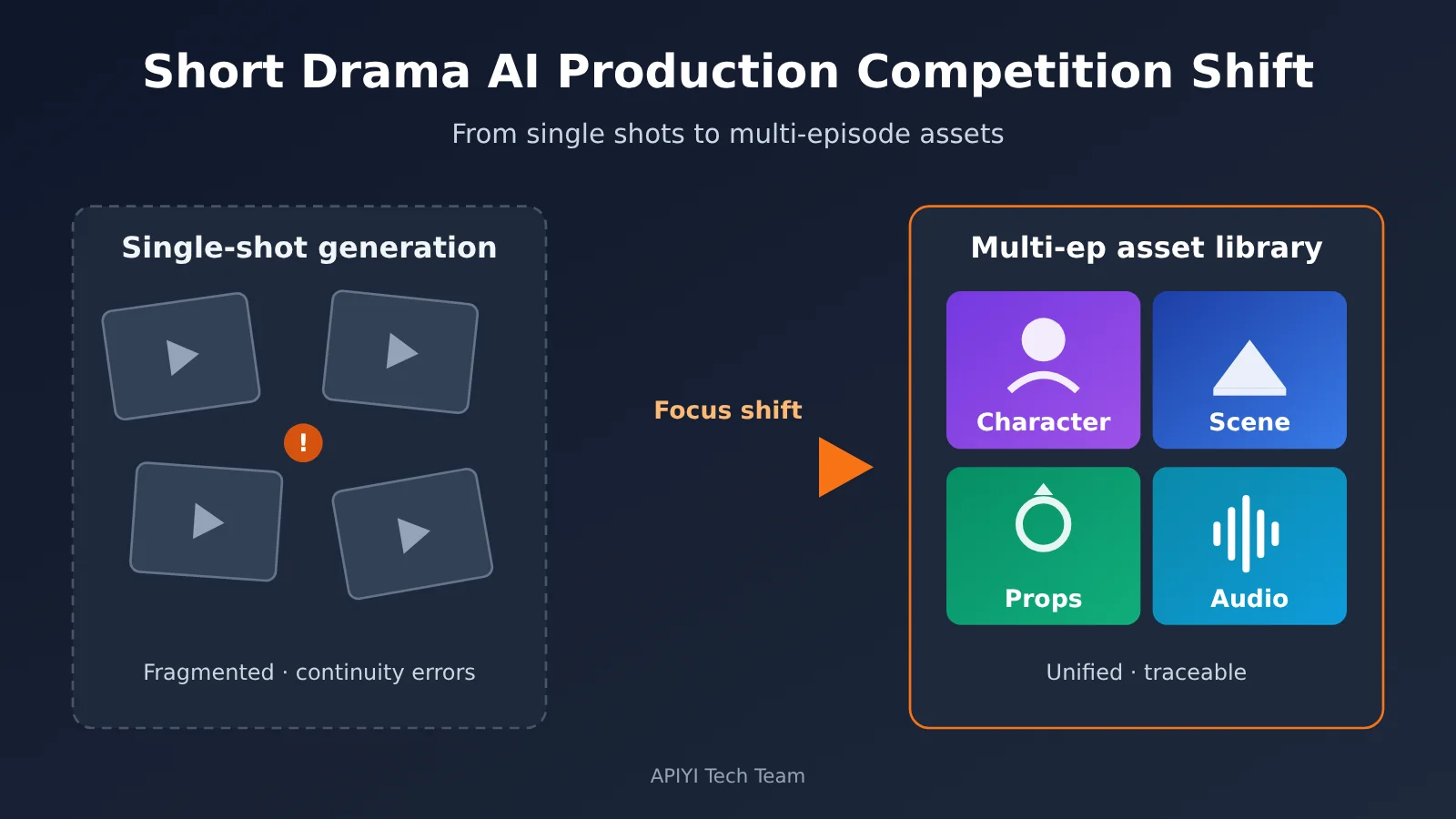
Key Takeaways: Where the Competitive Edge in AI Short Drama Production Is Shifting
Audiences can judge a single shot at a glance. The problems in a multi-episode short drama, though, usually only surface when you watch episodes back to back: the lead actress’s hairstyle changes in episode 3, the villain’s office suddenly has a different layout, a phone that got smashed in one episode is in perfect shape in the next. No amount of per-shot polish makes up for that kind of continuity error.
| Dimension | Single-shot generation mindset | Multi-episode asset management mindset | Practical value |
|---|---|---|---|
| Core goal | Make the current frame look good | Keep the whole series consistent | Reduces the risk of cross-episode continuity errors |
| Unit of work | Prompts and individual clips | Numbered, versioned assets | Assets become reusable and traceable |
| How you make changes | Redo clips one by one after spotting a problem | Trace the reference relationships first, then rework in a targeted way | Narrows the scope of rework |
| Where know-how accumulates | Stays in individual prompts | Stays in a shared team asset library | Lowers the cost of handovers |
Why AI short drama production needs to keep multi-episode assets under control
Short dramas typically run for many episodes, move fast, and often have several people producing in parallel. Every episode you add brings more state that has to stay consistent: whether a character is injured, which outfit they’ve changed into, who’s currently holding a particular keepsake. Relying on memory and chat logs to keep track of all this gets error-prone fast once the episode count climbs.
Asset management solves exactly this problem. It turns “settings that live in someone’s head” into “data you can query, reference, and lock down.” Even if the generation tool gets replaced later on, character settings, reference images, and shot relationships stay with the team — which makes this the most stable thing to accumulate while the tools keep iterating so quickly.
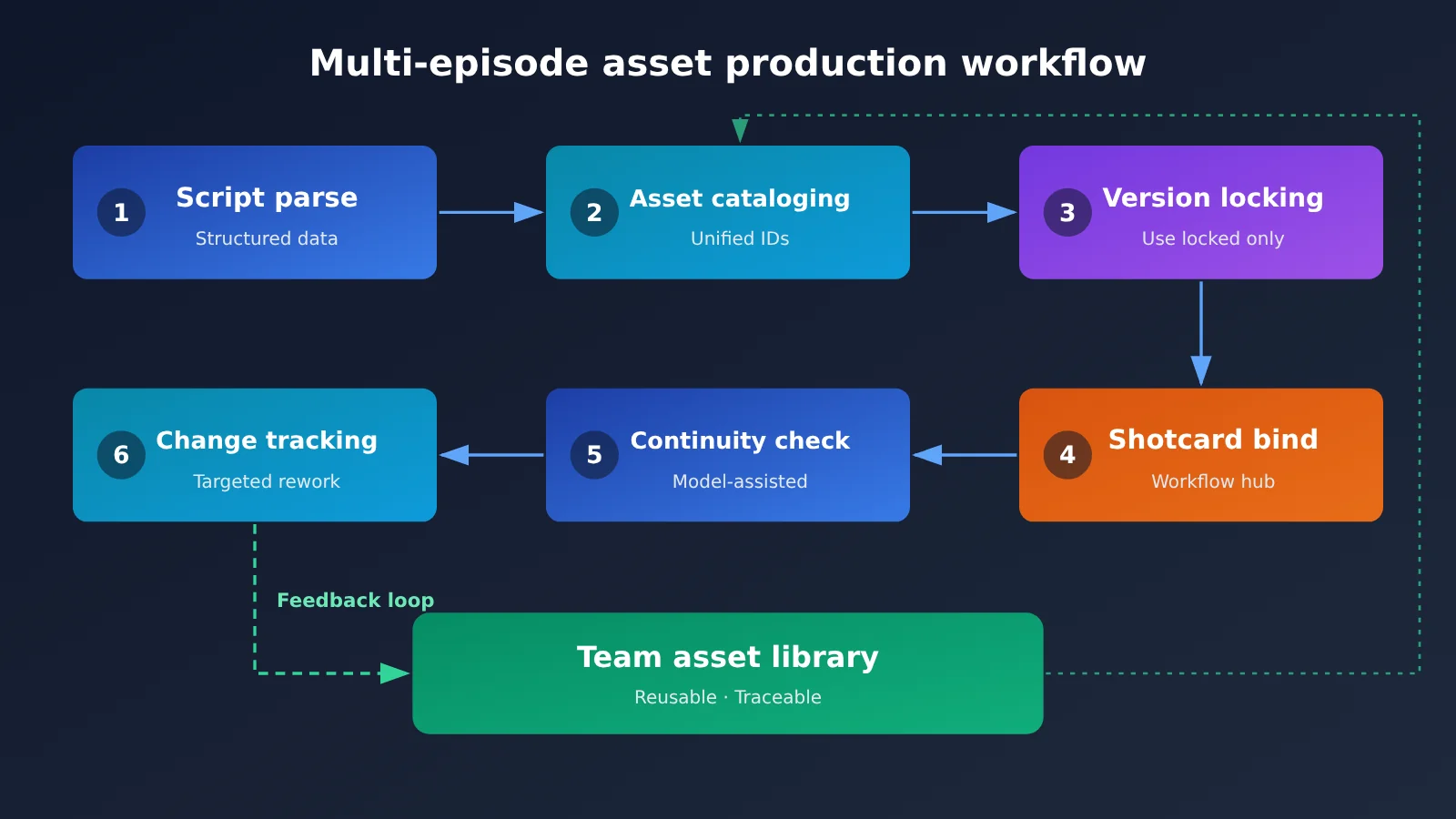
Short Drama AI Production Multi-Episode Assets Quick Start: 6-Step Workflow
The workflow below isn’t tied to any specific platform. Small teams can get started with a spreadsheet database and object storage, then migrate to a database or specialized system as they scale.
Step 1: Turn the script into structured data for short drama AI production
Start by creating a “series bible”—a master document of the show’s settings that records the worldview, character relationships, timeline, and episode outlines. Next, break each episode’s script into scenes and shots, and extract the characters, locations, props, and state changes that appear in them.
This step is a great fit for having a Large Language Model produce a first draft, followed by manual review from a writer or production coordinator. The model handles extraction and categorization, while people judge whether the settings are accurate. This improves efficiency and keeps errors from flowing straight into later steps.
Step 2: Classify and number assets consistently across episodes
You need to settle on a numbering scheme before work starts — otherwise nothing will be traceable later. Aim for a unique ID for every asset, with the type and version baked into the number. For example, CHR-LINNA-V03 means version 3 of the character Linna, and EP03-S02-SH014 means episode 3, scene 2, shot 14.
| Asset type | What to store | Example ID | Typical problem when it’s unmanaged |
|---|---|---|---|
| Character | Makeup/wardrobe reference images, multi-angle views, costumes, age states | CHR-LINNA-V03 |
The same person looks different from episode to episode |
| Location | Spatial layout, time-of-day lighting, key set dressing | LOC-OFFICE-V02 |
The same room’s layout changes |
| Prop | Appearance, ownership, current state | PROP-RING-V01 |
A prop that was destroyed or handed off reappears intact |
| Voice | Character vocal timbre, speaking pace, licensing records | VOC-LINNA-V01 |
Dubbing timbre shifts between episodes |
| Style | Color palette, aspect ratio, camera language, negative constraints | STY-MAIN-V02 |
Episodes made by different people feel visually inconsistent |
Step 3: Set versioning and locking rules for assets across episodes
Four states work well: draft for work in progress, review for awaiting approval, locked for approved-and-frozen, and deprecated for retired. As a rule, final shots should only reference assets in locked state — that way nobody can start work off an unconfirmed version.
Once a version is locked, don’t overwrite it in place. When something changes, save it as a new version and note why. If a character gets a haircut in episode 10, for instance, create a new version and specify which episodes it applies to. Keep the old version around too, because earlier shots are still referencing it.
Step 4: Use shot cards to connect the various assets in short drama AI production
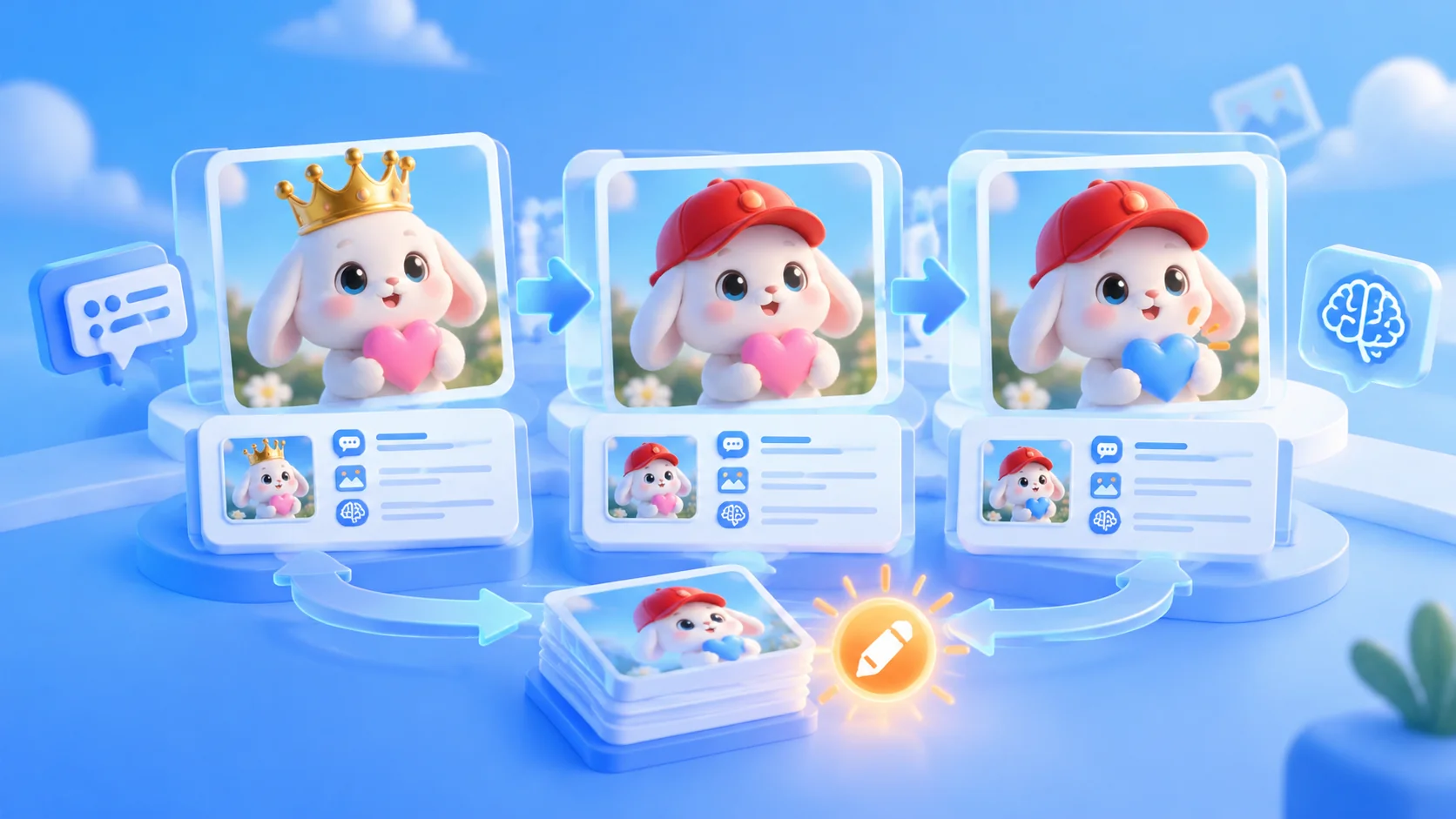
The shot card is the hub of the entire workflow. It records which assets a shot used, what parameters generated it, and where the result is stored. As long as every video has a corresponding shot card, later checks and rework have a basis.
| Field | Description | Example |
|---|---|---|
shot_id |
Unique shot ID | EP03-S02-SH014 |
asset_refs |
Referenced assets and versions | CHR-LINNA-V03, LOC-OFFICE-V02 |
story_state |
Current story state | Left hand injured, ring already returned |
prompt_version |
Prompt version | P-EP03-014-V02 |
generator |
Generation tool or model and parameters used | Fill in according to the actual tool and model |
output_uri |
Storage location of the final cut or source material | Team object storage path |
review_status |
Review status | Pending review, approved, needs rework |
Step 5: Use models to check asset continuity across episodes
Check once before and after generating each episode. Before generation, have the text model compare the character states and timeline from the previous episode and check whether this episode’s shot cards contain contradictions. After generation, have a multimodal model that supports image input compare keyframes with asset reference images, flagging differences in costumes, hairstyles, and set dressing.
The model’s check results should only serve as warnings; final confirmation still requires human review. We recommend having the model output the shot ID, conflict type, evidence, and severity in fixed fields so the results can be imported into a spreadsheet and handled by priority.
Step 6: Track how asset changes affect short-drama AI production
When an asset changes, first look up every shot card that references the old version, then flag which shots are affected. After that, decide whether to redo them based on release status and how noticeable the visual impact is — rather than tearing down the whole episode. Whether this step goes smoothly depends on how completely asset_refs was filled in earlier.
After each episode wraps, it’s worth tracking the share of reworked shots, the number of continuity issues, and the model invocation cost for that episode. Your team’s own numbers will guide the next episode’s schedule and budget better than any generic rule of thumb.
🚀 Quick start: Pick one episode and run the workflow above as a trial — you don’t need to cover the whole series at once. Model invocations in the workflow can go through APIYI; integration notes are in the docs center at
docs.apiyi.com.
How to connect a multi-episode asset workflow for short-drama AI production via API
The asset management system itself doesn’t need to be tied to any particular model. A safer approach is to wrap script breakdown, setting extraction, and continuity checks as independent tasks, so the model can be swapped per task. APIYI provides the text and multimodal model API calls used in this article, and it’s compatible with both OpenAI and Anthropic interface formats — existing projects usually just need a config change to connect. For the specific model list, refer to the APIYI models page.
| Workflow task | Input | Expected output | Required model capability | Key parameters |
|---|---|---|---|---|
| Script breakdown | Single-episode script | Scenes, shots, asset list | Long-text understanding, structured output | model, messages |
| Setting extraction | Character bios, series outline | Character and prop profiles | Information extraction | response_format (OpenAI format; support varies by model) |
| State validation | Shot cards from two consecutive episodes | List of plot-state conflicts | Logical reasoning | system, max_tokens (Anthropic format) |
| Visual comparison | Keyframes, asset reference images | Visual difference hints | Image understanding | Fill in according to the multimodal input format of the chosen model |
Follow this order when connecting:
- Read the APIYI docs at
docs.apiyi.comto confirm the endpoint, authentication method, and format you’ll use. - Check
https://docs.apiyi.com/modelsto confirm the target model is available and review its billing rules. - Put the API key in an environment variable or a secrets manager — never in shared spreadsheets or prompt templates.
- Test with one episode’s data first, and record the prompt, model name, and output together.
Cost tracking should be built into the workflow from the start too. OpenAI-format responses typically expose prompt_tokens and completion_tokens, while Anthropic-format responses use input_tokens and output_tokens. Write them back to the shot card or task log and you can account for costs per episode.
💰 Pricing note: This article doesn’t list specific unit prices. Model pricing, billing conventions, input/output rates, and cache pricing should all be based on the actual data on the APIYI pricing page at
https://docs.apiyi.com/models.
Short Drama AI Production: Comparing Multi-Episode Asset Management Approaches
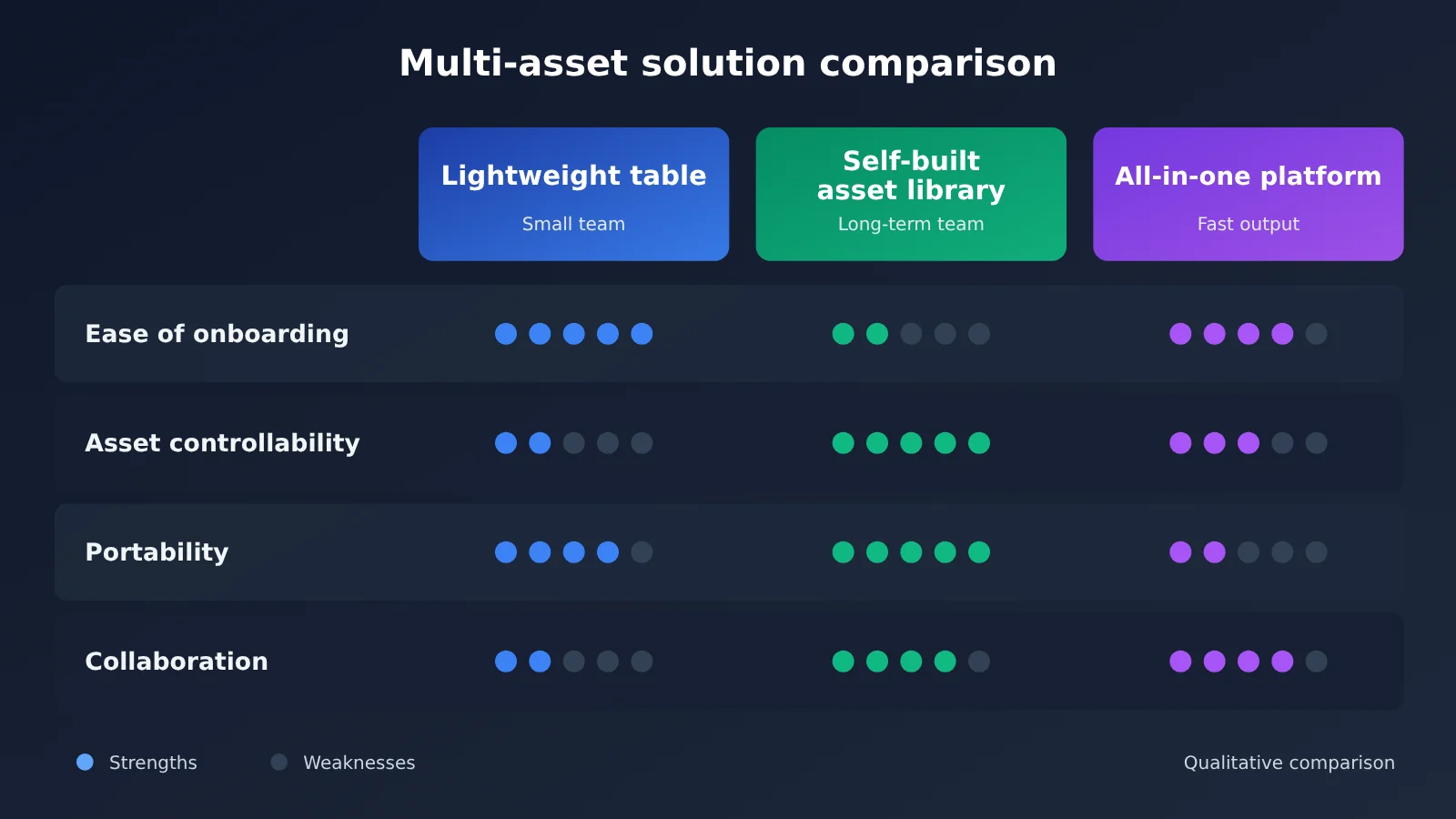
Teams of different sizes need different management approaches. The table below is a qualitative comparison based on workflow characteristics, not measured benchmark results. When choosing an approach, you should still run a trial with your own project.
| Approach | Core features | Best for | Main limitations | Model integration advice |
|---|---|---|---|---|
| Spreadsheet + object storage | Quick to set up, low cost to adapt | Small teams, pilot projects | Manual maintenance, references are easy to miss | Use APIYI to call models for assisted extraction |
| In-house asset repository + model orchestration | Data and processes stay under control | Teams running multiple projects long term | Requires R&D and operations investment | Switch models by task through a unified interface |
| All-in-one creation platform | Centralized creation workflow, lower operating barrier | Teams that want to produce episodes fast | Need to assess asset export and migration capabilities | Depends on what the platform actually exposes |
Comparison takeaways
The lightweight spreadsheet approach has the biggest advantage in startup speed, but as the episode count grows, manual syncing becomes a noticeably heavier burden. By contrast, an in-house asset repository is a better fit for teams that need to reuse assets across projects; reference lookup and impact analysis are also easier to automate.
An all-in-one creation platform reduces tool switching, and beta products like Looogen are worth watching. But when choosing one, don’t just look at generation quality. Also check whether it supports batch asset export, keeps version history, and exposes APIs. For most teams, keeping core assets and metadata under your own control is the safer bet.
💡 Selection tip: Run a comparison test with a real script from the same episode. For the text-checking step, you can switch between different models through APIYI, then compare extraction accuracy and usage cost before deciding.
Short-Drama AI Production: Multi-Episode Assets FAQ
Q1: What are multi-episode assets in short-drama AI production?
Multi-episode assets are the production elements that get reused across episodes and need to stay consistent — characters, scenes, props, voices, style guides, plus their corresponding prompts, version records, and reference relationships.
Q2: How is multi-episode asset management different from an ordinary asset library?
An ordinary asset library mostly answers “where is the file?” Multi-episode asset management also has to answer “which version is currently valid, which shots reference it, and which episodes are affected if I change it” — the focus is on state and reference relationships.
Q3: Can Looogen be used right now? What asset management features does it have?
According to a 36Kr article headline dated November 4, 2026, Looogen is in closed beta. For the scope of availability and specific features, please refer to Alibaba’s official information — this article doesn’t speculate.
Q4: Which short-drama projects need this workflow most?
Projects with many episodes in a series, complex character relationships, multiple people producing in parallel, or plans to keep updating and reusing an IP need it most. For single-episode or one-off content, a lightweight shot card is usually enough.
Q5: How do I call models through the API to do script breakdown and continuity checks?
You can call models through APIYI, which is compatible with the OpenAI and Anthropic API formats. Start by checking `docs.apiyi.com` to get configured, then do a trial run with a single episode’s script, and lock down the output fields so the results can be stored in your database.
Q6: How do I estimate model invocation costs?
First, use one episode as a sample and record the Token usage for each task, then extrapolate the total based on episode count. For unit prices and caching billing rules, check the APIYI pricing page at `https://docs.apiyi.com/models` — go by the actual data shown on the page.
Q7: What are the limitations of this multi-episode asset workflow?
It adds upfront record-keeping and review work, and it can’t replace the consistency capabilities of the generation models themselves. Model checks may miss issues or produce false positives, and anything involving likeness and voice licensing still requires a separate compliance review.
Key Takeaways: Multi-Episode Assets in AI Short Drama Production
- The competitive focus is shifting: Single-shot quality still matters, but multi-episode consistency has a bigger impact on how the whole series feels.
- Assets need IDs: Characters, scenes, props, voices, and styles all need unique IDs and versions.
- Final shot references should lock versions: A
lockedrule helps keep unconfirmed settings out of the final cut. - Shot cards are the hub: They record asset references and generation parameters, so you can pinpoint issues precisely when reworking.
- Models provide early warnings: Continuity checks can be automated, but humans still make the final call.
- Keep integrations swappable: Use APIYI as a unified model gateway so you can compare and switch models by task.
Summary
The shift in where competition happens in AI short drama production doesn’t mean generation quality no longer matters. It means good shots alone are no longer enough to carry a multi-episode production.
The core approach in this article comes down to three things:
- Build assets first, then generate at scale: Finish script breakdown, asset ID assignment, and version locking before moving into batch production.
- Make every shot traceable: Use shot cards to record asset references, story state, and generation parameters.
- Build checks and changes into the workflow: Use models to catch conflicts early, and rework selectively based on reference relationships.
I recommend trying it out starting with the next episode. Get the minimal workflow running first, then gradually add automation. When you need to connect models, you can test through APIYI. For integration instructions, see the documentation center at docs.apiyi.com. For model pricing and billing rules, refer to the actual data at https://docs.apiyi.com/models.
📚 References
- 36Kr – Alibaba Is Internally Testing an AI Creation Platform Called “Looogen” — an Alibaba Version of Jimeng AI?: The source of this article’s industry news
- Link:
36kr.com/p/4054988150478473 -
Note: Published November 4, 2026; useful for learning about the Looogen internal testing coverage
-
APIYI Documentation Center: API integration instructions
- Link:
docs.apiyi.com -
Note: Use it to look up how to configure the OpenAI- and Anthropic-compatible formats
-
APIYI Models & Pricing Page: Model and billing information
- Link:
docs.apiyi.com/models - Note: Model prices, billing rules, and cache pricing all follow the actual data on this page
Author: APIYI Technical Team
Technical discussion: Feel free to reach us through the APIYI website homepage. For more resources, visit the docs.apiyi.com documentation center.