
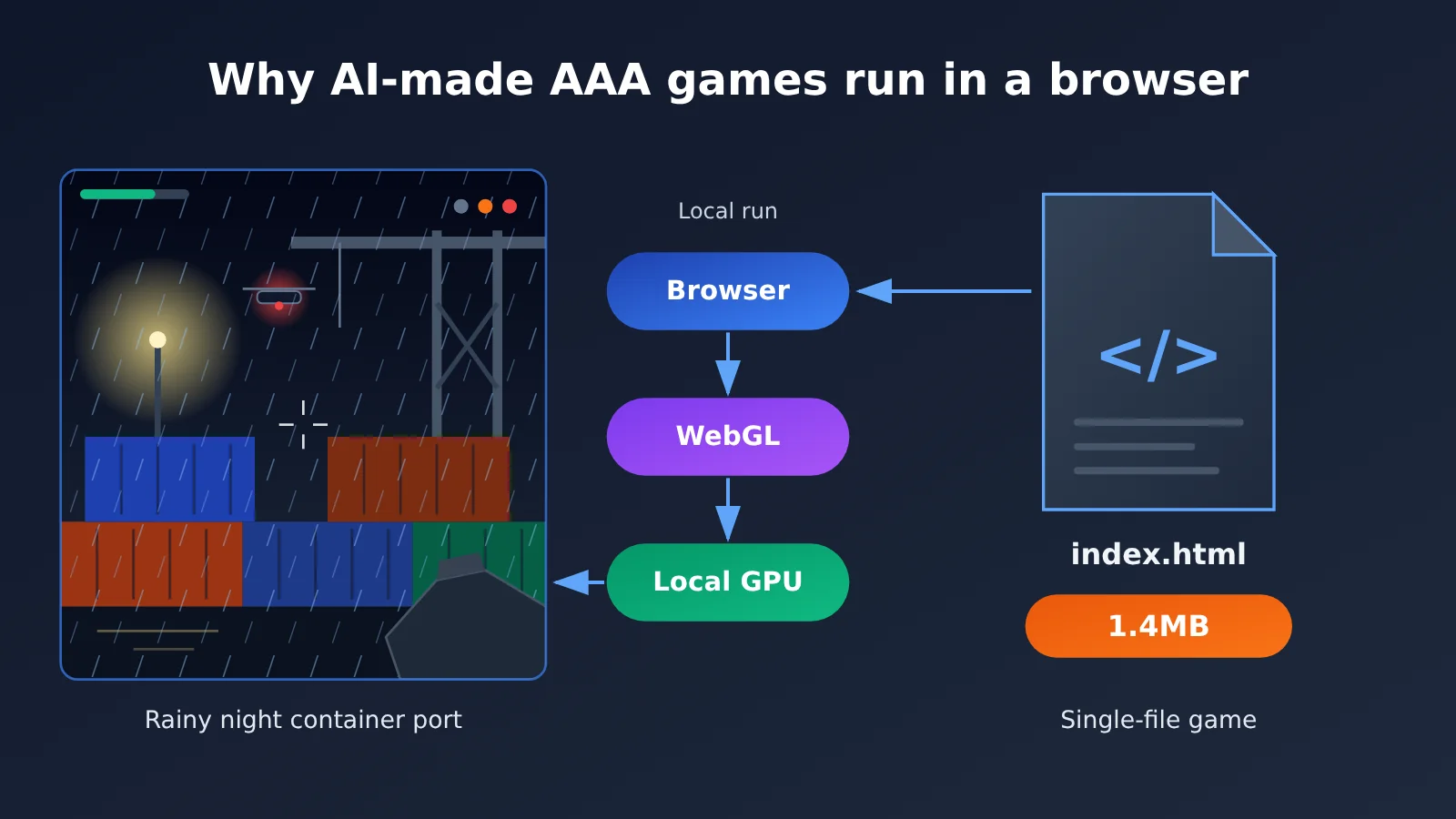
Author’s note: Saltline runs its game code in the browser and calls on the player’s local GPU to handle rendering. Procedural assets plus WebGL explain how a roughly 1.4MB web page can present a full 3D shooter scene.
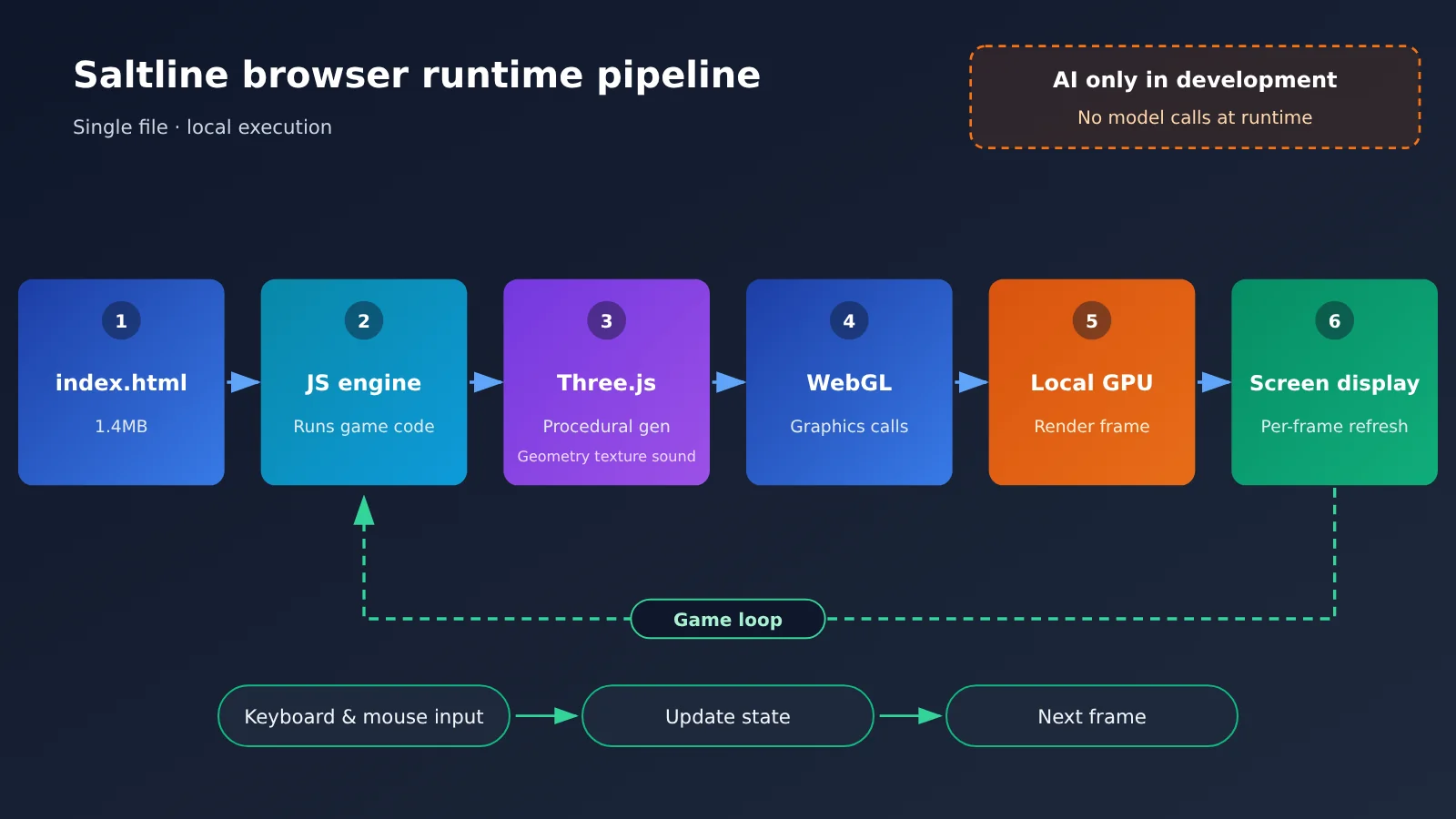
There are three reasons an “AAA game” made by AI can run in a web page. First, a modern browser is itself a complete runtime environment for 3D applications: JavaScript executes the game logic, Three.js organizes the scene, and WebGL hands the drawing work off to the GPU on the player’s machine. Second, what AI produces during development is a game program — once development is done, running it is entirely up to the browser, and no AI model gets called while the player is actually playing. Third, Saltline’s models, textures, and sounds are all generated by code, so a single HTML file of about 1.4MB lets you open the page and drop straight into the game.
The “AAA” here is a visual target the developer set for the AI, an analogy for the art style. Saltline itself is a small, playable prototype with just one level.
Let’s start with the Saltline case to pin down where the game actually runs. Then we’ll break down the technical chain behind browser-rendered 3D scenes, explain why procedural generation can squeeze the file down to 1.4MB, and line up three approaches side by side: local web runtime, cloud gaming, and AI world models. Finally, there’s a piece of code you can run right away that walks you through generating and measuring a web 3D scene with AI — plus a look at the real distance between browser games and commercial AAA games.
To Know: Understanding the Terminology in AI-Powered Browser AAA Games
| Term | Explanation |
|---|---|
| JavaScript | A programming language executed by the browser; Saltline’s game logic is written in it |
| Three.js | A JavaScript 3D graphics library used to build scenes, cameras, lighting, and objects |
| WebGL | A graphics API provided by the browser that lets web pages use the device’s GPU to render 3D visuals |
| WebGPU | A newer-generation browser graphics and compute API with more modern capabilities; Saltline doesn’t rely on it |
| WebAssembly (Wasm) | Low-level bytecode that browsers can execute, allowing C++, Rust, and other programs to run at high speed on the web |
| GPU | Graphics processing unit; well-suited to parallel computations such as processing large numbers of pixels and vertices at once |
| Shader | A small program that runs on the GPU, calculating the position of each vertex or the color of each pixel |
| Procedural generation | A technique that uses rules and mathematical functions to construct game content instead of pre-made image and model files |
| Instancing (instanced rendering) | A rendering technique that draws many objects of the same shape in a single draw call, such as rows of shipping containers |
| Frame time | The time required to render one frame; 60 FPS corresponds to about 16.67 milliseconds per frame |
| Cloud gaming | A setup where the game runs on a remote server and streams the visuals to the player as video |
| WebRTC | A browser technology for real-time audio and video transmission, commonly used in cloud gaming to stream visuals and input |
| World model | An AI model that learns how environments change and predicts or generates subsequent scenes based on player input |
1 Why AI-Built AAA Games Only Need a Webpage: The Saltline Story
1.1 What Kind of AI Web Game Is Saltline?
On November 9, 2026, Anthropic engineer Felix Rieseberg published a coding experiment with Claude Fable 5.2. He gave the model a single prompt asking it to build a small-scale first-person shooter that looked as visually close to a AAA game as possible, without providing any human feedback throughout the process. The result was Saltline.
The game is set in a container port on a rainy night, with warehouses, docks, and stacked shipping containers. The player must shut down three signal relay stations and extract. The enemies include aerial patrol drones and ground-based mechanical hounds. The game supports first-person movement, camera control, shooting, interaction, and mission objectives, along with rain, lighting, ambient audio, and weapon effects. The page offers graphics quality settings, including a low-quality option.
According to the developer’s own post on X, the experiment took about 8 hours, with an estimated cost of around $550 at API pricing. It consumed around 445 million input tokens, many of them cached, and around 2.7 million output tokens. These figures are the developer’s reported estimates, not third-party-audited bills.
The “Jimao · Domestic AAA Blockbuster” that later spread on Chinese social platforms was a Chinese version or repackaged version of Saltline. “Domestic AAA blockbuster” was a name coined during its spread.
1.2 The Whole AAA-Style Game Fits in a Single 1.4MB File
The standalone HTML version of Saltline has just one index.html, and the GitHub repository lists its size as 1,425,707 bytes, about 1.43MB (1.36MiB). The file contains the core code needed to run the game, and the Three.js runtime is bundled in as well. There are no separate 3D models, textures, or sound files.
By comparison, traditional 3D game installers usually include a large number of models, high-resolution textures, animations, sound effects, and scene data. Saltline replaces all of these assets with “code that generates assets.” That’s the fundamental reason for its small size, and Section 3 explains this in detail.
1.3 Saltline Actually Runs on the Player’s Own Device
AI is involved only in the development stage. Saltline’s GitHub mirror shows this: the original version was a Claude Artifact. When it was ported, the Artifact framework’s runtime script was removed, the game code was kept, DOCTYPE, charset, and viewport declarations were added, and it could then be launched with a local HTTP server.
This shows that the game logic is completely separate from Claude’s chat interface. When a player opens the webpage, the browser reads the HTML, executes JavaScript, initializes WebGL, and then the local GPU draws every frame. No AI model inference happens at any point in the process.
One detail worth adding: the mirror’s notes mention that fonts are still loaded from Google Fonts. To be precise, Saltline’s core game program runs locally, its scenes, textures, and sound are generated by local code, and the fonts have an external loading dependency.
2 How Browsers Become the 3D Runtime Environment for AI AAA Games
Modern browsers can parse HTML, but they can also call graphics APIs, run high-performance code, manage memory, and handle audio and video. Saltline uses one of the most common combinations among them: JavaScript + Three.js + WebGL.
2.1 JavaScript Handles the Logic of Web Games
JavaScript is the game’s “brain.” Where enemies patrol, whether a bullet hits, whether a relay station is shut down, whether the player can evacuate—all these rules are written as JavaScript code and executed by the browser’s JavaScript engine on the CPU.
For heavier computational tasks, browsers also offer WebAssembly. When engines like Unity export a web version, they compile part of the program into WebAssembly to improve execution speed. WebAssembly handles program execution, while rendering is still done by WebGL—the two can work together. Saltline mainly relies on JavaScript to handle its logic.
2.2 Three.js: Organizing the 3D Scene
Writing a 3D scene directly with WebGL means dealing with a lot of low-level details. Three.js wraps those details into intuitive objects:
- Scene: the scene container that holds all objects and lights
- Camera: the camera—in a first-person game, it’s the player’s eyes
- Geometry: the geometric structure that defines the shapes of containers and warehouses
- Material: the material that determines whether a surface looks like metal or concrete
- Mesh: the visible object formed by combining geometry and material
- Light: lights—the streetlamps and warning lights of a rainy night port
- Renderer: the renderer that hands all of the above to the GPU to draw
The official Three.js example library also showcases capabilities like skeletal animation, shadow mapping, post-processing effects, and instanced rendering. Instancing in particular is especially useful for a port scene: hundreds or thousands of similar containers can share a single geometry, with only position and color parameters changing, all completed in a single draw call—significantly reducing the burden on the browser.
2.3 WebGL: Handing the Drawing Work to the Local GPU
WebGL is the graphics interface the browser provides to JavaScript, built on top of OpenGL ES-related technology. Its workflow is straightforward: game code calls WebGL through JavaScript, WebGL sends drawing instructions to the GPU, the GPU computes the image, and the browser displays that image on the page.
The key point is that this GPU is the graphics card inside the player’s own computer. Every frame of Saltline is computed on the player’s device—the network is only responsible for delivering the initial 1.4MB file to the browser. This is also why Saltline’s official page suggests that players stuck on the loading screen check WebGL 2 and browser hardware acceleration.
2.4 Shaders, Materials, and Lighting Make Up a 3D Scene’s Appearance
A 3D scene’s appearance is determined by four things working together: the model provides the shape, the material provides the surface properties, the lighting provides the light and shadow, and the shader computes all of these into the final pixel color.
Shaders run on the GPU and come in two kinds. Vertex shaders compute where each vertex lands on the screen; fragment shaders compute the color of each pixel. Take the rainy-night shipping container as an example: a fragment shader can use mathematical functions to generate the corrugated panel ridges, the rust spots, and the reflections on the wet surface — no pre-drawn texture needed at all.
2.5 The Web Game Loop: Handling Input and Refreshing the Frame Continuously
What separates a game from a static webpage is that it has to redraw the screen dozens of times per second. Browsers provide the requestAnimationFrame interface, which calls back into the game code before each screen refresh, forming the game loop:
- Read keyboard, mouse, or touch input (Saltline requires clicking the game area to capture mouse control)
- Update game state: player position, enemy behavior, bullet trajectories
- Call the Three.js renderer so that WebGL gets the GPU to draw a new frame
- The browser displays the frame and waits for the next refresh
3 Why 1.4MB Can Generate a Complete AAA-Style Scene: Procedural Generation
3.1 Models, Textures, and Sound Are All Written as Functions
Felix Rieseberg added on November 10 that everything in the game is code — textures and models are functions, with no separate image or 3D model assets. What Claude generates is the code and shaders that build those pieces.
Compare that to the traditional approach and the difference is immediately obvious:
- Textures: Traditionally, you download a container texture image and slap it on; procedurally, you use noise functions, color variation, and shaders to compute the metal surface in real time
- Models: Traditionally, you import a model file made in modeling software; procedurally, you construct it at runtime from vertices and geometry parameters
- Sound: Traditionally, you load recorded audio files; procedurally, you synthesize it in real time through browser audio APIs
What’s stored in the file is the “generation rules” — the final frame is only computed at runtime. Rules are typically far smaller than the result: a few dozen lines of shader can cover the ground texture for an entire port.
3.2 Separating File Size, Runtime Memory, and Compute Load
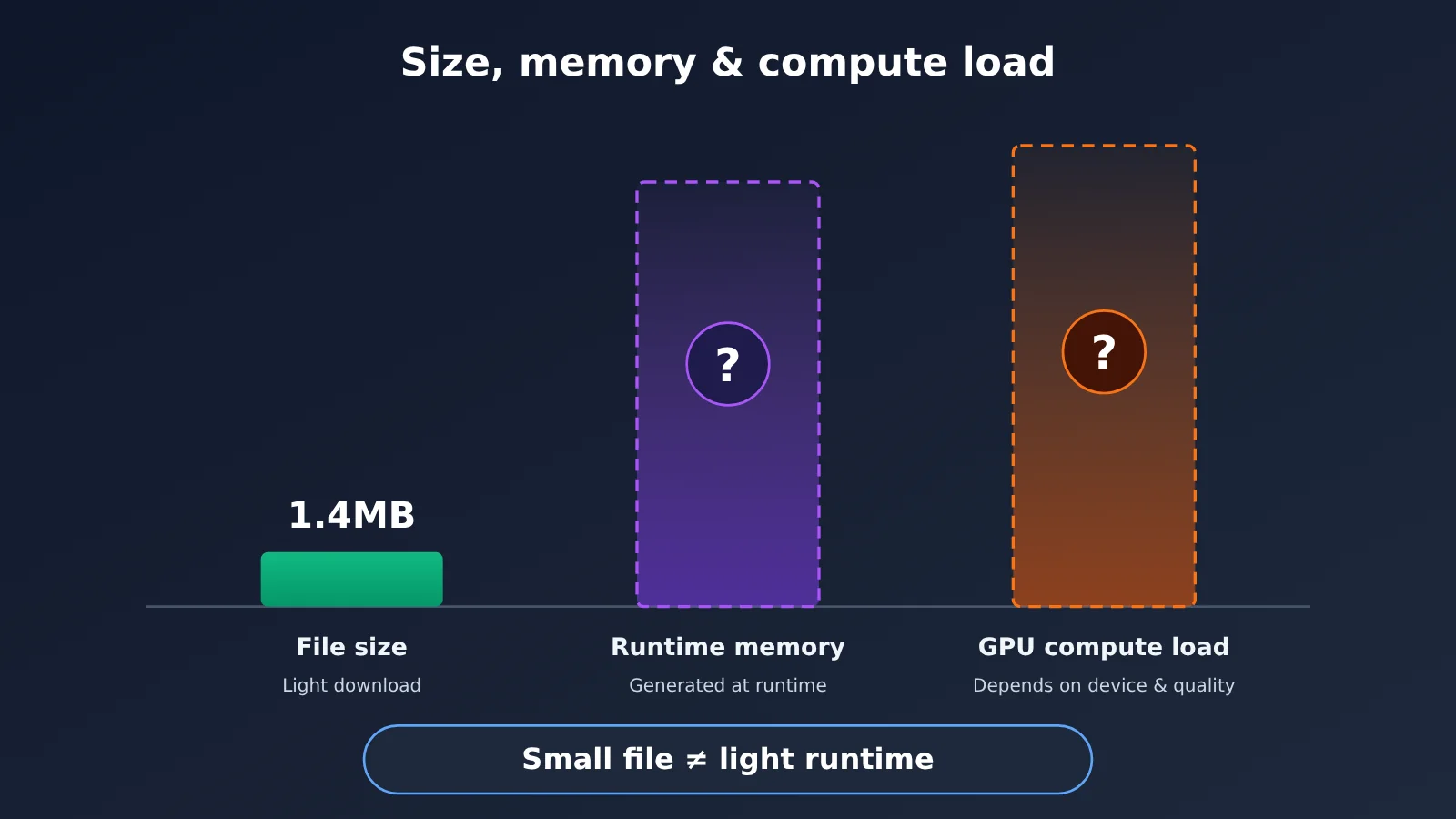
The key to understanding 1.4MB is to keep three concepts apart:
| Concept | What it measures | Saltline’s case |
|---|---|---|
| File size | How much code and assets need to be downloaded | About 1.4MB, very light to distribute |
| Runtime memory | How much memory and VRAM is used while running | Scenes are generated at runtime; official figures not published |
| Compute load | How much work the CPU and GPU do per frame | Depends on quality settings and device; official figures not published |
| Initialization time | Time from opening the page to being able to interact | Official notes it must build the port, warehouses, lighting, and sound; duration depends on the device |
Procedural generation trades “runtime computation” for “download size.” A 1.4MB program can create a huge amount of geometry, materials, and textures at runtime, while the GPU still has to grind through plenty of shader work each frame. Saltline’s official page also explicitly notes that when the START button appears depends on the player’s device, and if it stutters you can switch to Low quality.
3.3 Single-File Architecture Makes Distribution Extremely Light
The value of a single-file HTML comes down to distribution. It can sit on any static hosting service, or be downloaded locally and opened with an HTTP server; sharing it takes just one link. The GitHub repo for the Chinese version, 几猫, offers an online demo and a download entry directly, and notes that it can run offline (except for font loading).
This format is especially friendly for AI-generated prototypes. The model outputs one complete file in a single pass, so developers don’t have to deal with asset pipelines, bundling tools, or server configuration — once it’s generated, they can immediately send it to someone to try out.
4 Three different routes to running AAA games on the web
“Playing games on the web” actually covers three technical routes with completely different compute models. Seeing them clearly is the only way to accurately understand Saltline.
4.1 Local execution in the browser: Saltline’s route
AI generates the code, the code is sent to the player, and the browser runs the logic and renders the visuals on the local GPU. The player’s device carries the main compute load, the game doesn’t need to connect to an AI model while running, and once the files are downloaded there’s a chance it can run offline. The trade-off is that performance depends entirely on the player’s device and browser.
4.2 Cloud Gaming: The GeForce NOW and Pixel Streaming Approaches
The game runs on a remote server, where a cloud GPU renders each frame, and the result is streamed to the browser as video. The browser’s only job is to display the video, play the audio, and send the player’s input back to the server.
Epic Games’ Pixel Streaming runs Unreal Engine applications on cloud or remote machines and sends video and audio to the browser over WebRTC. NVIDIA GeForce NOW is a cloud gaming service aimed at players, and its officially published browser network requirements are: at least 15Mbps for 720p/60FPS, at least 25Mbps for 1080p/60FPS, and at least 35Mbps for 1440p/120FPS, with latency ideally under 80ms. This approach lowers the local hardware bar, at the cost of constant dependence on the network.
4.3 AI World Models: The Genie 3 Approach
A world model doesn’t pre-author scenes and rules. Instead, it predicts and generates the next stretch of frames based on the current state and player input. In August 2025, Google DeepMind released Genie 3, which it says can generate explorable environments in real time at 720p and up to 24FPS, maintaining scene consistency for several minutes. Microsoft’s Muse/WHAMM and Decart’s Oasis are exploring this direction too.
In January 2026, Project Genie, built on Genie 3, opened for hands-on trials, initially for Google AI Ultra subscribers aged 18 and over in the US, with each generation session capped at 60 seconds. This approach is currently at the research and product-prototype stage, and it has nothing to do with the technology Saltline uses.
4.4 The Three Approaches Side by Side
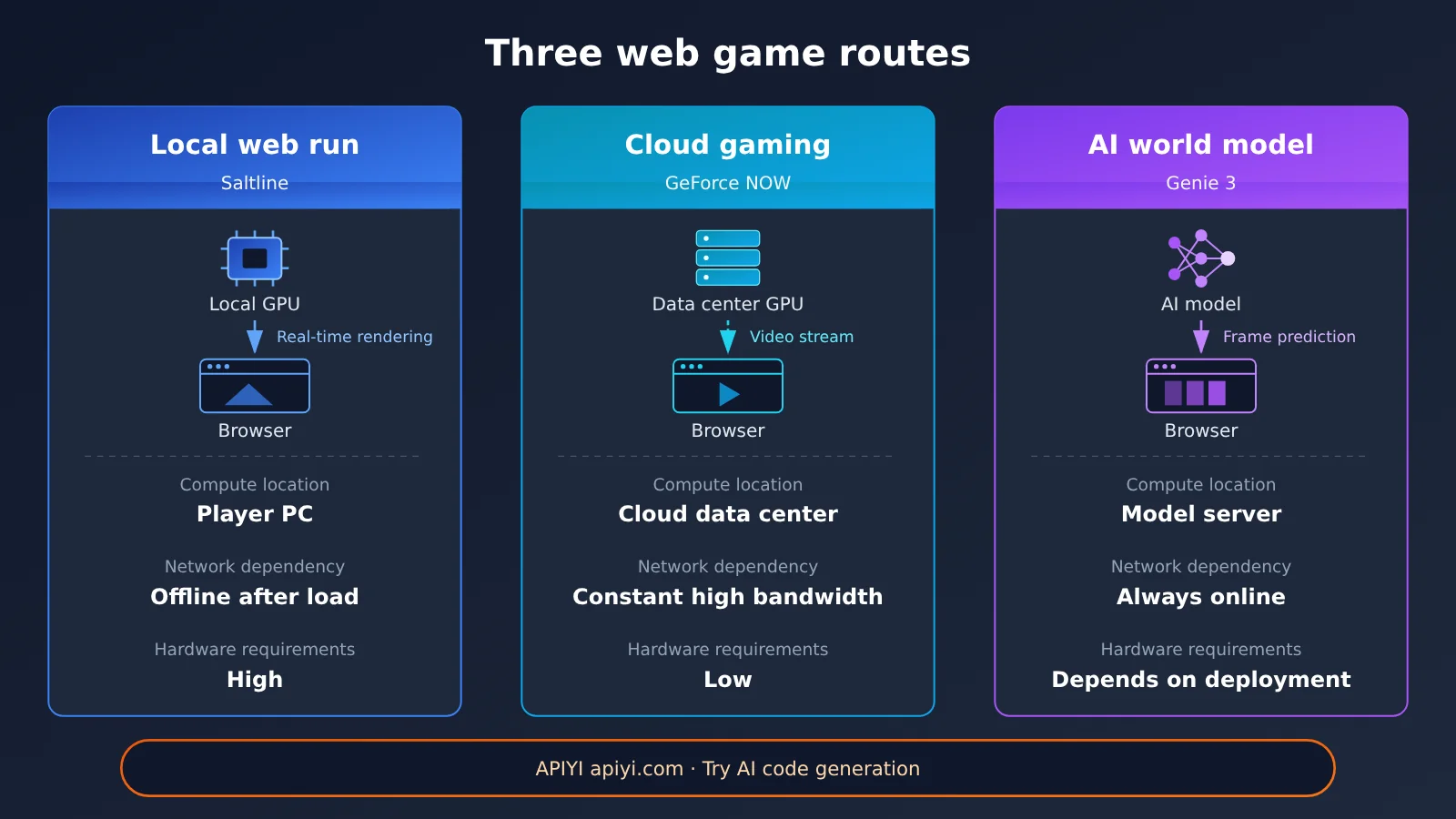
| Aspect | Local In-Browser Execution | Cloud Gaming | AI World Model |
|---|---|---|---|
| Representative example | Saltline | GeForce NOW, Pixel Streaming | Genie 3 |
| Game logic | Pre-written code runs locally | Pre-written code runs in the cloud | The model learns environment dynamics from data |
| Visual generation | Local GPU rendering | Cloud GPU rendering | Real-time AI generation |
| Browser’s role | Game runtime environment | Video and interaction terminal | Interaction entry point |
| Network dependency | Mostly offline after the initial load | Persistent connection; requires high bandwidth and low latency | Usually requires a persistent connection |
| Local hardware requirements | Relatively high | Relatively low | Depends on how the model is deployed |
| When AI costs occur | Concentrated in the development phase | No AI inference; continuously consumes cloud GPU | Continuous inference during every play session |
Cost structure is the most practical difference among the three. Saltline concentrates AI costs into a single development effort, after which rendering is handled by players’ devices, so the estimated $550 cost doesn’t grow with the number of players. Cloud gaming and world models, by contrast, consume server compute continuously during every play session.
5 Hands-On Practice: Generating and Running a Web 3D Scene with AI
The fastest way to understand the principles is to run through it yourself. This section has three steps: first, run a hand-written procedural scene; then use the API to have a Large Language Model generate a single-file game; and finally, measure its frame time.
5.1 A Minimal Runnable Three.js Procedural Scene
The file below uses Instancing to draw 400 shipping containers, with each container’s corrugated ribs and rust spots computed in real time by a Shader — no image files involved anywhere. Save it as index.html, run python3 -m http.server 8000 in the same directory, then open http://localhost:8000 in your browser.
<!DOCTYPE html>
<html lang="zh">
<head>
  <meta charset="UTF-8">
  <meta name="viewport" content="width=device-width, initial-scale=1.0">
  <title>Procedural Container Port</title>
  <style>body{margin:0;overflow:hidden;background:#05070a}</style>
  <script type="importmap">
    { "imports": { "three": "https://unpkg.com/[email protected]/build/three.module.js" } }
  </script>
</head>
<body>
<script type="module">
import * as THREE from 'three';

const renderer = new THREE.WebGLRenderer({ antialias: true });
renderer.setSize(innerWidth, innerHeight);
document.body.appendChild(renderer.domElement);

const scene = new THREE.Scene();
scene.fog = new THREE.Fog(0x05070a, 20, 90);
const camera = new THREE.PerspectiveCamera(60, innerWidth / innerHeight, 0.1, 200);

// Procedural material: corrugated ribs + noise-driven rust + simple directional light
const material = new THREE.ShaderMaterial({
  uniforms: { uTime: { value: 0 } },
  vertexShader: `
    varying vec2 vUv; varying vec3 vNormal; varying vec3 vColor;
    void main() {
      vUv = uv;
      vNormal = normalize(mat3(modelMatrix * instanceMatrix) * normal);
      vColor = vec3(1.0);
      #ifdef USE_INSTANCING_COLOR
        vColor = instanceColor;
      #endif
      gl_Position = projectionMatrix * viewMatrix * modelMatrix * instanceMatrix * vec4(position, 1.0);
    }`,
  fragmentShader: `
    varying vec2 vUv; varying vec3 vNormal; varying vec3 vColor;
    float hash(vec2 p) { return fract(sin(dot(p, vec2(127.1, 311.7))) * 43758.5453); }
    void main() {
      float ribs = 0.75 + 0.25 * step(0.5, fract(vUv.x * 14.0));   // corrugated ribs
      float rust = smoothstep(0.82, 1.0, hash(floor(vUv * 40.0)));  // rust spots
      vec3 base = mix(vColor * ribs, vec3(0.35, 0.18, 0.08), rust);
      float light = max(dot(vNormal, normalize(vec3(0.4, 1.0, 0.3))), 0.15);
      gl_FragColor = vec4(base * light, 1.0);
    }`
});

// Instancing: draw 400 containers in a single draw call
const count = 400;
const mesh = new THREE.InstancedMesh(new THREE.BoxGeometry(6, 2.6, 2.4), material, count);
const m = new THREE.Matrix4(), c = new THREE.Color();
const palette = [0x8a2b1e, 0x1f4e79, 0x2f6b3a, 0x9a7b1c];
for (let i = 0; i < count; i++) {
  const x = (i % 20) * 7 - 70, z = Math.floor(i / 20) * 4 - 40;
  const y = 1.3 + Math.floor(Math.random() * 3) * 2.6;
  m.makeTranslation(x, y, z);
  mesh.setMatrixAt(i, m);
  mesh.setColorAt(i, c.set(palette[i % palette.length]));
}
scene.add(mesh);

// Game loop: update the camera and render each frame
renderer.setAnimationLoop((t) => {
  const s = t * 0.0001;
  camera.position.set(Math.sin(s) * 50, 18, Math.cos(s) * 50);
  camera.lookAt(0, 0, 0);
  renderer.render(scene, camera);
});

addEventListener('resize', () => {
  camera.aspect = innerWidth / innerHeight;
  camera.updateProjectionMatrix();
  renderer.setSize(innerWidth, innerHeight);
});
</script>
</body>
</html>
This code distills the core idea behind Saltline: the geometry is constructed from BoxGeometry, the appearance is computed by a Shader, and large numbers of repeated objects are drawn with Instancing. The whole file is only a few KB, with Three.js loaded from a CDN; Saltline, by contrast, bundles Three.js straight into the HTML.
5.2 Using an API to Have a Large Language Model Generate a Single-File 3D Game
Saltline’s generation process is long-running, multi-turn agentic programming that burned through hundreds of millions of tokens. Individual developers can start with a single call: ask the model to output a runnable single-file Three.js mini-game and get a feel for the division of labor where “the AI writes the program and the browser runs it.” The code below uses an OpenAI-compatible endpoint — just swap the model name for one from the platform’s model list that supports long code output.
import openai

client = openai.OpenAI(
    api_key="YOUR_API_KEY",
    base_url="https://api.apiyi.com/v1"  # APIYI OpenAI-compatible endpoint
)

resp = client.chat.completions.create(
    model="YOUR_MODEL_NAME",  # Refer to the platform's model list
    messages=[{"role": "user", "content": "用 Three.js 写一个单文件 HTML 第一人称小游戏,所有模型和纹理用代码与 Shader 生成,只输出完整 HTML。"}],
)
open("game.html", "w", encoding="utf-8").write(resp.choices[0].message.content)
View the full implementation (including code-fence cleanup and prompt constraints)
import re
import openai
from pathlib import Path

SYSTEM_PROMPT = """你是一名资深 Web 3D 游戏工程师。
要求:
1. 只输出一个完整的 HTML 文件,不要任何解释文字。
2. 使用 Three.js(通过 importmap 从 CDN 引入 [email protected])。
3. 不引用任何外部图片、模型或音频文件;几何体用代码构造,纹理用 ShaderMaterial 计算,音效用 Web Audio API 合成。
4. 使用 requestAnimationFrame 或 renderer.setAnimationLoop 实现游戏循环。
5. 提供 Low / High 两档画质切换,Low 档降低像素比和物体数量。
6. 点击画面后使用 Pointer Lock 获取鼠标控制,WASD 移动。
"""

def extract_html(text: str) -> str:
    """Strip the ```html fence the model may wrap around its output"""
    match = re.search(r"```(?:html)?\s*(.*?)```", text, re.S)
    return (match.group(1) if match else text).strip()

def generate_game(idea: str, model: str, out_file: str = "game.html") -> Path:
    client = openai.OpenAI(
        api_key="YOUR_API_KEY",
        base_url="https://api.apiyi.com/v1"
    )
    resp = client.chat.completions.create(
        model=model,
        messages=[
            {"role": "system", "content": SYSTEM_PROMPT},
            {"role": "user", "content": idea},
        ],
        max_tokens=16000,
    )
    html = extract_html(resp.choices[0].message.content)
    path = Path(out_file)
    path.write_text(html, encoding="utf-8")
    print(f"已生成 {path},大小 {path.stat().st_size / 1024:.1f} KB")
    print("运行:python3 -m http.server 8000,然后打开 http://localhost:8000/" + out_file)
    return path

if __name__ == "__main__":
    generate_game(
        idea="雨夜集装箱港口,玩家需要关闭三个信号塔后撤离,有巡逻无人机。",
        model="YOUR_MODEL_NAME",
    )
The generated file follows the same runtime logic as Saltline: the API call happens only once, during generation. After that, you can open game.html and play it as many times as you like without racking up any further model charges.
🚀 Quick-start tip: If you want to compare how different models handle a Three.js game, you can switch between Claude, GPT, Gemini, and others with the same API key through APIYI at apiyi.com. The endpoint is OpenAI-compatible, so all you need to change in the code above is the
modelparameter. New users get free trial credits, which makes it a great way to sanity-check output quality with a small prompt first.
5.3 Measuring the real performance of browser 3D games
1.4MB only answers “how fast does it download.” To figure out whether a web game actually runs well, you need to measure these metrics:
| Metric | What it tells you | How to measure it |
|---|---|---|
| Time to first playable | Startup experience | From opening the page to being able to control the character; use the Performance API to mark timing points |
| FPS / frame time | Smoothness and stability | 60 FPS works out to about 16.67ms per frame, so watch for frame time variance |
| CPU usage | Game logic load | Watch the main thread in the Chrome DevTools Performance panel |
| GPU usage and VRAM | Rendering load | System task manager or a GPU monitoring tool |
| System memory | Runtime resources | Check browser process memory once scene initialization finishes |
| Post-load network traffic | External dependencies | DevTools Network panel, separating font, program, and other requests |
Paste the following snippet into the browser console to get the average frame time and the slowest frame over 10 seconds:
(() => {
  const times = []; let last = performance.now();
  const start = last;
  function tick(now) {
    times.push(now - last); last = now;
    if (now - start < 10000) return requestAnimationFrame(tick);
    const avg = times.reduce((a, b) => a + b, 0) / times.length;
    const worst = Math.max(...times);
    console.log(`Average frame time ${avg.toFixed(2)}ms (about ${(1000 / avg).toFixed(1)} FPS), slowest frame ${worst.toFixed(2)}ms`);
  }
  requestAnimationFrame(tick);
})();
When testing, keep the browser version, operating system, device model, resolution, and quality preset fixed. Your measurements should cover scenes where player movement, enemy activity, shooting, and rain effects all happen at once — measuring only the empty scene right after you enter the game will give you results that are far too optimistic.
6 How Far Are Web-Based 3A Games from True Commercial 3A Titles?
6.1 The Hardware and Platform Limits Browser Games Face
Unity’s official documentation is pretty clear about the Web platform’s constraints: file system access is restricted, some caching features aren’t available, multithreading is bound by the browser environment, memory resources are limited, and compatibility varies across browsers. Unity’s WebGL builds are mainly aimed at desktop browsers, with only limited support for mobile devices.
Saltline’s experience page confirms these limits. It warns that initialization may be slow, that startup speed depends on device performance, that you should check for WebGL 2 and hardware acceleration, and that you should switch to Low quality if things start to stutter. Getting the page open has a very low barrier to entry, but running it smoothly still comes down to the player’s GPU.
6.2 1.4MB Means the Distribution Is Light—Runtime Load Is a Different Story
Procedural generation turns “downloaded assets” into “assets computed at runtime.” Textures are calculated pixel by pixel on the GPU in real time, and geometry is constructed by the CPU during initialization—all of this happens on the player’s device. At present, the developers haven’t published Saltline’s standard startup time, average FPS, VRAM usage, or memory usage. To assess its runtime load, you’ll need to measure it yourself using the method described in Section 5.3.
6.3 The Engineering Scale of Commercial AAA Games
A commercial AAA game usually implies large-scale funding, staffing, and resource investment. The label describes production scale; there’s no unified technical certification standard. A commercial AAA game needs dozens of hours of content, complex character animation and physics systems, multiplayer network synchronization, cross-platform adaptation, and years of ongoing updates, maintenance, and testing/optimization. Procedural generation excels at highly rule-driven content such as shipping containers, ground, and rain. When it comes to characters and narrative scenes that require extensive artistic polish, traditional asset production is still the better fit.
6.4 What Saltline Actually Proves
What Saltline demonstrates is that an AI model with strong coding ability can, within a single continuous generation run, pull together level design, scene construction, shaders, game mechanics, control logic, and audio generation into a complete, stylistically coherent 3D game prototype that’s ready to share. In the traditional pipeline, the handoff costs between different tools and different roles get compressed into one model’s context here.
Cross-referencing the developer’s own account with the officially published model pricing, the cost breakdown of this experiment becomes clear:
| Item | Data | Source |
|---|---|---|
| Development time | About 8 hours | Felix Rieseberg’s account, 2026-11-09 |
| Estimated cost | About $550 (estimated at API pricing) | Felix Rieseberg’s account |
| Input tokens | About 445 million, much of it cached | Felix Rieseberg’s account |
| Output tokens | About 2.7 million | Felix Rieseberg’s account |
| Fable 5.2 input / output pricing | $8 / $40 per million tokens | Anthropic official model docs |
| Fable 5.2 cached read pricing | $0.20 per million tokens | Anthropic official model docs |
| Context window / max output | 1M tokens / 128K tokens | Anthropic official model docs |
Cached read pricing is far lower than regular input pricing, so the 445 million input tokens can’t simply be converted into a total cost using the standard input unit price. The developer didn’t disclose the exact bill breakdown, so the $550 should be read as an estimated cost for a single generation experiment.
💰 Cost tip: The cost of AI-generated browser games is concentrated in the development phase, with long context and multiple rounds of iteration being the main expenses. Before committing to a long task, you can use APIYI apiyi.com with a smaller prompt to first compare the code quality of several models, then decide which model to run long-form generation on. Pay-as-you-go billing makes it easy to keep trial-and-error costs under control.
7 FAQ
Q1: When an AI-made AAA game runs in the browser, is the game footage streamed from a server?
Saltline renders its graphics on the player’s local GPU. The browser downloads a roughly 1.4 MB HTML file, runs the game logic in JavaScript, and draws each frame by calling the local graphics card through WebGL. Cloud gaming services like GeForce NOW, which stream rendered frames from a server, follow a completely different technical approach.
Q2: Does playing Saltline invoke the Claude model in real time?
No. Claude Fable 5.2 is only used during development to generate the game code. The GitHub mirror has already removed the Claude Artifact framework scripts, so the game starts from an ordinary HTTP server, and playing it incurs no model invocation costs.
Q3: How is Saltline different from AI world models like Genie 3?
Saltline’s rules and scenes are written out as code ahead of time by AI, then executed at runtime by a conventional rendering pipeline. Genie 3 predicts and generates frames from player input on a frame-by-frame basis, with its rules learned from data. The former is AI writing a program; the latter is AI generating visuals directly. Technically, the two are independent of each other.
Q4: For a 1.4 MB browser-based AAA game, what kind of machine runs it smoothly?
The developers haven’t published minimum specs or FPS figures. The official page recommends confirming that your browser supports WebGL 2 and has hardware acceleration enabled, and switching to the Low quality preset if things get choppy. For concrete numbers, measure on your own device using the frame-time script in Section 5.3 of this article.
Q5: How can I use an API to generate a similar browser-based 3D game myself?
Sign up at APIYI apiyi.com and get an API key, set `base_url` in the code from Section 5.2 to `https://api.apiyi.com/v1`, and pick a model that’s good at producing long code output. In your prompt, state explicitly that you want “a single-file HTML, Three.js, and all assets generated with code and shaders.” Once it’s generated, open it through a local HTTP server and try it out.
Q6: What are the limitations of generating browser games with AI?
A single call has a limited output length, so complex games require multiple rounds of long-context generation, and costs rise accordingly. Generated code often needs debugging for performance and compatibility issues. The browser itself imposes limits on memory, threading, and mobile support. A good approach is to first run small-scale comparisons across several models through APIYI apiyi.com, pick the one with the most stable code, and then scale up the project.
8 Key Takeaways for AI-Built Web AAA Games
- Where it runs: Saltline runs in the player’s browser, with the local GPU handling rendering
- Clear division of labor: AI writes the code during development; the browser executes it at runtime
- Tech stack: JavaScript handles logic, Three.js assembles scenes, and WebGL talks to the GPU
- The size secret: Models, textures, and sounds are all written as functions, making the single file about 1.4MB
- Small file doesn’t mean light runtime: Procedural assets shift download cost into runtime compute cost
- Three paths: Local web execution, cloud gaming, and AI world models each put computation in different places
- Hands-on validation: You can use APIYI apiyi.com to call multiple models, generate single-file Three.js games, and test them yourself
9 Conclusion
An AI-made AAA-style game can run in the browser thanks to the 3D capabilities browsers have long had, combined with procedural generation. There are three main takeaways:
- The browser is already a game engine runtime: JavaScript, Three.js, and WebGL work together so a web page can directly call the local GPU to render 3D scenes.
- AI cost is concentrated in development: Once Saltline was generated, it ran independently of Claude. The developer’s self-reported cost of about $550 is a one-time estimate.
- 1.4MB solves a distribution problem: Runtime memory and GPU load still fall on the player’s device. Saltline is positioned as a playable 3D prototype built quickly.
If you want to experience the “AI writes the game, browser runs the game” workflow yourself, try using APIYI apiyi.com with the same OpenAI-compatible API to compare how different models generate Three.js code, then measure the results with the frame-time script from this article.
📚 References
- Saltline standalone demo page: game demo entry point, plus loading, graphics quality, and controls
- Link:
saltline.games -
Description: includes official notes on initialization time, WebGL 2, and hardware acceleration
-
Saltline code mirror and README: single-file HTML version
- Link:
github.com/realcodebear/saltline-fable-5.2 -
Description: documents the Artifact porting process, file structure, and external Google Fonts dependency
-
Jimao Chinese edition GitHub repository: Chinese-packaged version of Saltline
- Link:
github.com/Megasu/jimao-3a-game -
Description: provides details on file size, offline operation, and browser requirements
-
Claude Fable 5.2 model specs and pricing: Anthropic official documentation
- Link:
platform.claude.com/docs/en/models/fable-5-2/overview -
Description: input, output, and cache pricing plus context window
-
MDN WebGL API: browser GPU rendering interface documentation
- Link:
developer.mozilla.org/en-US/docs/Web/API/WebGL_API -
Description: an authoritative resource for understanding how WebGL works
-
Three.js official documentation: Web 3D graphics library
- Link:
threejs.org/docs -
Description: API documentation for Scene, Mesh, ShaderMaterial, InstancedMesh, and more
-
Unity WebGL technical limitations: browser game platform limitations
- Link:
docs.unity.cn/6000.0/Documentation/Manual/webgl-technical-overview.html -
Description: notes on limitations around the file system, threading, memory, and mobile support
-
NVIDIA GeForce NOW system requirements: cloud gaming network requirements
- Link:
nvidia.com/en-us/geforce-now/system-reqs -
Description: bandwidth and latency recommendations for different graphics quality levels and frame rates
-
Epic Games Pixel Streaming: cloud rendering streaming
- Link:
dev.epicgames.com/documentation/unreal-engine/pixel-streaming-in-unreal-engine -
Description: official Unreal Engine documentation on streaming visuals to browsers via WebRTC
-
Genie 3 technical announcement: Google DeepMind world model
- Link:
deepmind.google/blog/genie-3-a-new-frontier-for-world-models - Description: capabilities and limitations of real-time interactive environment generation
- Link:
Author: APIYI Technical Team
Technical discussion: Feel free to contact us through the APIYI homepage. For more model integration resources, visit the docs.apiyi.com documentation center.