作者注:手把手教你在 OpenClaw 中配置 OpenAI 兼容模式和 Claude 原生格式兩種接入方式,包含完整 JSON 配置代碼、適用模型列表和關鍵差異對比
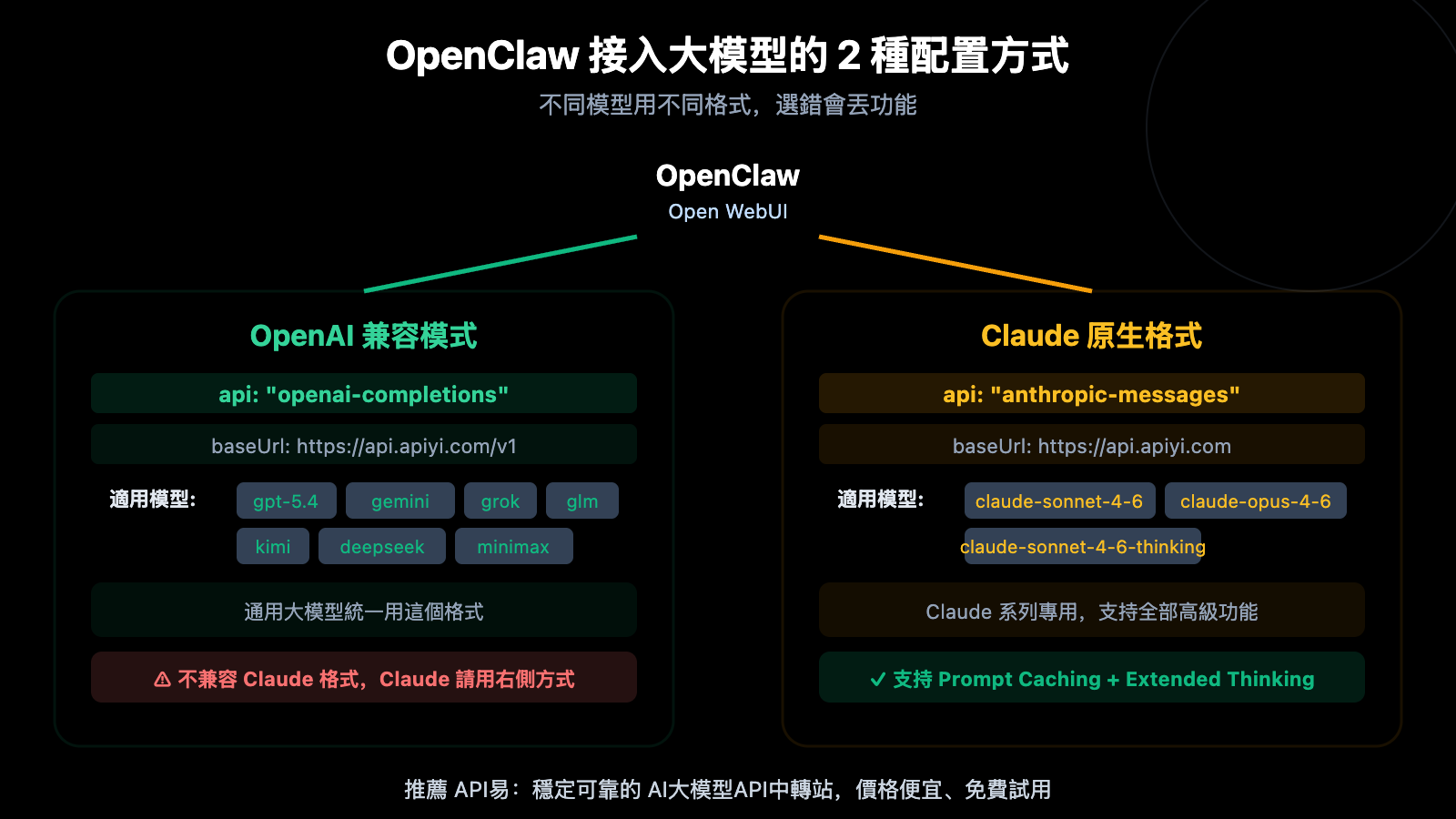
在 OpenClaw(Open WebUI)中接入大模型有兩種方式:OpenAI 兼容模式(openai-completions)和 Claude 原生格式(anthropic-messages)。很多用戶不清楚兩者的區別,導致要麼用錯了格式接 Claude 模型,要麼錯過了原生格式帶來的 Prompt Caching 等高級功能。
核心價值: 讀完本文,你將掌握 OpenClaw 中兩種接入方式的完整配置方法,明確每種模型該用哪種格式,並能直接複製配置代碼使用。
OpenClaw 兩種接入方式 核心對比
| 對比維度 | OpenAI 兼容模式 | Claude 原生格式 |
|---|---|---|
| api 類型 | openai-completions |
anthropic-messages |
| baseUrl | https://api.apiyi.com/v1 |
https://api.apiyi.com |
| 適用模型 | GPT、Gemini、Grok、GLM、Kimi、DeepSeek、Minimax 等 | Claude 系列(sonnet、opus、haiku) |
| 是否需要額外 headers | 不需要 | 需要 anthropic-version |
| Prompt Caching | ✗ 不支持 | ✓ 支持 |
| Extended Thinking | ✗ 不支持 | ✓ 支持(thinking 模型) |
| URL 路徑差異 | 末尾帶 /v1 |
末尾不帶 /v1 |
OpenClaw 兩種接入方式的一句話總結
記住一個簡單規則:Claude 系列模型用 anthropic-messages,其他所有模型用 openai-completions。兩者最直觀的區別是 baseUrl——OpenAI 兼容模式末尾帶 /v1,Claude 原生格式不帶。
OpenClaw OpenAI 兼容模式配置教程
OpenAI 兼容模式適用場景
OpenAI 兼容模式(openai-completions)是 OpenClaw 中最通用的接入方式,適用於所有非 Claude 的大模型。大多數 API 中轉服務都使用這種標準化的 OpenAI 格式。
OpenAI 兼容模式完整配置代碼
以下是通過 API易 接入 GPT-5.4 的完整配置:
{
  "agents": {
    "defaults": {
      "model": { "primary": "apiyi/gpt-5.4" }
    }
  },
  "models": {
    "providers": {
      "apiyi": {
        "baseUrl": "https://api.apiyi.com/v1",
        "apiKey": "sk-你的API密鑰",
        "api": "openai-completions",
        "models": [
          { "id": "gpt-5.4", "name": "GPT-5.4" }
        ]
      }
    }
  }
}
查看多模型擴展配置
如果需要同時接入多個通用模型,可以在 models 數組中添加更多模型:
{
  "models": {
    "providers": {
      "apiyi": {
        "baseUrl": "https://api.apiyi.com/v1",
        "apiKey": "sk-你的API密鑰",
        "api": "openai-completions",
        "models": [
          { "id": "gpt-5.4", "name": "GPT-5.4" },
          { "id": "gemini-3-flash-preview", "name": "Gemini 3 Flash" },
          { "id": "deepseek-v3.2", "name": "DeepSeek V3.2" },
          { "id": "glm-5", "name": "GLM-5" },
          { "id": "kimi-k2.5", "name": "Kimi K2.5" },
          { "id": "grok-4", "name": "Grok 4" },
          { "id": "Minimax-M2.5", "name": "Minimax M2.5" }
        ]
      }
    }
  }
}
所有這些模型共用同一個 API Key 和 baseUrl,這就是 OpenAI 兼容模式的便利之處——一個配置接入所有通用模型。
OpenAI 兼容模式配置要點
| 配置項 | 值 | 說明 |
|---|---|---|
baseUrl |
https://api.apiyi.com/v1 |
必須帶 /v1 |
api |
openai-completions |
指定使用 OpenAI 兼容協議 |
apiKey |
sk-你的密鑰 |
在 API易 apiyi.com 獲取 |
models[].id |
模型 ID | 必須與 API 支持的模型名一致 |
🎯 配置提醒: baseUrl 末尾的
/v1不能省略,這是 OpenAI 兼容協議的標準路徑。訪問 API易 apiyi.com 註冊即可獲取 API Key 和免費額度。
OpenClaw Claude 原生格式配置教程
Claude 原生格式適用場景
Claude 原生格式(anthropic-messages)是 Claude 系列模型的專屬接入方式。使用原生格式可以獲得 Prompt Caching、Extended Thinking、PDF 處理等 Claude 獨有的高級功能。
Claude 原生格式完整配置代碼
以下是通過 API易 接入 Claude 模型的完整配置:
{
  "models": {
    "providers": {
      "apiyi-claude": {
        "baseUrl": "https://api.apiyi.com",
        "apiKey": "sk-你的API密鑰",
        "api": "anthropic-messages",
        "headers": {
          "anthropic-version": "2023-06-01",
          "anthropic-beta": ""
        },
        "models": [
          {
            "id": "claude-sonnet-4-6",
            "name": "Claude Sonnet 4.6",
            "reasoning": false,
            "input": ["text"],
            "contextWindow": 200000,
            "maxTokens": 16384
          },
          {
            "id": "claude-sonnet-4-6-thinking",
            "name": "Claude Sonnet 4.6 Thinking",
            "reasoning": false,
            "input": ["text"],
            "contextWindow": 200000,
            "maxTokens": 16384
          }
        ]
      }
    }
  }
}
查看包含 Opus 和 Haiku 的完整配置
{
  "models": {
    "providers": {
      "apiyi-claude": {
        "baseUrl": "https://api.apiyi.com",
        "apiKey": "sk-你的API密鑰",
        "api": "anthropic-messages",
        "headers": {
          "anthropic-version": "2023-06-01",
          "anthropic-beta": ""
        },
        "models": [
          {
            "id": "claude-sonnet-4-6",
            "name": "Claude Sonnet 4.6",
            "reasoning": false,
            "input": ["text"],
            "contextWindow": 200000,
            "maxTokens": 16384
          },
          {
            "id": "claude-sonnet-4-6-thinking",
            "name": "Claude Sonnet 4.6 Thinking",
            "reasoning": false,
            "input": ["text"],
            "contextWindow": 200000,
            "maxTokens": 16384
          },
          {
            "id": "claude-opus-4-6",
            "name": "Claude Opus 4.6",
            "reasoning": false,
            "input": ["text"],
            "contextWindow": 200000,
            "maxTokens": 16384
          },
          {
            "id": "claude-haiku-4-5-20251001",
            "name": "Claude Haiku 4.5",
            "reasoning": false,
            "input": ["text"],
            "contextWindow": 200000,
            "maxTokens": 8192
          }
        ]
      }
    }
  }
}
Claude 原生格式配置要點
| 配置項 | 值 | 說明 |
|---|---|---|
baseUrl |
https://api.apiyi.com |
不帶 /v1,這是關鍵差異 |
api |
anthropic-messages |
指定使用 Claude 原生協議 |
headers.anthropic-version |
2023-06-01 |
Anthropic API 版本號,必填 |
headers.anthropic-beta |
"" |
留空即可,用於啓用 Beta 功能 |
contextWindow |
200000 |
Claude 系列支持 200K 上下文 |
maxTokens |
16384 |
最大輸出 Token 數 |
🎯 關鍵區別: Claude 原生格式的 baseUrl 不帶
/v1。這是新手最容易犯的錯誤——如果 Claude 接入報錯,先檢查 URL 末尾是否誤加了/v1。
OpenClaw 兩種格式同時使用配置
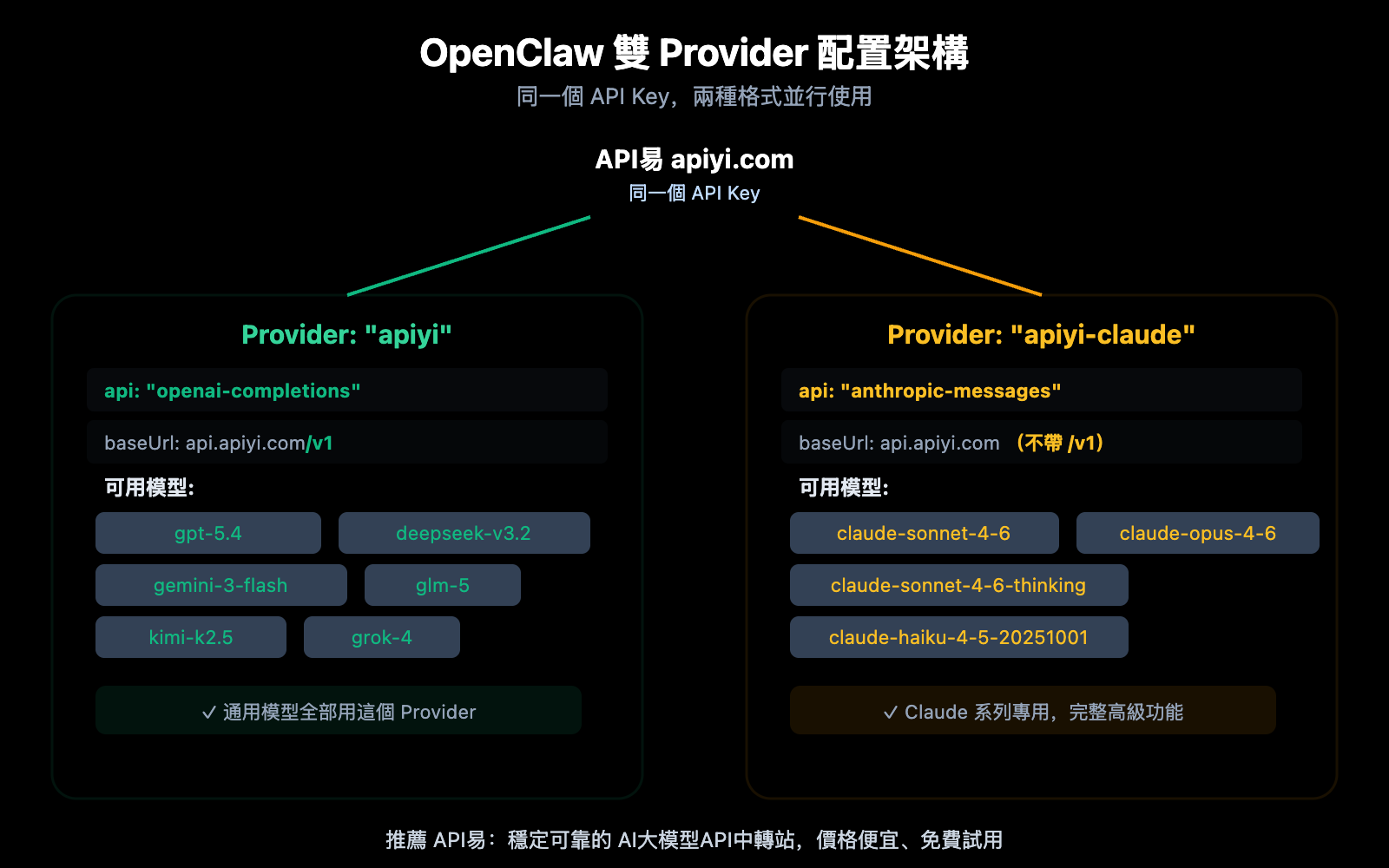
在實際使用中,你很可能需要同時使用通用模型和 Claude 模型。這時需要在 OpenClaw 中配置兩個 provider:
雙 Provider 合併配置代碼
將兩種格式的 provider 寫在同一個配置文件中,在 OpenClaw 中即可自由切換模型:
{
  "agents": {
    "defaults": {
      "model": { "primary": "apiyi/gpt-5.4" }
    }
  },
  "models": {
    "providers": {
      "apiyi": {
        "baseUrl": "https://api.apiyi.com/v1",
        "apiKey": "sk-你的API密鑰",
        "api": "openai-completions",
        "models": [
          { "id": "gpt-5.4", "name": "GPT-5.4" },
          { "id": "deepseek-v3.2", "name": "DeepSeek V3.2" },
          { "id": "gemini-3-flash-preview", "name": "Gemini 3 Flash" },
          { "id": "glm-5", "name": "GLM-5" },
          { "id": "kimi-k2.5", "name": "Kimi K2.5" },
          { "id": "grok-4", "name": "Grok 4" },
          { "id": "Minimax-M2.5", "name": "Minimax M2.5" }
        ]
      },
      "apiyi-claude": {
        "baseUrl": "https://api.apiyi.com",
        "apiKey": "sk-你的API密鑰",
        "api": "anthropic-messages",
        "headers": {
          "anthropic-version": "2023-06-01",
          "anthropic-beta": ""
        },
        "models": [
          {
            "id": "claude-sonnet-4-6",
            "name": "Claude Sonnet 4.6",
            "reasoning": false,
            "input": ["text"],
            "contextWindow": 200000,
            "maxTokens": 16384
          },
          {
            "id": "claude-sonnet-4-6-thinking",
            "name": "Claude Sonnet 4.6 Thinking",
            "reasoning": false,
            "input": ["text"],
            "contextWindow": 200000,
            "maxTokens": 16384
          },
          {
            "id": "claude-opus-4-6",
            "name": "Claude Opus 4.6",
            "reasoning": false,
            "input": ["text"],
            "contextWindow": 200000,
            "maxTokens": 16384
          }
        ]
      }
    }
  }
}
🎯 重要說明: 兩個 provider 可以使用同一個 API Key。API易 apiyi.com 的同一個密鑰同時支持 OpenAI 兼容格式和 Claude 原生格式,無需申請多個 Key。
OpenClaw 兩種格式常見錯誤排查
配置過程中最容易出錯的地方是 baseUrl 和 api 類型不匹配。以下是常見錯誤及解決方案:
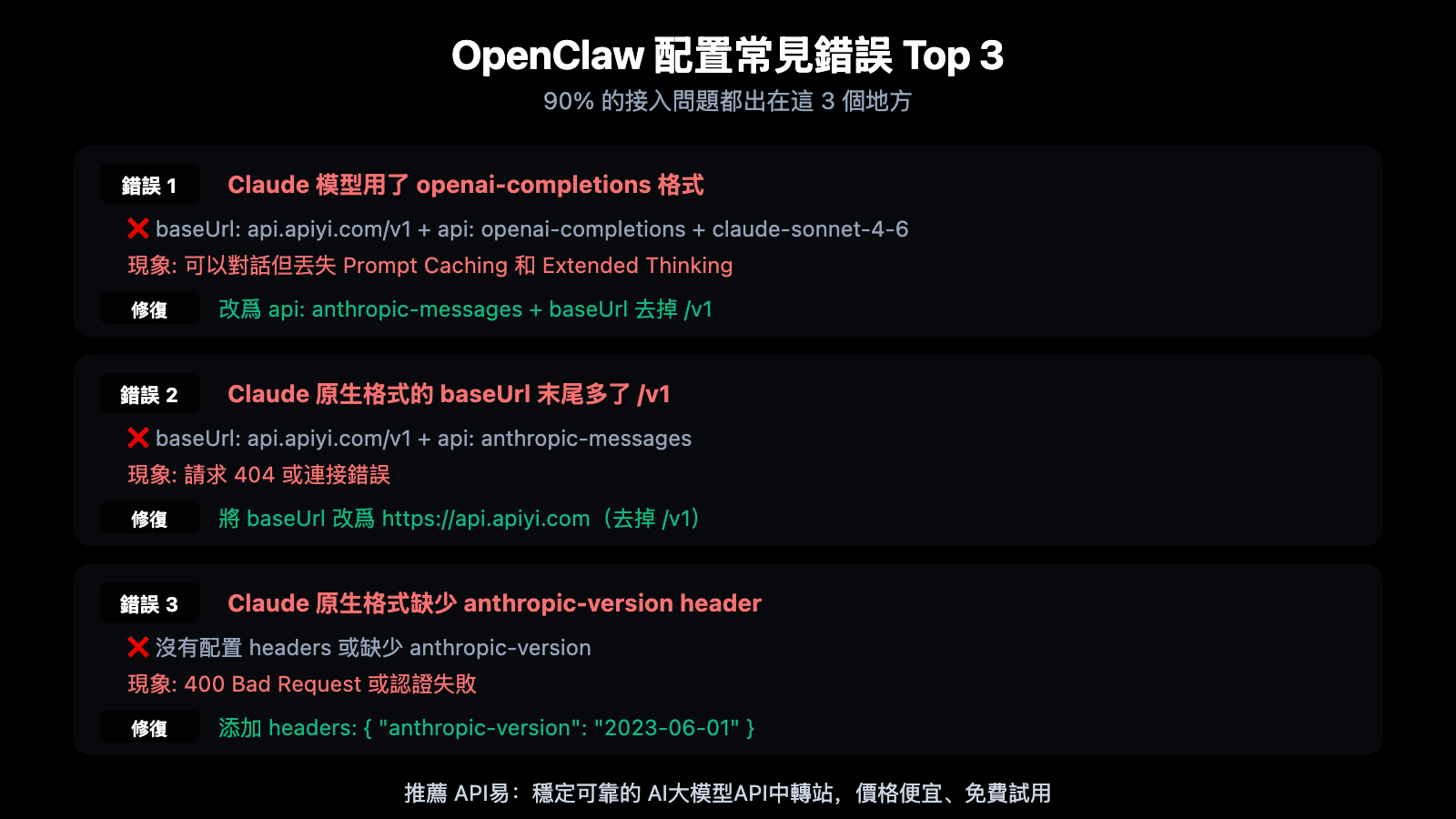
| 錯誤類型 | 錯誤配置 | 正確配置 | 錯誤現象 |
|---|---|---|---|
| Claude 用錯格式 | api: openai-completions |
api: anthropic-messages |
能對話但丟高級功能 |
| baseUrl 多了 /v1 | api.apiyi.com/v1 + anthropic |
api.apiyi.com + anthropic |
404 或連接錯誤 |
| 缺少 headers | 無 anthropic-version | "2023-06-01" |
400 Bad Request |
| 通用模型少了 /v1 | api.apiyi.com + openai |
api.apiyi.com/v1 + openai |
路徑錯誤 |
| 模型名寫錯 | claude-4-sonnet |
claude-sonnet-4-6 |
模型不存在 |
🎯 快速排錯口訣: OpenAI 格式帶
/v1,Claude 格式不帶/v1。記住這一點就能避免 80% 的配置錯誤。如果遇到其他問題,可以訪問 API易 apiyi.com 的文檔中心查看完整的接入指南。
常見問題
Q1: 爲什麼不能用 OpenAI 兼容模式接 Claude?
技術上可以(Claude 也有 OpenAI 兼容端點),但會損失 Prompt Caching(節省 90% 輸入成本)、Extended Thinking(深度推理輸出)、PDF 處理、Citations 引用等重要功能。對於日常聊天沒有影響,但生產環境和長對話場景下成本差距顯著。在 OpenClaw 中使用 anthropic-messages 原生格式是更優選擇。
Q2: 兩個 Provider 可以用同一個 API Key 嗎?
可以。API易 apiyi.com 的同一個 API Key 同時支持 OpenAI 兼容格式和 Claude 原生格式。在配置中,apiyi 和 apiyi-claude 兩個 provider 填寫相同的 apiKey 值即可。不需要申請兩個不同的密鑰。
Q3: OpenClaw 中如何切換不同的模型?
配置好雙 Provider 後,在 OpenClaw 的對話界面中可以直接在模型選擇下拉框中看到所有已配置的模型。通用模型會顯示爲 apiyi/gpt-5.4 等,Claude 模型會顯示爲 apiyi-claude/claude-sonnet-4-6 等。點擊即可切換,無需修改配置文件。
總結
OpenClaw 兩種接入方式的核心要點:
- 通用模型用
openai-completions: GPT、Gemini、DeepSeek、GLM、Kimi、Grok、Minimax 等所有非 Claude 模型,baseUrl 帶/v1 - Claude 系列用
anthropic-messages: claude-sonnet-4-6、claude-opus-4-6、claude-haiku 等,baseUrl 不帶/v1,需要anthropic-versionheader - 兩個 Provider 並存是最佳實踐: 同一個 API Key 配置兩個 provider,在 OpenClaw 中自由切換所有模型
推薦通過 API易 apiyi.com 獲取 API Key,一個密鑰即可接入 GPT、Claude、Gemini、DeepSeek 等全部主流模型,支持 OpenAI 兼容和 Claude 原生兩種格式。
📚 參考資料
-
API易幫助中心: OpenClaw 接入配置完整教程
- 鏈接:
help.apiyi.com - 說明: 包含各站點的詳細接入文檔和最新模型列表
- 鏈接:
-
Anthropic API 文檔: Claude 原生 API 格式規範
- 鏈接:
platform.claude.com/docs/en/api/messages - 說明: Messages API 的完整參數和響應格式
- 鏈接:
-
OpenAI SDK 兼容性文檔: 哪些參數在 Claude 上被忽略
- 鏈接:
platform.claude.com/docs/en/api/openai-sdk - 說明: 支持和不支持的參數完整列表
- 鏈接:
-
Open WebUI 文檔: OpenClaw 多 Provider 配置指南
- 鏈接:
docs.openwebui.com - 說明: Provider 配置、模型管理和 Agent 設置
- 鏈接:
作者: APIYI 技術團隊
技術交流: 歡迎在評論區討論,更多資料可訪問 API易 docs.apiyi.com 文檔中心