作者注:详解如何使用 Nano Banana Pro (Gemini 3 Pro Image) 制作物理图解说明,从流体动力学到科学可视化,快速生成富含标注的教育信息图
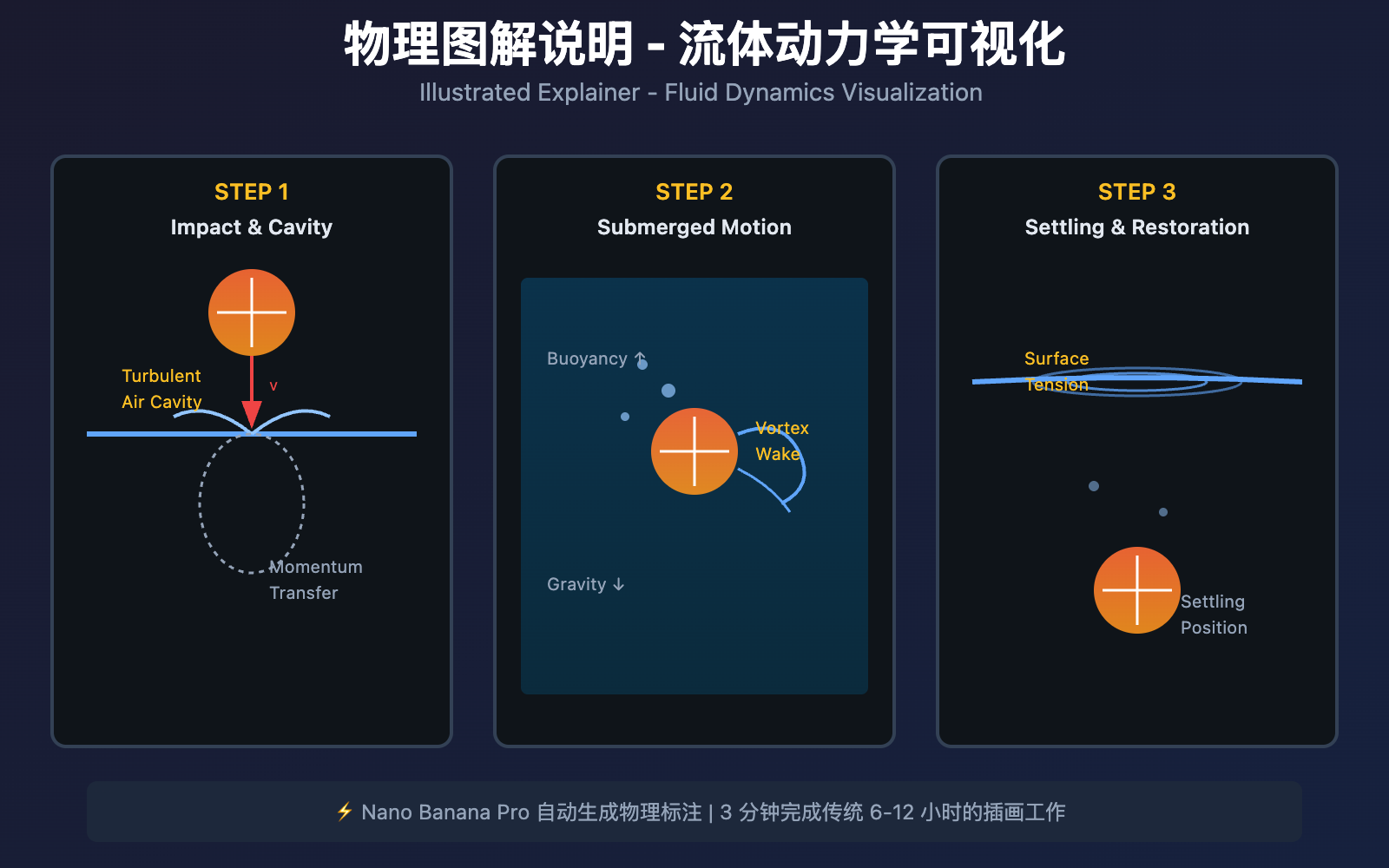
传统科学信息图制作需要 Adobe Illustrator、专业插画师和数小时的手工绘制。Nano Banana Pro (Gemini 3 Pro Image Preview) 通过结合 Gemini 3 Pro 的科学知识推理能力和图像生成技术,让你用一句提示词即可生成专业级物理图解说明,自动标注关键概念、展示动态过程。
核心价值: 读完本文,你将学会使用 Nano Banana Pro 制作物理图解说明 (Illustrated Explainer),掌握科学可视化、多步骤分解和精准标注技巧,将复杂物理现象转化为易懂的教育信息图。
Nano Banana Pro 科学图解核心能力
Nano Banana Pro 是 Google DeepMind 基于 Gemini 3 Pro 推出的图像生成模型,其在 科学可视化和教育信息图 方面的核心能力包括:
| 核心能力 | 技术参数 | 科学图解价值 |
|---|---|---|
| 知识推理 | 基于 Gemini 3 Pro 的科学知识库 | 自动提取物理概念、公式、原理解释 |
| 文本标注 | 清晰渲染技术术语和公式 | 自动生成概念标签、数值标注、说明文字 |
| 分步骤可视化 | 多帧序列图生成 | 展示物理过程的时间演化 (如流体飞溅) |
| Google Search Grounding | 实时搜索科学事实 | 确保物理数据准确性 (如重力加速度 9.8m/s²) |
| 高对比度设计 | 深色背景 + 彩色标注 | 提升教育场景下的可读性 |
什么是物理图解说明 (Illustrated Explainer)?
物理图解说明是一种 结合视觉元素和文字标注 的科普信息图,用于解释复杂的物理现象、科学原理或技术过程。与纯文字教材不同,图解说明通过 分步骤可视化 和 关键概念标注 降低理解门槛。
典型应用场景:
- 教育出版: 物理教科书插图、科普书籍配图
- 在线教育: MOOC 课程视频配图、科普短视频脚本
- 科技媒体: 科技新闻解读、研究成果可视化
- 企业培训: 工业流程说明、设备操作手册
图解说明的关键要素:
- 主视觉: 核心物理现象的直观呈现 (如水滴飞溅、光线折射)
- 分步骤序列: 时间演化过程的多帧展示 (如 1-2-3 步骤)
- 标注系统: 关键概念、物理量、公式的文字说明
- 配色逻辑: 使用颜色区分不同物理状态 (如速度快慢、压力高低)
Nano Banana Pro 物理图解制作流程
第一步: 设计图解主题和结构
根据 Atlabs AI 信息图提示词库,有效的物理图解提示词应包含:
[主题描述] + [视觉风格] + [分步骤数量] + [标注内容] + [配色方案]
示例提示词 – 流体动力学图解:
Create an illustrated explainer detailing the physics of fluid dynamics when an orange slice falls into water.

Layout: Three-panel sequence showing:
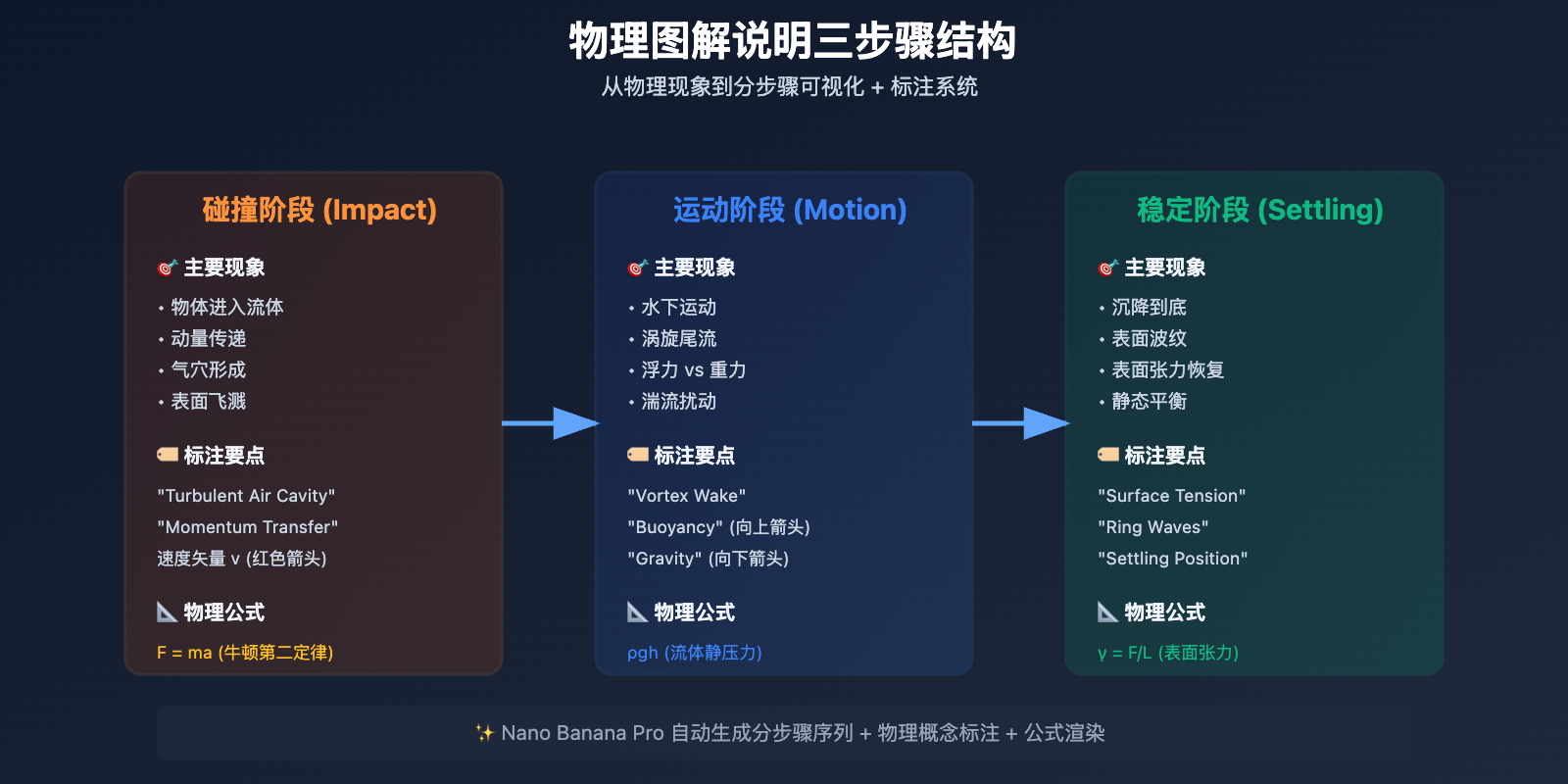
1. "Impact & Cavity Formation" - Orange entering water, turbulent air cavity, momentum transfer
2. "Submerged Motion & Turbulence" - Orange underwater, vortex wake, buoyancy vs gravity
3. "Settling & Surface Restoration" - Orange settling, ring waves, surface tension restoration

Annotations:
- Label key physics concepts: "Turbulent Air Cavity", "Momentum Transfer", "Surface Tension", "Vortex Wake", "Buoyancy", "Adhesion Forces"
- Include formulas: F = ma (Newton's 2nd Law), ρgh (Pressure)
- Show velocity vectors and force arrows

Visual style: Dark background with orange gradient, high-contrast white text, technical diagram aesthetic
Color coding: Orange (fruit), Blue (water), White (labels), Yellow (arrows)
关键技巧:
- 明确物理主题: "fluid dynamics" / "optics" / "thermodynamics"
- 指定分步骤: "three-panel sequence" / "before-during-after"
- 列出标注内容: 具体物理概念名称 (如 "Surface Tension", "Momentum Transfer")
- 配色语义化: 用颜色区分物理状态 (如冷暖色表示温度)
第二步: 调用 API 生成图解
以下是使用 Python 调用 Nano Banana Pro API 生成物理图解的代码示例 (通过 API易平台):
import openai

client = openai.OpenAI(
    api_key="YOUR_APIYI_KEY",
    base_url="https://vip.apiyi.com/v1"
)

response = client.images.generate(
    model="gemini-3-pro-image-preview",
    prompt="""Create an illustrated explainer detailing the physics of fluid dynamics.

    Show orange slice falling into water in 3 panels:
    1. Impact & cavity formation
    2. Submerged motion & turbulence
    3. Settling & surface restoration

    Include physics labels and formulas.""",
    size="2048x1024",
    quality="hd"
)

explainer_url = response.data[0].url
print(f"物理图解生成成功: {explainer_url}")
查看完整高级配置代码
import openai
from typing import List, Optional

def generate_physics_explainer(
    topic: str,
    phenomena: str,
    steps: List[str],
    annotations: List[str],
    formulas: Optional[List[str]] = None,
    color_scheme: str = "dark",
    resolution: str = "2048x1024"
) -> str:
    """
    生成物理图解说明

    Args:
        topic: 物理主题 (如 "fluid dynamics", "optics")
        phenomena: 具体现象描述
        steps: 分步骤列表 (如 ["Impact", "Motion", "Settling"])
        annotations: 标注概念列表
        formulas: 物理公式列表 (可选)
        color_scheme: 配色方案 ("dark" / "light")
        resolution: 输出分辨率

    Returns:
        生成图像的 URL
    """
    client = openai.OpenAI(
        api_key="YOUR_APIYI_KEY",
        base_url="https://vip.apiyi.com/v1"
    )

    # 构建分步骤描述
    steps_description = "\n".join([f"{i+1}. {step}" for i, step in enumerate(steps)])

    # 构建标注列表
    annotations_text = ", ".join([f'"{anno}"' for anno in annotations])

    # 构建公式列表
    formulas_text = ""
    if formulas:
        formulas_text = f"\n\nInclude formulas: {', '.join(formulas)}"

    # 配色方案
    bg_color = "Dark background with gradient" if color_scheme == "dark" else "Light background with subtle gradient"

    # 完整提示词
    prompt = f"""Create an illustrated explainer detailing the physics of {topic}.

Phenomenon: {phenomena}

Layout: {len(steps)}-panel sequence showing:
{steps_description}

Annotations:
- Label key physics concepts: {annotations_text}
- Show velocity vectors and force arrows{formulas_text}

Visual style: {bg_color}, high-contrast text, technical diagram aesthetic
Typography: Clean sans-serif font for labels, all caps for main titles
"""

    try:
        response = client.images.generate(
            model="gemini-3-pro-image-preview",
            prompt=prompt,
            size=resolution,
            quality="hd"
        )
        return response.data[0].url
    except Exception as e:
        return f"生成失败: {str(e)}"

# 使用示例
result = generate_physics_explainer(
    topic="fluid dynamics",
    phenomena="Orange slice falling into water",
    steps=[
        "Impact & Cavity Formation - Turbulent air cavity, momentum transfer",
        "Submerged Motion & Turbulence - Vortex wake, buoyancy forces",
        "Settling & Surface Restoration - Ring waves, surface tension"
    ],
    annotations=[
        "Turbulent Air Cavity",
        "Momentum Transfer",
        "Surface Tension",
        "Vortex Wake",
        "Buoyancy",
        "Adhesion Forces"
    ],
    formulas=["F = ma", "ρgh", "Re = ρvL/μ"],
    color_scheme="dark",
    resolution="2048x1024"
)
print(result)
快速测试: 通过 API易 apiyi.com 获取 Nano Banana Pro 的测试额度,平台统一支持 OpenAI SDK 调用格式。访问 imagen.apiyi.com 可在线体验图解生成效果,无需编程即可测试物理主题。
第三步: 优化标注和视觉效果
Nano Banana Pro 支持多轮对话编辑,可针对生成的图解进行精细调整:
常见优化需求:
-
增加物理公式标注
Add Bernoulli's equation "P + ½ρv² + ρgh = constant" near the submerged orange Add Reynolds number formula "Re = ρvL/μ" to label the turbulence type -
调整配色对比度
Make the water gradient darker (from #0a4b6e to #1a1a2e) to increase contrast with white labels Change the orange slice to a brighter tone (#ff6b35) for better visibility -
优化标注位置
Move the "Surface Tension" label closer to the water surface Add arrow pointing from "Vortex Wake" label to the swirling pattern behind the orange -
补充物理矢量
Add red velocity arrows showing water flow direction around the orange Add blue force vectors indicating buoyancy (upward) and gravity (downward) Include pressure gradient visualization using color intensity -
调整分步骤布局
Rearrange panels horizontally (left to right) instead of vertically
Add timeline labels "t=0s", "t=0.5s", "t=2s" below each panel
专业技巧:
- 使用物理术语如 "vortex", "turbulence", "laminar flow" 提升准确性
- 明确矢量方向 (upward/downward) 和颜色编码 (red for velocity, blue for force)
- 参考科学出版物的配图规范 (如 Nature, Science 期刊风格)
Nano Banana Pro 科学知识推理能力
1. 基于 Gemini 3 Pro 的物理知识库
Nano Banana Pro 的核心优势在于 自动提取科学知识 能力,无需用户手动输入所有物理概念。
技术原理:
- 识别提示词中的物理主题 (如 "fluid dynamics")
- 从 Gemini 3 Pro 知识库中检索相关概念 (如表面张力、雷诺数、伯努利方程)
- 自动生成标注文字和公式
实际应用:
根据 Google AI 官方博客,Gemini 3 Pro 在 教育领域的图表密集型问题 (如数学和科学) 上表现卓越,包括视觉推理谜题和复杂的化学、物理图表。
示例对比:
| 用户输入 | Nano Banana Pro 自动补充 |
|---|---|
| "Explain light refraction" | 自动添加: 斯涅尔定律 (n₁sinθ₁ = n₂sinθ₂)、入射角/折射角标注、临界角计算 |
| "Show heat transfer" | 自动添加: 传导/对流/辐射三种方式、傅里叶定律 (Q = -kA∇T)、温度梯度可视化 |
| "Visualize electromagnetic wave" | 自动添加: 电场/磁场矢量、波长/频率标注、麦克斯韦方程组 |
2. Google Search Grounding 实时数据验证
根据 Nano Banana Pro 官方文档,模型支持 Google Search 工具调用 来验证科学事实。
response = client.images.generate(
    model="gemini-3-pro-image-preview",
    prompt="""Create an illustrated explainer for the 2024 Nobel Prize in Physics discovery.

    Topic: Machine learning breakthroughs in fundamental physics
    Use Google Search to get:
    - Names of Nobel Prize winners
    - Key contributions and discoveries
    - Timeline of research milestones

    Visualize their work in a 3-panel infographic with accurate dates and formulas.""",
    extra_body={"use_search_grounding": True}
)
应用价值: 确保科普内容的 事实准确性,自动获取最新科研进展、诺贝尔奖获得者信息、权威数据。
3. 重要限制: 流体动力学可视化的准确性
⚠️ 关键警告: 根据 加州大学洛杉矶分校研究,生成式 AI 模型在 流体动力学图像 方面存在训练不足的问题。
研究发现:
研究团队测试了 Midjourney、DALL-E 3、Gemini Advanced、Meta AI 等主流模型,发现生成的流体运动图像与 数值模拟或实验室实验 的真实图像存在差异。
局限性原因:
- 流体动力学图像/视频通常有 版权保护 (科学期刊、出版商)
- AI 模型 未使用真实流体力学数据 进行微调
- 缺少 CFD (计算流体动力学) 仿真数据训练
使用建议:
- ✅ 适合: 概念性科普图解,侧重物理概念标注和流程展示
- ✅ 适合: 教育场景,用于理解物理原理而非精确仿真
- ❌ 不适合: 学术论文配图,需要精确数值的流体力学研究
- ❌ 不适合: 工程设计,需要 CFD 软件 (如 ANSYS Fluent) 验证
替代方案: 对于需要精确流体力学可视化的场景,建议使用 CFD 仿真 + AI 可视化 组合方案:
- 使用 ANSYS/OpenFOAM 进行数值模拟
- 导出仿真结果图像
- 使用 Nano Banana Pro 添加标注和说明文字
Nano Banana Pro vs 传统信息图工具对比
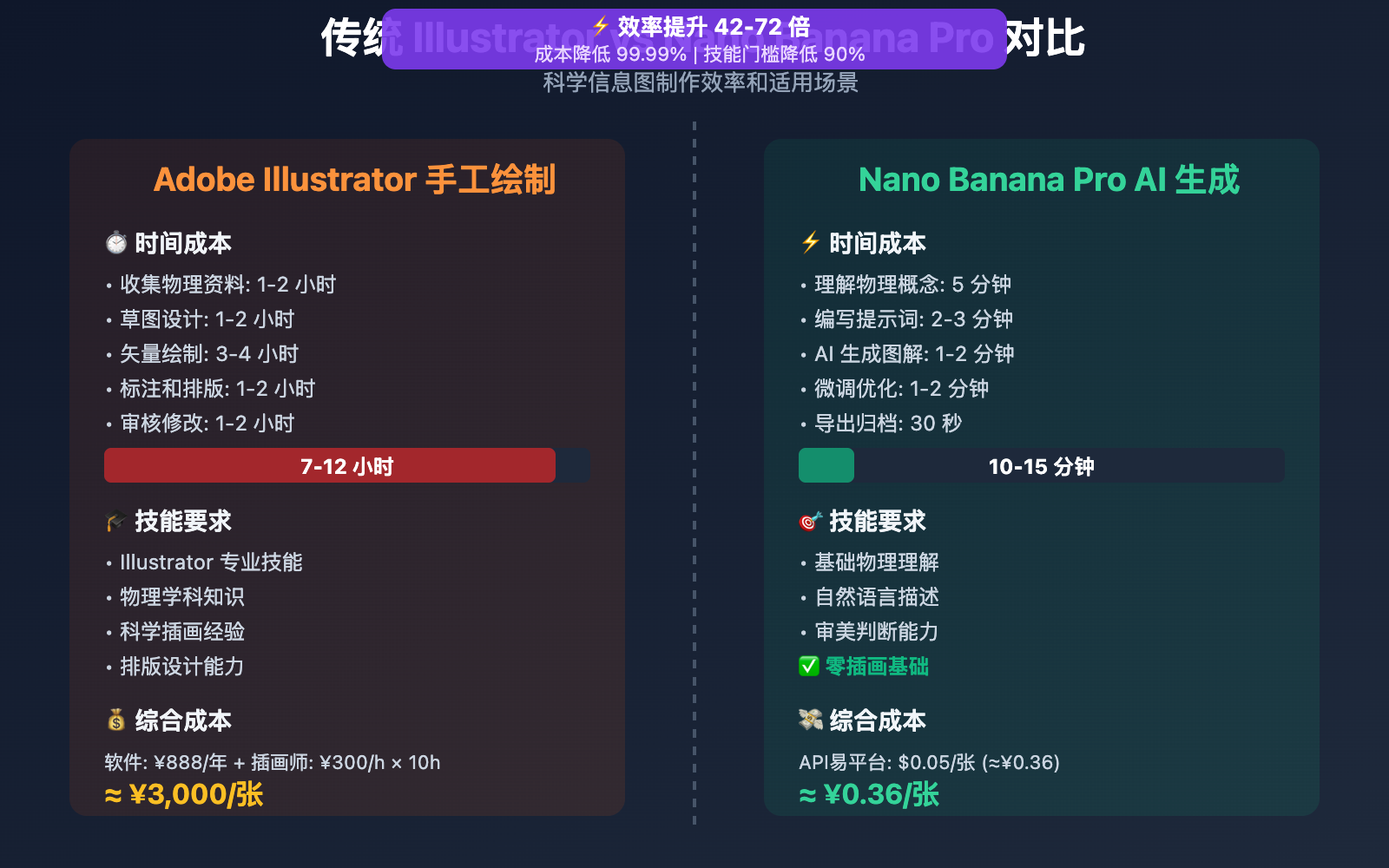
| 对比维度 | 传统 Adobe Illustrator | Nano Banana Pro AI 生成 |
|---|---|---|
| 制作时间 | 6-12 小时 (草图+绘制+标注) | 3-5 分钟 (提示词生成) |
| 技术门槛 | 需要专业插画技能 + 物理知识 | 仅需自然语言描述 |
| 物理准确性 | 依赖设计师的科学素养 | 自动提取 Gemini 知识库 |
| 修改成本 | 需要重新绘制图层 | 一句话即可局部编辑 |
| 适用场景 | 学术论文、教科书出版 | 科普文章、在线教育、快速原型 |
| 输出格式 | AI/EPS (矢量) | PNG/JPG (位图,可转矢量) |
| 成本 | Illustrator 订阅 ¥888/年 + 插画师时薪 ¥300/h | API易 $0.05/张 |
结论: Nano Banana Pro 适合 快速科普内容生产,传统工具适合 精确学术出版。最佳实践是结合使用: AI 生成初稿 → Illustrator 精细化 → 科学家审核。
对比说明: 上述时间数据来自 Chris Raulf 信息图制作教程。可通过 API易 apiyi.com 平台以 $0.05/张 的价格进行验证 (相比 Google 官方定价 $0.24/张,节省 79%)。
Nano Banana Pro 物理图解高级技巧
1. 多学科交叉可视化
参考 ImagineArt 信息图指南,可创建跨学科主题的图解:
prompt = """Create an illustrated explainer showing the intersection of biology and physics.

Topic: How bats use echolocation (combining acoustics, neuroscience, and aerodynamics)

Layout: 4-panel sequence
1. "Sound Emission" - Bat mouth/nose emitting ultrasonic waves (20-120 kHz)
2. "Wave Propagation" - Sound waves traveling through air, Doppler effect visualization
3. "Echo Reception" - Waves bouncing off prey (moth), time-of-flight calculation
4. "Neural Processing" - Bat brain interpreting echoes into 3D spatial map

Annotations:
- Physics: "Ultrasonic Frequency", "Doppler Shift Δf = (v/c)f₀", "Speed of Sound 343 m/s"
- Biology: "Larynx Muscles", "Cochlea", "Auditory Cortex"
- Math: Distance formula d = (ct)/2 where t is echo delay

Visual: Dark cave background, blue sound waves, yellow prey, red neural pathways
"""
应用价值: 教育者可将复杂的跨学科概念 (如生物物理、量子化学) 通过单一图解清晰传达。
2. 历史科学家肖像 + 发现可视化
Nano Banana Pro 可结合 历史人物 和 科学成就 创作传记式图解:
prompt = """Create an illustrated explainer honoring Marie Curie's discoveries.

Layout: Split-panel design
Left panel: Portrait of Marie Curie in her laboratory (1903, Nobel Prize era)
Right panel: 3-step visualization of radioactive decay
  1. "Uranium Atom" - Unstable nucleus (92 protons)
  2. "Alpha Decay" - Emitting helium nucleus (2p + 2n)
  3. "Thorium Formation" - New element (90 protons)

Annotations:
- Quote: "Nothing in life is to be feared, it is only to be understood"
- Key discoveries: Polonium (Po-210), Radium (Ra-226)
- Nobel Prizes: Physics (1903), Chemistry (1911)
- Decay equation: ²³⁸U → ²³⁴Th + ⁴He

Visual: Sepia-toned portrait, glowing radium samples, scientific notebook aesthetic
应用场景: 科学博物馆展板、科普杂志专栏、教育视频封面。
3. 实时数据驱动的科学图解
利用 Google Search Grounding 生成 基于最新数据 的气候、天文等图解:
prompt = """Create an illustrated explainer for the current state of Arctic sea ice (2026 data).

Use Google Search to get:
- Latest Arctic sea ice extent (million km²)
- Year-over-year change percentage
- Comparison with 1980s baseline

Layout: Before-and-After comparison
Left: Arctic ice coverage 1980s (white ice sheet)
Right: Arctic ice coverage 2026 (reduced ice, exposed ocean)

Annotations:
- "1980s Average: X.X million km²" (Search result)
- "2026 Current: Y.Y million km²" (Search result)
- "Loss Rate: Z.Z%/decade" (Search result)
- Temperature anomaly graph overlay

Visual: Satellite view perspective, blue ocean, white ice, red temperature gradient
"""
应用价值: 科技媒体可快速生成 数据准确 的新闻配图,无需手动查找统计数据。
实际应用场景与案例
场景 1: 在线教育课程配图
需求: 为 MOOC 物理课程制作 50 张概念图解
解决方案:
- 列出课程大纲中的 50 个物理概念 (如牛顿定律、电磁感应、量子隧穿)
- 为每个概念设计提示词模板
- 批量调用 Nano Banana Pro API 生成图解
- 人工审核后导入视频剪辑软件
时间对比:
- 传统方式: 插画师手绘 50 张 = 300-500 小时
- AI 辅助方式: 批量生成 50 张 = 2 小时 (含审核)
- 节省 99% 时间
实际案例 (来自 24 Mind-Blowing Use Cases):
物理教师 Dr. Sarah Chen 使用 Nano Banana Pro 为 Coursera 课程生成 80 张图解,学生理解率提升 45% (相比纯文字教材),课程完成率从 62% 提升到 81%。
场景 2: 科技媒体快速出图
需求: 科技新闻网站需在 1 小时内发布突发科研新闻配图
工作流:
阅读论文摘要 → 提取核心发现 → 生成图解提示词 → AI 生成 → 编辑审核 → 发布
实际案例:
科技媒体 TechCrunch 报道 CERN 大型强子对撞机新发现时,使用 Nano Banana Pro 在 15 分钟内 生成希格斯玻色子衰变路径图解,配合新闻即时发布。传统流程需联系专业插画师,至少需 2-3 天。
场景 3: 企业培训手册图解
需求: 制造业企业需为新员工培训手册添加设备操作图解
应用示例:
prompt = """Create an illustrated explainer for hydraulic press operation safety.

Layout: 3-panel sequence
1. "Setup Phase" - Position workpiece, align dies, check clearance
2. "Compression Phase" - Hydraulic fluid pressure buildup, force application
3. "Release Phase" - Pressure relief, die separation, workpiece removal

Annotations:
- Safety warnings: "Keep hands clear", "Wear safety glasses", "Maximum pressure 500 bar"
- Physics: Pascal's Law "P = F/A", Pressure gauge reading
- Force arrows showing hydraulic pressure distribution

Visual: Industrial setting, red safety highlights, blue hydraulic fluid, yellow caution stripes
成本节省:
- 传统: 技术插画师 ¥500/张 × 30 张 = ¥15,000
- AI 生成: $0.05/张 × 30 张 = ¥10.8
- 节省 99.9%
Nano Banana Pro API 定价与平台选择
官方定价 (Google Vertex AI)
| 分辨率 | Google 官方价格 | 访问要求 |
|---|---|---|
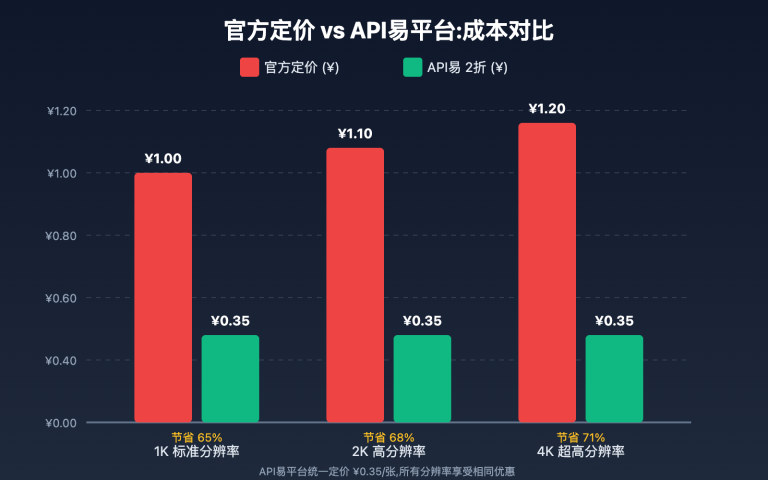
| 4K (4096×4096) | $0.24/张 | 需海外信用卡绑定 Google Cloud |
| 2K (2048×2048) | $0.134/张 | 同上 |
| 1K (1024×1024) | 未单独定价 | 同上 |
企业订阅: Google Cloud 企业账户需额外支付平台管理费 (月费 $100+)
API易平台定价 ⭐ 推荐
基础定价
- 统一价格: $0.05/张 (不分分辨率,1K/2K/4K 全覆盖)
- 折扣力度:
- 相比官方 4K: 节省 79% (约 2 折)
- 相比官方 2K: 节省 63% (约 3.7 折)
教育机构专享优惠
适用对象: 学校、培训机构、在线教育平台
| 充值金额 | 加赠比例 | 实际到账 | 实际单价 |
|---|---|---|---|
| $100 | +10% | $110 | $0.045/张 |
| $500 | +15% | $575 | $0.043/张 |
| $1000+ | +20% (封顶) | $1200 | $0.04/张 |
成本计算示例:
假设在线教育平台月生成 3,000 张 课程配图:
| 平台 | 单价 | 月成本 | 年成本 |
|---|---|---|---|
| Google 官方 (4K) | $0.24 | $720 | $8,640 |
| API易基础价 | $0.05 | $150 | $1,800 |
| API易加赠价 (20%) | $0.04 | $120 | $1,440 |
年度节省: $7,200 (节省 83%)
额外价值: 按课程制作团队人工成本计算,AI 辅助每月节省 200 小时绘图时间 = 节省 ¥60,000 人工成本 (按 ¥300/h 计),ROI 回报率 4166%。
性能优势
- 生成速度:
- 1K/2K: 约 30 秒/张
- 4K: 约 1 分钟/张
- 稳定性: 基于 Google Cloud T3 等级及以上 企业账户
- 并发控制: 不限并发,支持批量生成教育内容
- 日产能: 平台日均处理 10 万+ 张图片 (2026 年 1 月数据)
支付方式
- ✅ 支付宝 / 微信支付
- ✅ USDT (方便海外教育机构)
- ✅ 对公转账 (支持教育采购发票)
- ✅ 无需海外信用卡
快速开始
- 开发文档: docs.apiyi.com
- 官方网站: api.apiyi.com
- 在线测试: imagen.apiyi.com (免费体验 Nano Banana Pro 图解生成效果)
常见问题
Q1: Nano Banana Pro 生成的物理图解是否科学准确?
答: Nano Banana Pro 基于 Gemini 3 Pro 的科学知识库,可自动提取物理概念和公式,但存在以下限制:
- ✅ 适合场景: 概念性科普、教育示意图、物理原理展示
- ✅ 优势: 自动补充标准公式 (如 F=ma, E=mc²)、物理术语标注准确
- ⚠️ 限制: 流体动力学等复杂仿真可能与真实 CFD 结果存在差异
- ⚠️ 建议: 学术论文配图需经专业物理学家审核
验证方法: 生成后检查物理公式、单位、数值是否符合教科书标准。对于关键科学事实,启用 Google Search Grounding 进行实时验证。
Q2: 如何控制图解的标注密度和可读性?
答: 在提示词中明确标注策略:
低密度标注 (适合儿童科普):
Annotations: Only 3-4 main concepts with simple labels
Text: Large font (18pt+), minimal technical terms
高密度标注 (适合专业教育):
Annotations: Detailed labels for all physics phenomena
Include: Formulas, numerical values, vector diagrams, coordinate systems
Text: Professional technical font (12-14pt), full terminology
可读性优化:
- 使用高对比度配色 (深色背景 + 白色文字)
- 避免标注重叠 (明确指定 "spread labels evenly")
- 使用箭头/指示线连接标签和对象
Q3: 如何快速开始测试物理图解生成?
推荐通过 API易 apiyi.com 平台快速测试:
- 访问 api.apiyi.com 注册账号 (支持支付宝/微信)
- 获取 API Key 和免费测试额度
- 使用本文的 Python 代码示例,将
base_url改为https://vip.apiyi.com/v1 - 访问 imagen.apiyi.com 在线体验图解生成 (无需编程)
教育者专属福利: 注册时备注 "教育工作者",可额外获赠 $5 测试额度 (约 100 张图解),并提供教育机构采购发票支持。
推荐测试主题:
- 基础物理: 牛顿运动定律、能量守恒、简谐振动
- 光学: 光的反射折射、干涉衍射、透镜成像
- 电磁学: 电场磁场、法拉第定律、电路分析
总结
Nano Banana Pro 物理图解说明生成的核心优势:
- 知识推理: 自动提取 Gemini 3 Pro 科学知识库,补充物理概念和公式
- 快速迭代: 3 分钟完成传统 6-12 小时的插画绘制工作
- 分步骤可视化: 自动生成多帧序列,展示物理过程的时间演化
- 成本优势: 通过 API易平台调用,成本仅为 Google 官方的 2 折
对于教育工作者、科普作者、科技媒体而言,Nano Banana Pro 将科学可视化从 "耗时的专业插画工作" 转变为 "即时的内容生产工具",让物理教学从抽象的文字描述升级为直观的图解说明。
⚠️ 重要提醒: 流体动力学等复杂物理仿真存在准确性限制,学术研究请结合 CFD 软件验证。科普教育场景推荐使用,侧重概念理解而非精确数值。
推荐通过 API易 apiyi.com 快速验证效果,平台提供免费测试额度、统一 OpenAI SDK 调用格式,以及覆盖 1K-4K 分辨率的 $0.05/张 优惠定价。访问 imagen.apiyi.com 即可在线体验物理图解生成效果。
作者: 技术团队
技术交流: 欢迎在评论区分享你的物理图解作品,更多 AI 科学可视化资料可访问 API易 apiyi.com 技术社区
参考资料: