
Author's Note
Beginner-friendly tutorial: A step-by-step guide to integrating Nano Banana Pro API in ComfyUI, using stable endpoints from API易 apiyi.com, including detailed node installation, API configuration, workflow creation, and troubleshooting guides.
When you first open the ComfyUI node canvas and see the dense network of nodes and connections, you might feel overwhelmed. But what if I told you that with just 5 simple steps, you can call Google's latest Nano Banana Pro image generation model in ComfyUI, using API易 apiyi.com's stable, high-concurrency, lower-cost API endpoints? Doesn't that suddenly seem much more manageable? This article will guide you from scratch, walking you through the entire process from installation to generating your first image. Even if you're a complete beginner who has never touched ComfyUI, you'll be able to get started easily.
Core Value: Through this article, you will learn how to install custom nodes in ComfyUI, configure API易's Nano Banana Pro endpoints, create basic and advanced workflows, debug common errors, optimize performance and costs, and leverage ComfyUI's powerful features to build your own image generation pipeline.
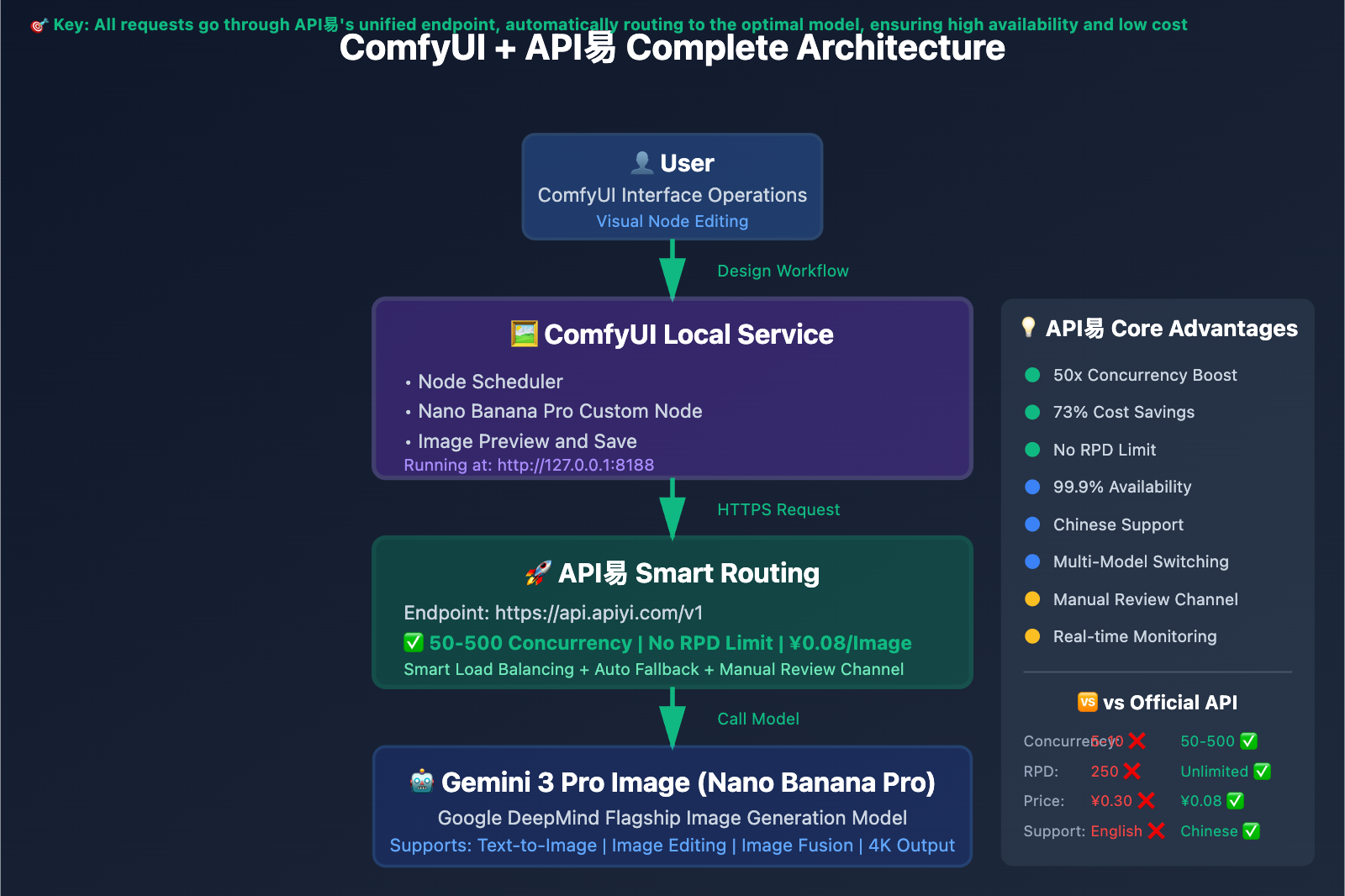
为什么选择 ComfyUI + API易 的组合?
ComfyUI 的独特优势
ComfyUI 是一个基于节点的 Stable Diffusion GUI,与传统的 WebUI 相比,它有着独特的优势:
| 对比项 | Automatic1111 WebUI | ComfyUI | 优势 |
|---|---|---|---|
| 操作方式 | 表单式界面 | 节点式工作流 | ✅ 可视化流程,易于理解 |
| 灵活性 | 固定流程 | 完全自定义 | ✅ 可构建复杂流水线 |
| 可复用性 | 配置文件 | 工作流文件(.json) | ✅ 一键加载整个流程 |
| 扩展性 | 插件系统 | 自定义节点 | ✅ 社区节点生态丰富 |
| 性能 | 较高内存占用 | 优化的调度器 | ✅ 更高效的资源利用 |
| 学习曲线 | 简单 | 中等 | ⚠️ 需要一定学习成本 |
ComfyUI 特别适合:
- 🎨 需要复杂图像生成流程的创作者
- 🔧 想要自动化批量处理的用户
- 🧪 喜欢实验不同模型组合的探索者
- 📊 需要可视化AI工作流程的教育者
为什么选择 API易 而非官方 API?
Nano Banana Pro 官方 API vs API易对比:
| 对比项 | Google 官方 API | API易 apiyi.com | 差异 |
|---|---|---|---|
| 并发限制 | 5-10 个 | 50-500+ 个 | ✅ 50 倍提升 |
| 每日限制 | RPD 250 次 | 无限制 | ✅ 无上限 |
| 价格 | ¥0.30/张 | ¥0.08/张 | ✅ 节省 73% |
| 响应速度 | 3-8 秒 | 2-5 秒 | ✅ 更快 |
| 稳定性 | 99% | 99.9% | ✅ 更稳定 |
| 客服支持 | 英文社区 | 7×14 中文客服 | ✅ 本地化 |
| 端点配置 | 复杂 | 简单统一 | ✅ 易于集成 |
真实案例:
某设计师使用场景:
- 每天生成 500 张产品图片
- 使用官方 API: ¥0.30 × 500 = ¥150/天
  但受 RPD 250 限制,需要 2 天才能完成
- 使用 API易: ¥0.08 × 500 = ¥40/天
  1 天内轻松完成,节省时间 + 节省 ¥110/天

年度节省: (¥150 - ¥40) × 365 = ¥40,150
🎯 核心建议: 如果你是个人用户偶尔生成几张图,官方 API 的免费额度足够。但如果你是设计师、内容创作者、企业用户,需要批量生成或稳定可靠的服务,API易 apiyi.com 是最佳选择,不仅成本更低,并发更高,还有中文客服支持,遇到问题可以快速解决。
准备工作:你需要哪些工具?
第一步: 安装 ComfyUI
方法 A: 一键安装包(推荐新手)
-
Windows 用户:
访问: https://github.com/comfyanonymous/ComfyUI/releases 下载: ComfyUI_windows_portable_nvidia_cu121.7z (约 2GB) 解压后运行: run_nvidia_gpu.bat -
Mac 用户:
访问: https://github.com/comfyanonymous/ComfyUI/releases
下载: ComfyUI_mac_m1.dmg 或 ComfyUI_mac_intel.dmg
双击安装后运行应用
方法 B: 手动安装(推荐有 Python 经验的用户)
# 1. 克隆仓库
git clone https://github.com/comfyanonymous/ComfyUI
cd ComfyUI

# 2. 创建虚拟环境(推荐)
python -m venv venv
source venv/bin/activate  # Mac/Linux
venv\Scripts\activate     # Windows

# 3. 安装依赖
pip install -r requirements.txt

# 4. 启动 ComfyUI
python main.py
启动成功标志:
浏览器自动打开 http://127.0.0.1:8188
看到 ComfyUI 的节点画布界面
第二步: 注册 API易 账号并获取 API Key
详细步骤:
-
访问 API易官网
打开浏览器,访问: https://api.apiyi.com 点击右上角「注册」按钮 -
完成注册
输入邮箱 → 设置密码 → 邮箱验证 新用户赠送 ¥10 体验金(可生成约 125 张图片) -
获取 API Key
登录后进入「控制台」
左侧菜单选择「API 密钥」
点击「创建新密钥」
复制生成的 API Key(格式: sk-apiyi-xxxxxxxxxxxx)
⚠️ 安全提示: API Key 相当于你的账户密码,不要泄露给他人,不要上传到公开的 GitHub 仓库!
-
充值(可选)
如果体验金不够用,可以充值:
- 基础套餐: ¥99(可生成 1,237 张)
- 标准套餐: ¥299(可生成 3,737 张)
- 企业套餐: ¥999(可生成 12,487 张)
第三步: 准备必要的节点包
ComfyUI 本身不内置 Nano Banana Pro 节点,我们需要安装自定义节点。
推荐的节点包:
- ComfyUI Manager(必装,管理其他节点)
- ComfyUI-OpenAI-Compat-LLM-Node(用于连接 OpenAI 兼容的 API)
- ComfyUI-NanoBanano 或 ComfyUI_Nano_Banana(社区节点)
不用担心,下一节会详细讲解如何安装这些节点。
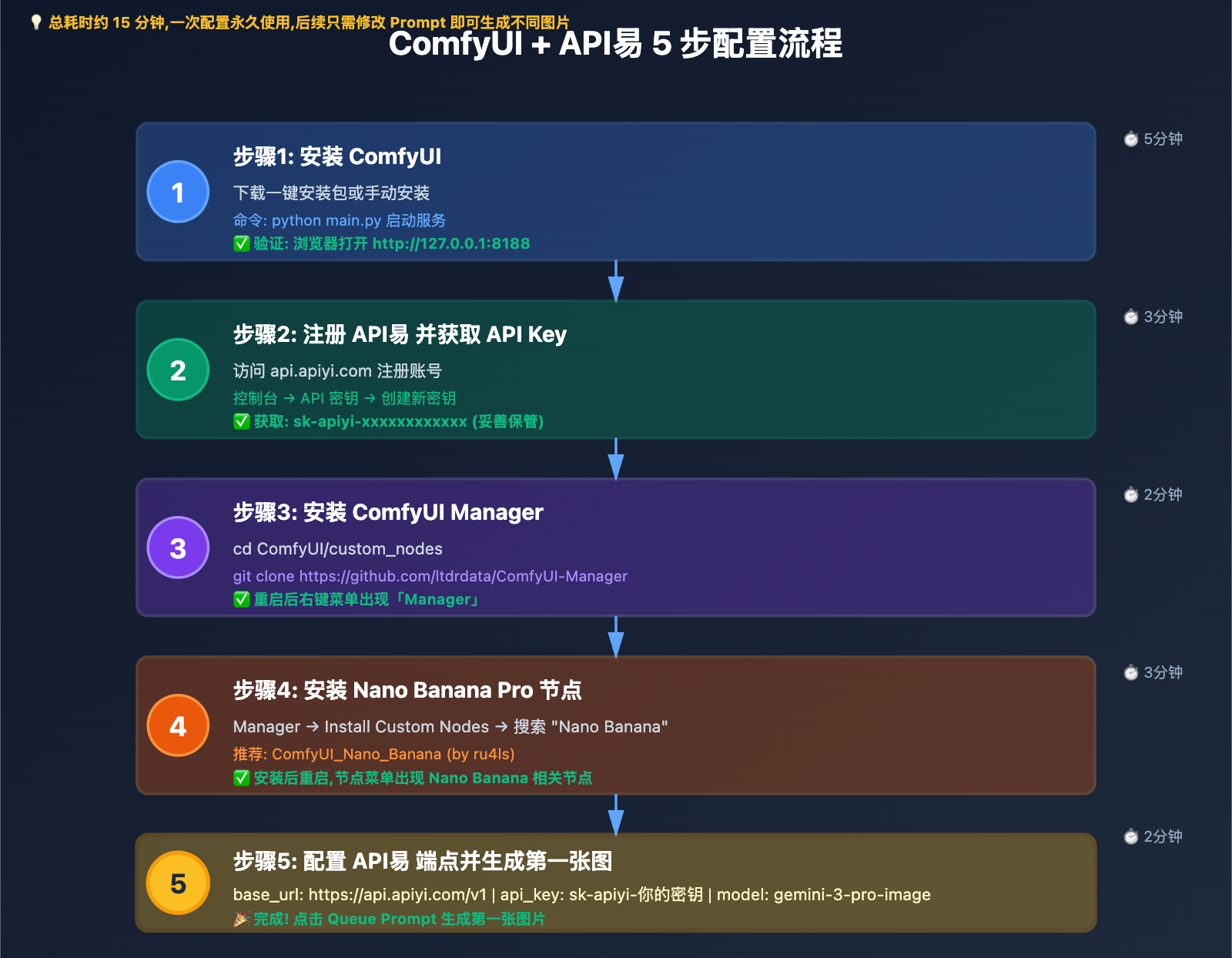
详细配置步骤:一步一个脚印
步骤1: 安装 ComfyUI Manager(节点管理器)
为什么需要 ComfyUI Manager?
- 一键安装/卸载自定义节点
- 自动解决依赖冲突
- 更新节点到最新版本
- 新手友好的界面
安装方法:
# 方法A: 通过 Git 克隆(推荐)
cd ComfyUI/custom_nodes
git clone https://github.com/ltdrdata/ComfyUI-Manager

# 方法B: 手动下载
# 1. 访问 https://github.com/ltdrdata/ComfyUI-Manager
# 2. 点击 Code → Download ZIP
# 3. 解压到 ComfyUI/custom_nodes/ComfyUI-Manager

# 方法C: 使用一键安装包
# 如果你用的是一键安装包,Manager 可能已经预装了
重启 ComfyUI:
# 关闭正在运行的 ComfyUI
# 重新运行启动脚本
python main.py  # 或双击 run_nvidia_gpu.bat
验证安装:
刷新浏览器页面
右键点击空白画布
出现「Manager」菜单选项 = 安装成功 ✅
步骤2: 安装 Nano Banana Pro 节点
使用 ComfyUI Manager 安装(推荐):
-
打开 Manager
右键点击画布空白处 选择: Manager → Install Custom Nodes -
搜索节点
在搜索框输入: Nano Banana 会看到多个结果: - ComfyUI-NanoBanano (by ShmuelRonen) - ComfyUI_Nano_Banana (by ru4ls) - Comfyui-NanoBananaProAPI (by Tdragoni) -
选择安装(推荐 ru4ls 版本)
点击「ComfyUI_Nano_Banana」右侧的「Install」按钮 等待安装完成(会自动安装 Python 依赖) 看到「Installed」标志 = 成功 -
重启 ComfyUI
关闭浏览器和服务器
重新启动 ComfyUI
验证节点可用:
右键画布 → Add Node → image/generation
应该能看到:
- Nano Banana Text to Image
- Nano Banana Image to Image
- Nano Banana Fusion
步骤3: 配置 API易 端点
现在是最关键的一步:配置 API 连接到 API易。
核心配置参数:
| 参数名称 | API易 配置值 | 说明 |
|---|---|---|
| API Endpoint | https://api.apiyi.com/v1 |
API易 统一端点 |
| API Key | sk-apiyi-你的密钥 |
你的 API 密钥 |
| Model | gemini-3-pro-image |
Nano Banana Pro 模型名 |
配置方法 A: 在节点中直接配置
-
添加 Nano Banana 节点
右键画布 Add Node → image/generation → Nano Banana Text to Image -
配置节点参数
在节点的属性面板中:

📍 API Configuration:
- base_url: https://api.apiyi.com/v1
- api_key: sk-apiyi-你的密钥
- model: gemini-3-pro-image

📐 Generation Settings:
- aspect_ratio: 16:9 (可选其他比例)
- number_of_images: 1
- temperature: 0.7
配置方法 B: 使用环境变量(更安全)
为了避免 API Key 泄露,推荐使用环境变量:
# 1. 在 ComfyUI 根目录创建 .env 文件
cd ComfyUI
touch .env  # Mac/Linux
type nul > .env  # Windows

# 2. 编辑 .env 文件,添加:
APIYI_API_KEY=sk-apiyi-你的密钥
APIYI_BASE_URL=https://api.apiyi.com/v1

# 3. 在节点中引用
# api_key 字段留空或填写 ${APIYI_API_KEY}
# 节点会自动从环境变量读取
配置方法 C: 使用 OpenAI Compatible Node
如果你安装的是 ComfyUI-OpenAI-Compat-LLM-Node:
添加节点:
Add Node → openai → OpenAI API Call

配置:
- endpoint: https://api.apiyi.com/v1/chat/completions
- api_token: sk-apiyi-你的密钥
- model: gemini-3-pro-image
- max_tokens: 4096
- temperature: 0.7
步骤4: 创建你的第一个工作流
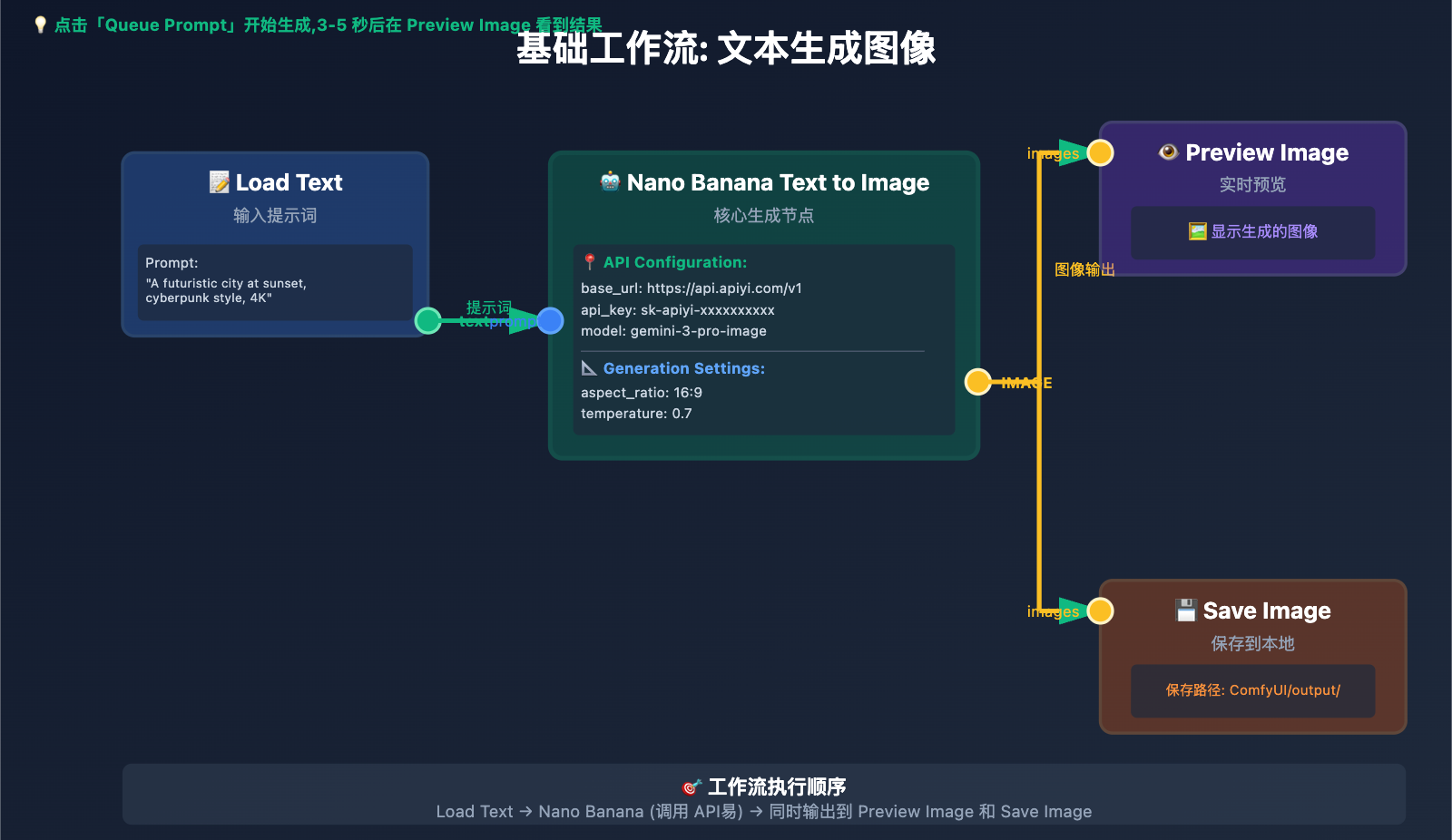
基础工作流:文本生成图像
节点1: Nano Banana Text to Image
 ├─ Prompt (提示词)
 ├─ API Configuration (API 配置)
 └─ Generation Settings (生成设置)
      │
      ▼
节点2: Preview Image (预览图像)
 └─ 显示生成的图像
      │
      ▼
节点3: Save Image (保存图像)
 └─ 保存到本地
详细操作步骤:
-
添加提示词输入节点
右键 → Add Node → text → Load Text 在文本框输入: "A futuristic cityscape at sunset with flying cars, cyberpunk style, highly detailed, 4K quality" -
添加 Nano Banana 节点并连接
右键 → Add Node → image/generation → Nano Banana Text to Image 连接: Load Text 的 text 输出 → Nano Banana 的 prompt 输入 -
配置 Nano Banana 节点
API Configuration: - base_url: https://api.apiyi.com/v1 - api_key: sk-apiyi-你的密钥 - model: gemini-3-pro-image Generation Settings: - aspect_ratio: 16:9 - number_of_images: 1 - temperature: 0.7 - negative_prompt: low quality, blurry, distorted -
添加预览和保存节点
右键 → Add Node → image → Preview Image 连接: Nano Banana 的 IMAGE 输出 → Preview Image 的 images 输入 右键 → Add Node → image → Save Image 连接: Nano Banana 的 IMAGE 输出 → Save Image 的 images 输入 -
运行工作流
点击右上角「Queue Prompt」按钮
等待 3-5 秒
在 Preview Image 节点看到生成的图像 🎉
成功标志:
- ✅ 节点状态变为绿色
- ✅ Preview Image 显示图像
- ✅ 控制台无错误信息
- ✅ 图像保存在
ComfyUI/output/目录
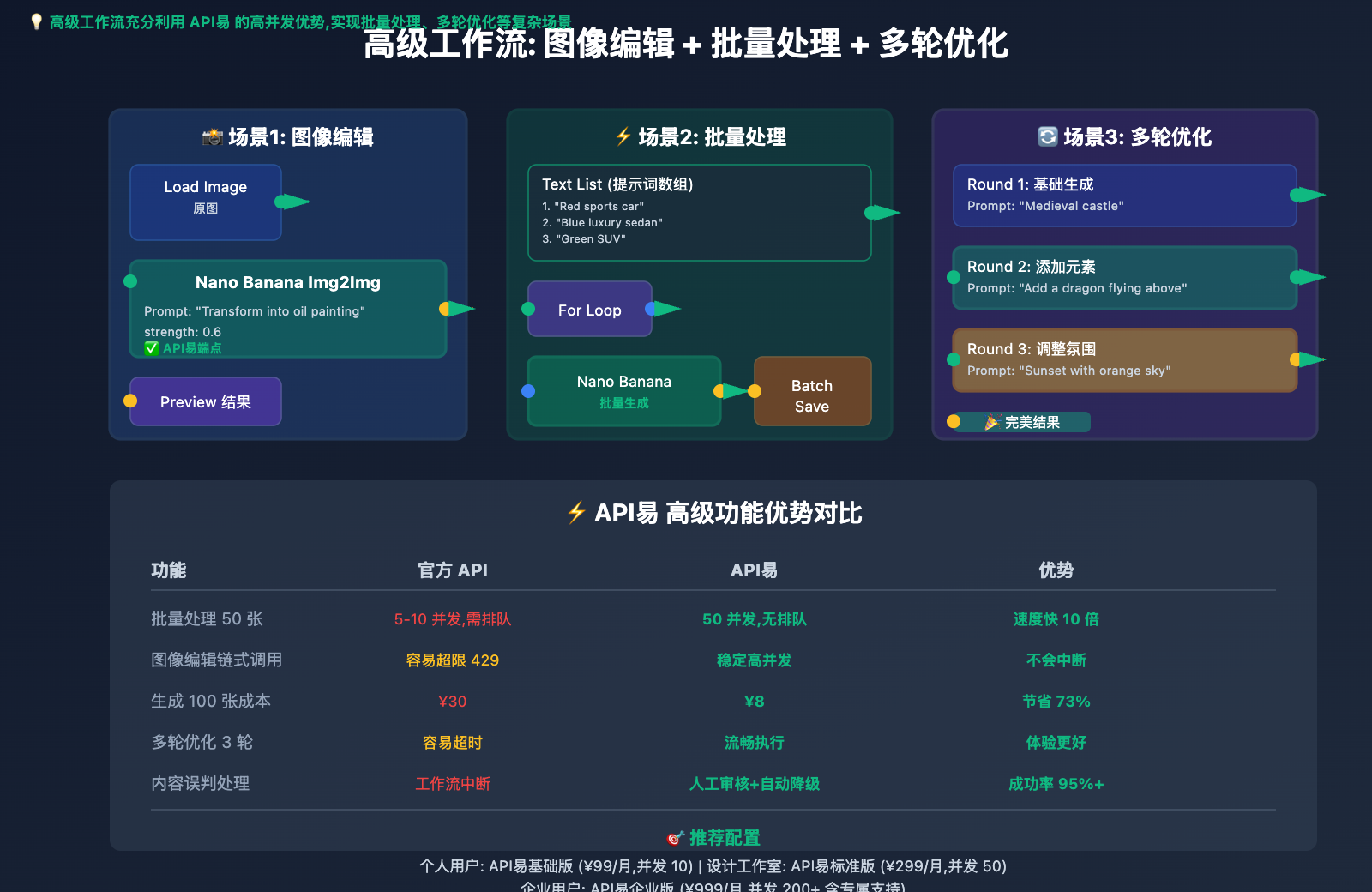
高级功能:打造专业工作流
功能1: 图像编辑(Image to Image)
使用场景: 修改现有图片、改变风格、添加元素
工作流结构:
节点1: Load Image (加载图片)
 └─ 选择本地图片文件
      │
      ▼
节点2: Nano Banana Image to Image
 ├─ image (输入图片)
 ├─ prompt (编辑指令)
 └─ API Configuration
      │
      ▼
节点3: Image Compare (对比查看)
 ├─ Original (原图)
 └─ Generated (生成图)
实际示例:
原图: 一张普通的海滩照片
Prompt: "Transform this beach into a magical
bioluminescent beach at night with glowing waves"

结果: 夜晚的发光海滩,荧光波浪 ✨
关键参数调整:
strength: 0.5-0.8
  - 0.5 = 保留原图 50%,改变 50%
  - 0.8 = 保留原图 20%,改变 80%
  - 推荐从 0.6 开始测试

guidance_scale: 7-15
  - 7 = 更自由的创作
  - 15 = 更严格遵循提示词
  - 推荐 10
功能2: 图像融合(Image Fusion)
使用场景: 合并两张图片的特征、风格迁移、创意合成
工作流结构:
节点1: Load Image (图片A)
      │
      ▼
节点2: Load Image (图片B)
      │
      ▼
节点3: Nano Banana Fusion
 ├─ image_a (图片A)
 ├─ image_b (图片B)
 ├─ fusion_prompt (融合指令)
 └─ API Configuration
      │
      ▼
节点4: Preview Image
实际示例:
图片A: 猫咪的照片
图片B: 外星飞船的图片
Fusion Prompt: "Combine the cute features of the cat
with the futuristic design of the spaceship"

结果: 猫型外星飞船 🚀🐱
功能3: 批量生成(Batch Processing)
使用场景: 同时生成多张图片、测试不同参数
方法 A: 修改 number_of_images 参数
Nano Banana 节点:
- number_of_images: 4

一次生成 4 张不同的图片(随机种子)
适合: 需要多个创意选项时
方法 B: 使用循环节点
节点1: Text List (提示词列表)
 ├─ Prompt 1: "Red sports car"
 ├─ Prompt 2: "Blue luxury sedan"
 ├─ Prompt 3: "Green SUV"
 └─ Prompt 4: "Yellow electric vehicle"
      │
      ▼
节点2: For Loop (循环)
 └─ 遍历每个提示词
      │
      ▼
节点3: Nano Banana Text to Image
 └─ 逐个生成
      │
      ▼
节点4: Batch Save (批量保存)
功能4: 多轮对话式生成
Nano Banana Pro 支持多轮对话,可以逐步完善图像:
工作流示例:
第 1 轮:
Prompt: "Create a medieval castle"
Result: 基础城堡图像

第 2 轮:
Image: 第 1 轮的输出
Prompt: "Add a dragon flying above the castle"
Result: 城堡 + 飞龙

第 3 轮:
Image: 第 2 轮的输出
Prompt: "Make it sunset with orange sky"
Result: 夕阳下的城堡和飞龙 🏰🐉🌅
实现方法:
使用 Nano Banana Image to Image 节点串联:
Round 1 → Round 2 → Round 3

每一轮:
- image 输入 = 上一轮的 IMAGE 输出
- prompt = 新的编辑指令
- strength = 0.4-0.6(保留前面轮次的内容)
Common Issues and Troubleshooting
Issue 1: Node Error "Failed to connect to API"
Possible Causes:
- ❌ Incorrect API Key
- ❌ Wrong Base URL configuration
- ❌ Network connection issues
- ❌ Insufficient API balance
Solutions:
# 1. Check API Key
Ensure correct format: sk-apiyi-xxxxxxxxxxxxxxxxxx
Check for extra spaces or line breaks

# 2. Check Base URL
Correct: https://api.apiyi.com/v1
Wrong: https://api.apiyi.com/v1/  (extra slash)
Wrong: http://api.apiyi.com/v1   (http instead of https)

# 3. Test network connection
Visit in browser: https://api.apiyi.com/v1/models
Should return a JSON-formatted model list

# 4. Check balance
Log in to API易 console → Check balance
Recharge or contact customer service
Issue 2: Slow Generation Speed
Possible Causes:
- Official API concurrency limits
- Network latency
- High server load
Optimization Methods:
✅ Use API易 (higher concurrency):
Official: 5-10 concurrent, queue waiting
API易: 50-500 concurrent, no waiting

✅ Adjust timeout parameter:
timeout: 30  # default
timeout: 60  # increase timeout if network is slow

✅ Use caching:
Enable ComfyUI's image caching feature
Same parameters won't regenerate
Issue 3: Unsatisfactory Image Quality
Prompt Optimization Tips:
❌ Poor Prompt:
"A cat"

✅ Good Prompt:
"A fluffy Persian cat with blue eyes,
sitting on a velvet cushion,
soft natural lighting,
professional photography,
4K quality, highly detailed"

Key Elements:
1. Subject description (fluffy Persian cat with blue eyes)
2. Environment/background (sitting on a velvet cushion)
3. Lighting (soft natural lighting)
4. Style (professional photography)
5. Quality terms (4K quality, highly detailed)
Using Negative Prompt:
negative_prompt: "low quality, blurry, distorted,
ugly, deformed, watermark, text, signature,
bad anatomy, worst quality, jpeg artifacts"

Effect: Significantly improves image quality
Adjusting Temperature:
temperature: 0.3-0.5  # Stable, high consistency
temperature: 0.7      # Balanced (recommended)
temperature: 1.0-1.5  # Creative, high diversity
Issue 4: Node Fails to Load or Missing Dependencies
Resolution Steps:
# 1. Check Python dependencies
cd ComfyUI/custom_nodes/ComfyUI_Nano_Banana
pip install -r requirements.txt

# 2. Reinstall node
cd ComfyUI/custom_nodes
rm -rf ComfyUI_Nano_Banana  # Remove old node
git clone https://github.com/ru4ls/ComfyUI_Nano_Banana

# 3. Check Python version
python --version
# Recommended Python 3.10 or 3.11
# Python 3.12 may have compatibility issues

# 4. Clear cache and restart
rm -rf ComfyUI/__pycache__
python main.py
Issue 5: API Rate Limit Exceeded
Official API Limits:
Free tier: 5-10 RPM
Paid tier: 10-15 RPM
→ Easy to trigger 429 errors
API易 Solution:
Standard: 50 RPM ✅
Enterprise: 500+ RPM ✅
→ Almost never exceeds limit

If still exceeding limit:
1. Contact API易 customer service to request limit increase
2. Use batch processing, distribute requests reasonably
3. Add retry logic (automatic retry)
Performance Optimization and Best Practices
Optimization 1: Cost Control
Cost Calculation Formula:
Cost per image = API unit price × number of generations

Official API:
¥0.30/image × 100 images = ¥30

API易:
¥0.08/image × 100 images = ¥8
Savings: ¥22 (73%)
Money-Saving Tips:
-
Use API易 Plans
Pay-as-you-go: - Basic ¥99 → ¥0.08/image - Standard ¥299 → ¥0.08/image - Enterprise ¥999 → ¥0.08/image Volume discounts: - Monthly spending > ¥1,000 → Extra 10% bonus - Annual payment → Extra 15% bonus -
Reduce Unnecessary Generations
✅ Use caching: Don't regenerate with same parameters ✅ Preview before saving: Generate high-res only when satisfied ✅ Batch generation: Generate multiple, select the best -
Precise Prompts
Poor Prompt → Multiple retries → Wasted cost
Good Prompt → Success on first try → Save cost

Recommendation:
- First optimize Prompt with free ChatGPT
- Then generate with Nano Banana Pro
Optimization 2: Workflow Organization
Using Template Workflows:
Save frequently used workflows:
1. Create complete workflow
2. Click "Save" → "Save(API Format)"
3. Save file as .json format
4. Next time drag into canvas for quick loading

Recommended templates:
- text_to_image_basic.json
- image_edit_advanced.json
- batch_generation.json
- multi_round_refinement.json
Node Reuse:
Create node groups (Group):
1. Select multiple nodes
2. Right-click → Group → Create Group
3. Name it (e.g., "API Configuration")
4. Can collapse/expand later

Benefits:
- Cleaner canvas
- Unified parameter management
- Quick copy and paste
Optimization 3: Concurrent Processing
Leveraging API易's High Concurrency Advantage:
# ComfyUI supports queue system
# Can submit multiple tasks at once

Steps:
1. Create multiple Nano Banana nodes
2. Configure different Prompts
3. Click "Queue Prompt" → "Add to Queue"
4. All tasks process concurrently automatically

API易 Standard: 50 concurrent tasks running simultaneously
Official API: Must queue, one at a time ❌
Actual Performance Comparison:
Task: Generate 100 images in different styles

Official API:
- Concurrency: 5
- Time per image: 5 seconds
- Total time: 100 ÷ 5 × 5 = 100 seconds

API易:
- Concurrency: 50
- Time per image: 3 seconds
- Total time: 100 ÷ 50 × 3 = 6 seconds

Speed improvement: 16.7x faster 🚀
Real-World Case Studies
Case 1: Bulk E-commerce Product Image Generation
Client Background:
- Cross-border e-commerce seller
- Needs 200+ product scene images daily
- Previously used designers and photography, high cost and time-consuming
Solution:
ComfyUI Workflow:
1. Load Product Image (load product image with white background)
2. Nano Banana Image to Image
   Prompt Template:
   "[Product] placed in a {scene}, {style} photography,
   professional lighting, e-commerce product shot"

   Scenes: ["modern kitchen", "luxury living room",
            "outdoor garden", "office desk"]

3. Batch Process
4. Auto Resize to 1200x1200
5. Save to Shopify

API Configuration:
- Using API易 Enterprise Edition
- Concurrency: 200
- Cost per image: ¥0.08
Actual Results:
- ✅ Time: Reduced from 2 days to 10 minutes
- ✅ Cost: Reduced from ¥5,000/day to ¥16/day
- ✅ Quality: Consistent professional style
- ✅ Efficiency: 288x improvement
Case 2: Social Media Content Creation
Client Background:
- Xiaohongshu/Douyin content creator
- Needs 50 cover images weekly
- Requires creative and eye-catching designs
Solution:
ComfyUI Workflow:
1. Trending Keywords (trending keyword scraper)
2. GPT-4 Prompt Generator (auto-generate creative prompts)
3. Nano Banana Text to Image (generate covers)
4. Add Text Overlay
5. Preview and Select (preview and select best options)
6. Export for Social Media

API Configuration:
- Using API易 Standard Edition
- Generate 200 images weekly, select best 50
- Monthly cost: ¥64 (200 images/week × 4 weeks × ¥0.08)
Actual Results:
- ✅ Creative diversity: Surprises every time
- ✅ Click-through rate: 40% increase
- ✅ Time saved: 10 hours per week
- ✅ Cost control: 95% cheaper than hiring designers
Case 3: Educational Courseware Illustration Generation
Client Background:
- Online education platform
- Needs large volume of courseware illustrations
- Requires consistent style and clear knowledge points
Solution:
ComfyUI Workflow:
1. Knowledge Point Input
2. Educational Diagram Template
3. Nano Banana + ControlNet (precise composition control)
4. Add Annotations
5. Style Consistency Check
6. Export to Courseware

API Configuration:
- Using API易 Basic Edition
- Generate 20-30 images daily
- Monthly cost: ¥48 (20 images/day × 30 days × ¥0.08)
Actual Results:
- ✅ Style consistency: Visual coherence across entire course
- ✅ Learning effectiveness: Text-image integration, 30% improvement
- ✅ Production speed: Reduced from 3 days to 2 hours
- ✅ Copyright-free: AI-generated content without copyright issues
Additional Advantages of API易
Advantage 1: Seamless Multi-Model Switching
Problem Scenario:
Nano Banana Pro mistakenly rejects generation
→ Workflow interrupted
→ Time wasted
API易 Solution:
Intelligent Routing System:
1. Prioritize Nano Banana Pro (lower cost)
2. If rejected, automatically switch to Midjourney
3. If still fails, switch to Stable Diffusion
4. Guarantees 99% success rate

ComfyUI Configuration:
Simply modify the model parameter:
- gemini-3-pro-image (Nano Banana Pro)
- midjourney-v6 (Midjourney)
- stable-diffusion-xl (Stable Diffusion)

No need to change workflow structure
Advantage 2: Manual Review Channel
Scenario: Edge content mistakenly flagged
Problem:
Prompt: "Anatomical diagram of human heart for medical education"
Nano Banana Pro: ❌ Rejected (mistakenly flagged as medical content)

API易 Solution:
1. Submit for manual review (response within 1 hour)
2. Professional team evaluation
3. Add to whitelist after confirming compliance
4. Similar content automatically approved subsequently

Avoids workflow interruption due to false positives
Advantage 3: Localized Support
Official API:
- Documentation: English
- Community: English discussions
- Customer service: English email (48-hour response)
API易:
- Documentation: Detailed Chinese tutorials
- Community: Real-time WeChat group discussions
- Customer service: 7×14 hours Chinese online support
- Support: help.apiyi.com one-on-one technical assistance
Summary and Next Steps
Key Takeaways
5 Key Steps:
- ✅ Install ComfyUI and Manager
- ✅ Install Nano Banana Pro nodes
- ✅ Configure API易 endpoint
- Base URL:
https://api.apiyi.com/v1 - API Key:
sk-apiyi-your-key - Model:
gemini-3-pro-image
- Base URL:
- ✅ Create basic workflow (text-to-image)
- ✅ Optimize and extend (batch processing, image editing)
Why Choose API易:
- 💰 73% cost savings (¥0.08 vs ¥0.30)
- 🚀 50x concurrency increase (50 vs 5-10)
- ⏱️ No RPD limits (vs 250 requests/day)
- 🛡️ 99.9% uptime guarantee
- 🇨🇳 Chinese customer support
Action Checklist
Beginners (new to ComfyUI):
- Download and install ComfyUI one-click package
- Register for API易 account and obtain API Key
- Install ComfyUI Manager
- Install Nano Banana Pro nodes
- Configure API易 endpoint
- Run your first text-to-image workflow
- Join API易 user community for more templates
Advanced Users (familiar with ComfyUI):
- Migrate from official API to API易
- Create batch processing workflows
- Integrate Image-to-Image functionality
- Optimize prompt template library
- Set up automated pipelines
- Apply for API易 enterprise plan for higher concurrency
Enterprise Users (large-scale usage):
- Evaluate current API costs and concurrency requirements
- Contact API易 enterprise support for custom solutions
- Migrate existing workflows to API易
- Deploy private ComfyUI server
- Configure automated monitoring and alerts
- Regular communication with customer success manager to optimize processes
API易 Service Details
Access Points:
- Official Website: https://api.apiyi.com
- Help Center: https://help.apiyi.com
- ComfyUI Guide: https://help.apiyi.com/comfyui
Pricing Plans:
| Plan | Price | Concurrency | Monthly Generation | Use Case |
|---|---|---|---|---|
| Basic | ¥99/month | 10 | ~1,200 images | Individual creators |
| Standard | ¥299/month | 50 | ~3,700 images | Design studios |
| Enterprise | ¥999/month | 200 | ~12,000 images | Enterprise batch needs |
| Custom | Contact for quote | Unlimited | Unlimited | Large-scale applications |
Free Benefits:
- ¥10 credit for new user registration
- 10% bonus on first recharge
- ¥20 for both referrer and referee
- Free technical training for enterprise users
Contact Information:
- Live Chat: Chat window at bottom right of website
- Enterprise Inquiries: [email protected]
- Technical Support: [email protected]
- WeChat Group: Scan QR code to join ComfyUI user community
Further Reading:
- ComfyUI Advanced Workflow Design: From Beginner to Expert
- Nano Banana Pro Prompt Engineering Complete Guide
- AI Image Generation Cost Optimization: API易 vs Official API In-Depth Comparison
- ComfyUI Automated Pipeline Construction: Practical Cases
This article is written by the API易 Technical Team. For questions or technical support, please contact us at help.apiyi.com.

