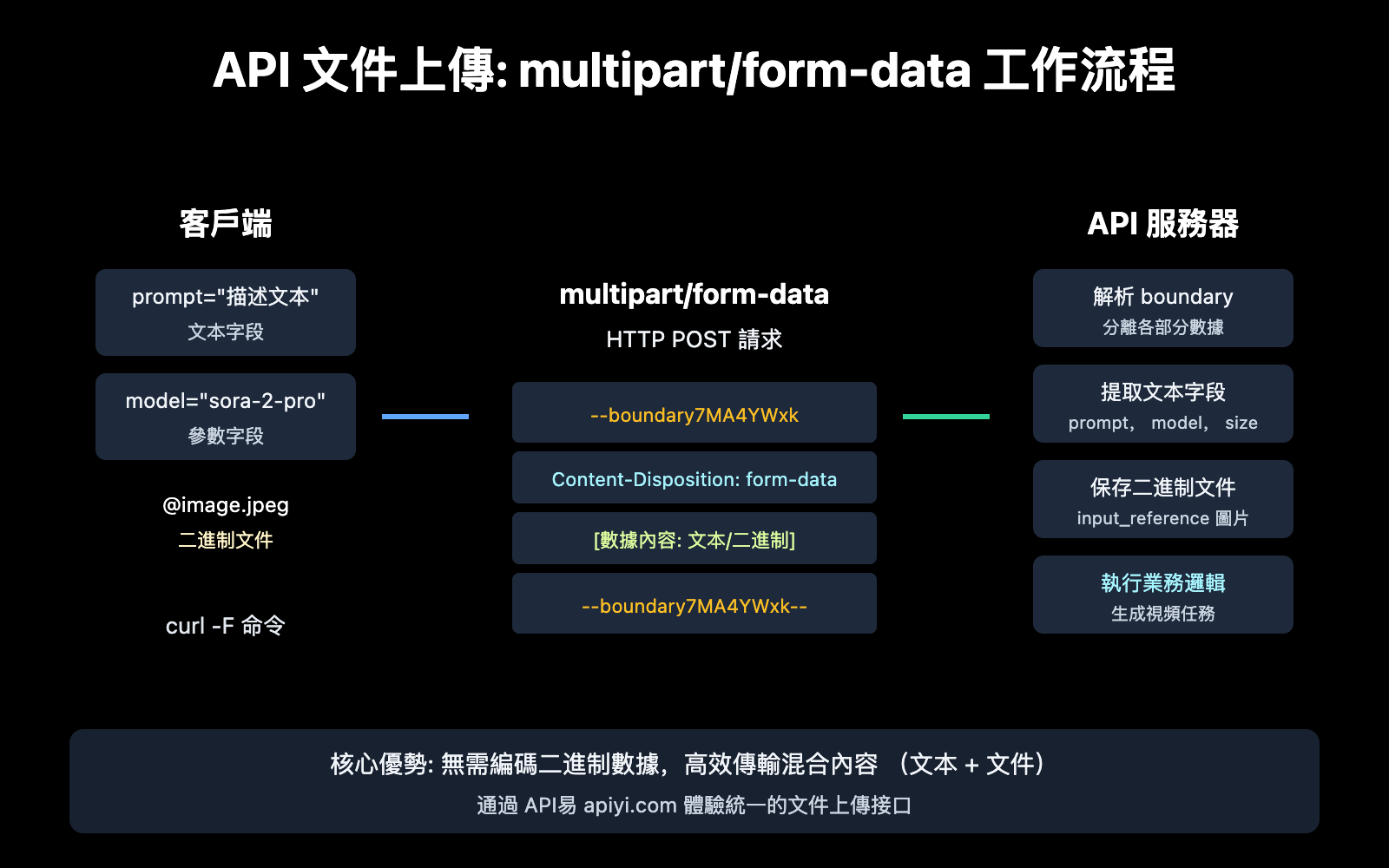
API 文件上傳是開發者在調用 AI 視頻生成、圖像處理等接口時經常遇到的技術需求。本文將系統講解 multipart/form-data 編碼方式的工作原理,並以 Sora 2 圖生視頻 API 爲例,幫助你掌握 API 文件上傳的核心技能。
核心價值: 讀完本文,你將完全理解 multipart/form-data 的底層機制,學會使用 curl -F 命令進行文件上傳,並能獨立實現 Sora 2 等 AI API 的圖片上傳功能。
API 文件上傳核心知識
在深入代碼之前,我們需要理解爲什麼 API 文件上傳需要使用特殊的編碼方式。
爲什麼需要 multipart/form-data
當你通過 API 發送普通的文本數據時,可以使用簡單的 application/x-www-form-urlencoded 編碼。然而,這種方式在處理文件時存在嚴重問題:
| 編碼類型 | 適用場景 | 文件處理能力 | 效率 |
|---|---|---|---|
application/x-www-form-urlencoded |
簡單鍵值對 | ❌ 不適合 | 二進制需 URL 轉義,效率低 |
application/json |
結構化數據 | ⚠️ 需 Base64 編碼 | 體積增大 33% |
multipart/form-data |
文件上傳 | ✅ 原生支持 | 無需編碼,高效 |
multipart/form-data 是 1998 年 RFC 2388 標準提出的方案,專門解決 HTTP 協議中混合發送文本和二進制數據的問題。
multipart/form-data 工作原理
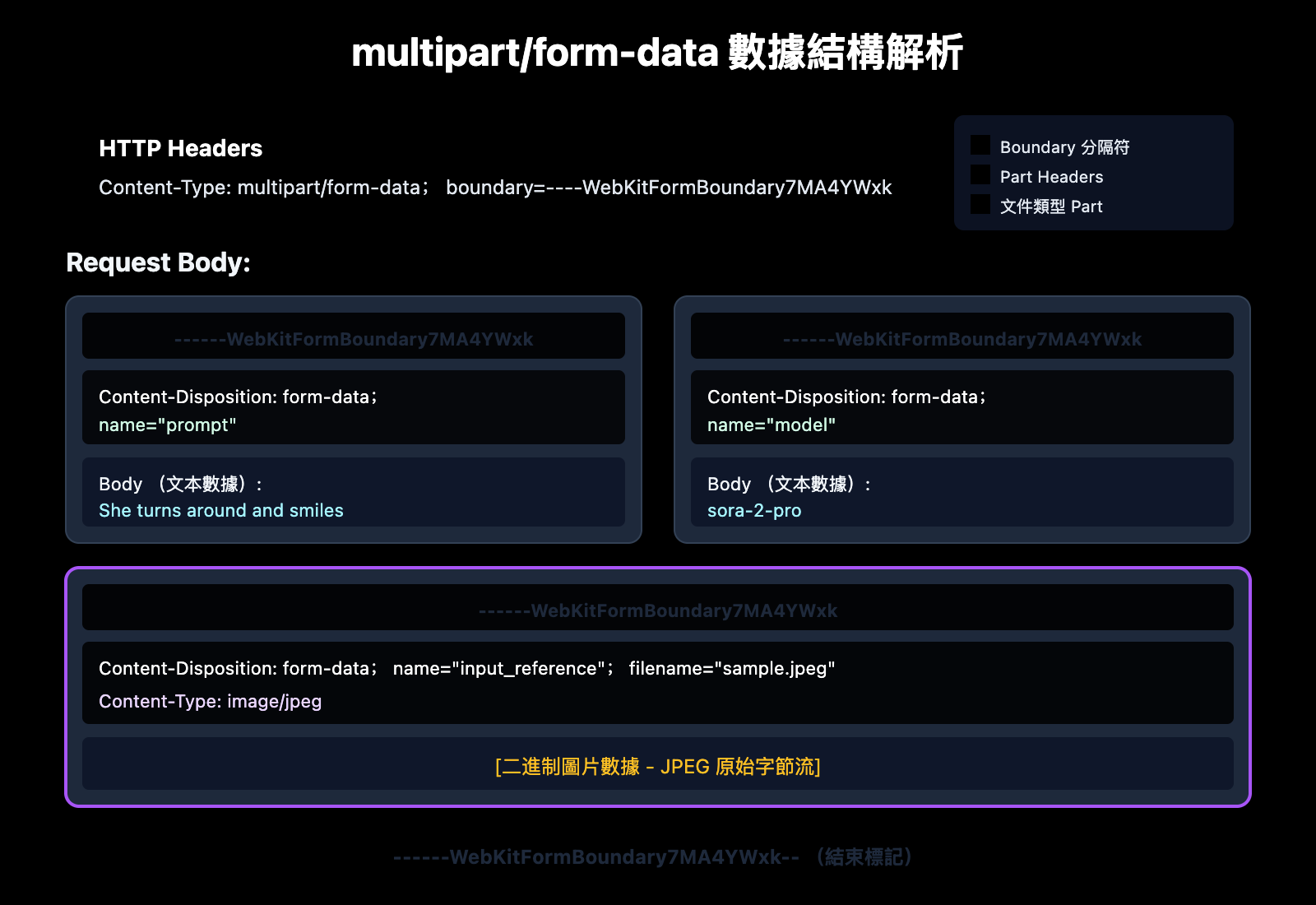
multipart/form-data 的核心思想是將一個 HTTP 請求體分割成多個獨立的「部分」(parts),每個部分可以有自己的內容類型。
數據結構詳解
一個典型的 multipart/form-data 請求包含以下結構:
POST /v1/videos HTTP/1.1
Host: api.apiyi.com
Content-Type: multipart/form-data; boundary=----WebKitFormBoundary7MA4YWxk

------WebKitFormBoundary7MA4YWxk
Content-Disposition: form-data; name="prompt"

She turns around and smiles
------WebKitFormBoundary7MA4YWxk
Content-Disposition: form-data; name="model"

sora-2-pro
------WebKitFormBoundary7MA4YWxk
Content-Disposition: form-data; name="input_reference"; filename="sample.jpeg"
Content-Type: image/jpeg

[二進制圖片數據]
------WebKitFormBoundary7MA4YWxk--
| 組件 | 作用 | 示例 |
|---|---|---|
| Boundary | 分隔各個數據部分的唯一標識符 | ----WebKitFormBoundary7MA4YWxk |
| Content-Disposition | 描述該部分的元數據 | form-data; name="prompt" |
| Content-Type | 該部分的 MIME 類型 | image/jpeg |
| Body | 實際數據內容 | 文本或二進制數據 |
🎯 技術要點: Boundary 必須是請求體中不會出現的唯一字符串。服務器通過 boundary 來解析和分離各個數據部分。
curl -F 命令詳解: API 文件上傳實戰
curl 是最常用的命令行 HTTP 客戶端工具,其 -F 參數專門用於 multipart/form-data 請求。
curl -F 基礎語法
curl -F "字段名=值" URL
curl -F "文件字段=@本地文件路徑" URL
| 參數形式 | 說明 | 示例 |
|---|---|---|
-F "key=value" |
發送普通文本字段 | -F "prompt=Hello" |
-F "key=@file" |
上傳本地文件 | -F "[email protected]" |
-F "key=@file;type=mime" |
指定文件 MIME 類型 | -F "[email protected];type=image/jpeg" |
-F "key=@file;filename=new.jpg" |
自定義上傳文件名 | -F "[email protected];filename=upload.jpg" |
curl -F 與其他參數的區別
很多開發者容易混淆 -F、-d 和 -X POST 的用法:
# ❌ 錯誤: -d 用於 x-www-form-urlencoded,不適合文件上傳
curl -X POST -d "[email protected]" https://api.example.com/upload

# ❌ 錯誤: 手動指定 Content-Type 但使用 -d
curl -X POST -H "Content-Type: multipart/form-data" -d "..." https://api.example.com/upload

# ✅ 正確: 使用 -F 自動設置正確的 Content-Type 和 boundary
curl -F "[email protected]" https://api.example.com/upload
技術說明: 使用
-F時,curl 會自動:
- 將請求方法設爲 POST
- 設置
Content-Type: multipart/form-data- 生成唯一的 boundary
- 按照 RFC 標準格式化請求體
Sora 2 API 文件上傳實戰
Sora 2 是 OpenAI 推出的視頻生成模型,支持通過 API 上傳參考圖片來生成視頻。這是 multipart/form-data 的典型應用場景。
Sora 2 圖生視頻 API 參數
| 參數 | 類型 | 必填 | 說明 |
|---|---|---|---|
prompt |
string | ✅ | 視頻描述文本 |
model |
string | ❌ | 模型選擇: sora-2 或 sora-2-pro |
size |
string | ❌ | 分辨率: 1280x720, 720x1280, 1024x1792, 1792x1024 |
seconds |
integer | ❌ | 時長: 4, 8, 12 秒 |
input_reference |
file | ❌ | 參考圖片,作爲視頻首幀 |
Sora 2 模型對比
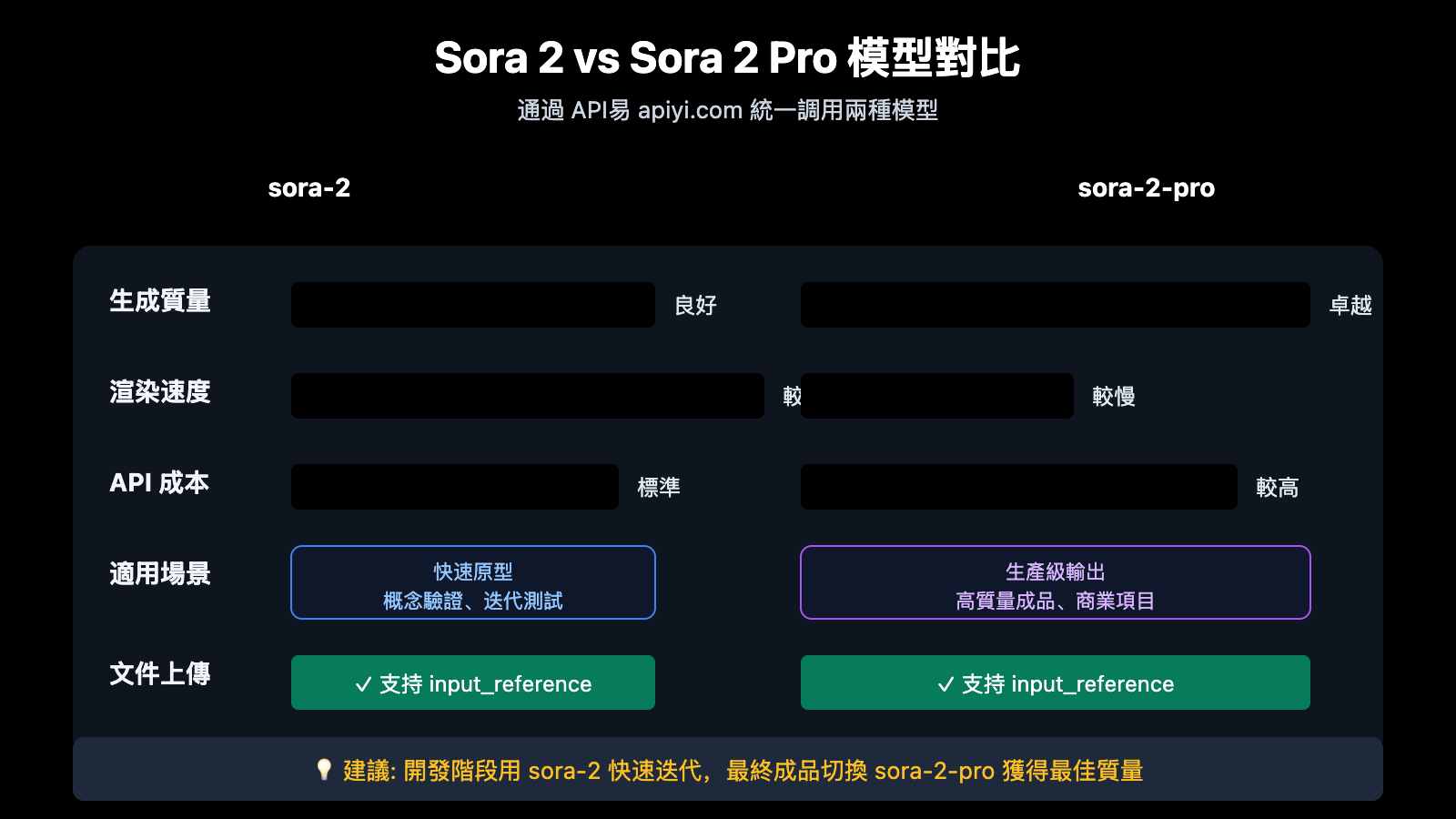
| 特性 | sora-2 | sora-2-pro |
|---|---|---|
| 生成質量 | 良好 | 卓越 |
| 渲染速度 | 較快 | 較慢 |
| 適用場景 | 快速原型、概念驗證 | 生產級輸出 |
| 價格 | 標準 | 較高 |
| 可用平臺 | API易 apiyi.com, 官方 API | API易 apiyi.com, 官方 API |
Sora 2 文件上傳完整示例
以下是使用 curl 調用 Sora 2 API 進行圖生視頻的完整示例:
curl -X POST "https://api.apiyi.com/v1/videos" \
  -H "Authorization: Bearer $APIYI_KEY" \
  -H "Content-Type: multipart/form-data" \
  -F prompt="She turns around and smiles, then slowly walks out of the frame." \
  -F model="sora-2-pro" \
  -F size="1280x720" \
  -F seconds="8" \
  -F input_reference="@sample_720p.jpeg;type=image/jpeg"
命令解析
| 部分 | 說明 |
|---|---|
curl -X POST |
指定 POST 請求方法 |
"https://api.apiyi.com/v1/videos" |
API易 Sora 2 視頻生成端點 |
-H "Authorization: Bearer $APIYI_KEY" |
使用環境變量傳遞 API 密鑰 |
-H "Content-Type: multipart/form-data" |
聲明內容類型 (curl -F 會自動添加) |
-F prompt="..." |
視頻描述提示詞 |
-F model="sora-2-pro" |
選擇高質量模型 |
-F size="1280x720" |
橫屏 720p 分辨率 |
-F seconds="8" |
8 秒時長 |
-F input_reference="@sample_720p.jpeg;type=image/jpeg" |
上傳參考圖片 |
🚀 快速開始: 推薦使用 API易 apiyi.com 平臺快速測試 Sora 2 API。該平臺提供開箱即用的 API 接口,無需複雜配置即可完成集成。
圖片上傳注意事項
使用 Sora 2 API 上傳參考圖片時需要注意:
| 要求 | 說明 |
|---|---|
| 分辨率匹配 | 圖片分辨率必須與目標視頻 size 參數匹配 |
| 支持格式 | image/jpeg, image/png, image/webp |
| 文件大小 | 建議不超過 10MB |
| 圖片質量 | 清晰、構圖完整的圖片效果更好 |
Python 實現 multipart/form-data 上傳
除了 curl,在實際開發中更常使用編程語言來實現文件上傳。以下是 Python 的實現方式。
極簡示例
import requests

# 使用 API易 統一接口
url = "https://api.apiyi.com/v1/videos"
headers = {"Authorization": "Bearer YOUR_API_KEY"}

# 準備 multipart 數據
files = {
    "input_reference": ("sample.jpeg", open("sample_720p.jpeg", "rb"), "image/jpeg")
}
data = {
    "prompt": "She turns around and smiles, then slowly walks out of the frame.",
    "model": "sora-2-pro",
    "size": "1280x720",
    "seconds": "8"
}

response = requests.post(url, headers=headers, data=data, files=files)
print(response.json())
查看完整代碼 (含錯誤處理和輪詢)
import requests
import time
import os

class Sora2Client:
    """Sora 2 API 客戶端 - 支持 multipart/form-data 文件上傳"""

    def __init__(self, api_key: str, base_url: str = "https://api.apiyi.com/v1"):
        self.api_key = api_key
        self.base_url = base_url
        self.headers = {"Authorization": f"Bearer {api_key}"}

    def create_video(
        self,
        prompt: str,
        model: str = "sora-2",
        size: str = "1280x720",
        seconds: int = 8,
        input_reference: str = None
    ) -> dict:
        """
        創建視頻生成任務

        Args:
            prompt: 視頻描述
            model: 模型選擇 (sora-2 或 sora-2-pro)
            size: 分辨率
            seconds: 時長 (4, 8, 12)
            input_reference: 參考圖片路徑 (可選)

        Returns:
            任務信息字典
        """
        url = f"{self.base_url}/videos"

        data = {
            "prompt": prompt,
            "model": model,
            "size": size,
            "seconds": str(seconds)
        }

        files = None
        if input_reference and os.path.exists(input_reference):
            # 根據文件擴展名確定 MIME 類型
            ext = os.path.splitext(input_reference)[1].lower()
            mime_types = {
                ".jpg": "image/jpeg",
                ".jpeg": "image/jpeg",
                ".png": "image/png",
                ".webp": "image/webp"
            }
            mime_type = mime_types.get(ext, "application/octet-stream")

            files = {
                "input_reference": (
                    os.path.basename(input_reference),
                    open(input_reference, "rb"),
                    mime_type
                )
            }

        try:
            response = requests.post(
                url,
                headers=self.headers,
                data=data,
                files=files,
                timeout=30
            )
            response.raise_for_status()
            return response.json()
        except requests.exceptions.RequestException as e:
            return {"error": str(e)}
        finally:
            if files and "input_reference" in files:
                files["input_reference"][1].close()

    def get_video_status(self, video_id: str) -> dict:
        """查詢視頻生成狀態"""
        url = f"{self.base_url}/videos/{video_id}"
        response = requests.get(url, headers=self.headers, timeout=30)
        return response.json()

    def wait_for_completion(self, video_id: str, poll_interval: int = 10) -> dict:
        """輪詢等待視頻生成完成"""
        while True:
            status = self.get_video_status(video_id)
            if status.get("status") in ["completed", "failed"]:
                return status
            print(f"Status: {status.get('status')}... waiting {poll_interval}s")
            time.sleep(poll_interval)


# 使用示例
if __name__ == "__main__":
    client = Sora2Client(api_key=os.getenv("APIYI_KEY"))

    # 創建圖生視頻任務
    result = client.create_video(
        prompt="She turns around and smiles, then slowly walks out of the frame.",
        model="sora-2-pro",
        size="1280x720",
        seconds=8,
        input_reference="sample_720p.jpeg"
    )

    if "id" in result:
        print(f"Task created: {result['id']}")
        final_result = client.wait_for_completion(result["id"])
        print(f"Video URL: {final_result.get('video_url')}")
    else:
        print(f"Error: {result}")
建議: 通過 API易 apiyi.com 獲取免費測試額度,快速驗證圖生視頻功能。
requests 庫的 multipart 處理
Python requests 庫處理 multipart/form-data 的關鍵點:
| 參數 | 用途 | 說明 |
|---|---|---|
data |
普通表單字段 | 字典格式: {"key": "value"} |
files |
文件字段 | 元組格式: {"name": (filename, file_obj, content_type)} |
⚠️ 注意: 同時使用
data和files參數時,requests 會自動設置正確的Content-Type和 boundary,無需手動指定。
JavaScript/Node.js 實現方案
瀏覽器環境 (FormData API)
const formData = new FormData();
formData.append('prompt', 'She turns around and smiles');
formData.append('model', 'sora-2-pro');
formData.append('size', '1280x720');
formData.append('seconds', '8');
formData.append('input_reference', fileInput.files[0]);

fetch('https://api.apiyi.com/v1/videos', {
    method: 'POST',
    headers: {
        'Authorization': 'Bearer YOUR_API_KEY'
        // 注意: 不要手動設置 Content-Type
    },
    body: formData
})
.then(response => response.json())
.then(data => console.log(data));
Node.js 環境
const FormData = require('form-data');
const fs = require('fs');
const axios = require('axios');

const form = new FormData();
form.append('prompt', 'She turns around and smiles');
form.append('model', 'sora-2-pro');
form.append('size', '1280x720');
form.append('seconds', '8');
form.append('input_reference', fs.createReadStream('sample_720p.jpeg'), {
    contentType: 'image/jpeg'
});

axios.post('https://api.apiyi.com/v1/videos', form, {
    headers: {
        ...form.getHeaders(),
        'Authorization': 'Bearer YOUR_API_KEY'
    }
})
.then(response => console.log(response.data));
💡 關鍵提示: 在瀏覽器中使用 FormData 時,不要手動設置
Content-Typeheader。瀏覽器會自動添加正確的 boundary 參數。
multipart/form-data 常見問題排查
上傳失敗常見原因
| 問題 | 症狀 | 解決方案 |
|---|---|---|
| boundary 缺失 | 服務器返回 400 | 不要手動設置 Content-Type,讓工具自動生成 |
| MIME 類型錯誤 | 文件被拒絕 | 使用 ;type=image/jpeg 明確指定 |
| 文件路徑錯誤 | 找不到文件 | 確保 @ 後的路徑正確,支持相對/絕對路徑 |
| 分辨率不匹配 | Sora API 報錯 | 圖片分辨率必須與 size 參數匹配 |
| 文件過大 | 超時或被拒絕 | 壓縮圖片或分片上傳 |
調試技巧
使用 curl 的 -v 參數查看完整請求:
curl -v -F "[email protected]" https://api.example.com/upload
這會顯示:
- 請求頭 (包括自動生成的 Content-Type 和 boundary)
- 請求體結構
- 服務器響應
常見問題
Q1: multipart/form-data 和 Base64 編碼哪個更好?
multipart/form-data 更適合文件上傳。Base64 編碼會將文件體積增大約 33%,增加網絡傳輸時間和服務器處理負擔。multipart/form-data 直接傳輸二進制數據,效率更高。
不過在某些場景下 (如 WebSocket、單字段 JSON API),Base64 可能是唯一選擇。通過 API易 apiyi.com 平臺調用 API 時,優先使用 multipart/form-data 方式可獲得更好的性能體驗。
Q2: 爲什麼我的 curl -F 上傳失敗?
常見原因包括:
- 文件路徑問題: 確保
@符號後跟正確的文件路徑 - 權限問題: 檢查文件讀取權限
- MIME 類型: 某些 API 要求指定正確的 content-type
建議先通過 API易 apiyi.com 獲取測試環境驗證請求格式,平臺提供詳細的錯誤信息幫助快速定位問題。
Q3: Sora 2 API 支持哪些圖片格式?
Sora 2 API 支持以下圖片格式用於 input_reference:
- JPEG (
.jpg,.jpeg) – 推薦,壓縮率好 - PNG (
.png) – 支持透明通道 - WebP (
.webp) – 現代格式,體積小
圖片分辨率必須與目標視頻的 size 參數匹配。例如使用 1280x720 分辨率,參考圖片也需要是 1280×720。
Q4: 如何處理大文件上傳?
對於大文件上傳,可以考慮:
- 分片上傳: 將文件分成小塊依次上傳
- 壓縮優化: 在保證質量的前提下壓縮文件
- 斷點續傳: 支持上傳失敗後從斷點繼續
multipart/form-data 支持流式傳輸,服務器可以邊接收邊處理,適合大文件場景。
總結
本文詳細介紹了 API 文件上傳的核心技術 multipart/form-data:
關鍵知識點回顧:
| 要點 | 說明 |
|---|---|
| 編碼原理 | boundary 分隔多部分數據,每部分獨立 Content-Type |
| curl -F 命令 | -F "key=value" 發送文本,-F "key=@file" 上傳文件 |
| Sora 2 實戰 | input_reference 參數上傳參考圖片,分辨率需匹配 |
| 多語言實現 | Python requests / JavaScript FormData |
| 調試技巧 | 使用 curl -v 查看完整請求 |
掌握 multipart/form-data 是進行 AI API 開發的基礎能力。無論是 Sora 2 視頻生成、GPT-4 Vision 圖像理解,還是其他需要文件上傳的 API,核心原理都是相通的。
推薦通過 API易 apiyi.com 快速驗證文件上傳功能,體驗統一的 API 接口和詳盡的技術支持。
作者: APIYI Team | 專注 AI 大模型 API 技術分享
技術交流: 訪問 apiyi.com 獲取更多 API 開發資源
參考資料
-
RFC 2388: multipart/form-data 標準規範
- 鏈接:
tools.ietf.org/html/rfc2388
- 鏈接:
-
curl 官方文檔: Multipart Formposts
- 鏈接:
everything.curl.dev/http/post/multipart
- 鏈接:
-
MDN Web Docs: Using FormData Objects
- 鏈接:
developer.mozilla.org/en-US/docs/Web/API/XMLHttpRequest_API/Using_FormData_Objects
- 鏈接:
-
OpenAI Sora API 文檔: Video Generation Guide
- 鏈接:
platform.openai.com/docs/guides/video-generation
- 鏈接: