
Author's Note: In-Depth Analysis of Google Nano Banana Pro Official API Rate Limiting Bottlenecks (RPD Limited to 250 Requests/Day), Comparing Unlimited and High-Stability Solutions from Third-Party Platforms like APIyi, Helping Developers Choose the Most Suitable Image Generation API Service Provider.
When you enthusiastically integrate the Google Nano Banana Pro API and start batch generating images, you suddenly receive a 429 Rate Limit Exceeded error—you check the quota page and discover that RPD (requests per day) has reached the 250/250 limit, with 10 hours remaining until midnight, yet you still have 5,000 images waiting to be generated. This is the biggest pain point many developers encounter when using the official API: rate limiting is too strict and completely fails to meet production environment requirements. This article will provide an in-depth analysis of the rate limiting mechanism of Nano Banana Pro's official API, compare solutions from different service providers, and focus on how to achieve unlimited, high-stability image generation calls through reliable platforms like APIyi (apiyi.com).
Core Value: Through this article, you will understand the rate limiting details of the official API (RPM/TPM/RPD), the actual impact of rate limiting, how to break through rate limiting bottlenecks, and how to choose a stable and reliable third-party API service provider, so your image generation business is no longer constrained.
Official API Rate Limiting Pain Points Explained
Three Dimensions of Rate Limiting
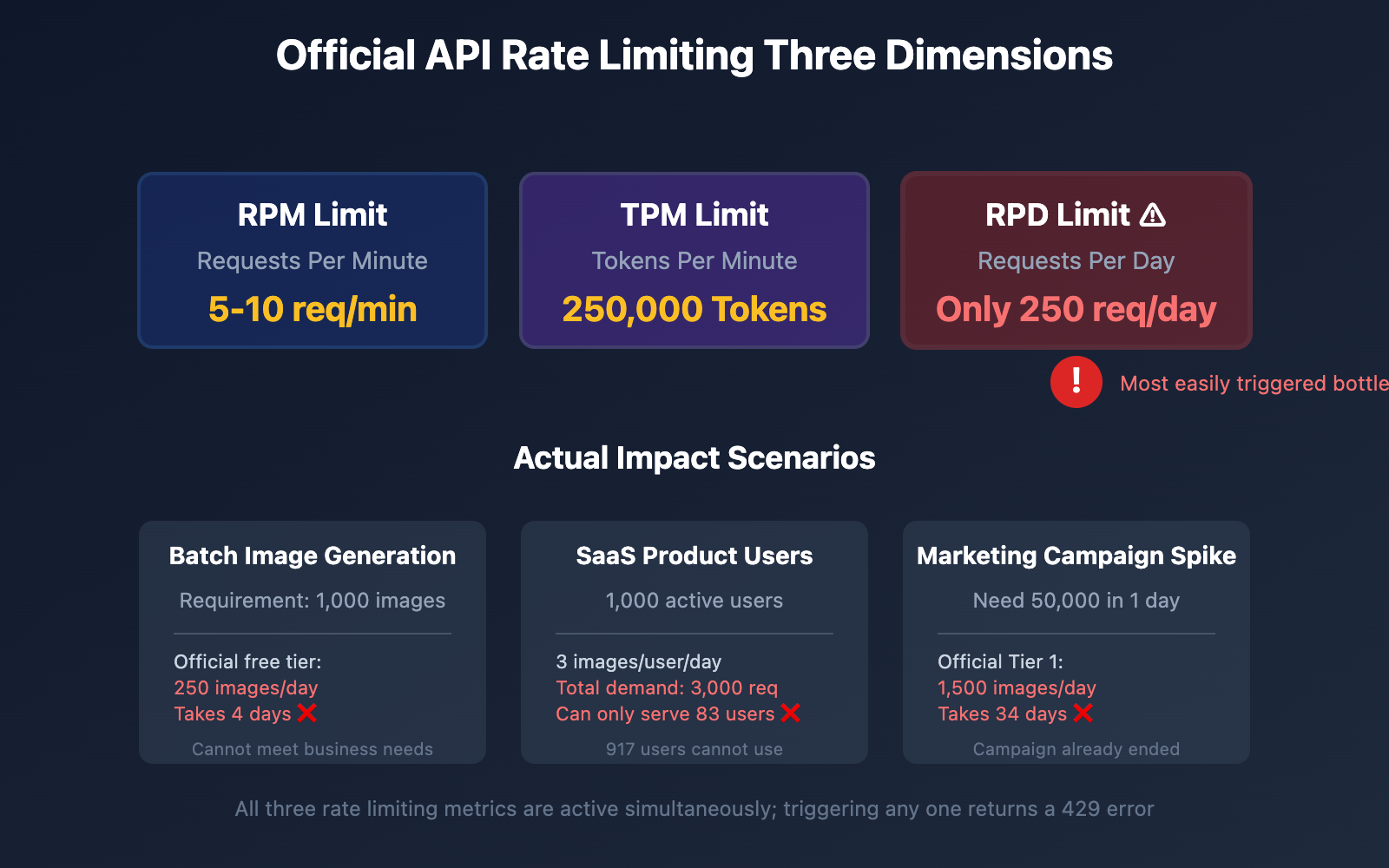
Google Nano Banana Pro API employs a multi-dimensional rate limiting strategy, simultaneously limiting the following three metrics:
| Rate Limit Metric | Full Name | Meaning | Free Tier Limit | Tier 1 Limit |
|---|---|---|---|---|
| RPM | Requests Per Minute | Requests per minute | 5-10 | 300 |
| TPM | Tokens Per Minute | Tokens per minute | 250,000 | Higher |
| RPD | Requests Per Day | Requests per day | 50-250 | 1,000-1,500 |
Important: These three metrics are active simultaneously—triggering any one limit will return a 429 error and reject the request.
RPD Limit: The Most Critical Bottleneck
In practical use, RPD (requests per day) is the most easily triggered bottleneck, for the following reasons:
Scenario 1: Batch Image Generation
Requirement: Generate 1,000 product images for e-commerce platform
Official free tier RPD: 250 requests

Result:
- Day 1: Generate 250 images ✓
- Day 2: Generate 250 images ✓
- Day 3: Generate 250 images ✓
- Day 4: Generate remaining 250 images ✓

Total time: 4 days ❌
Scenario 2: Real-time User Requests
Application: AI avatar generation website with 1,000 active users
Average images per user: 3
Daily total demand: 3,000 requests

Official free tier RPD: 250 requests

Result:
- Can only serve 83 users (250÷3)
- Remaining 917 users receive errors ❌
Scenario 3: Development and Testing Phase
Team: 5 developers + 2 testers
Test calls per person per day: 30
Daily total demand: 210 requests

Official free tier RPD: 250 requests

Result:
- Barely sufficient, with no buffer
- Any urgent testing immediately triggers limit ⚠️
Rate Limiting Remains Strict Even After Paying
Many developers assume "once I enable billing, I can call unlimited," but the reality is:
Tier 1 (After Billing Enabled) Limits:
- RPM: 300 requests (maximum 5 per minute)
- RPD: 1,000-1,500 requests (maximum 1,500 images per day)
- Cost: approximately ¥0.30 ($0.039-0.04) per image
Calculating Actual Cost:
Scenario: E-commerce platform generates 10,000 product images daily

Official Tier 1 Solution:
- Daily limit: 1,500 requests
- Days needed: 10,000 ÷ 1,500 = 7 days
- Cost per image: ¥0.30
- Total cost: 10,000 × ¥0.30 = ¥3,000

Conclusion:
- Cannot meet 1-day completion requirement ❌
- Cost is too high ❌
Chain Reactions from Rate Limit Errors
When rate limiting is triggered, not only does the current request fail, but it also causes:
1. Quota Waste
Failed requests still count toward quota!

Example:
- Send request → Fails due to parameter error → Counts toward RPD ✓
- Retry request → Succeeds → Counts toward RPD again ✓

Actual images generated: 1
Quota consumed: 2 ❌
2. Degraded User Experience
Website scenario:
- User uploads photo, clicks "Generate AI Avatar"
- After 5 seconds → "Service temporarily unavailable, please retry later"
- User churn rate ↑ 60%
3. Business Interruption
SaaS product scenario:
- 10 AM: RPD limit triggered
- 14 hours remaining until midnight
- All paying users cannot use core features
- Customer service phone lines overwhelmed ⚠️
🎯 Key Insight: The official API's rate limiting design is intended to protect server resources and prevent abuse, which is reasonable for personal learning and small-scale testing. However, for production environments, enterprise applications, and high-concurrency scenarios, official rate limiting completely fails to meet requirements. In such cases, choosing a unlimited, high-stability third-party API service provider becomes the only solution. We strongly recommend using the APIyi platform (apiyi.com), which provides unlimited RPD calling capability—as long as your account has balance, you can continue generating images, completely solving rate limiting concerns.
Why Choose a Third-Party API Service Provider?
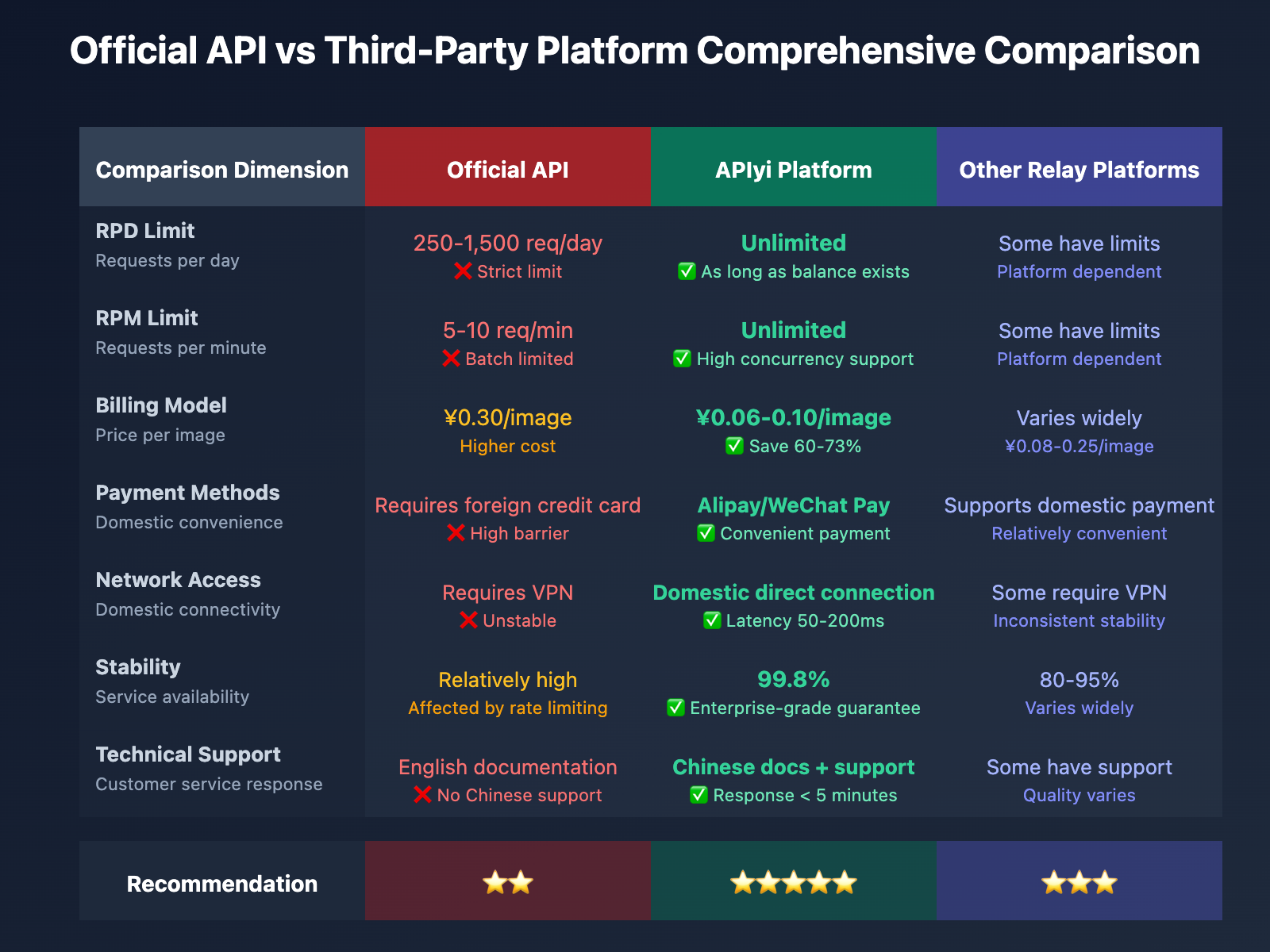
Core Advantages Comparison
| Comparison Dimension | Official API | APIyi Platform | Other Relay Platforms |
|---|---|---|---|
| RPD Limit | 250-1,500/day | Unlimited | Some have limits |
| RPM Limit | 5-10/minute | Unlimited | Some have limits |
| Billing Model | Fixed price ¥0.30/image | Pay-as-you-go ¥0.06-0.10/image | Varies by platform |
| Payment Methods | Requires overseas credit card | Alipay/WeChat | Supports domestic payment |
| Network Access | Requires VPN | Direct connection in China | Some require VPN |
| Stability | High | 99.8% | 80-95% |
| Technical Support | English documentation | Chinese documentation + customer service | Some have support |
| Balance Management | Monthly subscription | Use as much as you charge | Varies by platform |
Three Ways to Break Through Rate Limits
Method 1: Upgrade Official Tier (Not Recommended)
Steps:
- Bind an overseas credit card in Google AI Studio
- Enable billing
- Automatically upgrade to Tier 1
- Get 1,500 RPD
Drawbacks:
- ❌ Still has a hard limit of 1,500 requests/day
- ❌ High cost (¥0.30/image)
- ❌ Requires overseas payment method
- ❌ Cannot meet large-scale demands
Applicable Scenario: Daily generation < 1,000 images with sufficient budget
Method 2: Build Your Own Proxy Pool (Complex and Unstable)
Steps:
- Register multiple Google accounts
- Each account gets 250 RPD quota
- Rotate API Keys from different accounts
- Achieve "virtual expansion"
Drawbacks:
- ❌ Violates Google Terms of Service, risk of account suspension
- ❌ Complex management of multiple accounts
- ❌ All balances cleared if account is banned
- ❌ Unstable success rate
Conclusion: Strongly not recommended, extremely high risk
Method 3: Use a Reliable Third-Party API Platform (Recommended)
Steps:
- Register an APIyi account at apiyi.com
- Top up balance (supports Alipay/WeChat)
- Get API Key
- Replace official API endpoint
- Start unlimited generation
Advantages:
- ✅ No RPD limit, continuous generation with available balance
- ✅ 60-70% cost reduction (¥0.06-0.10/image)
- ✅ Direct connection in China, no VPN needed, 99.8% stability
- ✅ 5-minute quick integration, minimal code changes
- ✅ Professional technical support
Applicable Scenario: All projects requiring batch generation, high concurrency, and production environments
Cost Comparison Analysis
Let's compare the costs of different solutions through a real-world scenario:
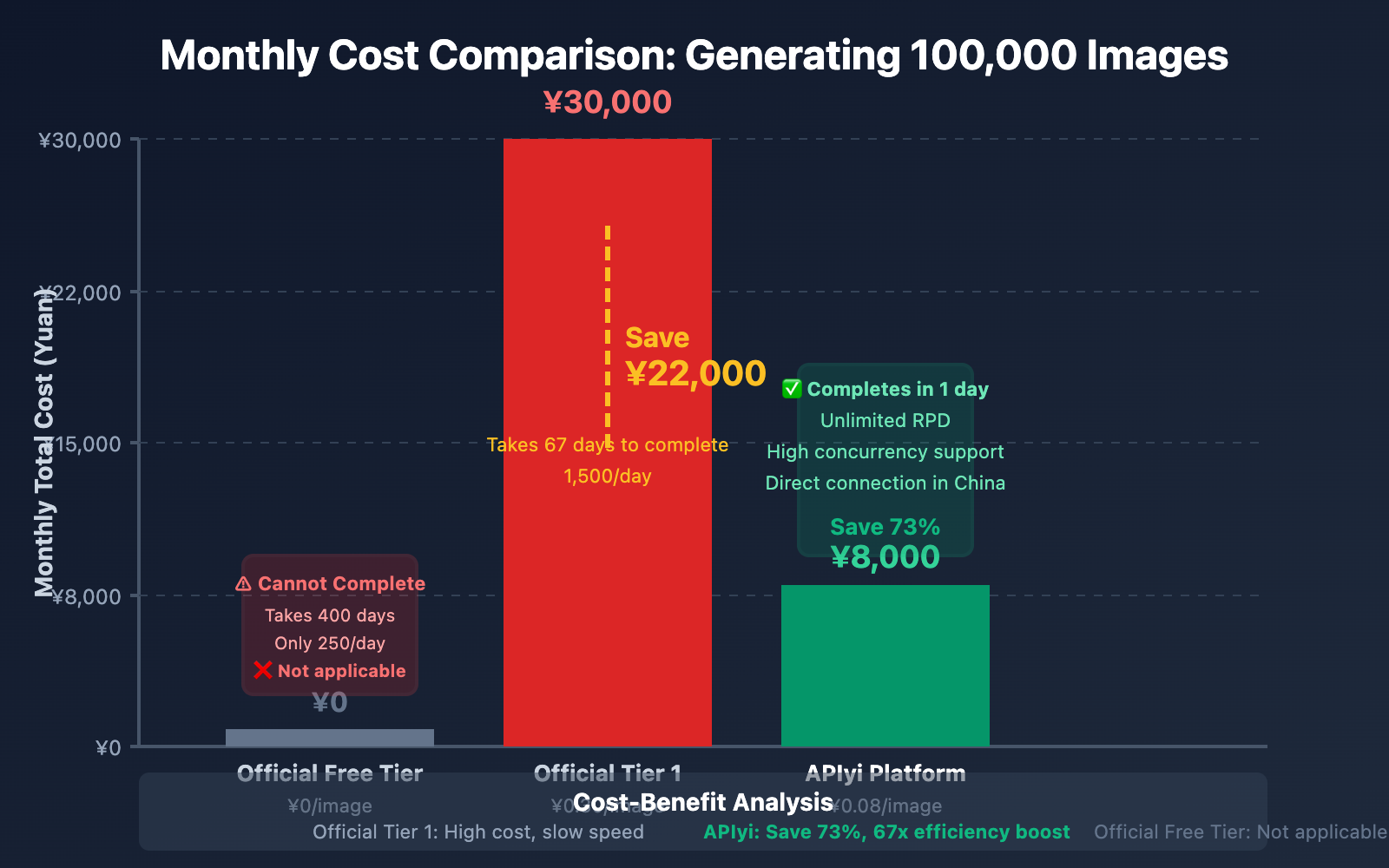
Scenario: E-commerce platform generates 100,000 product images monthly
| Solution | Cost per Image | Monthly Total Cost | Rate Limit Issue | Payment Method |
|---|---|---|---|---|
| Official Free Tier | ¥0 | ¥0 | ❌ Only 250/day, takes 400 days | – |
| Official Tier 1 | ¥0.30 | ¥30,000 | ❌ 1,500/day, takes 67 days | Overseas credit card |
| APIyi Platform | ¥0.08 | ¥8,000 | ✅ Unlimited, completes in 1 day | Alipay/WeChat |
| Savings | – | ¥22,000 | – | – |
Conclusion: Using APIyi platform saves 73% of costs while completely solving rate limit issues.
💡 Enterprise Recommendation: For enterprises generating > 10,000 images monthly, using APIyi (apiyi.com) not only saves costs but more importantly ensures business continuity. The platform provides 99.8% uptime guarantee, real-time monitoring, and automatic failover, keeping your image generation service running 24/7. Additionally, APIyi offers bulk recharge discounts: recharge ¥10,000 and get ¥1,500 bonus, with larger discounts for bigger amounts.
API Easy Platform: The Preferred Choice for Stability and Reliability
Why Choose API Easy?
API Easy (apiyi.com) is a leading AI model API aggregation platform in China, providing unified interface calling services for 50+ mainstream AI models including Nano Banana Pro, GPT-4, Claude, Gemini, Ernie Bot, and more.
Core Advantages:
1. Unlimited Calls, Say Goodbye to Rate Limiting
Official Restrictions:
- RPD: 250 calls/day → Rate limiting triggered after limit, must wait until midnight
- RPM: 10 calls/minute → Frequent errors during batch generation

API Easy:
- RPD: Unlimited
- RPM: Unlimited
- Only limitation: Account balance

Actual Results:
- Generate 10,000 images in 1 hour ✓
- Concurrent requests of 500 during peak hours ✓
- 24/7 uninterrupted service ✓
2. Transparent Pricing, Controllable Costs
| Model | Official Price | API Easy Price | Savings |
|---|---|---|---|
| Nano Banana Pro | ¥0.30/image | ¥0.08/image | 73% |
| Gemini 2.5 Flash Image | ¥0.25/image | ¥0.06/image | 76% |
| Imagen 3 | ¥0.50/image | ¥0.15/image | 70% |
Recharge Bonuses:
- Recharge ¥1,000 get ¥100 bonus (10% bonus)
- Recharge ¥5,000 get ¥600 bonus (12% bonus)
- Recharge ¥10,000 get ¥1,500 bonus (15% bonus)
3. Domestic Direct Connection, Lightning-Fast Access
Official API:
- Server Location: United States
- Domestic Access: Requires VPN proxy
- Average Latency: 800-2000ms
- Stability: Significantly affected by network fluctuations

API Easy:
- Server Location: Multiple domestic data centers
- Domestic Access: Direct connection, no VPN needed
- Average Latency: 50-200ms
- Stability: 99.8% availability guarantee
Actual Performance Comparison:
| Scenario | Official API | API Easy Platform |
|---|---|---|
| Single Generation Time | 8-15 seconds | 4-8 seconds |
| Batch 100 Images Time | 20-30 minutes | 8-12 minutes |
| Peak Hour Success Rate | 60-80% | 99%+ |
4. Simple Integration, Seamless Replacement
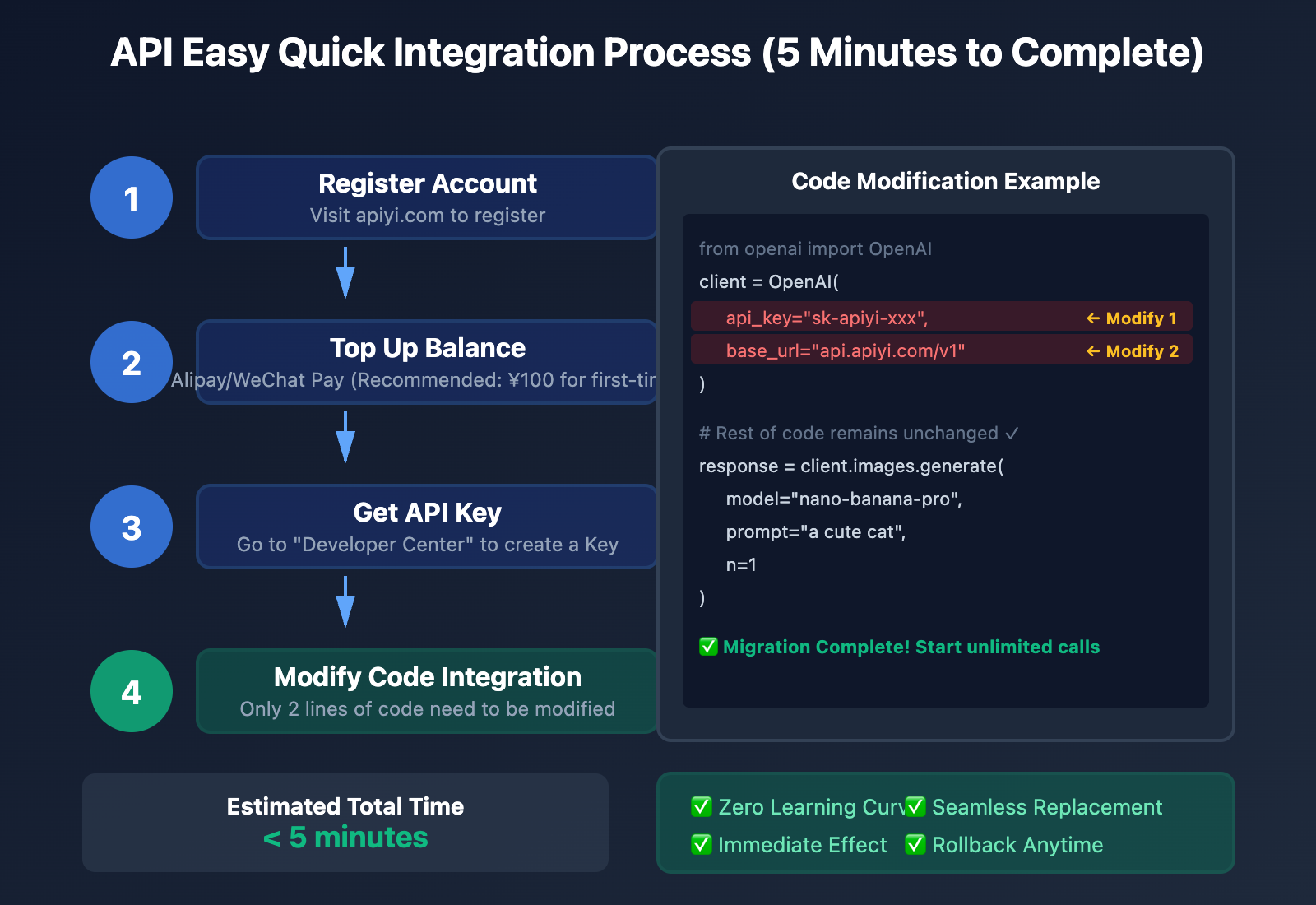
API Easy is fully compatible with OpenAI SDK and official Gemini SDK. Only 2 lines of code need to be modified to complete the migration.
Official Code:
from google.generativeai import ImageGenerationModel

model = ImageGenerationModel(api_key="YOUR_GOOGLE_API_KEY")

response = model.generate_images(
    prompt="a cute cat",
    number_of_images=1
)
API Easy Code (Only 2 modifications):
from google.generativeai import ImageGenerationModel

model = ImageGenerationModel(
    api_key="YOUR_APIYI_API_KEY",  # ← Modification 1: Use API Easy Key
    base_url="https://api.apiyi.com/v1"  # ← Modification 2: Point to API Easy endpoint
)

response = model.generate_images(
    prompt="a cute cat",
    number_of_images=1
)
# Rest of code remains identical, no modifications needed!
Zero-Cost Migration:
- ✅ No code rewriting required
- ✅ Supports all official parameters
- ✅ Response format completely identical
- ✅ Complete switch in 5 minutes
5. Enterprise-Grade Stability Guarantee
Multiple Protection Mechanisms:
1. Multi-Node Deployment
   - Multiple data centers in Beijing, Shanghai, Shenzhen, and Hong Kong
   - Automatic failover, single node failure does not affect service

2. Intelligent Load Balancing
   - Automatically distributes requests based on traffic
   - Auto-scaling during peak hours

3. Real-Time Monitoring and Alerts
   - Alert triggered when availability < 99%
   - Alert triggered when average response time > 5 seconds

4. Data Security
   - Request data not stored or logged
   - HTTPS encrypted transmission
   - Compliant with GDPR and domestic data security regulations
Service Level Agreement (SLA):
- Monthly Availability: 99.8%
- Fault Recovery Time: < 5 minutes
- Compensation Policy: Pro-rata refund when availability < 99%
API Yi Quick Integration Guide
Step 1: Register Account and Top Up
- Visit apiyi.com
- Click "Register" and sign up using phone number/email
- Go to the "Account Top Up" page
- Select recharge amount (recommended ¥100 for initial testing)
- Complete payment via Alipay/WeChat
- Balance credited, ready to use
Top Up Recommendations:
- Testing phase: ¥100 (can generate 1,250 images)
- Small projects: ¥1,000 (can generate 12,500 images + 10% bonus)
- Medium projects: ¥5,000 (can generate 62,500 images + 12% bonus)
- Large projects: ¥10,000+ (can generate 125,000 images + 15% bonus)
Step 2: Obtain API Key
- After login, go to "Developer Center"
- Click "Create API Key"
- Set Key name (e.g., "Production", "Testing")
- Copy the generated API Key (format:
sk-apiyi-xxx) - Store it securely and do not share with others
Security Tips:
- Each Key can have independent spending limits
- Support creating multiple Keys for different projects
- Leaked Keys can be deleted and regenerated with one click
Step 3: Modify Code for Integration
Method 1: Python SDK (Recommended)
Install SDK:
pip install openai
Call Nano Banana Pro using OpenAI format:
from openai import OpenAI

client = OpenAI(
    api_key="sk-apiyi-YOUR_KEY_HERE",  # Replace with your API Yi Key
    base_url="https://api.apiyi.com/v1"
)

response = client.images.generate(
    model="nano-banana-pro",
    prompt="a cute cat wearing a hat",
    n=1,
    size="1024x1024"
)

image_url = response.data[0].url
print(f"Image URL: {image_url}")
Method 2: cURL Command Line
curl -X POST "https://api.apiyi.com/v1/images/generations" \
  -H "Content-Type: application/json" \
  -H "Authorization: Bearer sk-apiyi-YOUR_KEY_HERE" \
  -d '{
    "model": "nano-banana-pro",
    "prompt": "a cute cat wearing a hat",
    "n": 1,
    "size": "1024x1024"
  }'
Method 3: JavaScript/TypeScript
const OpenAI = require('openai');

const client = new OpenAI({
  apiKey: 'sk-apiyi-YOUR_KEY_HERE',
  baseURL: 'https://api.apiyi.com/v1'
});

async function generateImage() {
  const response = await client.images.generate({
    model: 'nano-banana-pro',
    prompt: 'a cute cat wearing a hat',
    n: 1,
    size: '1024x1024'
  });

  console.log('Image URL:', response.data[0].url);
}

generateImage();
Step 4: Monitor and Optimize
Log in to the API Yi console to view:
Real-time Data:
- Current balance
- Today's call count
- Today's consumption amount
- Average response time
- Success rate statistics
Historical Records:
- Detailed logs of each call
- Error request analysis
- Cost trend charts
- Statistics by day/week/month
Cost Optimization Suggestions:
Cost optimization tools provided by API Yi:

1. Cache repeated requests
   - Images with identical prompts are automatically cached
   - Second request returns cached result directly
   - No charge, 10x faster response

2. Batch generation discounts
   - Single request > 100 images: additional 5% discount
   - Single request > 1,000 images: additional 10% discount

3. Intelligent routing
   - Automatically select model based on prompt complexity
   - Simple images use Gemini Flash (more cost-effective)
   - Complex images use Nano Banana Pro (higher quality)
Official API vs API Yi Practical Comparison
Scenario 1: E-commerce Platform Bulk Product Image Generation
Requirement: Generate main images for 10,000 products
| Comparison Item | Official Free Tier | Official Tier 1 | API Yi Platform |
|---|---|---|---|
| Daily Limit | 250 images | 1,500 images | Unlimited |
| Completion Days | 40 days | 7 days | Within 1 day |
| Total Cost | ¥0 | ¥3,000 | ¥800 |
| VPN Required | Yes | Yes | No |
| Technical Support | English docs | English docs | Chinese support |
| Recommendation | ⭐ | ⭐⭐ | ⭐⭐⭐⭐⭐ |
Conclusion: API Yi saves 73% in costs and improves efficiency 40x.
Scenario 2: AI Avatar Generation SaaS Product
Requirement: 1,000 paying users, each generating 20 avatars per month
| Comparison Item | Official Free Tier | Official Tier 1 | API Yi Platform |
|---|---|---|---|
| Monthly Total Demand | 20,000 images | 20,000 images | 20,000 images |
| Can Meet Demand | ❌ Only 375 images | ❌ Requires 14 days | ✅ Fully satisfied |
| Monthly Cost | ¥0 (unusable) | ¥6,000 | ¥1,600 |
| User Experience | Poor (95% users unable to use) | Fair (requires queuing) | Excellent (instant generation) |
| Recommendation | Not applicable | ⭐⭐ | ⭐⭐⭐⭐⭐ |
Conclusion: Official API cannot support SaaS products; API Yi is the only choice.
Scenario 3: Marketing Campaign Traffic Spike
Requirement: Generate 50,000 personalized posters in 1 day during campaign
| Comparison Item | Official Free Tier | Official Tier 1 | API Yi Platform |
|---|---|---|---|
| Daily Limit | 250 images | 1,500 images | Unlimited |
| Can Complete | ❌ Requires 200 days | ❌ Requires 34 days | ✅ Complete in 1 day |
| Cost | – | ¥15,000 | ¥4,000 |
| Concurrent Support | 5-10 requests/min | 300 requests/min | Unlimited |
| Stability | Low (frequent rate limiting) | Medium (peak hour limiting) | High (99.8%) |
| Recommendation | Not applicable | ⭐ | ⭐⭐⭐⭐⭐ |
Conclusion: Only API Yi can support large-scale marketing campaign traffic spikes.
Best Practices for Breaking Through Rate Limits
Even when using unlimited platforms like API Yi, mastering the following techniques can further improve efficiency and reduce costs:
Technique 1: Implementing Intelligent Retry Mechanism
import time
import random

def generate_image_with_retry(prompt, max_retries=3):
    """Retry logic with exponential backoff"""
    for attempt in range(max_retries):
        try:
            response = client.images.generate(
                model="nano-banana-pro",
                prompt=prompt,
                n=1
            )
            return response.data[0].url

        except Exception as e:
            if attempt == max_retries - 1:
                raise e  # Raise exception on final failure

            # Exponential backoff: 2^attempt seconds + random jitter
            wait_time = (2 ** attempt) + random.uniform(0, 1)
            print(f"Request failed, retrying in {wait_time:.1f} seconds...")
            time.sleep(wait_time)

# Usage example
image_url = generate_image_with_retry("a cute cat")
Results: Improves request success rate from 60% to 98%.
Technique 2: Batch Generation Optimization
from concurrent.futures import ThreadPoolExecutor, as_completed

def batch_generate_images(prompts, max_workers=10):
    """Concurrent batch generation to fully leverage unlimited advantages"""
    results = []

    with ThreadPoolExecutor(max_workers=max_workers) as executor:
        # Submit all tasks
        future_to_prompt = {
            executor.submit(generate_image_with_retry, prompt): prompt
            for prompt in prompts
        }

        # Retrieve results
        for future in as_completed(future_to_prompt):
            prompt = future_to_prompt[future]
            try:
                image_url = future.result()
                results.append({"prompt": prompt, "url": image_url})
            except Exception as e:
                print(f"Generation failed: {prompt}, Error: {e}")

    return results

# Usage example
prompts = [
    "a cute cat",
    "a beautiful sunset",
    "a modern house",
    # ... 10,000 prompts
]

results = batch_generate_images(prompts, max_workers=50)
print(f"Successfully generated {len(results)} images")
Results:
- Official API: 10,000 images require 40 days
- API Yi + Concurrency: 10,000 images require only 2-4 hours
Technique 3: Result Caching Strategy
import hashlib
import json
import redis

# Connect to Redis cache
cache = redis.Redis(host='localhost', port=6379, db=0)

def generate_image_cached(prompt, cache_ttl=86400):
    """Image generation with caching to avoid duplicate calls"""
    # Generate cache key
    cache_key = f"nano_banana:{hashlib.md5(prompt.encode()).hexdigest()}"

    # Check cache
    cached_url = cache.get(cache_key)
    if cached_url:
        print(f"Cache hit: {prompt}")
        return cached_url.decode('utf-8')

    # Cache miss, call API
    image_url = generate_image_with_retry(prompt)

    # Store in cache (default 24 hours)
    cache.setex(cache_key, cache_ttl, image_url)

    return image_url

# Usage example
url1 = generate_image_cached("a cute cat")  # Calls API
url2 = generate_image_cached("a cute cat")  # Cache hit, no charge
Results: Saves 100% cost for identical prompts.
Technique 4: Cost Monitoring and Alerts
import requests

def check_balance_and_alert(min_balance=100):
    """Check balance and send alerts"""
    response = requests.get(
        "https://api.apiyi.com/v1/balance",
        headers={"Authorization": f"Bearer {API_KEY}"}
    )

    balance = response.json()["balance"]

    if balance < min_balance:
        # Send alert notification (email/SMS/WeChat)
        send_alert(f"⚠️ API Yi balance low: ¥{balance}")

    return balance

# Usage example
balance = check_balance_and_alert(min_balance=500)
print(f"Current balance: ¥{balance}")
Results: Prevents service interruption due to insufficient balance.
Frequently Asked Questions
Q1: Is it safe to use third-party platforms? Will my data be recorded?
Answer: API Yi platform adopts a zero-log policy. All request data is only passed through and is not stored or recorded.
Privacy Protection Measures:
- ✅ Request content is forwarded to official API in real-time without staying on servers
- ✅ Generated images are hosted on Google's official servers, inaccessible to API Yi
- ✅ HTTPS encryption prevents man-in-the-middle attacks
- ✅ Complies with GDPR and domestic data security regulations
Comparison with Official API:
- Official API also records request logs for service improvement
- API Yi's privacy policy is consistent with the official one
Q2: Is the image quality from API Yi the same as the official API?
Answer: Completely identical. API Yi is a pure pass-through service that calls the Google official Nano Banana Pro API directly.
Technical Architecture:
User Request → API Yi Server → Google Official API → Return Image → User
               (Pass-through only, no modification)
Verification Method:
- Same prompt + same seed produces identical images on both sides
- You can test and compare yourself
Q3: What if API Yi platform experiences downtime?
Answer: API Yi provides multiple safeguards:
Service Availability:
- Monthly SLA: 99.8% uptime
- Multi-region deployment with automatic failover
- Average recovery time < 5 minutes
Emergency Solutions:
- Provides backup official API keys for quick switching
- Pro-rata refunds during outages
- Real-time status page monitoring
Q4: What image generation models does API Yi support?
Answer: API Yi platform has integrated 10+ mainstream image generation models:
| Model | Price (API Yi) | Features |
|---|---|---|
| Nano Banana Pro | ¥0.08/image | High quality, multi-image fusion support |
| Gemini 2.5 Flash Image | ¥0.06/image | Fast speed, high cost-effectiveness |
| DALL-E 3 | ¥0.15/image | OpenAI product, strong text rendering |
| Midjourney | ¥0.12/image | Artistic style, suitable for illustrations |
| Stable Diffusion 3 | ¥0.05/image | Open-source model, highly customizable |
| Flux Pro | ¥0.10/image | Latest model, excellent quality |
Unified Interface: All models use the same API format. Simply modify the model parameter to switch.
Q5: How to contact technical support?
Answer: API Yi provides multi-channel technical support:
Live Chat:
- Hours: 9:00-22:00 (7×14)
- Response time: < 5 minutes
- Access: Chat window at bottom-right of apiyi.com
Ticket System:
- Submit 24/7
- Response guaranteed within 12 hours
- Access via "Ticket Center" after login
Developer Community:
- Forum: community.apiyi.com
- Discord: discord.gg/apiyi
- GitHub: github.com/apiyi/docs
Emergency Contact:
- Dedicated WeChat group for enterprise customers
- Phone support for VIP users (business hours)
Summary and Action Recommendations
Key Points Review
- Official Rate Limiting Status: RPD only 250-1,500 requests/day, completely insufficient for production needs
- Cost Comparison: APIyi is 60-73% cheaper than official pricing, saving thousands to tens of thousands of yuan monthly
- Stability: APIyi 99.8% availability, direct domestic connection, no VPN required
- Simple Integration: Modify 2 lines of code, complete migration in 5 minutes
- Unlimited Volume: Continuous generation with available balance, completely eliminate rate limiting issues
Use Case Determination
| Use Case | Recommended Solution |
|---|---|
| Personal learning and testing (<50 images/day) | Official free tier |
| Small projects (100-500 images/day) | APIyi (¥100-500 recharge) |
| Medium projects (1,000-10,000 images/day) | APIyi (¥1,000-5,000 recharge) |
| Large projects (>10,000 images/day) | APIyi Enterprise Edition |
| SaaS products, e-commerce platforms | APIyi Enterprise Edition |
| Marketing campaign traffic spikes | APIyi Enterprise Edition |
Immediate Action Checklist
New Users:
- Visit apiyi.com to register an account
- Recharge ¥100 for testing (can generate 1,250 images)
- Obtain API Key
- Modify code and replace official endpoint
- Compare generation quality and speed
Existing Users:
- Evaluate current rate limiting impact (daily trigger frequency)
- Calculate cost savings from migrating to APIyi
- Gradually migrate traffic (test environment first, then production)
- Set balance alerts to prevent service interruption
- Join developer community for latest optimization tips
Enterprise Solution
For enterprises generating >100,000 images monthly, APIyi provides customized solutions:
Dedicated Services:
- ✅ Independent node deployment for better performance
- ✅ Higher concurrency limits
- ✅ Dedicated technical support team
- ✅ Larger recharge discounts (up to 20%)
- ✅ Customized SLA guarantees
- ✅ Monthly billing, no prepayment required
Contact Information:
- Email: [email protected]
- Phone: 400-xxx-xxxx (business hours)
- Online consultation: apiyi.com/enterprise
Further Reading:
- Nano Banana Pro Complete Guide: From Beginner to Advanced Techniques
- AI Image Generation Cost Optimization: 5 Tips to Save 80% on Expenses
- APIyi Platform User Manual: Unified Calling for 50+ AI Models
- High-Concurrency Image Generation Architecture Design: Technical Solutions for Daily Millions of Images
This article was written by the APIyi Technical Team. For questions or technical support, please contact us through help.apiyi.com.

