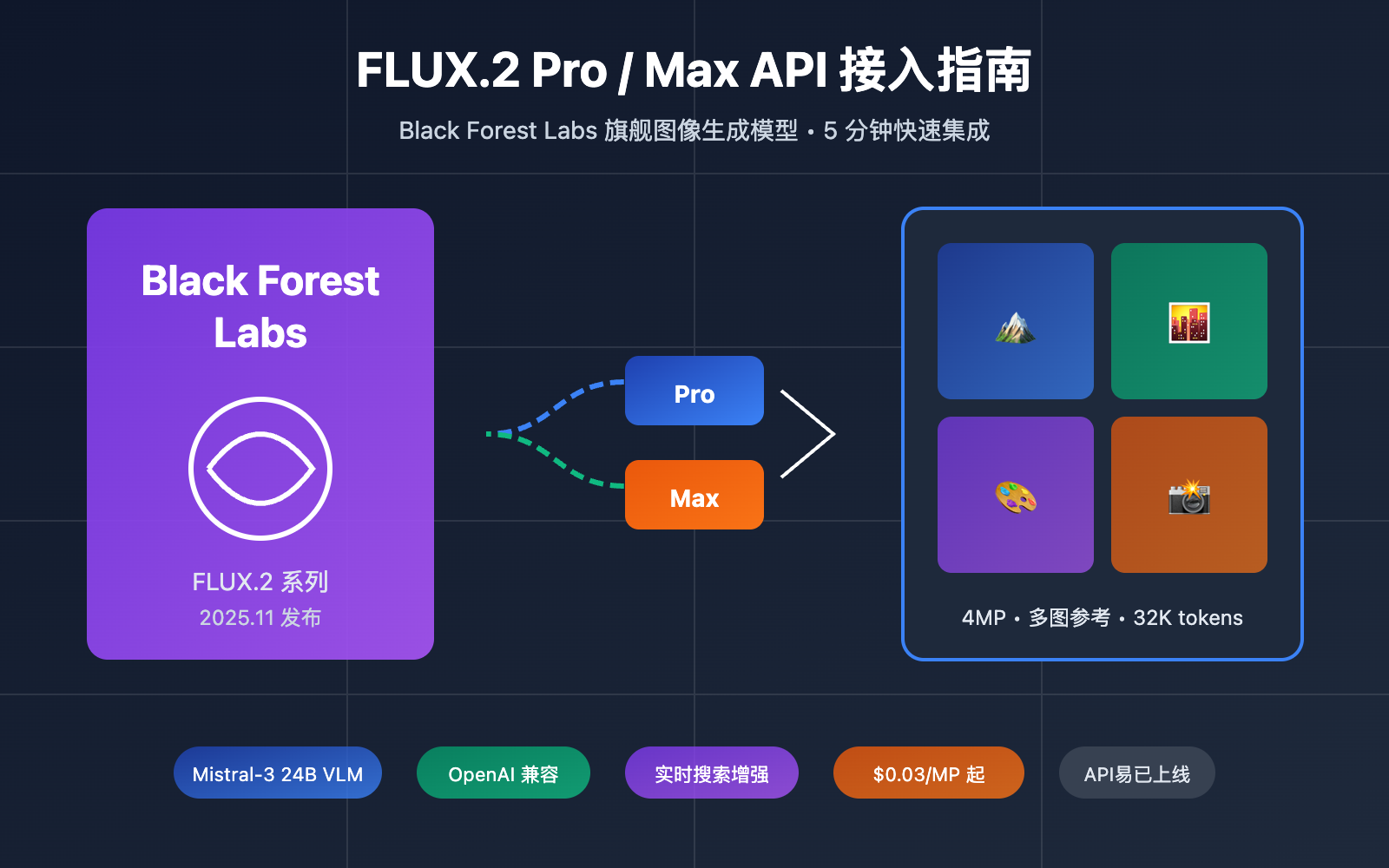
Black Forest Labs 的 FLUX.2 系列已成为 2025 年最受关注的图像生成模型之一。如何快速接入 FLUX.2 Pro 和 FLUX.2 Max API 是许多开发者和创意工作者关心的问题。本文将提供完整的接入指南,帮助你在 5 分钟内完成集成。
核心价值: 读完本文,你将掌握 FLUX.2 Pro/Max API 的调用方法、参数配置技巧,并了解如何选择适合你场景的模型版本。
FLUX.2 系列核心信息速览
在开始接入之前,先了解 FLUX.2 系列的核心信息:
| 信息项 | 详情 |
|---|---|
| 开发公司 | Black Forest Labs (德国弗莱堡) |
| 发布日期 | 2025年11月25日 |
| 核心架构 | Latent Flow Matching + Rectified Flow Transformer |
| 视觉语言模型 | Mistral-3 24B 参数 |
| 最大分辨率 | 4MP (如 2048×2048) |
| 多图参考 | 最多支持 10 张参考图像 |
| 文本输入 | 最高 32K tokens |
FLUX.2 模型矩阵
| 模型版本 | 定位 | 核心特点 | API定价 |
|---|---|---|---|
| FLUX.2 [max] | 旗舰质量 | 实时搜索增强、最强提示词遵循 | $0.07/MP (首个) |
| FLUX.2 [pro] | 生产标准 | 零配置、高性价比、稳定输出 | $0.03/MP (首个) |
| FLUX.2 [flex] | 开发调试 | 可调 steps/guidance、精细控制 | $0.05/MP |
| FLUX.2 [dev] | 开源部署 | 32B 参数开源权重 | 本地部署 |
| FLUX.2 [klein] | 轻量快速 | 4B/9B 参数、亚秒级推理 | $0.014+/图 |
🎯 接入建议: 对于大多数生产场景,我们建议通过 API易 apiyi.com 平台接入 FLUX.2 Pro,该平台提供统一的 OpenAI 兼容接口,无需处理复杂的官方 API 认证流程。
FLUX.2 Pro vs Max 核心差异
选择 FLUX.2 Pro 还是 Max?这是开发者最常问的问题。下表详细对比两者差异:
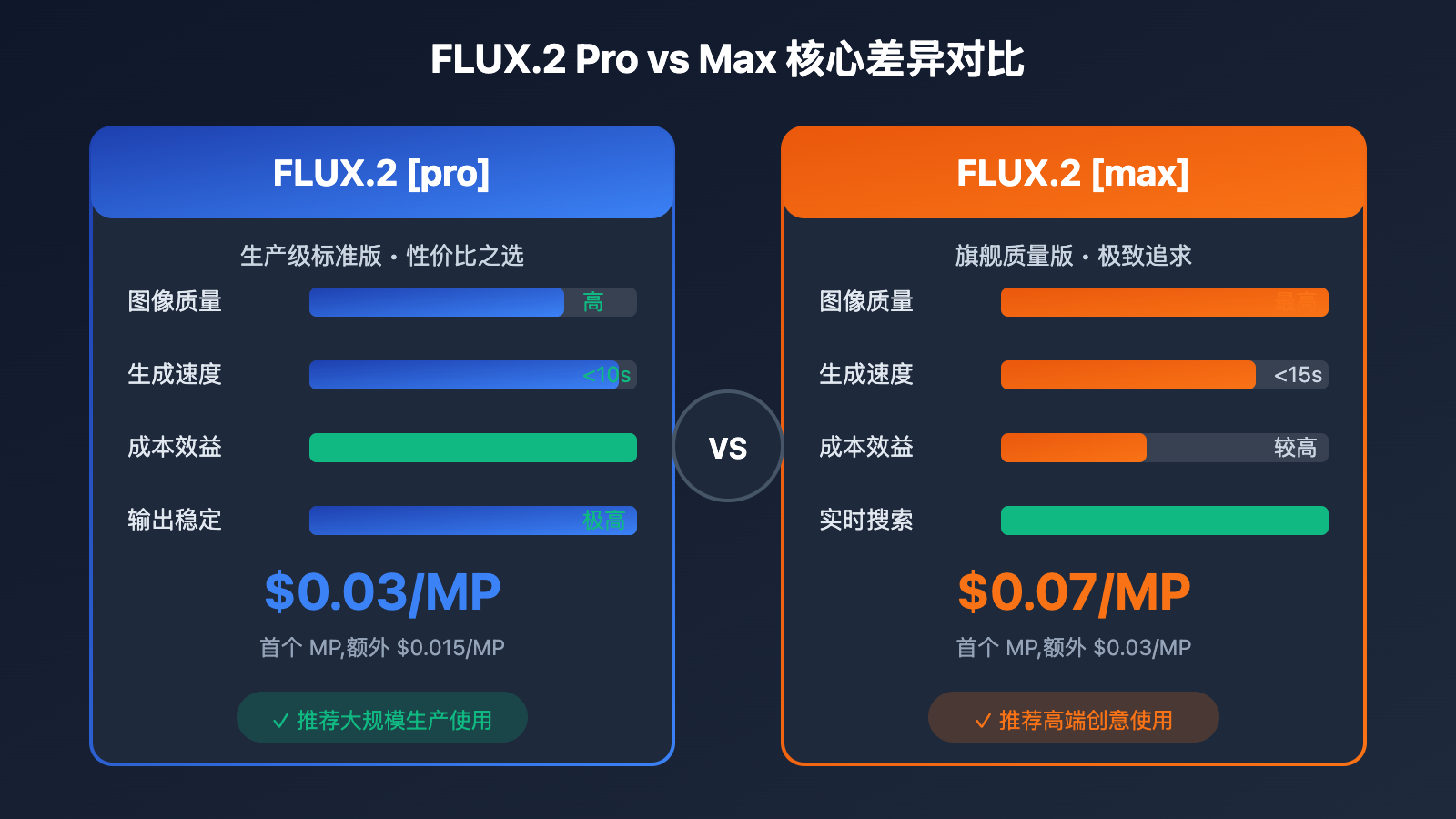
| 对比维度 | FLUX.2 [pro] | FLUX.2 [max] | 胜出方 |
|---|---|---|---|
| 图像质量 | 高质量、生产就绪 | 最高质量、专业级 | Max |
| 提示词遵循 | 强 | 最强 (24B VLM) | Max |
| 实时搜索 | ❌ 不支持 | ✅ 支持 | Max |
| 生成速度 | <10秒 | <15秒 | Pro |
| 价格 | $0.03/MP 起 | $0.07/MP 起 | Pro |
| 稳定性 | 极高 | 高 | Pro |
| 参数可调 | ❌ 固定最优 | ❌ 固定最优 | 平局 |
| 适用场景 | 大规模生产、商业内容 | 高端创作、精细需求 | 按需选择 |
选择建议
选择 FLUX.2 [pro] 的场景:
- 电商产品图批量生成
- 社交媒体内容创作
- 广告素材大规模生产
- 对成本敏感的项目
- 需要稳定一致的输出
选择 FLUX.2 [max] 的场景:
- 高端品牌广告创意
- 需要包含最新时事信息的图像
- 艺术创作和概念设计
- 复杂场景的精确还原
- 对质量要求极高的专业用途
FLUX.2 API 快速接入
方式一: 通过 API易 统一接口 (推荐)
API易平台已上线 FLUX.2 Pro 和 FLUX.2 Max,支持 OpenAI 兼容格式调用:
import requests

# API易统一接口
base_url = "https://api.apiyi.com/v1"

def generate_image_flux2(prompt, model="flux.2-pro", width=1024, height=1024):
    """
    通过 API易 调用 FLUX.2 生成图像

    Args:
        prompt: 图像描述
        model: flux.2-pro 或 flux.2-max
        width: 图像宽度 (16的倍数, 最大2048)
        height: 图像高度 (16的倍数, 最大2048)
    """
    headers = {
        "Authorization": "Bearer YOUR_APIYI_KEY",
        "Content-Type": "application/json"
    }

    data = {
        "model": model,
        "prompt": prompt,
        "size": f"{width}x{height}",
        "response_format": "url"
    }

    response = requests.post(
        f"{base_url}/images/generations",
        json=data,
        headers=headers
    )

    result = response.json()
    return result["data"][0]["url"]


# 使用示例
image_url = generate_image_flux2(
    prompt="A professional product photo of a modern smartphone on marble surface, soft studio lighting, ultra detailed",
    model="flux.2-pro",
    width=1024,
    height=1024
)
print(f"生成图像: {image_url}")
🚀 快速开始: 推荐使用 API易 apiyi.com 平台快速接入 FLUX.2。该平台提供开箱即用的 API 接口,无需复杂配置,支持 OpenAI SDK 直接调用。
方式二: BFL 官方 API
如需直接使用 Black Forest Labs 官方 API:
import requests
import time

class FLUX2Client:
    """FLUX.2 官方 API 客户端"""

    def __init__(self, api_key):
        self.api_key = api_key
        self.base_url = "https://api.bfl.ai/v1"
        self.headers = {
            "Authorization": f"Bearer {api_key}",
            "Content-Type": "application/json"
        }

    def generate(self, prompt, model="flux-2-pro", **kwargs):
        """
        生成图像

        Args:
            prompt: 图像描述
            model: flux-2-pro, flux-2-max, flux-2-flex
            **kwargs: width, height, seed, output_format, safety_tolerance
        """
        endpoint = f"{self.base_url}/{model}"

        data = {
            "prompt": prompt,
            "width": kwargs.get("width", 1024),
            "height": kwargs.get("height", 1024),
            "output_format": kwargs.get("output_format", "png")
        }

        # 添加可选参数
        if "seed" in kwargs:
            data["seed"] = kwargs["seed"]
        if "safety_tolerance" in kwargs:
            data["safety_tolerance"] = kwargs["safety_tolerance"]

        response = requests.post(endpoint, json=data, headers=self.headers)
        return response.json()

    def generate_with_flex(self, prompt, steps=50, guidance=4.5, **kwargs):
        """
        使用 FLUX.2 [flex] 生成 (支持参数调节)

        Args:
            prompt: 图像描述
            steps: 采样步数 1-50
            guidance: 引导系数 1.5-10
        """
        data = {
            "prompt": prompt,
            "steps": steps,
            "guidance": guidance,
            "width": kwargs.get("width", 1024),
            "height": kwargs.get("height", 1024)
        }

        response = requests.post(
            f"{self.base_url}/flux-2-flex",
            json=data,
            headers=self.headers
        )
        return response.json()


# 使用示例
client = FLUX2Client("YOUR_BFL_API_KEY")

# 使用 Pro 版本
result = client.generate(
    prompt="A serene Japanese garden with cherry blossoms",
    model="flux-2-pro",
    width=1536,
    height=1024
)
print(f"Pro 生成结果: {result}")

# 使用 Max 版本 (最高质量)
result_max = client.generate(
    prompt="A futuristic cityscape at night, neon lights, cyberpunk style, ultra detailed",
    model="flux-2-max",
    width=2048,
    height=2048
)
print(f"Max 生成结果: {result_max}")
查看异步批量生成完整代码
import asyncio
import aiohttp
from typing import List, Dict

class AsyncFLUX2Client:
    """FLUX.2 异步客户端,支持批量生成"""

    def __init__(self, api_key: str, base_url: str = "https://api.apiyi.com/v1"):
        self.api_key = api_key
        self.base_url = base_url
        self.headers = {
            "Authorization": f"Bearer {api_key}",
            "Content-Type": "application/json"
        }

    async def generate_single(self, session: aiohttp.ClientSession,
                              prompt: str, model: str = "flux.2-pro",
                              width: int = 1024, height: int = 1024) -> Dict:
        """异步生成单张图像"""
        data = {
            "model": model,
            "prompt": prompt,
            "size": f"{width}x{height}",
            "response_format": "url"
        }

        async with session.post(
            f"{self.base_url}/images/generations",
            json=data,
            headers=self.headers
        ) as response:
            return await response.json()

    async def generate_batch(self, prompts: List[str],
                             model: str = "flux.2-pro",
                             max_concurrent: int = 5) -> List[Dict]:
        """
        批量生成图像

        Args:
            prompts: 提示词列表
            model: 模型版本
            max_concurrent: 最大并发数
        """
        semaphore = asyncio.Semaphore(max_concurrent)

        async def limited_generate(session, prompt):
            async with semaphore:
                return await self.generate_single(session, prompt, model)

        async with aiohttp.ClientSession() as session:
            tasks = [limited_generate(session, p) for p in prompts]
            results = await asyncio.gather(*tasks, return_exceptions=True)

        return results


async def main():
    client = AsyncFLUX2Client("YOUR_APIYI_KEY")

    prompts = [
        "A modern minimalist living room with natural lighting",
        "A vintage coffee shop interior with warm tones",
        "A futuristic office space with holographic displays",
        "A cozy bookstore with wooden shelves",
        "A high-tech laboratory with blue lighting"
    ]

    print("开始批量生成...")
    results = await client.generate_batch(prompts, model="flux.2-pro")

    for i, result in enumerate(results):
        if isinstance(result, Exception):
            print(f"图像 {i+1} 生成失败: {result}")
        else:
            print(f"图像 {i+1}: {result['data'][0]['url']}")


if __name__ == "__main__":
    asyncio.run(main())
FLUX.2 API 核心参数详解
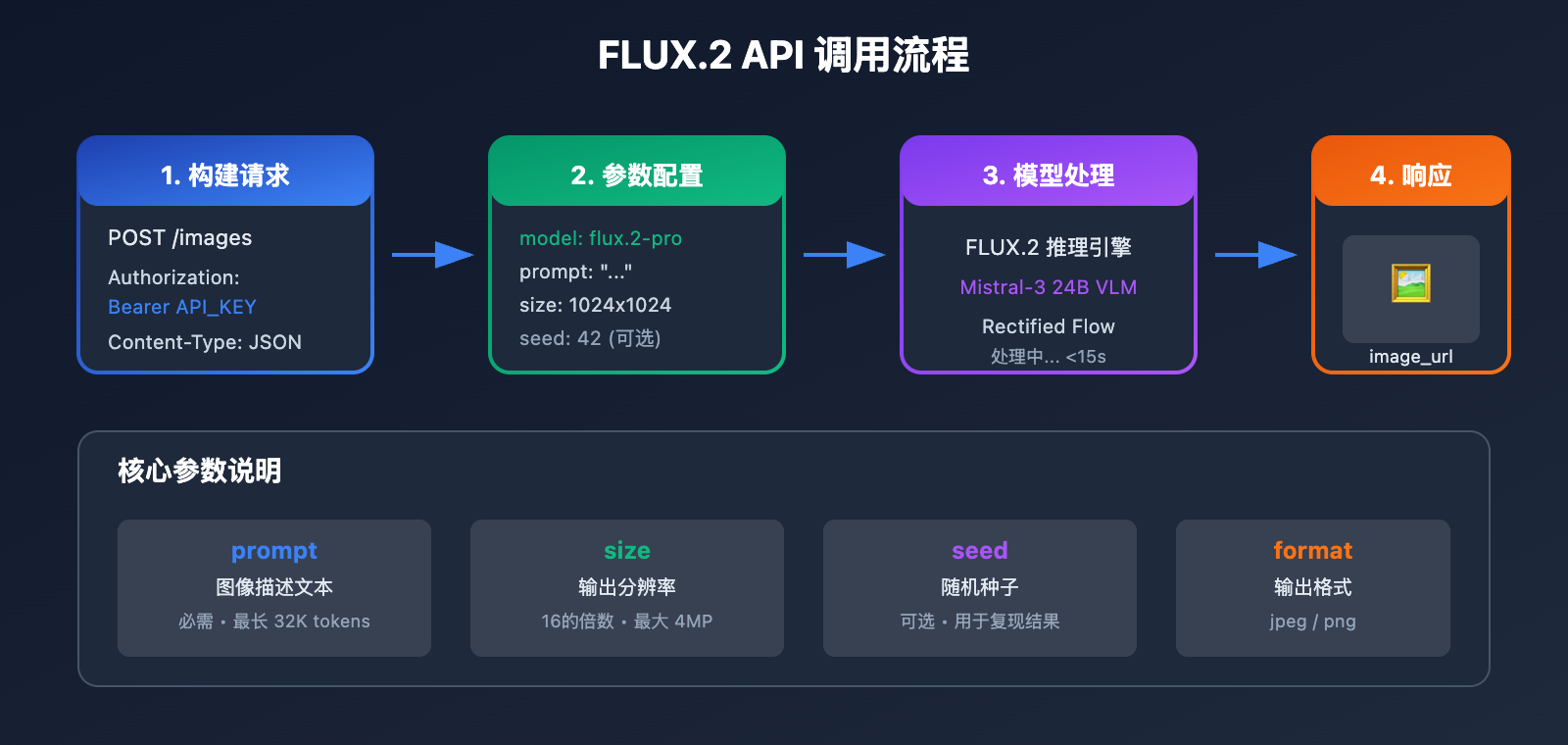
通用参数
| 参数 | 类型 | 必需 | 说明 | 示例值 |
|---|---|---|---|---|
prompt |
string | ✅ 是 | 图像描述,最长 32K tokens | "A beautiful sunset…" |
width |
int | 否 | 图像宽度,16的倍数 | 1024 |
height |
int | 否 | 图像高度,16的倍数 | 1024 |
seed |
int | 否 | 随机种子,用于复现结果 | 42 |
output_format |
string | 否 | 输出格式 jpeg/png | "png" |
safety_tolerance |
int | 否 | 安全等级 0-5 | 2 |
分辨率配置建议
| 用途 | 推荐分辨率 | 像素数 | Pro 价格 | Max 价格 |
|---|---|---|---|---|
| 社交媒体方图 | 1024×1024 | 1MP | $0.03 | $0.07 |
| 横版海报 | 1536×1024 | 1.5MP | $0.045 | $0.10 |
| 竖版海报 | 1024×1536 | 1.5MP | $0.045 | $0.10 |
| 高清大图 | 2048×2048 | 4MP | $0.075 | $0.16 |
| 超宽Banner | 2048×768 | 1.5MP | $0.045 | $0.10 |
💡 成本优化: 对于预算敏感的项目,可以通过 API易 apiyi.com 平台调用 FLUX.2 Pro,获取更优惠的价格,适合批量生成场景。
FLUX.2 [flex] 独有参数
FLUX.2 [flex] 版本支持精细的参数控制:
| 参数 | 类型 | 范围 | 默认值 | 说明 |
|---|---|---|---|---|
steps |
int | 1-50 | 50 | 采样步数,越高质量越好 |
guidance |
float | 1.5-10 | 4.5 | 引导系数,越高越贴近提示词 |
Steps 参数效果:
| Steps | 质量 | 速度 | 适用场景 |
|---|---|---|---|
| 6 | 基础 | 极快 | 快速草图预览 |
| 20 | 良好 | 快 | 迭代调试 |
| 50 | 最佳 | 标准 | 最终输出 |
高级功能: 多图参考与图像编辑
FLUX.2 支持最多 10 张参考图像输入,实现风格迁移、角色一致性等高级功能:
import base64
import requests

def generate_with_references(prompt, reference_images, model="flux.2-pro"):
    """
    使用参考图像生成

    Args:
        prompt: 图像描述
        reference_images: 参考图像URL或base64列表 (最多10张)
        model: 模型版本
    """
    headers = {
        "Authorization": "Bearer YOUR_APIYI_KEY",
        "Content-Type": "application/json"
    }

    # 处理参考图像
    images = []
    for img in reference_images[:10]:  # 最多10张
        if img.startswith("http"):
            images.append({"type": "url", "url": img})
        else:
            images.append({"type": "base64", "data": img})

    data = {
        "model": model,
        "prompt": prompt,
        "reference_images": images,
        "size": "1024x1024"
    }

    response = requests.post(
        "https://api.apiyi.com/v1/images/generations",
        json=data,
        headers=headers
    )

    return response.json()


# 使用示例: 保持角色一致性
result = generate_with_references(
    prompt="Same character in a coffee shop, reading a book, warm lighting",
    reference_images=[
        "https://example.com/character_ref1.jpg",
        "https://example.com/character_ref2.jpg"
    ],
    model="flux.2-max"
)
图像编辑功能
FLUX.2 支持基于自然语言的图像编辑:
def edit_image(source_image, edit_prompt, model="flux.2-pro"):
    """
    编辑现有图像

    Args:
        source_image: 源图像URL或base64
        edit_prompt: 编辑指令
        model: 模型版本
    """
    headers = {
        "Authorization": "Bearer YOUR_APIYI_KEY",
        "Content-Type": "application/json"
    }

    data = {
        "model": model,
        "prompt": edit_prompt,
        "image": source_image,
        "mode": "edit"
    }

    response = requests.post(
        "https://api.apiyi.com/v1/images/edits",
        json=data,
        headers=headers
    )

    return response.json()


# 使用示例
result = edit_image(
    source_image="https://example.com/room.jpg",
    edit_prompt="Change the wall color to light blue, add plants near the window",
    model="flux.2-pro"
)
FLUX.2 提示词最佳实践
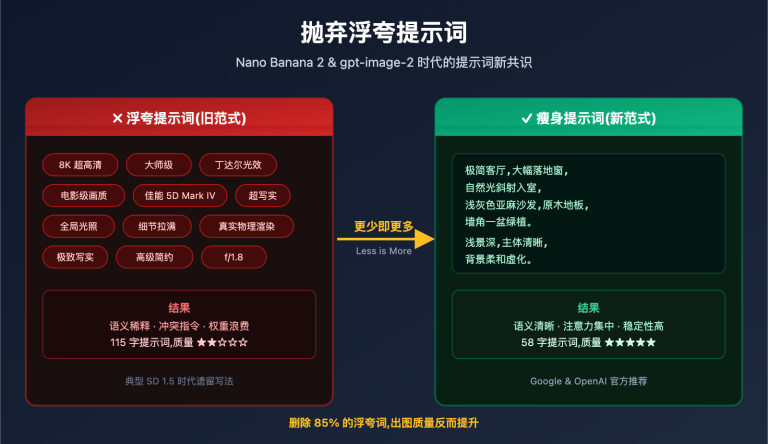
FLUX.2 的 Mistral-3 24B 视觉语言模型对提示词有很强的理解能力。以下是优化提示词的技巧:
提示词结构模板
[主体描述] + [风格定义] + [光照/氛围] + [细节要求] + [质量修饰]
优秀提示词示例
| 场景 | 提示词示例 | 关键技巧 |
|---|---|---|
| 产品摄影 | "A sleek wireless headphone on white marble surface, professional studio lighting, product photography, sharp focus, 8K" | 明确材质、光照、用途 |
| 人像艺术 | "Portrait of a woman with braided hair, golden hour lighting, soft bokeh background, film grain, Hasselblad style" | 指定相机风格、光照时段 |
| 建筑可视化 | "Modern minimalist house exterior, sunset light, architectural visualization, photorealistic, wide angle lens" | 明确建筑类型、视角 |
| 概念艺术 | "Floating islands with waterfalls, fantasy world, epic scale, volumetric lighting, matte painting style" | 描述独特元素、风格 |
颜色控制技巧
FLUX.2 支持精确的十六进制颜色控制:
# 使用 hex 颜色代码确保品牌色准确
prompt = """
A modern tech company logo mockup on business card,
primary color: #FF6B35 (orange),
secondary color: #1A1A2E (dark navy),
clean minimalist design, professional presentation
"""
成本优化与最佳实践
定价计算示例
| 场景 | 分辨率 | 数量 | Pro 成本 | Max 成本 | 推荐 |
|---|---|---|---|---|---|
| 社交媒体配图 | 1024×1024 | 100张 | $3.00 | $7.00 | Pro |
| 产品详情页 | 1536×1024 | 50张 | $2.25 | $5.00 | Pro |
| 高端广告 | 2048×2048 | 20张 | $1.50 | $3.20 | Max |
| 快速原型 | 512×512 | 200张 | $1.50 | $3.50 | Pro/Flex |
成本优化策略
- 分辨率优化: 根据实际用途选择合适分辨率,避免过度
- 模型选择: 批量内容用 Pro,精品内容用 Max
- 预览迭代: 使用 Flex 的低 steps 快速预览,满意后再高质量输出
- 批量处理: 使用异步批量接口提高效率
💰 成本对比: 通过 API易 apiyi.com 平台接入 FLUX.2,可获得更灵活的计费方式。对于月调用量较大的用户,平台提供阶梯优惠。
常见问题
Q1: FLUX.2 Pro 和 Max 如何选择?
选择依据主要是质量需求和预算:
- FLUX.2 Pro: 适合 90% 的生产场景,性价比高,输出稳定
- FLUX.2 Max: 适合高端创意、品牌广告等对质量极致追求的场景
通过 API易 apiyi.com 平台可以同时接入两个版本,便于根据项目需求灵活切换。
Q2: 如何保证生成结果的一致性?
使用 seed 参数可以保证在相同提示词下获得一致的结果:
result = generate_image(
    prompt="A red apple on wooden table",
    seed=12345  # 固定种子
)
相同的 seed + prompt + 参数 = 相同的输出图像。
Q3: FLUX.2 支持中文提示词吗?
支持。FLUX.2 的 Mistral-3 VLM 具备多语言理解能力,中文提示词可以正常使用。但建议:
- 复杂场景使用英文提示词效果更稳定
- 中英混合使用时,核心描述用英文
- 专业术语保持英文原词
Q4: 生成失败或超时怎么处理?
建议的错误处理策略:
import time
from requests.exceptions import Timeout, RequestException

def generate_with_retry(prompt, max_retries=3):
    for attempt in range(max_retries):
        try:
            result = generate_image(prompt, timeout=60)
            return result
        except Timeout:
            if attempt < max_retries - 1:
                time.sleep(2 ** attempt)  # 指数退避
            continue
        except RequestException as e:
            print(f"请求错误: {e}")
            break
    return None
API易平台提供稳定的接口服务,超时问题较少出现。如遇问题可联系技术支持。
Q5: 如何获取 FLUX.2 API 访问权限?
有两种方式:
- BFL 官方 API: 访问 bfl.ai 注册账号
- API易平台 (推荐): 访问 apiyi.com 注册,获取统一 API Key,无需单独申请 BFL 账号
API易平台提供免费测试额度,可快速验证集成效果。
FLUX.2 API 接入总结
<text x="60" y="140" text-anchor="middle" fill="#e2e8f0" font-size="11" font-family="Arial, sans-serif">访问 apiyi.com</text>
<text x="60" y="158" text-anchor="middle" fill="#94a3b8" font-size="10" font-family="Arial, sans-serif">1 分钟完成</text>
<text x="60" y="140" text-anchor="middle" fill="#e2e8f0" font-size="11" font-family="Arial, sans-serif">创建 API Key</text>
<text x="60" y="158" text-anchor="middle" fill="#94a3b8" font-size="10" font-family="Arial, sans-serif">免费测试额度</text>
<text x="60" y="140" text-anchor="middle" fill="#e2e8f0" font-size="11" font-family="Arial, sans-serif">使用代码示例</text>
<text x="60" y="158" text-anchor="middle" fill="#94a3b8" font-size="10" font-family="Arial, sans-serif">OpenAI 兼容格式</text>
<text x="60" y="140" text-anchor="middle" fill="#e2e8f0" font-size="11" font-family="Arial, sans-serif">生成完成</text>
<text x="60" y="158" text-anchor="middle" fill="#94a3b8" font-size="10" font-family="Arial, sans-serif">4MP 高清输出</text>
FLUX.2 系列代表了当前图像生成技术的前沿水平。本文介绍的核心要点:
| 要点 | 说明 |
|---|---|
| 模型选择 | Pro 适合生产,Max 适合高端创意 |
| 接入方式 | 推荐通过 API易 统一接口,兼容 OpenAI SDK |
| 核心参数 | prompt、size、seed 是最重要的三个参数 |
| 成本优化 | 根据用途选择合适分辨率,批量用 Pro |
| 高级功能 | 支持多图参考、图像编辑、精确颜色控制 |
推荐接入路径:
- 访问 apiyi.com 注册账号
- 获取 API Key
- 使用本文代码示例快速集成
- 根据效果调整提示词和参数
通过 API易平台,你可以快速接入 FLUX.2 Pro 和 Max,享受统一接口、稳定服务和灵活计费的优势。
延伸阅读:
- FLUX.2 官方文档: docs.bfl.ai
- FLUX.2 模型介绍: bfl.ai/models/flux-2
- FLUX.2 官方博客: bfl.ai/blog/flux-2
本文由 APIYI 技术团队撰写,如需了解更多 AI 模型 API 接入方案,欢迎访问 apiyi.com